Ant-design-pro: 🐛[v5版本怎样设置antD的语言为中文 ]
🐛 bug 描述
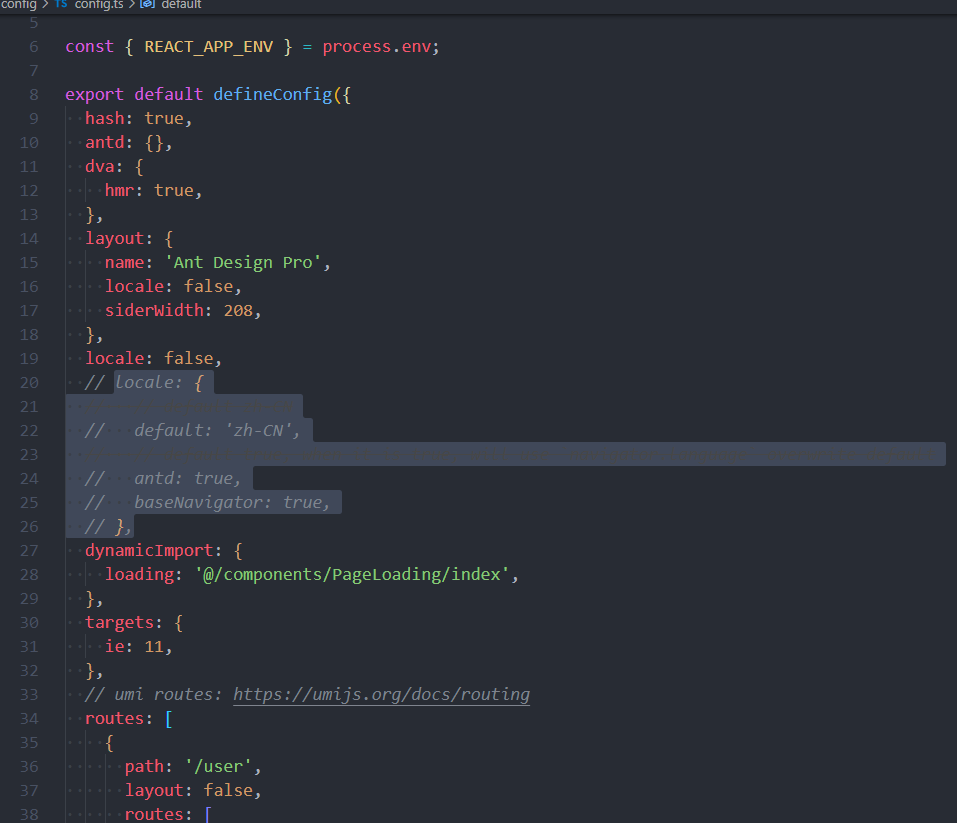
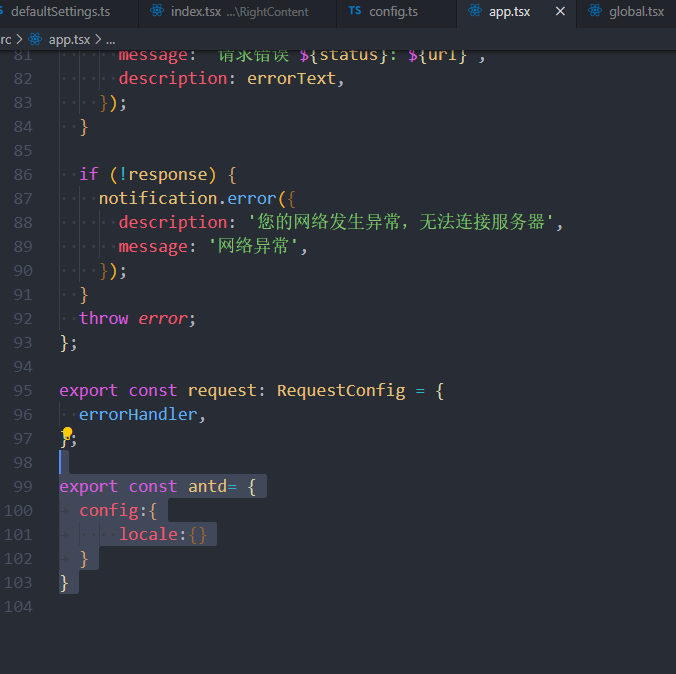
新拉的框架, 关闭国际化,配置
export const antd= {
    config:{
        locale:{}
    }
}
报错
© 版本信息
- Ant Design Pro 版本: [e.g. 5.0.0]
- umi 版本【3.2.13】
- 浏览器环境 谷歌
- 开发环境 [win10]
🚑 其他信息

 569202812
All 11 comments
为啥我看不到图?
 shaohuatsou
on 31 Jul 2020
shaohuatsou
on 31 Jul 2020
为啥我看不到图?
看不到吗
569202812
on 1 Aug 2020
“locale.antd: false” 就可以关闭国际化了
 Wanyucheng
on 3 Aug 2020
Wanyucheng
on 3 Aug 2020
可以用这个 api 来自定义
https://umijs.org/plugins/plugin-antd#config
https://ant.design/components/config-provider-cn/
 xiaohuoni
on 6 Aug 2020
xiaohuoni
on 6 Aug 2020
可以用这个 api 来自定义
https://umijs.org/plugins/plugin-antd#config
https://ant.design/components/config-provider-cn/
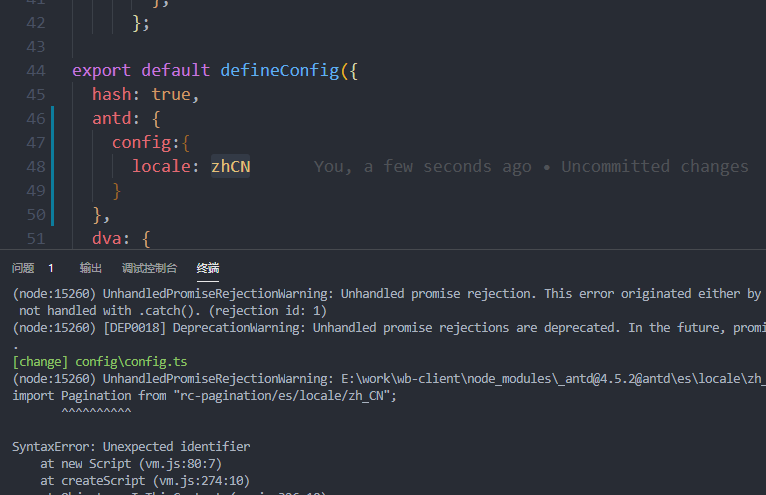
这样引用bao报错
569202812
on 10 Aug 2020
用 runtime 的写法
// src/app.ts
export const antd = {
  componentSize:'small'
}
 chenshuai2144
on 10 Aug 2020
chenshuai2144
on 10 Aug 2020
用 runtime 的写法
// src/app.ts
export const antd = {
  componentSize:'small'
}
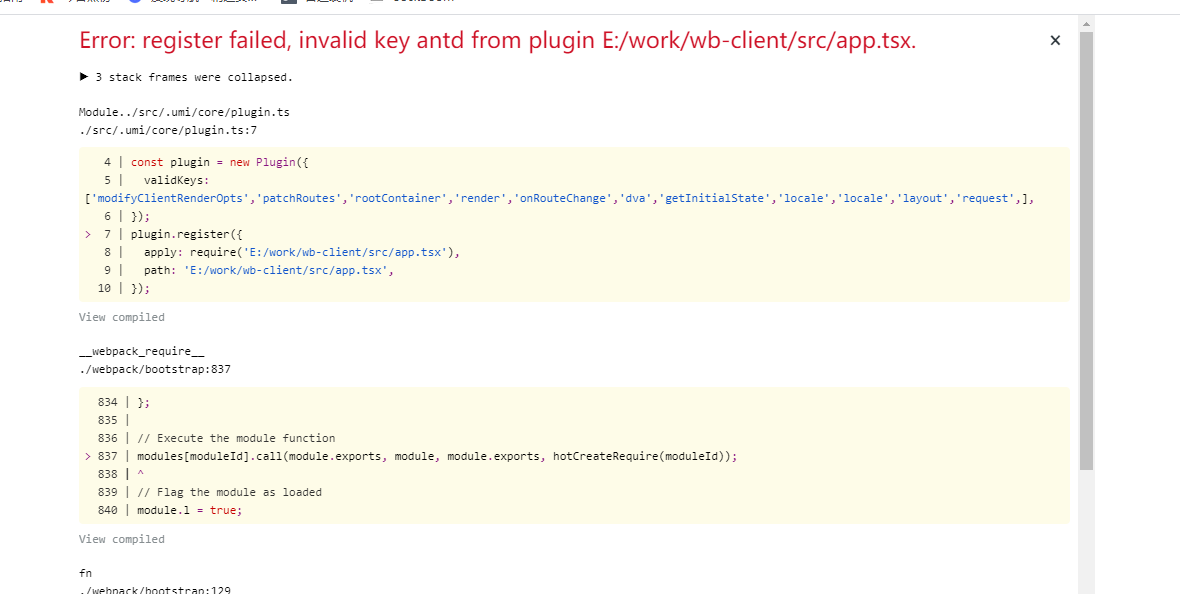
配置了后还是报错
569202812
on 10 Aug 2020
@569202812 这里的设计有点问题,配置中的 antd 的 config 配置了才会开启运行时配置。你需要在配置里面写上 antd:{config:{}}
xiaohuoni
on 12 Aug 2020
@569202812 这里的设计有点问题,配置中的 antd 的 config 配置了才会开启运行时配置。你需要在配置里面写上
antd:{config:{}}
配置了可以了, 日期还需要在app.tsx里面配置下
import 'moment/locale/zh-cn';
569202812
on 12 Aug 2020
@569202812 这里的设计有点问题,配置中的 antd 的 config 配置了才会开启运行时配置。你需要在配置里面写上
antd:{config:{}}配置了可以了, 日期还需要在app.tsx里面配置下
import 'moment/locale/zh-cn';
具体怎么配的能讲讲吗,看得我一脸懵逼
 Dowgen
on 9 Sep 2020
Dowgen
on 9 Sep 2020
@569202812 这里的设计有点问题,配置中的 antd 的 config 配置了才会开启运行时配置。你需要在配置里面写上
antd:{config:{}}配置了可以了, 日期还需要在app.tsx里面配置下
import 'moment/locale/zh-cn';具体怎么配的能讲讲吗,看得我一脸懵逼
config 文件 添加antd:{config:{}}
app.tsx 文件 添加
import 'moment/locale/zh-cn';

export const antd= {
    config:{
        locale: zhCN // 引用antd的语言包
    }
}
Related issues
 lvzheng0404
·
3Comments
lvzheng0404
·
3Comments
 skyFi
·
3Comments
skyFi
·
3Comments
 zhuanglong
·
3Comments
zhuanglong
·
3Comments
 happier2
·
3Comments
happier2
·
3Comments
 ghost
·
3Comments
ghost
·
3Comments
Most helpful comment
配置了可以了, 日期还需要在app.tsx里面配置下
import 'moment/locale/zh-cn';