Ant-design-pro: 动态菜单显示问题🐛[BUG]
🐛 bug 描述
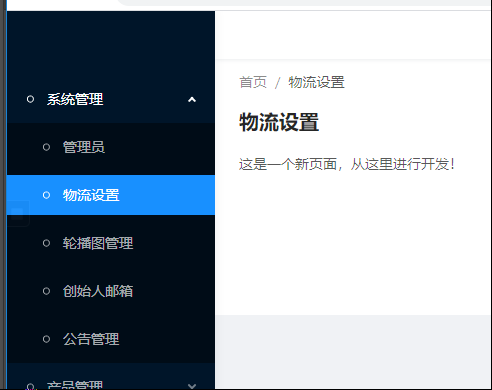
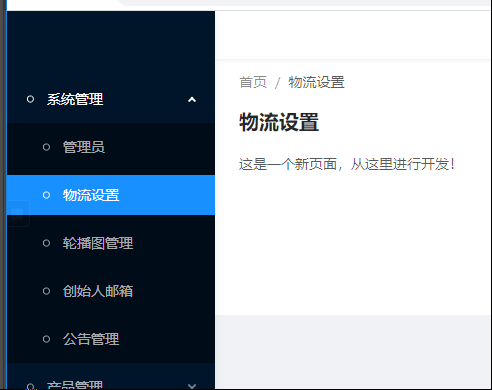
我菜单是使用动态加载出来 ,不过发现个问题。就是动态加载出来的时候 。菜单 没有自动展开并点亮,是全都闭合的
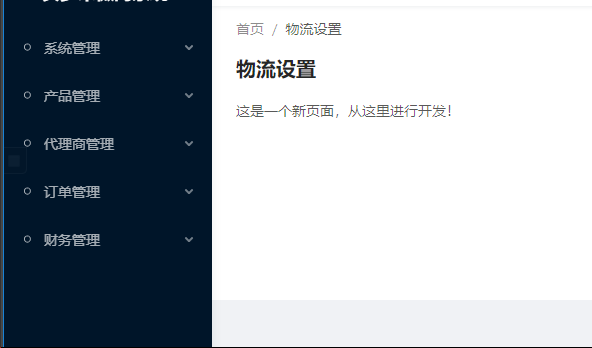
然后我把请求的数据直接写死在代码中。就没有问题
📷 复现步骤

🏞 期望结果
💻 复现代码
/**
 * Ant Design Pro v4 use `@ant-design/pro-layout` to handle Layout.
 * You can view component api by:
 * https://github.com/ant-design/ant-design-pro-layout
 */
import ProLayout, {
  MenuDataItem,
  BasicLayoutProps as ProLayoutProps,
  Settings,
} from '@ant-design/pro-layout';
import React, { useEffect, useState } from 'react';
import { Link } from 'umi';
import { Dispatch } from 'redux';
import { connect } from 'dva';
import { Result, Button } from 'antd';
import Authorized from '@/utils/Authorized';
import RightContent from '@/components/GlobalHeader/RightContent';
import { ConnectState } from '@/models/connect';
import {  getAuthorityFromRouter } from '@/utils/utils';
import logo from '../assets/logo.svg';
import Iconfont from "../components/Iconfont";

const noMatch = (
  <Result
    status={403}
    title="403"
    subTitle="Sorry, you are not authorized to access this page."
    extra={
      <Button type="primary">
        <Link to="/account/login">Go Login</Link>
      </Button>
    }
  />
);
export interface BasicLayoutProps extends ProLayoutProps {
  breadcrumbNameMap: {
    [path: string]: MenuDataItem;
  };
  route: ProLayoutProps['route'] & {
    authority: string[];
  };
  settings: Settings;
  dispatch: Dispatch;
}
export type BasicLayoutContext = { [K in 'location']: BasicLayoutProps[K] } & {
  breadcrumbNameMap: {
    [path: string]: MenuDataItem;
  };
};
/**
 * use Authorized check all menu item
 */

const menuDataRender = (menuList: MenuDataItem[]): MenuDataItem[] =>
  menuList.map(item => {
    const localItem = { ...item, children: item.children ? menuDataRender(item.children) : [] };
    return Authorized.check(item.authority, localItem, null) as MenuDataItem;
  });


const BasicLayout: React.FC<BasicLayoutProps> = props => {
  const {
    dispatch,
    children,
    settings,
    location = {
      pathname: '/',
    },
  } = props;
  /**
   * constructor
   */
  const [menuData, setMenuData] = useState([]);

  useEffect(() => {
    if (dispatch) {
      dispatch({
        type: 'admin/getLogin',
      });
    }
    // 这里是一个演示用法
    // 真实项目中建议使用 dva dispatch 或者 umi-request
    fetch('/api/admin/getMenu')
      .then(response => response.json())
      .then(data => {
        setMenuData(data || []);
      });
  }, []);
  /**
   * init variables
   */

  const handleMenuCollapse = (payload: boolean): void => {
    if (dispatch) {
      dispatch({
        type: 'global/changeLayoutCollapsed',
        payload,
      });
    }
  }; // get children authority

  const authorized = getAuthorityFromRouter(props.route.routes, location.pathname || '/') || {
    authority: undefined,
  };
  return (
    <ProLayout
      logo={logo}
      // formatMessage={formatMessage}
      menuHeaderRender={(logoDom, titleDom) => (
        <Link to="/">
          <span style={{ paddingLeft: '10px' }}>
            {titleDom}
          </span>
        </Link>
      )}
      onCollapse={handleMenuCollapse}
      menuItemRender={(menuItemProps, defaultDom) => {
        if (menuItemProps.isUrl || menuItemProps.children || !menuItemProps.path) {
          return defaultDom;
        }

        return <Link to={menuItemProps.path}>
          <Iconfont type={menuItemProps.icon} style={{ fontSize: '14px', marginRight: '10px' }} />
          <span>{menuItemProps.name}</span>
        </Link>;
      }}
      breadcrumbRender={(routers = []) => [
        {
          path: '/',
          breadcrumbName: '首页',
        },
        ...routers,
      ]}
      itemRender={(route, params, routes, paths) => {
        const first = routes.indexOf(route) === 0;
        return first ? (
          <Link to={paths.join('/')}>{route.breadcrumbName}</Link>
        ) : (
            <span>{route.breadcrumbName}</span>
          );
      }}
      footerRender={false}
      menuDataRender={() => menuData}
      rightContentRender={() => <RightContent />}
      {...props}
      {...settings}
    >
      <Authorized authority={authorized!.authority} noMatch={noMatch}>
        {children}
      </Authorized>
    </ProLayout>
  );
};

export default connect(({ global, settings }: ConnectState) => ({
  collapsed: global.collapsed,
  settings,
}))(BasicLayout);
© 版本信息
- Ant Design Pro 版本: [e.g. 4.0.0]
- umi 版本3.2.0
- 浏览器环境Google Chrome 81.0.4044.113
- 开发环境 window 10
🚑 其他信息
 lazyfish88
>All comments
如下用法即可解决问题:
{menuData && menuData.length > 0 && (
        <ProLayout
        </ProLayout>
      )}
 anyedapingguo
on 7 Aug 2020
anyedapingguo
on 7 Aug 2020
👍3
Was this page helpful?
0 / 5 - 0 ratings
Related issues
 ghost
·
3Comments
ghost
·
3Comments
 2uncle-code
·
3Comments
2uncle-code
·
3Comments
 RichardStark
·
3Comments
RichardStark
·
3Comments
 happier2
·
3Comments
happier2
·
3Comments
 renyi818
·
3Comments
renyi818
·
3Comments
Most helpful comment
如下用法即可解决问题:
{menuData && menuData.length > 0 && (
        <ProLayout
        </ProLayout>
      )}