Ant-design-pro: 🐛[BUG] v5 access插件登录后首次渲染菜单,没法按配置的权限显示
🐛 bug 描述
- 问题1:登录后首次渲染菜单,没法按配置的权限显示
- 问题2:菜单显示上一次用户登录的菜单,当前登录用户没权限的菜单无法隐藏
📷 复现步骤
问题描述
工程创建
创建复现项目
yarn create umi antd-v5-top-menu-not-hide
# 选ant-design-pro
# 选Pro V5
cd antd-v5-top-menu-not-hide
yarn

## 出现提示
## Couldn't find any versions for "omit.js" that matches "^2.0.0"
## ? Please choose a version of "omit.js" from this list: 1.0.2
## 选1.0.2
在src/pages目录下创建测试页面,目录结构如下:
src/pages
├── a
│   ├── a1
│   │   └── index.tsx
│   ├── a2
│   │   └── index.tsx
│   └── a3
│       └── index.tsx
├── b
│   └── index.tsx
├── c
    └── index.tsx
每个index.tsx的内容都是一个简单的<h1>标签,只是内容改为对应的字母而已:
import React from 'react';

export default () => {
  return (
    <h1>
      A1 {/* 其它页面的内容是A2, A3, B, C */}
    </h1>
  );
};
在config/config.ts中添加路由:
routes: [
    {
      path: '/a',
      name: 'a',
      icon: 'crown',
      routes: [
        {
          path: '/a/a1',
          name: 'a1',
          component: './a/a1/index',
        },
        {
          path: '/a/a2',
          name: 'a2',
          component: './a/a2/index',
        },
        {
          path: '/a/a3',
          name: 'a3',
          component: './a/a3/index',
        },
      ],
    },
    {
      path: '/b',
      name: 'b',
      icon: 'crown',
      component: './b/index'
    },
    {
      path: '/c',
      name: 'c',
      icon: 'crown',
      component: './c/index'
    },
]
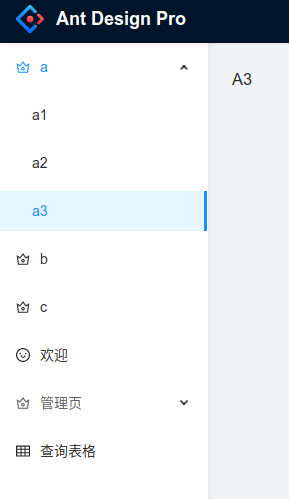
页面显示如下:
实现动态显示菜单
由于src/app.tsx中的getInitialState方法会初始化全局数据,这里会调用/api/currentUser接口初始化用户可访问的菜单
- 所以我在该接口返回的数据中加多一个字段
accessableMenus:
declare namespace API {
  export interface CurrentUser {
    accessableMenus?: string[] ////////// 加入该字段
    avatar?: string;
    name?: string;
    title?: string;
    group?: string;
    signature?: string;
    tags?: {
      key: string;
      label: string;
    }[];
    userid?: string;
    access?: 'user' | 'guest' | 'admin';
    unreadCount?: number;
  }
}
- 其次还要修改
mock/user.ts中/api/currentUser返回的mock数据,admin用户返回所有菜单的代码,user只返回部分菜单的代码:
// 代码中会兼容本地 service mock 以及部署站点的静态数据
export default {
  // 支持值为 Object 和 Array
  'GET /api/currentUser': (req: Request, res: Response) => {
    if (!getAccess()) {
      res.status(401).send({
        data: {
          isLogin: false,
        },
        errorCode: '401',
        errorMessage: '请先登录!',
        success: true,
      });
      return;
    }

    //////////////// 加入这段代码
    let accessableMenus: string[];
    if (getAccess()==='admin'){
      // 如果是admin登录, 该用户可访问所有菜单
      accessableMenus = ['a','a1','a2','a3','b','c']
    } else if( getAccess()==='user'){
      // 如果是user, 只可访问部分菜单
      accessableMenus = ['a','a1','b']
    }else{
      // 其它用户不能访问abc这些菜单,只能访问公共的菜单
      accessableMenus = []
    }
    //////////////// 加入这段代码

    res.send({
      accessableMenus, //////////////// 返回的CurrentUser加入该字段,表示当前登录用户可访问的菜单
      name: 'Serati Ma',
      // .........
    });
  },

  // .........

  'GET  /api/login/captcha': getFakeCaptcha,
};
- 在
src/access.ts中加入自定义的menuFilter:
// src/access.ts

export default function access(initialState: { currentUser?: API.CurrentUser | undefined }) {
  const { currentUser } = initialState || {};
  return {
    canAdmin: currentUser && currentUser.access === 'admin',
    // 多问一个问题, 这里回调的route具体是什么类型?
    menuFilter: (route) => {
      // initialState 中包含了的路由才有权限访问
      console.log('menuFilter, currentUser.accessableMenus: %o, route.name: %o',currentUser?.accessableMenus,route.name)
      return currentUser
        && currentUser.accessableMenus
        && currentUser.accessableMenus.includes(route.name)
    },
  };
}
- 回到路由配置
config/config.ts中添加路由:,加入access: 'menuFilter':
   routes: [
    {
      path: '/a',
      name: 'a',
      access: 'menuFilter', ////// 根据CurrentUser.accessableMenus过滤
      icon: 'crown',
      routes: [
        {
          path: '/a/a1',
          name: 'a1',
          access: 'menuFilter', ////// 根据CurrentUser.accessableMenus过滤
          component: './a/a1/index',
        },
        {
          path: '/a/a2',
          name: 'a2',
          access: 'menuFilter', ////// 根据CurrentUser.accessableMenus过滤
          component: './a/a2/index',
        },
        {
          path: '/a/a3',
          name: 'a3',
          access: 'menuFilter',////// 根据CurrentUser.accessableMenus过滤
          component: './a/a3/index',
        },
      ],
    },
    {
      path: '/b',
      name: 'b',
      access: 'menuFilter',////// 根据CurrentUser.accessableMenus过滤
      icon: 'crown',
      component: './b/index'
    },
    {
      path: '/c',
      name: 'c',
      access: 'menuFilter',////// 根据CurrentUser.accessableMenus过滤
      icon: 'crown',
      component: './c/index'
    },
]
测试复现问题
yarn start启动项目
问题1:登录后首次渲染菜单,没法按配置的权限显示
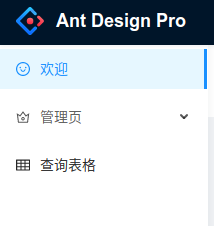
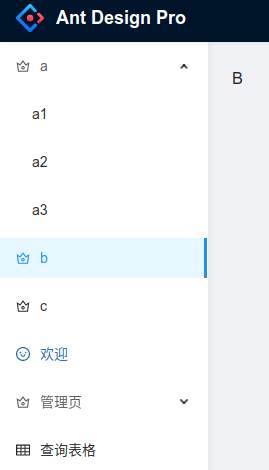
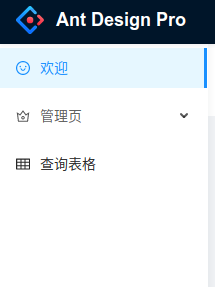
登录前F5手动刷新页面,然后登录,无论是admin还是user,登陆后首次渲染页面的菜单,都无法按配置显示菜单
admin登录后:
admin登录后手动F5刷新页面后:
user登录后:
user登录后手动F5刷新页面后:
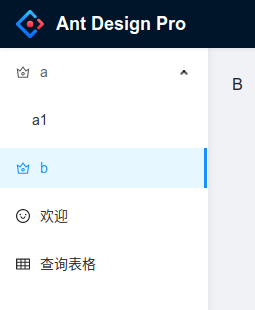
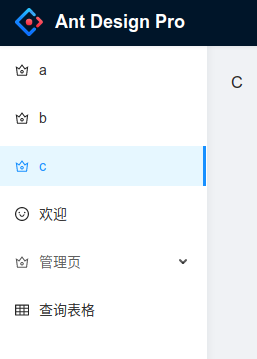
问题2:菜单显示上一次用户登录的菜单,当前登录用户没权限的菜单无法隐藏
复现步骤:
登录前F5手动刷新页面
admin登录
F5刷新
admin退出
user登录
问题复现:上一次登录的用户admin能看到
a, a1, a2, a3, b, c; 而本次登录用户user只配置了能访问a, a1, b,但是页面上能看到,如下图:
🏞 期望结果
期望用户登录后,仅显示该用户能访问的菜单,不能访问的菜单隐藏(不是点击显示403页)
💻 复现代码
https://github.com/CaiBaoHong/antd-v5-top-menu-not-hide
© 版本信息
- Ant Design Pro 版本: 5.0.0-alpha.0
- umi 版本: "Starting Umi UI using [email protected]..."
- 浏览器环境: Chrome 版本 83.0.4103.116(正式版本)64 位)
- 开发环境 Deepin v20
🚑 其他信息
无
 CaiBaoHong
All 16 comments
这是因为登录后通过路由跳转,会走到login的跳转逻辑里,返回默认值,我这边是通过js刷新网页来解决该问题的,登录成功。直接刷新页面
 leesama
on 10 Jul 2020
leesama
on 10 Jul 2020

这么写一下就好了.
 joesdu
on 10 Jul 2020
joesdu
on 10 Jul 2020
这么写一下就好了.
location.reload()的做法是hack,不太优雅啊
CaiBaoHong
on 10 Jul 2020
这么写一下就好了.location.reload()的做法是hack,不太优雅啊
目前只能这样了.没看到有其他好点的方法.
joesdu
on 10 Jul 2020
遇到了一样的问题,mark一下,目前也是通过location.reload()临时处理的
 nylqd
on 10 Jul 2020
nylqd
on 10 Jul 2020
@afc163 @sorrycc pls help, have to use location.reload() now in v5
 haisapan
on 12 Jul 2020
haisapan
on 12 Jul 2020
已修复该问题,请查看#6997
 tkvern
on 13 Jul 2020
tkvern
on 13 Jul 2020
@tkvern window.location.href = urlParams.href.split(urlParams.pathname)[0] + (redirect || '/'); 我也是暂时类似用这个临时解决的,但是本质上页面还是刷新了?
对于spa来说,正常应该要避免页面刷新不是吗?正常来讲initial state改变了,refresh后menu应该要自动变了(根据state或者model)才是正常的吧。
haisapan
on 13 Jul 2020
最近有点忙,暂时没空看源码了,过几天要是还没update的话再研究了。。
haisapan
on 13 Jul 2020
问题解决了,谢谢!!!
CaiBaoHong
on 13 Jul 2020
@tkvern window.location.href = urlParams.href.split(urlParams.pathname)[0] + (redirect || '/'); 我也是暂时类似用这个临时解决的,但是本质上页面还是刷新了?
对于spa来说,正常应该要避免页面刷新不是吗?正常来讲initial state改变了,refresh后menu应该要自动变了(根据state或者model)才是正常的吧。
同样的看法,页面刷新是给我一种膈应感。
看了半天代码,在@umjis/renderer-react里调试半天,感觉是传给根路由的route一直没变,由于根路由的渲染函数只由getRouteElement()生成了一次,所以每次渲染拿的都是第一次的闭包旧route值,不知道理解的对不对,但根<Route/>的由wrapInitialPropsFetch生成的<ComponentWithInitialPropsFetch/>子组件获得的props中的routes却能够一直保持刷新,但似乎不应该直接使用这个prop,这个好像是对应的根路由表。
造成这样两个字段值的更新情况不同的原因我有点搞不清楚...

 Trendymen
on 24 Jul 2020
Trendymen
on 24 Jul 2020
@sorrycc
 kennylbj
on 5 Aug 2020
kennylbj
on 5 Aug 2020
已修复该问题,请查看#6997
目前刷新暂且不说楼下强迫症的问题,主要是有一个问题是访问没有权限的页面,依然能打开,按照官方的介绍来说,应该提示401才对...
 MrArky
on 16 Aug 2020
MrArky
on 16 Aug 2020
@MrArky 更新"@ant-design/pro-layout"到"6.2.5"版本
tkvern
on 17 Aug 2020
@tkvern @MrArky 更新"@ant-design/pro-layout"到"6.2.5"版本
升级到6.4.7都不行
MrArky
on 17 Aug 2020
@MrArky 请升级到指定版本,先删除本地node_modules和package-lock.json
tkvern
on 17 Aug 2020
Related issues
 happier2
·
3Comments
happier2
·
3Comments
 skyFi
·
3Comments
skyFi
·
3Comments
 lvzheng0404
·
3Comments
lvzheng0404
·
3Comments
 yadongxie150
·
3Comments
yadongxie150
·
3Comments
 Yoping
·
3Comments
Yoping
·
3Comments
Most helpful comment
已修复该问题,请查看#6997