🐛 bug 描述
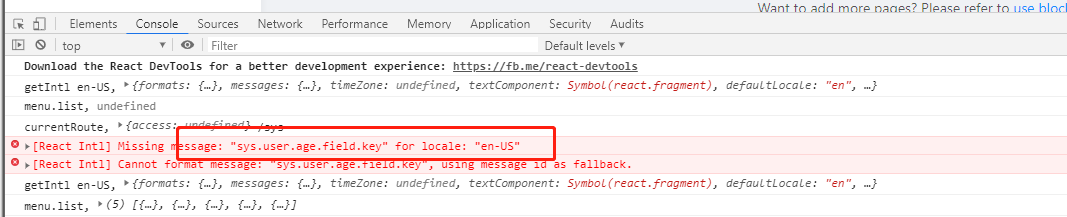
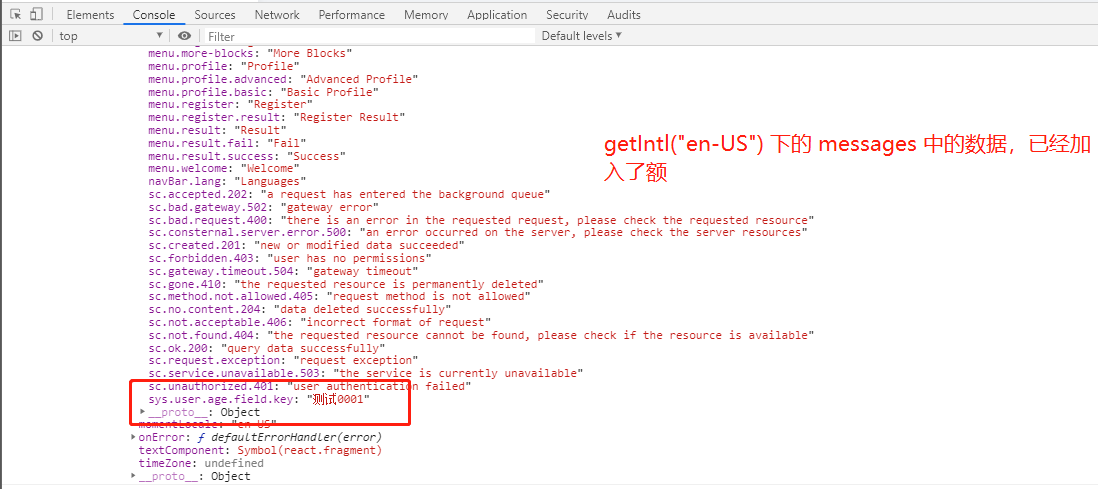
基于后台国际化资源数据,通过使用 addLocale 动态加入数据,使用 FormattedMessage 组件无法获取国际化资源内容, 栏目的名称也是由后台国际化数据基于 addLocale 注入,也出现同样的问题。
📷 复现步骤
- 动态增加国际化资源数据
import enUS from 'antd/es/locale/en_US';
addLocale("en-US", {
    "sys.user.age.field.key": "测试0001"
  },{
    momentLocale: "en-US",
    antd: enUS
  });
<FormattedMessage id="sys.user.age.field.key"/>
🏞 期望结果
通过 addLocale 添加国际化资源后, 基于 FormattedMessage 可获取指定国际化资源
💻 复现代码
import enUS from 'antd/es/locale/en_US';

addLocale("en-US", {
    "sys.user.age.field.key": "测试0001"
  },{
    momentLocale: "en-US",
    antd: enUS
  });

<FormattedMessage id="sys.user.age.field.key"/>
© 版本信息
- Ant Design Pro 版本: [e.g. 4.0.0] antd pro 4.0.0
- umi 版本 umi 3.1.4
- 浏览器环境 谷歌
- 开发环境 [e.g. mac OS] window
🚑 其他信息
 linkai0001
All 8 comments
请问这个问题找到解决方案了吗?
 taomengyue
on 17 Aug 2020
taomengyue
on 17 Aug 2020
请问这个问题找到解决方案了吗?
我贴下代码吧, 我目前是这么解决的
/**
* 获取指定 key 国际化内容, 简化函数名
* @param key
* @param locale
*/
const gl = (key: string, locale: string = getLocale()) : any => {
return getIntl(locale).messages[key] || key;
}
针对动态变量的注入定义
/**
* 获取指定 key 国际化内容,支持动态参数注入, 既支持 locales 下的国际化配置,也支持后台动态配置注入
* @param key
* @param item
* @param locale
*/
const fm = (key: string, item?: {[key: string]: any}, locale: string = getLocale()) : any => {
let result = gl(key);
if (objectUtils.isNotEmpty(item)) {
for (let attrName in item) {
let parser: RegExp = new RegExp(eval(`/{[\s]*${attrName}[\s]*}/g`));
result = result && result.replace(parser, item[attrName]);
}
}
return result;
}
引入的库
import { getIntl,getLocale, useIntl} from 'umi';
linkai0001
on 17 Aug 2020
谢谢楼主。我不太清楚fm方法什么时候用。是不是动态参数的话,页面就不用useIntl,用 fm() 这个方法吗?
taomengyue
on 17 Aug 2020
useIntl
就比如你配置了一个 key 为 app.table.selected.times, 然后他的内容是 Selected {selectedTimes} items ,对于 {selectedTimes} 而言,就是一个动态的参数呢,需要结合自己的上下文做数据的注入。
xx.fm("app.table.selected.times", {selectedTimes: 1})
国际化后结果: Selected 1 items
linkai0001
on 17 Aug 2020
谢谢楼主。我不太清楚fm方法什么时候用。是不是动态参数的话,页面就不用useIntl,用 fm() 这个方法吗?
如果变量绑定的内容是 jsx ,可以在封装下, 目前 gl 和 fm 我已经够用了额
linkai0001
on 17 Aug 2020
谢谢楼主,我明白您说的了。我想问一个额外的问题,如果语言包从后端获取的,怎么用?
taomengyue
on 18 Aug 2020
谢谢楼主,我明白您说的了。我想问一个额外的问题,如果语言包从后端获取的,怎么用?
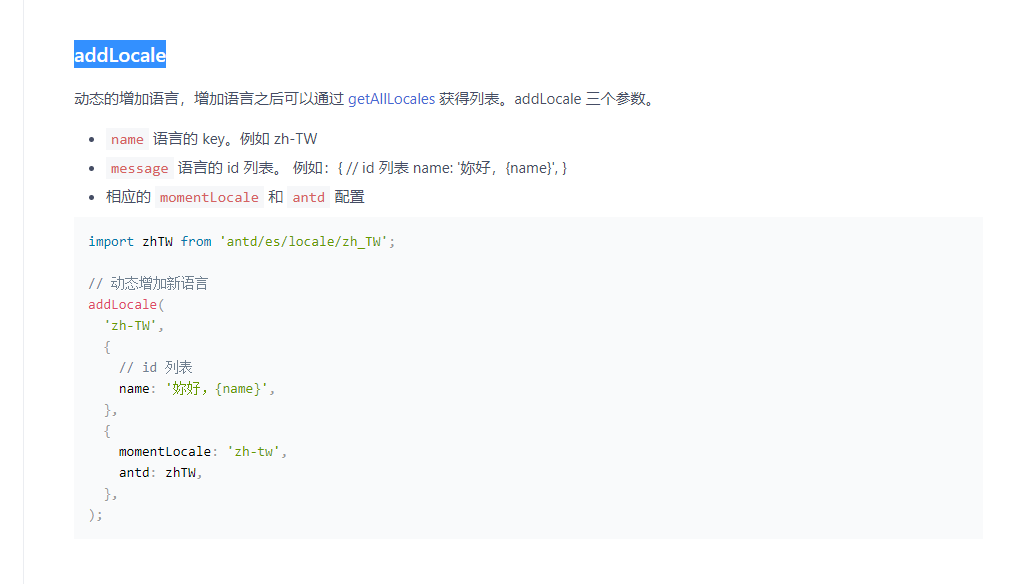
locale 插件 api :
https://umijs.org/plugins/plugin-locale#addlocale
有个 addLocale 函数就是了呢。
linkai0001
on 18 Aug 2020
@linkai0001 , @taomengyue ,我是在 app.ts 里面的 getInitialState() 动态添加多语言,下面是的我解决方案
// 以下的代码都在 `app.ts` 里面

export async function getInitialState() {
    // 1. 从后台获取多语言
    // 2. 调用 addLocale() 添加多语言
    // 3. 调用 setLocale() 设置当前多语言

    // 如果用 umi 自带的 useIntl 会出现如下错误
    // const msg = useIntl().formatMessage({
    //   id: 'Ui:InternalServerErrorMessage',
    //   defaultMessage: '你好,旅行者',
    // });
    // [React Intl] Missing message: "AbpUi:InternalServerErrorMessage" for locale: "en-US", using default message as fallback.

    // 所以需要在下面自定义一个 setLocale
}

// 官方的参考文档 https://umijs.org/zh-CN/plugins/plugin-locale#setlocale-1
// 设置一个自定义语言切换逻辑
// 4. 强制更新当前组件国际化状态
export const locale = {
  setLocale({ updater }: { updater: Function }) {
    updater() // 最主要是这句话
  },
}
 amin168
on 4 Oct 2020
amin168
on 4 Oct 2020
Related issues
 952425340
·
3Comments
952425340
·
3Comments
 renyi818
·
3Comments
renyi818
·
3Comments
 yaoleiroyal
·
3Comments
yaoleiroyal
·
3Comments
 ghost
·
3Comments
ghost
·
3Comments
 2uncle-code
·
3Comments
2uncle-code
·
3Comments
Most helpful comment
@linkai0001 , @taomengyue ,我是在
app.ts里面的getInitialState()动态添加多语言,下面是的我解决方案