Ant-design-pro: 🧐[问题]Button 添加样式float: "right"无法点击
🧐 问题描述
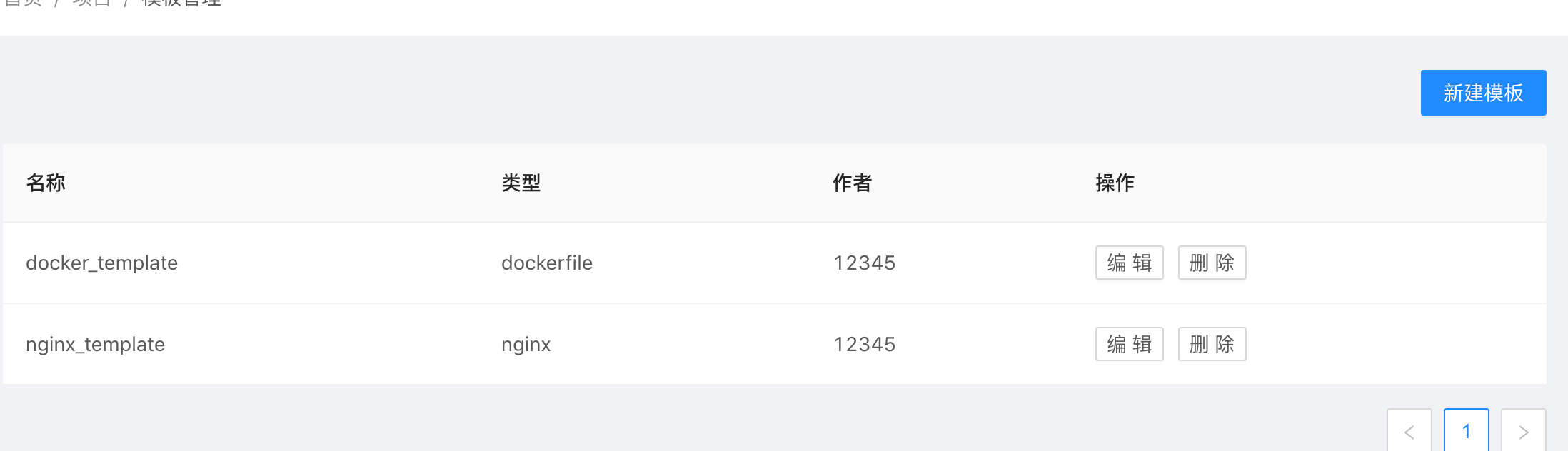
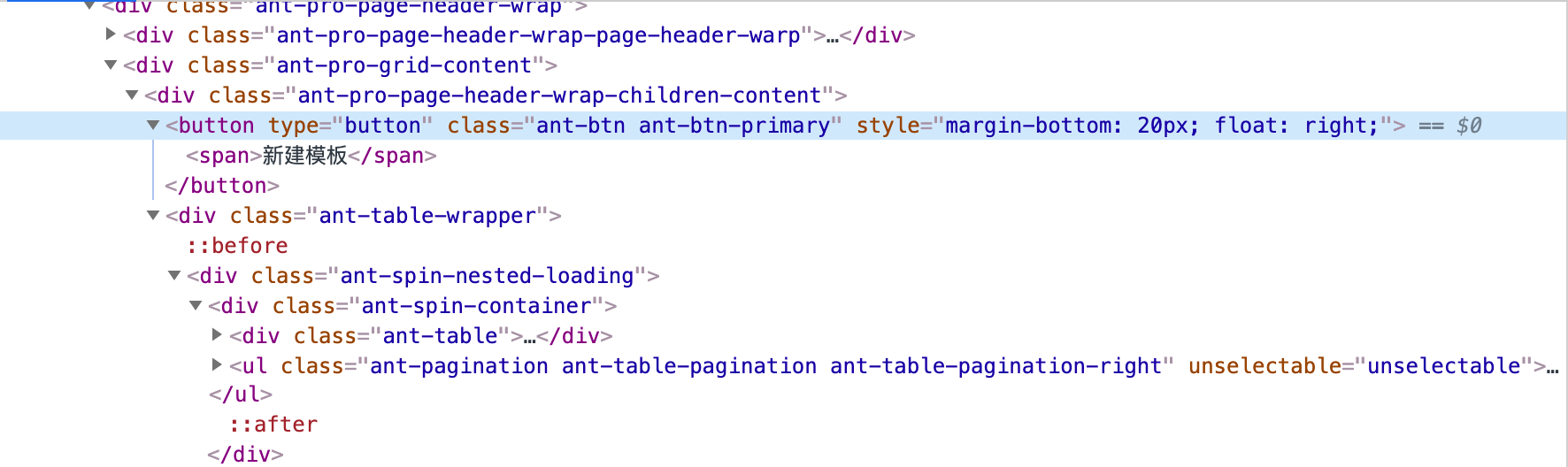
Button 添加style={{ marginBottom: 20, float: "right" }} , 其中添加float: "right"后无法点击?
💻 示例代码
      <Button
        type="primary"
        style={{ marginBottom: 20, float: "right" }}
        onClick={this.createTemplate}
      >
        新建模板
      </Button>
🚑 其他信息
package.json
{
  "name": "ant-design-pro",
  "version": "1.0.0",
  "private": true,
  "description": "An out-of-box UI solution for enterprise applications",
  "scripts": {
    "analyze": "cross-env ANALYZE=1 umi build",
    "build": "umi build",
    "deploy": "npm run site && npm run gh-pages",
    "dev": "npm run start:dev",
    "fetch:blocks": "pro fetch-blocks --branch=umi@3 && npm run prettier",
    "gh-pages": "cp CNAME ./dist/ && gh-pages -d dist",
    "i18n-remove": "pro i18n-remove --locale=zh-CN --write",
    "postinstall": "umi g tmp",
    "lint": "umi g tmp && npm run lint:js && npm run lint:style && npm run lint:prettier",
    "lint-staged": "lint-staged",
    "lint-staged:js": "eslint --ext .js,.jsx,.ts,.tsx ",
    "lint:fix": "eslint --fix --cache --ext .js,.jsx,.ts,.tsx --format=pretty ./src && npm run lint:style",
    "lint:js": "eslint --cache --ext .js,.jsx,.ts,.tsx --format=pretty ./src",
    "lint:prettier": "prettier --check \"**/*\" --end-of-line auto",
    "lint:style": "stylelint --fix \"src/**/*.less\" --syntax less",
    "prettier": "prettier -c --write \"**/*\"",
    "start": "umi dev",
    "start:dev": "cross-env REACT_APP_ENV=dev MOCK=none umi dev",
    "start:no-mock": "cross-env MOCK=none umi dev",
    "start:no-ui": "cross-env UMI_UI=none umi dev",
    "start:pre": "cross-env REACT_APP_ENV=pre umi dev",
    "start:test": "cross-env REACT_APP_ENV=test MOCK=none umi dev",
    "pretest": "node ./tests/beforeTest",
    "test": "umi test",
    "test:all": "node ./tests/run-tests.js",
    "test:component": "umi test ./src/components",
    "tsc": "tsc"
  },
  "husky": {
    "hooks": {
      "pre-commit": "npm run lint-staged"
    }
  },
  "lint-staged": {
    "**/*.less": "stylelint --syntax less",
    "**/*.{js,jsx,ts,tsx}": "npm run lint-staged:js",
    "**/*.{js,jsx,tsx,ts,less,md,json}": [
      "prettier --write"
    ]
  },
  "browserslist": [
    "> 1%",
    "last 2 versions",
    "not ie <= 10"
  ],
  "dependencies": {
    "@ant-design/icons": "^4.0.5",
    "@ant-design/pro-layout": "^5.0.8",
    "@ant-design/pro-table": "^2.1.11",
    "antd": "^4.0.0",
    "classnames": "^2.2.6",
    "dva": "^2.4.1",
    "lodash": "^4.17.11",
    "moment": "^2.24.0",
    "omit.js": "^1.0.2",
    "path-to-regexp": "2.4.0",
    "qs": "^6.9.0",
    "react": "^16.8.6",
    "react-dom": "^16.8.6",
    "react-helmet-async": "^1.0.4",
    "umi": "^3.0.14",
    "umi-request": "^1.2.19",
    "use-merge-value": "^1.0.1",
    "socket.io-client": "^2.3.0",
    "react-ace": "^8.1.0",
    "ace-builds": "^1.4.9",
    "sql-formatter": "^2.3.3"
  },
  "devDependencies": {
    "@ant-design/pro-cli": "^1.0.18",
    "@types/classnames": "^2.2.7",
    "@types/express": "^4.17.0",
    "@types/history": "^4.7.2",
    "@types/jest": "^25.1.0",
    "@types/lodash": "^4.14.144",
    "@types/qs": "^6.5.3",
    "@types/react": "^16.9.17",
    "@types/react-dom": "^16.8.4",
    "@types/react-helmet": "^5.0.13",
    "@types/socket.io-client": "^1.4.32",
    "@types/sql-formatter": "^2.3.0",
    "@umijs/fabric": "^2.0.5",
    "@umijs/plugin-blocks": "^2.0.5",
    "@umijs/preset-ant-design-pro": "^1.0.1",
    "@umijs/preset-react": "^1.4.8",
    "@umijs/preset-ui": "^2.0.9",
    "carlo": "^0.9.46",
    "chalk": "^3.0.0",
    "cross-env": "^7.0.0",
    "cross-port-killer": "^1.1.1",
    "detect-installer": "^1.0.1",
    "enzyme": "^3.11.0",
    "eslint": "^6.8.0",
    "express": "^4.17.1",
    "gh-pages": "^2.0.1",
    "husky": "^4.0.7",
    "jsdom-global": "^3.0.2",
    "lint-staged": "^10.0.0",
    "mockjs": "^1.0.1-beta3",
    "prettier": "^2.0.1",
    "pro-download": "1.0.1",
    "puppeteer-core": "^2.1.1",
    "stylelint": "^13.0.0"
  },
  "engines": {
    "node": ">=10.0.0"
  },
  "checkFiles": [
    "src/**/*.js*",
    "src/**/*.ts*",
    "src/**/*.less",
    "config/**/*.js*",
    "scripts/**/*.js"
  ]
}
🕵🏻♀️ question
 LianGee
All 11 comments
怎么可能
 whitedive
on 17 Apr 2020
whitedive
on 17 Apr 2020
😄1
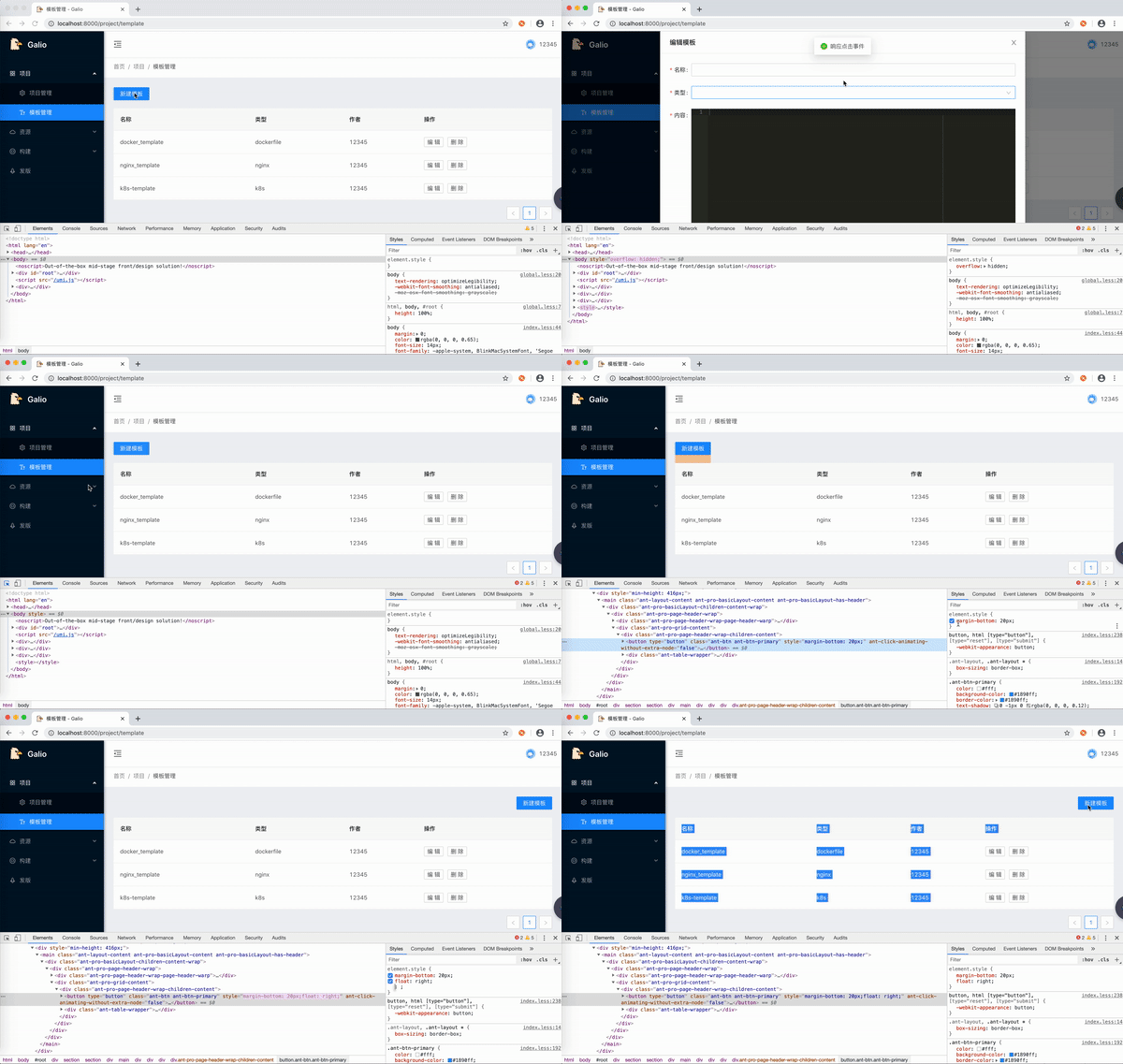
@whitedive 额…… 我也觉得不太可能,录制了一个gif。
LianGee
on 17 Apr 2020
估计是上面浮动了什么东西,导致按钮被挡住了
 chenshuai2144
on 17 Apr 2020
chenshuai2144
on 17 Apr 2020
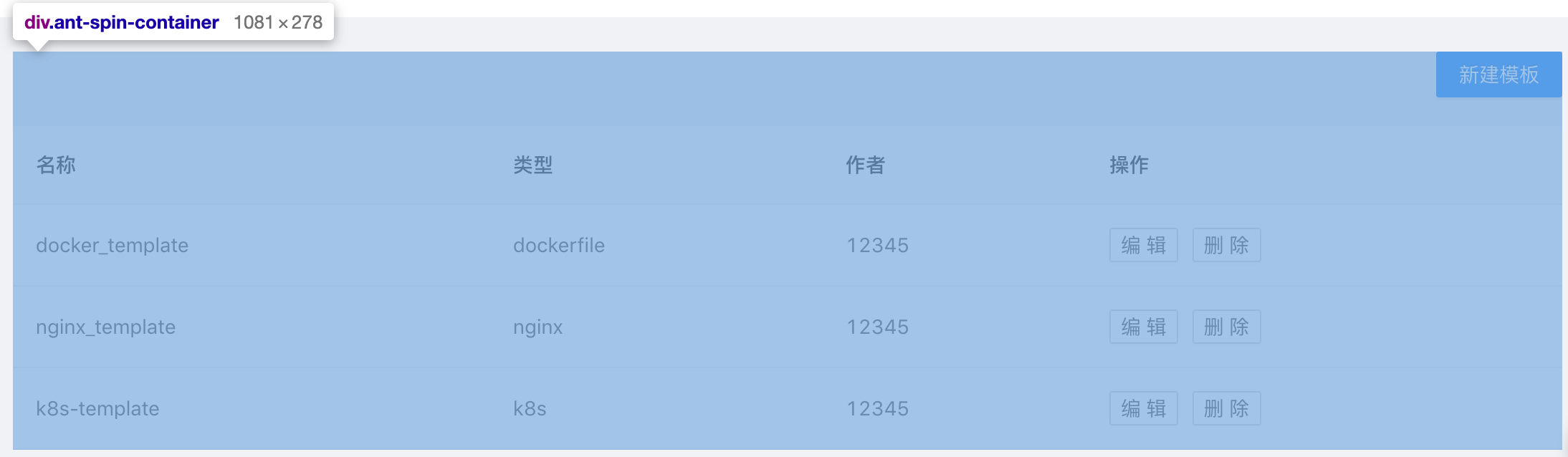
@chenshuai2144 Table 的 ant-spin-container 。
我仅仅是在button 下面放了个table而已。在左侧不会被挡住,右侧就会这样。
以下代码可以复现这个问题。我认为这是bug。
import React from 'react';
import ReactDOM from 'react-dom';
import 'antd/dist/antd.css';
import './index.css';
import { Table, Tag, Button, message } from 'antd';

const columns = [
  {
    title: 'Name',
    dataIndex: 'name',
    key: 'name',
    render: text => <a>{text}</a>,
  },
  {
    title: 'Age',
    dataIndex: 'age',
    key: 'age',
  },
  {
    title: 'Address',
    dataIndex: 'address',
    key: 'address',
  },
  {
    title: 'Tags',
    key: 'tags',
    dataIndex: 'tags',
    render: tags => (
      <span>
        {tags.map(tag => {
          let color = tag.length > 5 ? 'geekblue' : 'green';
          if (tag === 'loser') {
            color = 'volcano';
          }
          return (
            <Tag color={color} key={tag}>
              {tag.toUpperCase()}
            </Tag>
          );
        })}
      </span>
    ),
  },
  {
    title: 'Action',
    key: 'action',
    render: (text, record) => (
      <span>
        <a style={{ marginRight: 16 }}>Invite {record.name}</a>
        <a>Delete</a>
      </span>
    ),
  },
];

const data = [
  {
    key: '1',
    name: 'John Brown',
    age: 32,
    address: 'New York No. 1 Lake Park',
    tags: ['nice', 'developer'],
  },
  {
    key: '2',
    name: 'Jim Green',
    age: 42,
    address: 'London No. 1 Lake Park',
    tags: ['loser'],
  },
  {
    key: '3',
    name: 'Joe Black',
    age: 32,
    address: 'Sidney No. 1 Lake Park',
    tags: ['cool', 'teacher'],
  },
];

ReactDOM.render(
  <>
  <Button
  onClick={() => {message.success('test')}}
  style={{float: 'right'}}
  >test</Button>
<Table columns={columns} dataSource={data} />
</>
, document.getElementById('container'));
个人认为这是BUG
LianGee
on 18 Apr 2020
你好,我也是个andt的使用者
很好奇然后尝试并复现了你的问题
试着给表格加上一个边框,会发现按钮浮动后实际上被表格挡住了
查看样式发现andt表格组件使用了相对定位并且清除了浮动

处理办法是给按钮包一层div并给他一个合适的高度占领一整行,让按钮只在div层右浮动
whitedive
on 18 Apr 2020
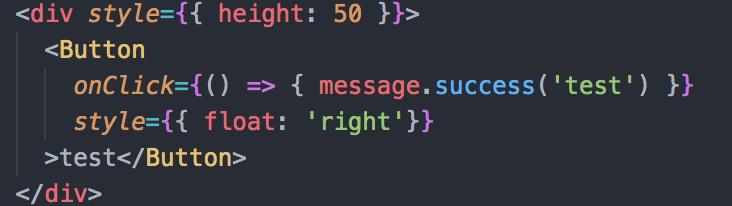
whitedive
on 18 Apr 2020
@whitedive 一开始没有意识到是被table遮挡住了,谢谢啦~
LianGee
on 18 Apr 2020
😄1
@whitedive 一开始没有意识到是被table遮挡住了,谢谢啦~
Add a big zIndex
 Gofive
on 21 Apr 2020
Gofive
on 21 Apr 2020
@whitedive 一开始没有意识到是被table遮挡住了,谢谢啦~
Add a big zIndex
等官方解决吧,代码会优雅一点。
LianGee
on 21 Apr 2020
等官方解决吧,代码会优雅一点。
给个重现吧,从讨论里还没看出来是官方问题。
 afc163
on 21 Apr 2020
afc163
on 21 Apr 2020
import React from 'react';
import ReactDOM from 'react-dom';
import 'antd/dist/antd.css';
import './index.css';
import { Table, Tag, Button, message } from 'antd';

const columns = [
  {
    title: 'Name',
    dataIndex: 'name',
    key: 'name',
    render: text => <a>{text}</a>,
  },
  {
    title: 'Age',
    dataIndex: 'age',
    key: 'age',
  },
  {
    title: 'Address',
    dataIndex: 'address',
    key: 'address',
  },
  {
    title: 'Tags',
    key: 'tags',
    dataIndex: 'tags',
    render: tags => (
      <span>
        {tags.map(tag => {
          let color = tag.length > 5 ? 'geekblue' : 'green';
          if (tag === 'loser') {
            color = 'volcano';
          }
          return (
            <Tag color={color} key={tag}>
              {tag.toUpperCase()}
            </Tag>
          );
        })}
      </span>
    ),
  },
  {
    title: 'Action',
    key: 'action',
    render: (text, record) => (
      <span>
        <a style={{ marginRight: 16 }}>Invite {record.name}</a>
        <a>Delete</a>
      </span>
    ),
  },
];

const data = [
  {
    key: '1',
    name: 'John Brown',
    age: 32,
    address: 'New York No. 1 Lake Park',
    tags: ['nice', 'developer'],
  },
  {
    key: '2',
    name: 'Jim Green',
    age: 42,
    address: 'London No. 1 Lake Park',
    tags: ['loser'],
  },
  {
    key: '3',
    name: 'Joe Black',
    age: 32,
    address: 'Sidney No. 1 Lake Park',
    tags: ['cool', 'teacher'],
  },
];

ReactDOM.render(
  <>
  <Button
  onClick={() => {message.success('test')}}
  style={{float: 'right'}}
  >test</Button>
<Table columns={columns} dataSource={data} />
</>
, document.getElementById('container'));
@afc163 以上可以复现
LianGee
on 21 Apr 2020
Was this page helpful?
0 / 5 - 0 ratings
Related issues
 cheung1111
·
3Comments
cheung1111
·
3Comments
 yjz1004
·
3Comments
yjz1004
·
3Comments
 yadongxie150
·
3Comments
yadongxie150
·
3Comments
 kaoding
·
3Comments
kaoding
·
3Comments
 wuyongdec
·
3Comments
wuyongdec
·
3Comments