Ant-design-pro: 🧐[问题]为什么我的antdpro里的eslint跟没有生效一样??
🧐 问题描述
为什么我的antdpro里的eslint跟没有生效一样??
不检测未逗号,也不检测是否有分号等等,整个检测下来只有检测 console 的警告(Unexpected console statement.eslint(no-console))
💻 示例代码
        if (response.result === 0) {
          yield put({
            type: `saveEdit`, // 存在的检测: Strings must use singlequote.eslint(quotes)
            payload: editCtx  // json最后一项不管有无逗号都不检测
          }) // 代码行结尾有无分号都不检测
        }
🚑 其他信息
我的 .eslintrc.js
const fabric = require('@umijs/fabric');

module.exports = fabric.eslint;
 HowGraceU
All 17 comments
🧐 问题描述
为什么我的antdpro里的eslint跟没有生效一样??
不检测未逗号,也不检测是否有分号等等,整个检测下来只有检测 console 的警告(Unexpected console statement.eslint(no-console))
💻 示例代码
if (response.result === 0) { yield put({ type: `saveEdit`, // 存在的检测: Strings must use singlequote.eslint(quotes) payload: editCtx // json最后一项不管有无逗号都不检测 }) // 代码行结尾有无分号都不检测 }🚑 其他信息
我的 .eslintrc.js
const fabric = require('@umijs/fabric'); module.exports = fabric.eslint;
const { strictEslint } = require('@umijs/fabric');
strictEslint.rules['max-len'] = [1, 500];
// 数组和对象键值对最后一个逗号, never参数:不能带末尾的逗号, always参数:必须带末尾的逗号,
// always-multiline:多行模式必须带逗号,单行模式不能带逗号
strictEslint.rules['comma-dangle'] = [1, 'never'];
// 禁用不必要的转义字符
strictEslint.rules['no-useless-escape'] = 0;
// 双峰驼命名格式
strictEslint.rules['brace-style'] = [2, '1tbs', { allowSingleLine: true }];
strictEslint.rules['no-underscore-dangle'] = 0;
strictEslint.rules['react/no-string-refs'] = false;
strictEslint.rules['react/jsx-no-bind'] = false;
// no-plusplus
strictEslint.rules['no-plusplus'] = 0;
strictEslint.rules['import/no-dynamic-require'] = false;
strictEslint.rules['global-require'] = 0;
strictEslint.rules['jsx-a11y/alt-text'] = false;
strictEslint.rules['default-case'] = 0;
strictEslint.rules['prefer-const'] = 0;
strictEslint.rules['guard-for-in'] = 0;
strictEslint.rules['no-restricted-syntax'] = 0;
strictEslint.rules['no-cond-assign'] = 0;
strictEslint.rules['space-in-parens'] = 0;
strictEslint.rules['consistent-return'] = 0;
strictEslint.rules['import/order'] = 0;
strictEslint.rules.radix = 0;
strictEslint.rules['import/no-extraneous-dependencies'] = 0;
strictEslint.rules['react/jsx-props-no-spreading'] = 0;
module.exports = {
...strictEslint,
globals: {
page: true
}
};
 joesdu
on 25 Mar 2020
joesdu
on 25 Mar 2020
应该这么用 ,你们用起来好邪道
module.exports = {
  extends: [require.resolve('@umijs/fabric/dist/eslint')],
  globals: {
    ANT_DESIGN_PRO_ONLY_DO_NOT_USE_IN_YOUR_PRODUCTION: true,
    page: true,
    REACT_APP_ENV: true,
  },
};
 chenshuai2144
on 25 Mar 2020
chenshuai2144
on 25 Mar 2020
应该这么用 ,你们用起来好邪道
module.exports = {
  extends: [require.resolve('@umijs/fabric/dist/eslint')],
  globals: {
    ANT_DESIGN_PRO_ONLY_DO_NOT_USE_IN_YOUR_PRODUCTION: true,
    page: true,
    REACT_APP_ENV: true,
  },
};
直接覆盖掉你的es那个文件就行了
joesdu
on 25 Mar 2020
应该这么用 ,你们用起来好邪道
module.exports = {
  extends: [require.resolve('@umijs/fabric/dist/eslint')],
  globals: {
    ANT_DESIGN_PRO_ONLY_DO_NOT_USE_IN_YOUR_PRODUCTION: true,
    page: true,
    REACT_APP_ENV: true,
  },
};
建议你把eslint安装成vs code的插件,这样它自动就能运行
joesdu
on 25 Mar 2020
应该这么用 ,你们用起来好邪道
module.exports = {
  extends: [require.resolve('@umijs/fabric/dist/eslint')],
  globals: {
    ANT_DESIGN_PRO_ONLY_DO_NOT_USE_IN_YOUR_PRODUCTION: true,
    page: true,
    REACT_APP_ENV: true,
  },
};
建议你把eslint安装成vs code的插件,这样它自动就能运行
感谢。默认的就是这个样子,没有效果,我才改成我现在这样的,是在文档上看的,刚才又改回来试了一下,也没用。我的vscode 已经装了 eslint,并且配置了
    "editor.codeActionsOnSave": {
        "source.fixAll": true,
    },
在其他项目都是好使的
HowGraceU
on 25 Mar 2020
补充,刚装了 airbnb 的 ts 的 eslint,上述格式问题应该都会在提醒并且在保存时修复(vscode 的 eslint 插件),而我看 @umijs/fabric 库里面似乎也用到了 airbnb 的 extends,不知什么原因导致我在 2020-03-25 装的 antdpro 的 eslint 不生效
HowGraceU
on 25 Mar 2020
补充,刚装了 airbnb 的 ts 的 eslint,上述格式问题应该都会在提醒并且在保存时修复(vscode 的 eslint 插件),而我看 @umijs/fabric 库里面似乎也用到了 airbnb 的 extends,不知什么原因导致我在 2020-03-25 装的 antdpro 的 eslint 不生效
😂按理说不应该呀.我一切正常.
joesdu
on 25 Mar 2020
今天才发现,昨天回复错人了😂
joesdu
on 26 Mar 2020
今天才发现,昨天回复错人了😂
没事,人家暂时也没有理你😂,并且我昨天在 antdpro 项目下执行 eslint --init 装上 airbnb 风格也不生效,换一台电脑也一样 😢
HowGraceU
on 26 Mar 2020
今天才发现,昨天回复错人了😂
没事,人家暂时也没有理你😂,并且我昨天在 antdpro 项目下执行 eslint --init 装上 airbnb 风格也不生效,换一台电脑也一样 😢
我是这么用的,你看一下你右下角ESLint的服务有没有运行起来.还要看看代码有没有错误,若是代码有错误,我的ESLint也是不生效.
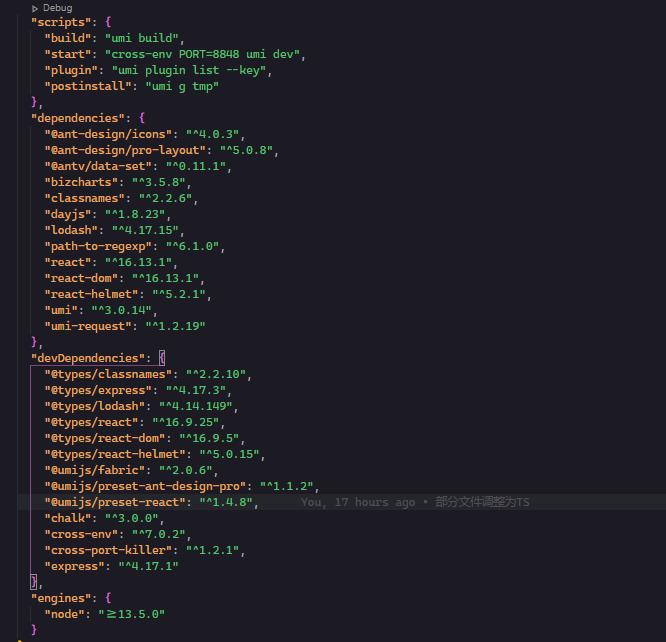
明白了,刚看了下右下角有提示
Cannot read config file: D:\demo\antdpro2\node_modules\@umijs\fabric\node_modules\eslint-config-airbnb\index.js Error: ENOENT: no such file or directory,
open 'D:\demo\antdpro2\node_modules\@umijs\fabric\node_modules\eslint-config-airbnb\index.js' Referenced from: D:\demo\antdpro2\.eslintrc.js
我先看看怎么回事
HowGraceU
on 26 Mar 2020
这回没有报错,eslint 也运行了,怎么弄都不行,我真的是吐了呀 💢
HowGraceU
on 26 Mar 2020
这回没有报错,eslint 也运行了,怎么弄都不行,我真的是吐了呀 💢
我换成了官方的代码,也能正常使用,你看下你VS Code的设置看看.删掉项目文件中的.vscode文件夹重新打开项目再试试
joesdu
on 26 Mar 2020
这回没有报错,eslint 也运行了,怎么弄都不行,我真的是吐了呀 💢
我换成了官方的代码,也能正常使用,你看下你VS Code的设置看看.删掉项目文件中的.vscode文件夹重新打开项目再试试
谢了,不用试了,我放弃了。
项目下没有创 .vscode 文件。
跑 npm run lint 也不会检测出错误(代码行结尾有无分号都不检测)。
我把 .eslintrc.js 里的 global 删掉是会报错的。
HowGraceU
on 26 Mar 2020
我们开启了 eslint-config-prettier,所有 prettier 能 cover 的代码风格相关的 eslint 规则都会被关闭,pro 默认配置提交代码会自动进行 prettier 格式化(换句话说你不用关心代码风格,提交时会统一格式化),建议开启。
 afc163
on 26 Mar 2020
afc163
on 26 Mar 2020
我们开启了
eslint-config-prettier,所有 prettier 能 cover 的代码风格相关的 eslint 规则都会被关闭,pro 默认配置提交代码会自动进行 prettier 格式化(换句话说你不用关心代码风格,提交时会统一格式化),建议开启。https://github.com/prettier/eslint-config-prettier
我几个功能都是用VSC插件提供的支持,把package里边的相关库我都删掉了.
joesdu
on 26 Mar 2020
哦。好吧,这让我全靠 eslint 来续命的代码风格有点难受
HowGraceU
on 26 Mar 2020
@HowGraceU 代码风格只要统一就好,慢慢就会习惯的,
而且 prettier 很香的
chenshuai2144
on 26 Mar 2020
Related issues
 lvzheng0404
·
3Comments
lvzheng0404
·
3Comments
 zhuanglong
·
3Comments
zhuanglong
·
3Comments
 2uncle-code
·
3Comments
2uncle-code
·
3Comments
 Jerry-goodboy
·
3Comments
Jerry-goodboy
·
3Comments
 gaoqiang19514
·
3Comments
gaoqiang19514
·
3Comments
Most helpful comment
应该这么用 ,你们用起来好邪道