Ant-design-pro: [BUG] V4 登录跳转异常
bug 描述
整合SecurityLayout 对前端进行权限检查。在登录界面需要登录成功两次才能正常跳转到首页
复现步骤
修改config.ts 的路由
期望结果
登录成功一次跳转到首页
复现代码 [提供可复现的代码,仓库,或线上示例]
{
path: '/',
component: '../layouts/SecurityLayout',
Routes: ['src/pages/Authorized'],
routes: [
{
    path: '/',
    component: '../layouts/BasicLayout',
    Routes: ['src/pages/Authorized'],
    // authority: ['admin', 'user'],
    routes: [{
        path: '/',
        name: 'welcome',
        icon: 'smile',
        component: './Welcome',
    },
    {
        path: 'http://www.baidu.com',
        name: 'hello',
        icon: 'smile',
        // component: './Hello',
    },
    {
        name: 'basic-list',
        path: '/basic-list',
        icon: 'rocket',
        component: './basic-list',
    },
    ],
},
],
},
版本信息:
- Ant Design Pro 版本: [e.g. 4.0.0]
- umi 版本
- 浏览器环境
- 开发环境 [e.g. mac OS]
其他信息 [如截图等其他信息可以贴在这里]
 DWAO
DWAO
All 22 comments
流程:登录成功就跳转到SecurityLayout ,但在 SecurityLayout 要获取当前用户,在获取用户需要时间,这时候 isLogin 还没有获取值,
const isLogin = currentUser && currentUser.userid;
接下来再有下面的跳转到登录界面的操作
if (!isLogin) {
return <Redirect to={`/user/login?${queryString}`}></Redirect>;
}
如果是第二次(或者没有刷新浏览器)就要登录2次(点击的很快可能要更多次数),所以这里点问题
 kaoding
on 27 Sep 2019
kaoding
on 27 Sep 2019
流程:登录成功就跳转到SecurityLayout ,但在 SecurityLayout 要获取当前用户,在获取用户需要时间,这时候 isLogin 还没有获取值,
const isLogin = currentUser && currentUser.userid;
接下来再有下面的跳转到登录界面的操作if (!isLogin) { return <Redirect to={`/user/login?${queryString}`}></Redirect>; }如果是第二次(或者没有刷新浏览器)就要登录2次(点击的很快可能要更多次数),所以这里点问题
有什么好的解决办法么?
DWAO
on 27 Sep 2019
另外一个BUG,当用户是登陆状态时候,访问一个没有权限的路由,不会跳转到403页面,而是跳转到了登陆页,不知道何时登出的。
pages\Authorized.jsx
return (
<Authorized
authority={getRouteAuthority(location.pathname, routes) || ''}
noMatch={isLogin ? <Redirect to="/exception/403" /> : <Redirect to="/user/login" />}
>
{children}
</Authorized>
);
 mytheshow
on 28 Sep 2019
mytheshow
on 28 Sep 2019
登陆按钮点击时,应当给按钮添加loading状态,并禁用(在 dispatch 之前设置disabled属性),以防止重复请求。
currentUser 使用SecurityLayout是必须获取的,检查服务端是否有相应属性的输出,currentUser 属性跟预设不同的话,可以自己去interface里面修改!
SecurityLayout 也可以按照自己的逻辑修改。
模型 *fetchCurrent 也可以自由修改。
 unrealsmart
on 28 Sep 2019
unrealsmart
on 28 Sep 2019
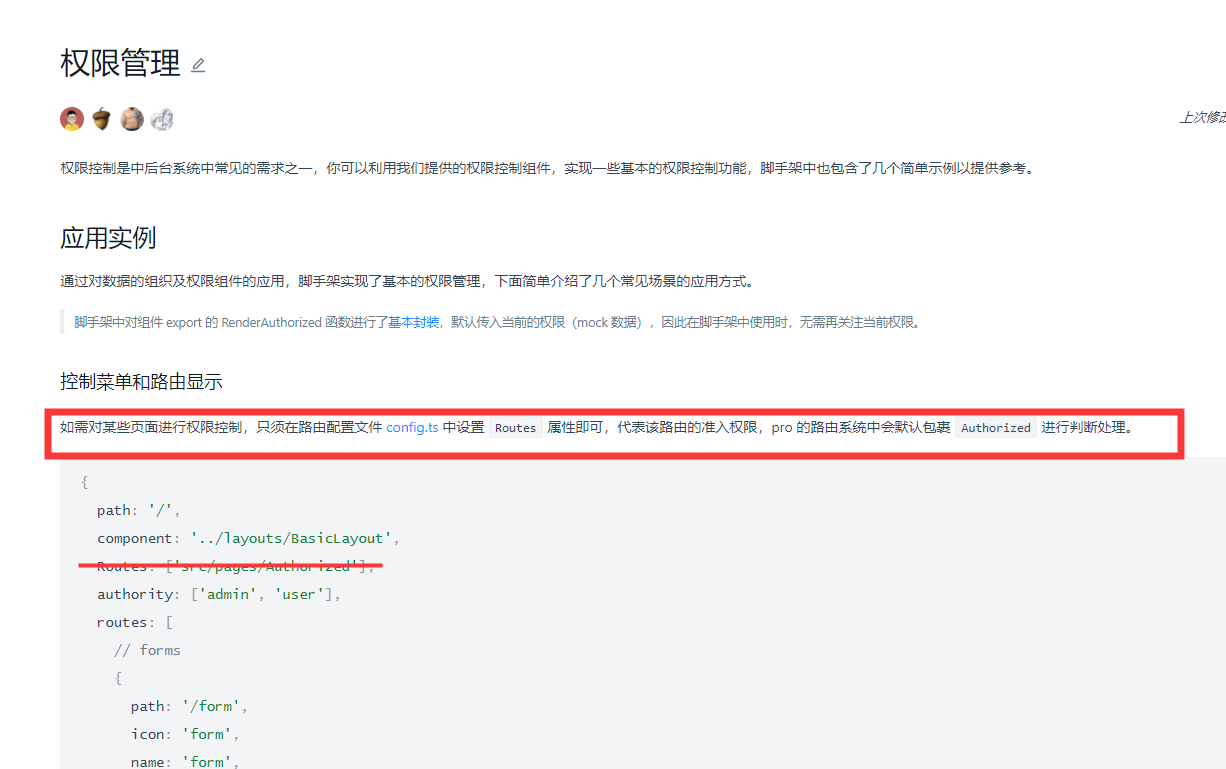
Routes: ['src/pages/Authorized'] 这个一定要加吗?这个是做什么的?
 kernelogic
on 7 Oct 2019
kernelogic
on 7 Oct 2019
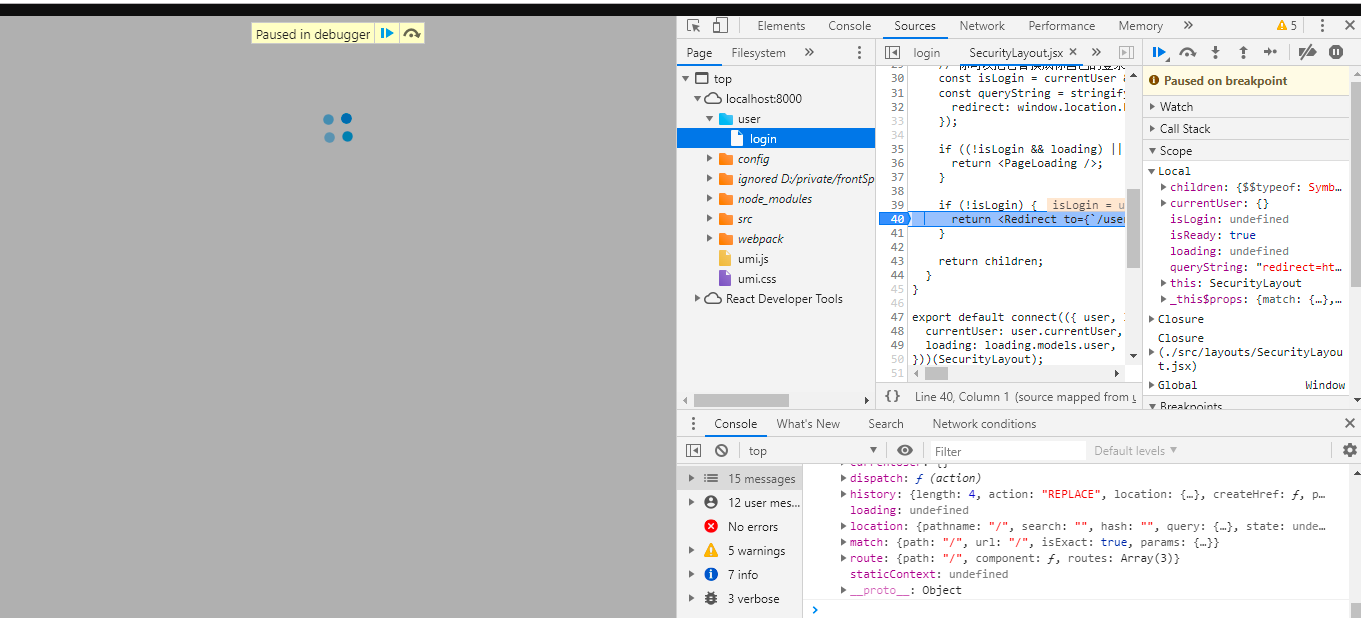
直接访问链接:http://localhost:8000/user/login,
登录成功跳转到SecurityLayout后,在componentDidMount中 setState和dispatch执行问题,setState触发render,此时dispatch loading状态暂未更新到,会导致isReady变为true,会跳到
if (!isLogin) {
return <Redirect to={/user/login?${queryString}}></Redirect>;
},跳转回登录页面,后面登录loading会有值,所有可以登录
 pingchangxinli
on 7 Oct 2019
pingchangxinli
on 7 Oct 2019
render 中跳转这个操作有问题,应该在 model 中处理,这样就会避免这个问题。
 ft20082
on 10 Oct 2019
ft20082
on 10 Oct 2019
@DWAO 把项目原样clone 下来,只是在 if (!isLogin) { return
ft20082
on 10 Oct 2019
你可以在SecurityLayout请求fetchCurrent的时候在类里面设置一个判断请求是否完成的标识符
callback后判断如果请求完成 将这个标识符setState为true
render的时候 判断这个标识符为True才进入isLogin的判断
 Locusc
on 16 Oct 2019
Locusc
on 16 Oct 2019
我的方法是用登录后返回的userid来判断是否登录,修改如下:
src/layouts/SecurityLayout.jsx 中 const isLogin = currentUser && currentUser.userid; 改成:const isLogin = login && login.userid;
 MichaelXu1983
on 18 Oct 2019
MichaelXu1983
on 18 Oct 2019
我的方法是用登录后返回的
userid来判断是否登录,修改如下:
src/layouts/SecurityLayout.jsx中const isLogin = currentUser && currentUser.userid;改成:const isLogin = login && login.userid;
用login来判断的问题在于,刷新就会跳出登录状态
 feifanlee
on 22 Oct 2019
feifanlee
on 22 Oct 2019
每次刷新从服务器重新获取就行了吧
 chenshuai2144
on 22 Oct 2019
chenshuai2144
on 22 Oct 2019
用callback来设置isReady,修改src/layouts/SecurityLayout.tsx:
componentDidMount() {
const { dispatch } = this.props;
if (dispatch) {
dispatch({
type: 'user/fetchCurrent',
callback: () => {
this.setState({
isReady: true,
});
},
});
}
}
userModel 修改:
*fetchCurrent({ callback }, { call, put }) {
const response = yield call(queryCurrent);
yield put({
type: 'saveCurrentUser',
payload: response,
});
if (callback && typeof callback === 'function') {
callback();
}
}
 lerence
on 22 Oct 2019
lerence
on 22 Oct 2019
我貌似解决这个问题了,直接上代码。
componentWillMount(){
    const { dispatch } = this.props;
    if (dispatch) {
      dispatch({
        type: 'user/fetchCurrent',
      });
    }
  }

  componentDidMount() {

    let delaySet = ()=>this.setState({isReady: true})

    setTimeout(() => {delaySet()},0)

  }
请问修改后,登陆还是不能正常跳转,需要刷新一次登陆页面,重新输入账户密码登陆,才能正常跳转
 C-SF-C
on 24 Oct 2019
C-SF-C
on 24 Oct 2019
要不把setTimeout的时间调长点,调到1000等1秒
feifanlee
on 24 Oct 2019
 kaoding
on 31 Oct 2019
kaoding
on 31 Oct 2019
我貌似解决这个问题了,直接上代码。
componentWillMount(){ const { dispatch } = this.props; if (dispatch) { dispatch({ type: 'user/fetchCurrent', }); } } componentDidMount() { let delaySet = ()=>this.setState({isReady: true}) setTimeout(() => {delaySet()},0) }
确实解决了,请问这是个什么原理😂
 TianenPang
on 24 Nov 2019
TianenPang
on 24 Nov 2019
Even after using the code which @feifanlee mentioned above, but still, this issue persists.
 jinuem
on 24 Nov 2019
jinuem
on 24 Nov 2019
用callback来设置isReady,修改src/layouts/SecurityLayout.tsx:
componentDidMount() {
    const { dispatch } = this.props;
    if (dispatch) {
      dispatch({
        type: 'user/fetchCurrent',
        callback: () => {
          this.setState({
            isReady: true,
          });
        },
      });
    }
  }
userModel 修改:
*fetchCurrent({ callback }, { call, put }) {
      const response = yield call(queryCurrent);
      yield put({
        type: 'saveCurrentUser',
        payload: response,
      });
      if (callback && typeof callback === 'function') {
          callback();
      }
    }
这个方法算是比较好的解决了,还是有一个回调好一点。
 BarrySong97
on 25 Nov 2019
BarrySong97
on 25 Nov 2019
@BarrySong97 I have changed as per your code. but still not redirecting after login. :(
jinuem
on 25 Nov 2019
哈哈,我的做法就比较简单粗暴了。
if (!isLogin && '/user/login' != window.location.pathname) {
    return <Redirect to={`/user/login?${queryString}`}></Redirect>;
}
 Leskur
on 5 Feb 2020
Leskur
on 5 Feb 2020
Related issues
 2uncle-code
·
3Comments
2uncle-code
·
3Comments
 happier2
·
3Comments
happier2
·
3Comments
 cheung1111
·
3Comments
cheung1111
·
3Comments
 wuyongdec
·
3Comments
wuyongdec
·
3Comments
 gaoqiang19514
·
3Comments
gaoqiang19514
·
3Comments
Most helpful comment
我貌似解决这个问题了,直接上代码。