Ant-design-pro: 如何关闭国际化功能呢?concole老是提示[React Intl] Missing message: "menu.首页" for locale: "zh-CN", using default message as fallback.
 fenghuolibie
All 17 comments
[React Intl] Missing message: "menu.首页.信息表" for locale: "zh-CN", using default message as fallback.
fenghuolibie
on 1 Sep 2019
@xiaohuoni
fenghuolibie
on 2 Sep 2019
@fifsky
fenghuolibie
on 3 Sep 2019
直接执行npm run i18n-remove并且在 config.ts 关闭 locale
 Hansuku
on 3 Sep 2019
Hansuku
on 3 Sep 2019
npm run i18n-remove
感谢!!!方法相当正确,先去除相关js包,再关闭
fenghuolibie
on 3 Sep 2019
npm run i18n-remove
感谢!!!方法相当正确,先去除相关js包,再关闭
请问是在哪里关闭呢,我的报错是这个

 lijinghuatongxue
on 7 Dec 2019
lijinghuatongxue
on 7 Dec 2019
npm run i18n-remove
感谢!!!方法相当正确,先去除相关js包,再关闭
请问是在哪里关闭呢,我的报错是这个
我不知到怎么上传图片在/config/config.js文件里,找到local把它的属性设为{},空对象就好了
fenghuolibie
on 9 Dec 2019
npm run i18n-remove
感谢!!!方法相当正确,先去除相关js包,再关闭
请问是在哪里关闭呢,我的报错是这个
我不知到怎么上传图片在/config/config.js文件里,找到local把它的属性设为{},空对象就好了
直接command+c 然后 command+v 扔到框里面,等一会会自动加载
lijinghuatongxue
on 9 Dec 2019
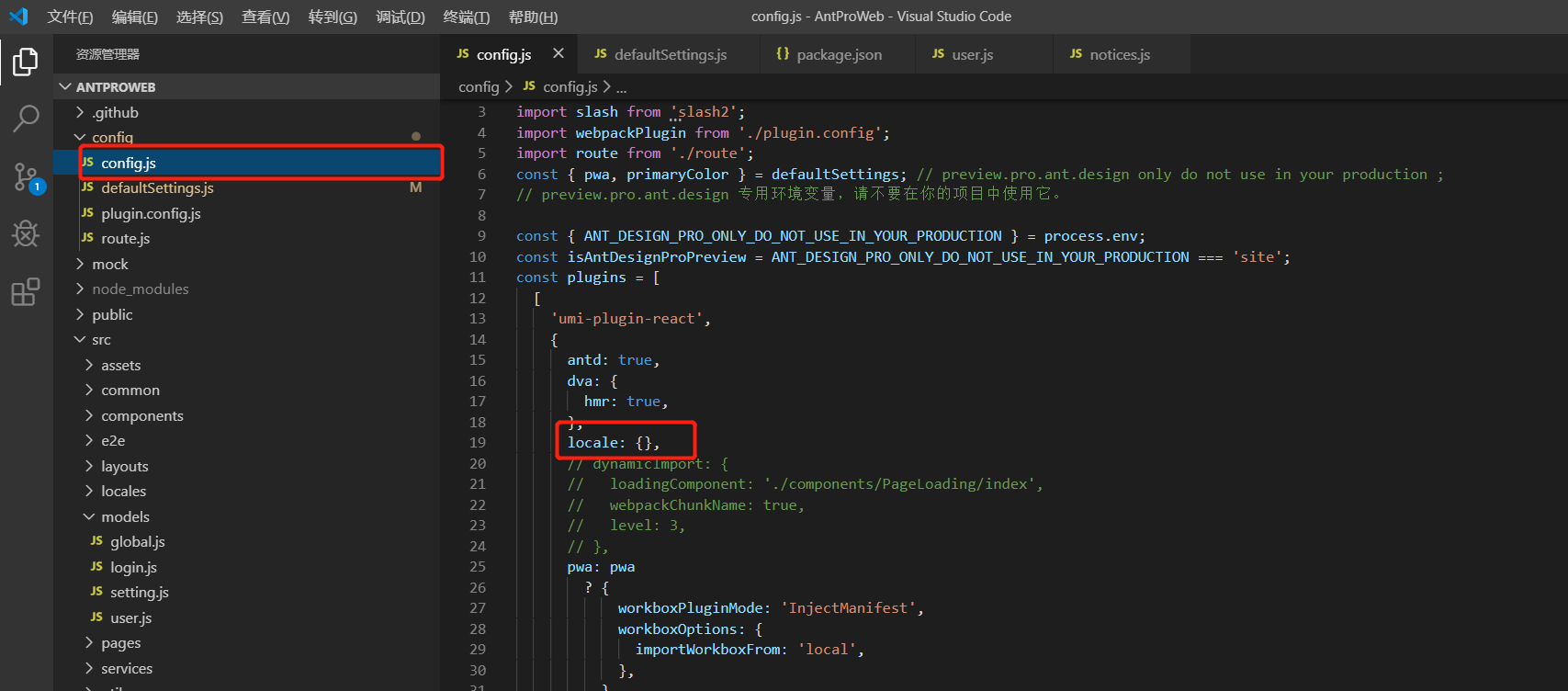
fenghuolibie
on 9 Dec 2019
@fenghuolibie 我关闭了,还是有

lijinghuatongxue
on 9 Dec 2019
@fenghuolibie

lijinghuatongxue
on 9 Dec 2019

fenghuolibie
on 9 Dec 2019
多找找,浅显的样式,我们开发是很容易找的
fenghuolibie
on 9 Dec 2019
@fenghuolibie
@fenghuolibie
羡慕老哥有mac ,~。~
fenghuolibie
on 9 Dec 2019
@fenghuolibie
@fenghuolibie
羡慕老哥有mac ,~。~
加我微信 lijinghua-1995
lijinghuatongxue
on 9 Dec 2019

 devlab02
on 23 Feb 2020
devlab02
on 23 Feb 2020
[React Intl] Missing message: "menu.首页.信息表" for locale: "zh-CN", using default message as fallback.
https://github.com/ant-design/ant-design-pro/issues/5191#issuecomment-590055670
devlab02
on 23 Feb 2020
Related issues
 cheung1111
·
3Comments
cheung1111
·
3Comments
 yaoleiroyal
·
3Comments
yaoleiroyal
·
3Comments
 renyi818
·
3Comments
renyi818
·
3Comments
 happier2
·
3Comments
happier2
·
3Comments
 952425340
·
3Comments
952425340
·
3Comments
Most helpful comment
直接执行
npm run i18n-remove并且在 config.ts 关闭 locale