Ant-design-pro: 请教一下关于 Form 组件在typescript中的使用问题
将一些表单封装为单独的组件,在页面组件使用。
代码如下
// 封装的组件
// CreateProject.tsx

import React from 'react';
import { Form, Input } from 'antd';
import { WrappedFormUtils } from 'antd/es/form/Form';

export interface CreateProjectProps {
  form?: WrappedFormUtils;
}

class CreateProject extends Component<CreateProjectProps, any> {
  render() {
     const {
      form: { getFieldDecorator }
    } = this.props;

    return (
       <Form>
            <FormItem label="名称">
              {getFieldDecorator('name', {
                rules: [
                  { required: true, message: 'Please input your username!' }
                ],
              })(
                <Input placeholder="请输入项目名称" />
              )}
            </FormItem>
        </Form>
    )
  }
}

// @ts-ignore
export default Form.create()(CreateProject);
问题如下:
props: form?: WrappedFormUtils; export default Form.create()(CreateProject); 会报错
props: form: WrappedFormUtils; 会在使用的组件报错(无需传入form)
 wangxingkang
All 26 comments
https://pro.ant.design/docs/uset-typescript-cn#Form.create()
使用之前先看文档是个好习惯
 chenshuai2144
on 13 Dec 2018
chenshuai2144
on 13 Dec 2018
并没有解决我的问题 在封装的组件里面 form 是必传的 使用该封装的组件 并不需要传form这个props
wangxingkang
on 13 Dec 2018
@chenshuai2144 根据文档使用 Form,结果 form 并没有成功导入 ?
 DezineLeo
on 28 Dec 2018
DezineLeo
on 28 Dec 2018
截图?重现?
chenshuai2144
on 28 Dec 2018
@chenshuai2144 失误,忘记把 Form.create() 加上了 😂
DezineLeo
on 28 Dec 2018
并没有解决我的问题 在封装的组件里面 form 是必传的 使用该封装的组件 并不需要传form这个props
请问后来解决了吗
 HealyXiang
on 18 Mar 2019
HealyXiang
on 18 Mar 2019
CreateProjectProps 要从FormComponentProps继承,就不需要传。
参考代码https://github.com/ant-design/ant-design-pro/blob/v3-typescript-and-maybe-hooks/src/pages/Forms/BasicForm.tsx
 xiaohuoni
on 18 Mar 2019
xiaohuoni
on 18 Mar 2019
@xiaohuoni 文件哪去了?
 abellee
on 2 Jun 2019
abellee
on 2 Jun 2019
@chenshuai2144
这个里组件里的
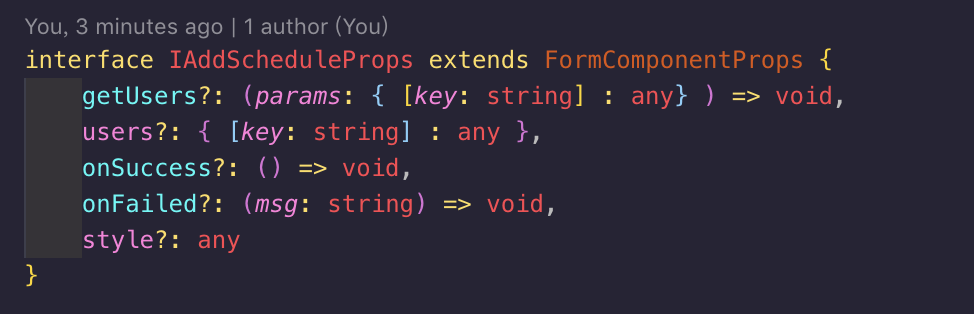
这个是调用的地方
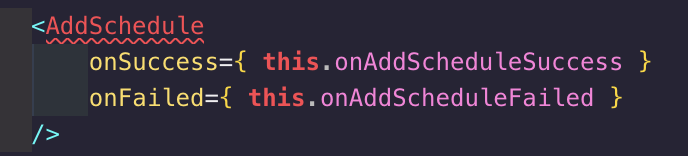
组件export default Form.create()(...) 报错
直接export default ... 要传form
abellee
on 2 Jun 2019
 afc163
on 2 Jun 2019
afc163
on 2 Jun 2019
@afc163 感谢 解决了
abellee
on 2 Jun 2019
@xiaohuoni 我也遇到了同样的问题,想参考您的链接拜读,发现这个链接已经是404状态了。
 lvybriage
on 14 Jun 2019
lvybriage
on 14 Jun 2019
@lvybriage
import React from 'react';
import { Button, Checkbox, Form, Input } from 'antd';
import { FormComponentProps } from 'antd/es/form';

interface IProps extends FormComponentProps {
  loading: boolean;
}
const Page: React.FC<IProps>  = (props) => {
  return (
     <div>Page</div>
  )
}

export default Form.create<IProps>()(Page)
Form.create()在tsx里面不支持修饰器的写法吗,下面的写法编辑器会报错:
Type 'ConnectedComponentClass<typeof Page, Pick<FormComponentProps<any>, "wrappedComponentRef">> is not assignable to type 'typeof Page'.
import React from 'react';
import { Button, Checkbox, Form, Input } from 'antd';
import { FormComponentProps } from 'antd/es/form';
interface IProps extends FormComponentProps {
loading: boolean;
}
@Form.create()
class Page extends React.Component<IProps, {}> {
render(){
return (
<div>Page</div>
)
}
}
 lijiangwei
on 21 Aug 2019
lijiangwei
on 21 Aug 2019
@lvybriage
import React from 'react';
import { Button, Checkbox, Form, Input } from 'antd';
import { FormComponentProps } from 'antd/es/form';

interface IProps extends FormComponentProps {
  loading: boolean;
}
const Page: React.FC<IProps>  = (props) => {
  return (
     <div>Page</div>
  )
}

export default Form.create<IProps>()(Page)
@wangxingkang 非常感谢!
lvybriage
on 21 Aug 2019
Form.create()在tsx里面不支持修饰器的写法吗,下面的写法编辑器会报错:
Type 'ConnectedComponentClass<typeof Page, Pick<FormComponentProps<any>, "wrappedComponentRef">> is not assignable to type 'typeof Page'.import React from 'react'; import { Button, Checkbox, Form, Input } from 'antd'; import { FormComponentProps } from 'antd/es/form'; interface IProps extends FormComponentProps { loading: boolean; } @Form.create() class Page extends React.Component<IProps, {}> { render(){ return ( <div>Page</div> ) } }
Hi, @lijiangwei
我用的 @wangxingkang 提供的写法是不报错的,正适用于tsx
lvybriage
on 21 Aug 2019
Form.create()在tsx里面不支持修饰器的写法吗,下面的写法编辑器会报错:
Type 'ConnectedComponentClass<typeof Page, Pick<FormComponentProps<any>, "wrappedComponentRef">> is not assignable to type 'typeof Page'.import React from 'react'; import { Button, Checkbox, Form, Input } from 'antd'; import { FormComponentProps } from 'antd/es/form'; interface IProps extends FormComponentProps { loading: boolean; } @Form.create() class Page extends React.Component<IProps, {}> { render(){ return ( <div>Page</div> ) } }Hi, @lijiangwei
我用的 @wangxingkang 提供的写法是不报错的,正适用于tsx
当作方法调用是不报错的,使用@修饰器的语法应该怎么写呢?
lijiangwei
on 27 Aug 2019
@修饰器 的类型错误,现在是不能用的
修饰器还没有定稿 babel 和 ts 实现不同。尽量不要用
chenshuai2144
on 28 Aug 2019
@chenshuai2144 @wangxingkang 不知道为什么我一直会报一个错,可以帮我看看吗?
import * as React from 'react'
import { Form, Icon, Input, Button } from 'antd'
import { FormComponentProps } from 'antd/lib/form'
interface IProps extends FormComponentProps {
loading: boolean,
}
class MyForm extends React.PureComponent<IProps> {
public hasErrors = (fieldsError: any) => {
return Object.keys(fieldsError).some((field) => fieldsError[field])
}
public render() {
const {
form: { getFieldDecorator, getFieldsError, getFieldError, isFieldTouched },
} = this.props
const usernameError = isFieldTouched('username') && getFieldError('username')
const passwordError = isFieldTouched('password') && getFieldError('password')
return (
<Form>
<Form.Item
validateStatus={usernameError ? 'error' : ''}
help={usernameError || ''}
>
{
getFieldDecorator('username', {
rules: [
{required: true, message: '请输入username'},
],
})(
<Input
prefix={<Icon type="user" />}
placeholder="Username"
/>,
)
}
</Form.Item>
<Form.Item
validateStatus={passwordError ? 'error' : ''}
help={passwordError || ''}
>
{
getFieldDecorator('password', {
rules: [
{required: true, message: '请输入password'},
],
})(
<Input
prefix={<Icon type="lock" />}
type="password"
placeholder="Password"
/>,
)
}
</Form.Item>
<Form.Item>
<Button type="primary" disabled={this.hasErrors(getFieldsError())}>
Submit
</Button>
</Form.Item>
</Form>
)
}
}
const wrappedMyForm = Form.create<IProps>()(MyForm)
export default wrappedMyForm

 lijianru
on 29 Sep 2019
lijianru
on 29 Sep 2019
看样子是类型写错了,照着区块抄一下吧
chenshuai2144
on 9 Oct 2019
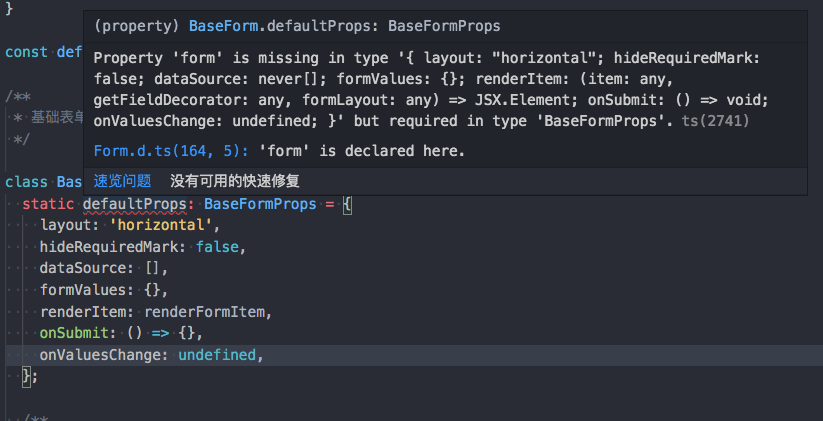
若设有 defaultProps 的情况类型该如何兼容? @chenshuai2144
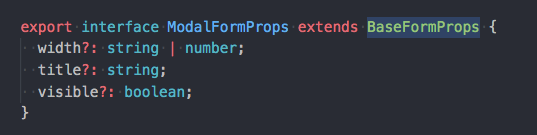
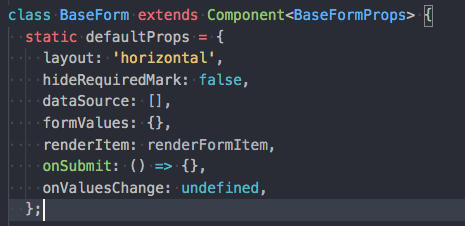


显式给 defaultProps 设置跟 props 一样的类型的话,会报 form 没有定义:
 anran758
on 10 Feb 2020
anran758
on 10 Feb 2020
@lvybriage
import React from 'react';
import { Button, Checkbox, Form, Input } from 'antd';
import { FormComponentProps } from 'antd/es/form';

interface IProps extends FormComponentProps {
  loading: boolean;
}
const Page: React.FC<IProps>  = (props) => {
  return (
     <div>Page</div>
  )
}

export default Form.create<IProps>()(Page)
调用的时候会报form没定义,
 awefeng
on 9 Mar 2020
awefeng
on 9 Mar 2020
@lvybriage
import React from 'react';
import { Button, Checkbox, Form, Input } from 'antd';
import { FormComponentProps } from 'antd/es/form';

interface IProps extends FormComponentProps {
  loading: boolean;
}
const Page: React.FC<IProps>  = (props) => {
  return (
     <div>Page</div>
  )
}

export default Form.create<IProps>()(Page)
调用的时候会报form没定义,
yourProps类型IProps, 会提示没有form定义
搞定了
interface IProps {
x:1
}
type CompProps = FormComponentProps & IProps
const Comp: React.FC
export default Form.create
@anran758 然后你调用的时候
awefeng
on 9 Mar 2020
import React from 'react';
import { Button, Checkbox, Form, Input } from 'antd';
import FormComponentProps from 'antd/lib/form';
interface IProps extends FormComponentProps {
loading: boolean;
}
const Page: React.FC
return (
)
}
export default Form.create
会提示 Expected 0 type arguments, but got 1.ts(2558)
怎末回事?
 tsing-dong
on 13 Mar 2020
tsing-dong
on 13 Mar 2020
在更新新版本以后
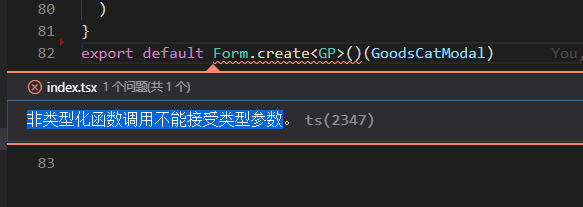
为啥呢
awefeng
on 23 Mar 2020
在更新新版本以后
为啥呢
antd 4.0版本的Form变了,现在不用 Form.create了
https://ant.design/docs/react/migration-v4
https://pro.ant.design/blog/antd-4.0-cn
 954545647
on 9 Jun 2020
954545647
on 9 Jun 2020
Related issues
 yadongxie150
·
3Comments
yadongxie150
·
3Comments
 zhuanglong
·
3Comments
zhuanglong
·
3Comments
 yjz1004
·
3Comments
yjz1004
·
3Comments
 952425340
·
3Comments
952425340
·
3Comments
 RichardStark
·
3Comments
RichardStark
·
3Comments
Most helpful comment
@lvybriage