步骤1:拉取最新代码
步骤2: 修改src目录下defaultSettings.js文件内容
module.exports = {
  'navTheme': 'light', // theme for nav menu
  'primaryColor': '#0072bc', // primary color of ant design
  'layout': 'sidemenu', // nav menu position: sidemenu or topmenu
  'contentWidth': 'Fluid', // layout of content: Fluid or Fixed, only works when layout is topmenu
  'fixedHeader': false, // sticky header
  'autoHideHeader': false, // auto hide header
  'fixSiderbar': false, // sticky siderbar
  'collapse': true
};
步骤3: install & build
步骤4:访问已编译文件
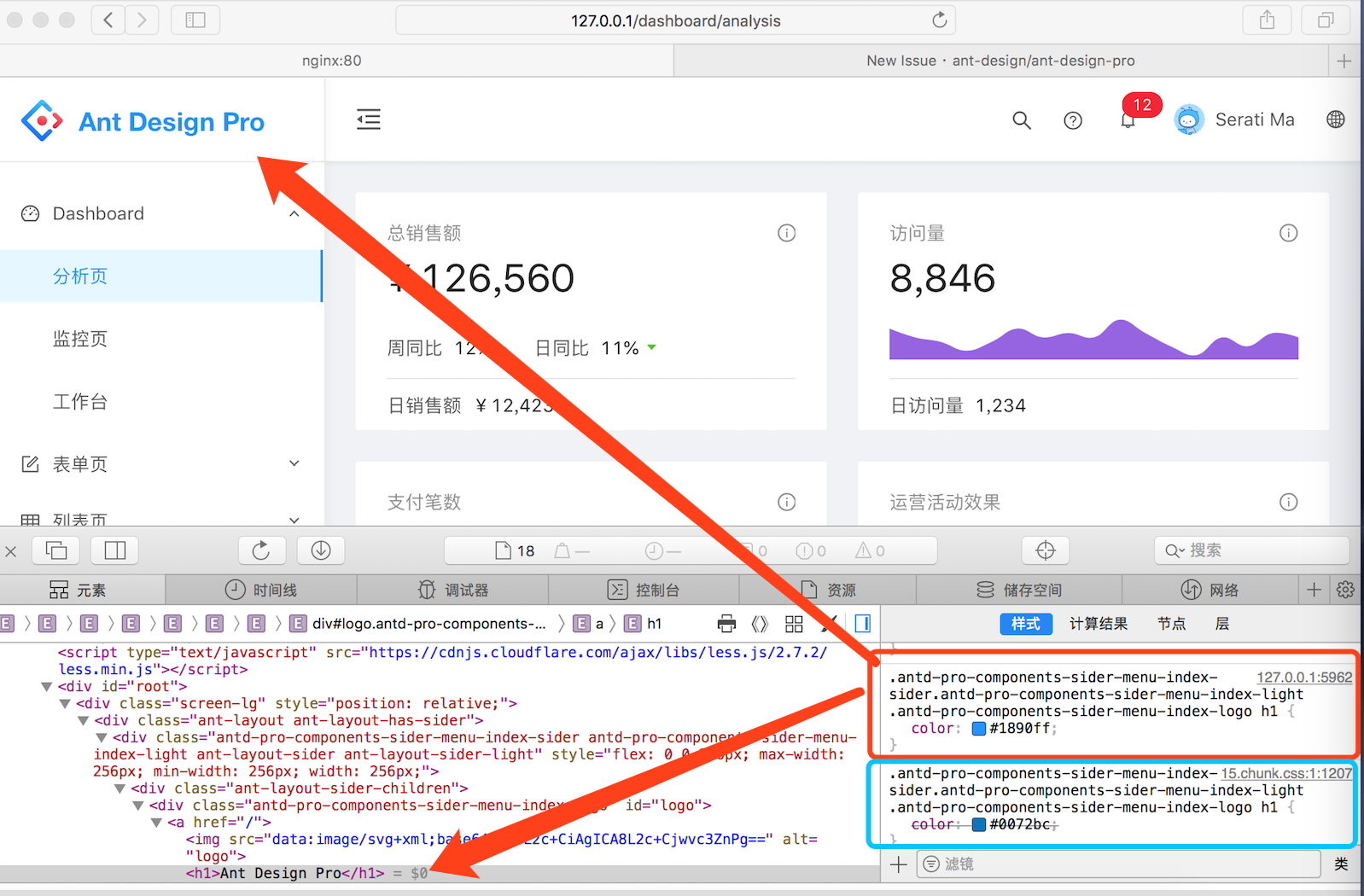
如图,配置文件中的颜色#0072bc 被默认色#1890ff所覆盖
 TingHsi
All 23 comments
@yutingzhao1991 看一看,最近改了加载顺序吗?
 chenshuai2144
on 13 Nov 2018
chenshuai2144
on 13 Nov 2018
@yutingzhao1991 @chenshuai2144 这个还没有解决方案吗?
 jinyaqiao1102
on 14 Nov 2018
jinyaqiao1102
on 14 Nov 2018
这块
umi 最近应该是没有做调整,其它项目也没有看到报这个问题。
是说主题色修改不管用吗?我试试看看能不能复现。
 yutingzhao1991
on 14 Nov 2018
yutingzhao1991
on 14 Nov 2018
@yutingzhao1991 对的,打包后没有生效, 打包后的index.html中引入了color.less引起设置置的主题色不生效
jinyaqiao1102
on 14 Nov 2018
是不是renderSettingDrawer要判断是不是dev环境
 xiaohuoni
on 14 Nov 2018
xiaohuoni
on 14 Nov 2018
我这里的现象是,开发阶段修改主题色后热更新刷新后无效,但是重启后生效。
构建打包之后也会有问题。
试了下屏蔽掉 config/config.js 中的 chainWebpack: webpackPlugin, 这个就好了,应该是和在线切换主题的 webpack 插件有关。
yutingzhao1991
on 14 Nov 2018
webpackPlugin中的配置都没有用吗?我建议尽快修复这个问题,下载的官方源码中这个问题也是存在的。
jinyaqiao1102
on 14 Nov 2018
可以看看 https://github.com/ant-design/ant-design-pro/issues/2528 这个,建议生产环境就不要使用切换主题这个功能了。
yutingzhao1991
on 14 Nov 2018
在线切换主题,为什么自定义组件的样式引用了@primary-color变量,却不能切换,比如src/components内的组件都不行,其他antd 组件都是可以的?
 RivanLuo
on 14 Nov 2018
RivanLuo
on 14 Nov 2018
没有使用这个在线编译,webpackPlugin里面的配置项都是关于切换主题的嘛?能否详细解释一下,感觉这样说的好笼统
jinyaqiao1102
on 14 Nov 2018
没有使用这个在线编译,webpackPlugin里面的配置项都是关于切换主题的嘛?能否详细解释一下,感觉这样说的好笼统
问题详情包含截图请参考
自定义组件不能跟着主题切换? #2847
RivanLuo
on 15 Nov 2018
@RivanLuo 我是遇到了这个问题,我们这边测试也给我提出了这个问题,问题是出在 andt-pro-theme-webpack-plugin这个包, 在打包的时候在index.html中插入了
<link rel="stylesheet/less" type="text/css" href="${options.publicPath}/color.less" />
这句话导致设置的主题失效的,这个还是得出一个解决问题的终极方案
jinyaqiao1102
on 15 Nov 2018
@RivanLuo 我是遇到了这个问题,我们这边测试也给我提出了这个问题,问题是出在 andt-pro-theme-webpack-plugin这个包, 在打包的时候在index.html中插入了
<link rel="stylesheet/less" type="text/css" href="${options.publicPath}/color.less" />
这句话导致设置的主题失效的,这个还是得出一个解决问题的终极方案
index中这个样式引用去掉,就可以正常了吗?
RivanLuo
on 15 Nov 2018
有没有遇到windows下部署的问题?windows部署pro有问题 #2852
RivanLuo
on 15 Nov 2018
@RivanLuo 我是遇到了这个问题,我们这边测试也给我提出了这个问题,问题是出在 andt-pro-theme-webpack-plugin这个包, 在打包的时候在index.html中插入了
<link rel="stylesheet/less" type="text/css" href="${options.publicPath}/color.less" />
这句话导致设置的主题失效的,这个还是得出一个解决问题的终极方案index中这个样式引用去掉,就可以正常了吗?
这是个依赖包,本地修改只能本地生效
jinyaqiao1102
on 15 Nov 2018
@RivanLuo 我是遇到了这个问题,我们这边测试也给我提出了这个问题,问题是出在 andt-pro-theme-webpack-plugin这个包, 在打包的时候在index.html中插入了
<link rel="stylesheet/less" type="text/css" href="${options.publicPath}/color.less" />
这句话导致设置的主题失效的,这个还是得出一个解决问题的终极方案index中这个样式引用去掉,就可以正常了吗?
这是个依赖包,本地修改只能本地生效
我不是所有无效,antd的组件可以生效,自定义的组件不行,包括pro中components中的组件也不生效,你是同样的现象吗?
RivanLuo
on 15 Nov 2018
@RivanLuo 我们是构建后有问题
jinyaqiao1102
on 15 Nov 2018
@RivanLuo pro 的插件安装了吗?
chenshuai2144
on 15 Nov 2018
@RivanLuo pro 的插件安装了吗?
哪个插件?
RivanLuo
on 15 Nov 2018
plugin.config.js 里面的
chenshuai2144
on 15 Nov 2018
plugin.config.js 里面的
内容和源码一样,是这样吗?
import MergeLessPlugin from 'antd-pro-merge-less';
import AntDesignThemePlugin from 'antd-pro-theme-webpack-plugin';
你说的是上面这两个插件吗?有的,要不然antd的样式也不会切换的,现在就是components中的组件还有自定义的样式,不会跟着在线切换,但是修改默认的颜色,编译完是生效的,就是不能切换
import path from 'path';
export default config => {
// 将所有 less 合并为一个供 themePlugin使用
const outFile = path.join(__dirname, '../.temp/ant-design-pro.less');
const stylesDir = path.join(__dirname, '../src/');
config.plugin('merge-less').use(MergeLessPlugin, [
{
stylesDir,
outFile,
},
]);
config.plugin('ant-design-theme').use(AntDesignThemePlugin, [
{
antDir: path.join(__dirname, '../node_modules/antd'),
stylesDir,
varFile: path.join(__dirname, '../node_modules/antd/lib/style/themes/default.less'),
mainLessFile: outFile, // themeVariables: ['@primary-color'],
indexFileName: 'index.html',
},
]);
};
RivanLuo
on 15 Nov 2018
我今天遇到同样的问题。我是在config.js文件中替换Ant Design的主题色,之前开发,打包是没问题的。今天出了圣诞彩蛋这档子事后,按照官方的推荐升级了Ant Design,然后就出现开发环境是好的,但是打包后主题色没有改变,仍然是默认的主题色。同时,打包后无法在线切换主题。
 JerryMissTom
on 25 Dec 2018
JerryMissTom
on 25 Dec 2018
删除了Config.js中的chainWebpack: webpackPlugin,,打包部署后主题样式是改变的。但是这样就无法在线修改主题了。
JerryMissTom
on 25 Dec 2018
Related issues
 RichardStark
·
3Comments
RichardStark
·
3Comments
 952425340
·
3Comments
952425340
·
3Comments
 skyFi
·
3Comments
skyFi
·
3Comments
 zhuanglong
·
3Comments
zhuanglong
·
3Comments
 cheung1111
·
3Comments
cheung1111
·
3Comments
Most helpful comment
删除了Config.js中的
chainWebpack: webpackPlugin,,打包部署后主题样式是改变的。但是这样就无法在线修改主题了。