开发工具:IntelliJ IDEA
升级到2.0后出现了如下问题
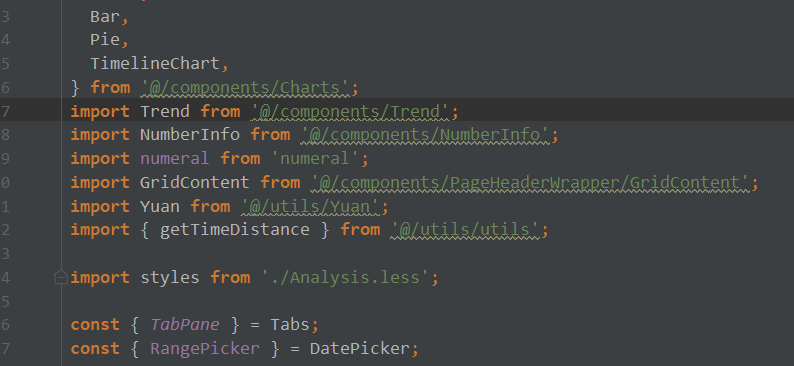
虽然项目正常运行但是无法智能引用方法,对开发造成一定困扰,请问是否有什么插件?
麻烦告知
 wudihaike
All 4 comments
Translation of this issue:
2.0 Path alias problem
Development Tools: IntelliJ IDEA
After upgrading to 2.0, the following problems occurred.
Although the project is running normally but cannot be intelligently referenced, it is a problem for development. Is there any plugin?
Trouble telling
 ant-design-bot
on 5 Sep 2018
ant-design-bot
on 5 Sep 2018
vscode有,IntelliJ IDEA 就不是很了解了
 chenshuai2144
on 5 Sep 2018
chenshuai2144
on 5 Sep 2018
根目录新建 webpack.config.js,内容如下:
module.exports = {
  resolve: {
    alias: { '@': 'src' }
  }
}
 sorrycc
on 5 Sep 2018
sorrycc
on 5 Sep 2018
@sorrycc 已经解决,完整代码如下:
```js
const path = require('path');
module.exports = {
resolve: {
alias: {
'@': path.resolve(__dirname, './src'),
'umi': path.resolve(__dirname, 'umi'),
},
}
};
````
参考:https://www.jetbrains.com/help/webstorm/using-webpack.html
wudihaike
on 5 Sep 2018
👍11
🎉2
😄2
Was this page helpful?
0 / 5 - 0 ratings
Related issues
 gaoqiang19514
·
3Comments
gaoqiang19514
·
3Comments
 skyFi
·
3Comments
skyFi
·
3Comments
 yadongxie150
·
3Comments
yadongxie150
·
3Comments
 zhuanglong
·
3Comments
zhuanglong
·
3Comments
 ghost
·
3Comments
ghost
·
3Comments
Most helpful comment
@sorrycc 已经解决,完整代码如下:
```js
const path = require('path');
module.exports = {
resolve: {
alias: {
'@': path.resolve(__dirname, './src'),
'umi': path.resolve(__dirname, 'umi'),
},
}
};
````
参考:https://www.jetbrains.com/help/webstorm/using-webpack.html