Ant-design-pro: The 'decorators' plugin requires a 'decoratorsBeforeExport' option, whose value must be a boolean.
当npm start的时候不能启动完成后会自动打开浏览器访问,后来报错的是The 'decorators' plugin requires a 'decoratorsBeforeExport' option, whose value must be a boolean.
怎么解决报错信息呢?
 jinzita007
All 55 comments
目测是babel的问题
cnpm试一试
 chenshuai2144
on 24 Aug 2018
chenshuai2144
on 24 Aug 2018
@chenshuai2144 第一种是使用cnpm命令行工具有报错了,但是第二种方式直接 clone git 仓库正常打开访问的,没有报错的。
jinzita007
on 24 Aug 2018
我也遇到这种情况了,怎么解决?
 dingzhenke
on 28 Aug 2018
dingzhenke
on 28 Aug 2018
我的情况和你一模一样呢
 shao7936626
on 28 Aug 2018
shao7936626
on 28 Aug 2018
怎么解决
 balancejia
on 28 Aug 2018
balancejia
on 28 Aug 2018
如果是测试,把项目删掉,重新Pro new新建项目,然后把项目中的node_modules文件删除,然后npm install PS:不要用cnpm
shao7936626
on 28 Aug 2018
@dead-horse 看看?tnpm 和 cnpm 都有问题,npm 是好的,pro 的 master 下载下来 install 和 start 就能重现。
应该又是某个 babel 依赖模块不统一的问题,@sorrycc 看看能不能固定一下。
 afc163
on 28 Aug 2018
afc163
on 28 Aug 2018
同上, 一样的问题.
cnpm tnpm 都有报错
 fish267
on 28 Aug 2018
fish267
on 28 Aug 2018
尝试使用npm安装,安装成功。但请求接口时,proxy失败:
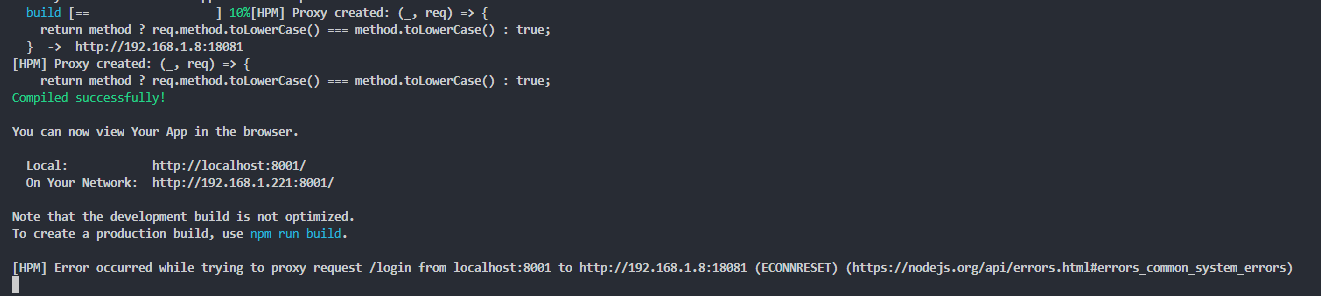
@afc163
 ybning
on 28 Aug 2018
ybning
on 28 Aug 2018
同报这个错误,tnpm 报错,删掉node_modules用npm重装之后ok
 hunter36
on 28 Aug 2018
hunter36
on 28 Aug 2018
修改 package.json 即可,作为暂时的方案:
cnpm:
{
  "cnpm": {
    "mode": "npm"
  }
}
tnpm:
{
  "tnpm": {
    "mode": "npm"
  }
}
 zinkey
on 28 Aug 2018
zinkey
on 28 Aug 2018
依赖的模块要统一锁下版本
 ql434
on 28 Aug 2018
ql434
on 28 Aug 2018
使用 cnpm/tnpm 的可以尝试删除 stylelint,stylelint 依赖了 @babel/core@rc,和 [email protected] 依赖的 @babel/core@beta 在 cnpm/tnpm 下提升依赖时有冲突。
 sorrycc
on 28 Aug 2018
sorrycc
on 28 Aug 2018
@ql434 [email protected] 依赖的 @babel 是锁了版本的。
sorrycc
on 28 Aug 2018
我也是这个问题,有解决办法了吗
 AirmaZ
on 28 Aug 2018
AirmaZ
on 28 Aug 2018
我们的环境目前只能用cnpm,这个问题可以解决吗?
 batistutaluke
on 28 Aug 2018
batistutaluke
on 28 Aug 2018
我这里使用 npm install 也出现这个问题了
 crazzyHuang
on 28 Aug 2018
crazzyHuang
on 28 Aug 2018
同问,已尝试删除stylelint相关,安装依赖之后还是不能启动。请问有没有临时解决的方案呢?
 acpplife
on 29 Aug 2018
acpplife
on 29 Aug 2018
我使用npm解决了问题
AirmaZ
on 29 Aug 2018
看 @zinkey 的回复。
afc163
on 29 Aug 2018
伴随着babel的升级,感觉带来不少问题,一不做二休,2.0发正式版吧
 wanliyunyan
on 29 Aug 2018
wanliyunyan
on 29 Aug 2018
wanliyunyan
on 29 Aug 2018
wanliyunyan
on 29 Aug 2018
以前的项目重新install就出现这种问题,改成npm install后,能正常启动,但是代理似乎出问题,所有请求接口都出现超时400现象。
 zuwensong
on 29 Aug 2018
zuwensong
on 29 Aug 2018
@sorrycc npm install成功后的代理问题,有临时解决方案吗?
ybning
on 29 Aug 2018
@ybning 重新npm install后,在.webpackrc.js中配置proxy才能生效,原先在.roadhogrc.mock.js中的配置方法失效。
.webpackrc.js:新增代理:
proxy: {
"/lesson": {
"target": "http://localhost:8080/teach",
"changeOrigin": true,
"pathRewrite": {"^/lesson": ""}
},
},
.roadhogrc.mock.js中以前的写法:
const noProxy = true;
const apiurl="http://localhost:8080";
export default (noProxy ? {
'GET /lesson/(.)': apiurl+'/teach/',
'POST /lesson/(.)': apiurl+'/teach/',
} : delay(proxy, 1000));
api.js:
export async function fakeAccountLogin(params) {
return request('/lesson/manage/login', {
method: 'POST',
body: params,
});
}
具体原因还未知。
zuwensong
on 29 Aug 2018
可以吧package中研发的相关依赖包锁定版本,cnpm下可以正常使用。
{
"name": "ant-design-pro",
"version": "1.4.4",
"description": "An out-of-box UI solution for enterprise applications",
"private": true,
"scripts": {
"precommit": "npm run lint-staged",
"start": "cross-env ESLINT=none roadhog dev",
"start:no-proxy": "cross-env NO_PROXY=true ESLINT=none roadhog dev",
"build": "cross-env ESLINT=none roadhog build",
"site": "roadhog-api-doc static && gh-pages -d dist",
"analyze": "cross-env ANALYZE=true roadhog build",
"lint:style": "stylelint \"src//.less\" --syntax less",
"lint": "eslint --ext .js src mock tests && npm run lint:style",
"lint:fix": "eslint --fix --ext .js src mock tests && npm run lint:style",
"lint-staged": "lint-staged",
"lint-staged:js": "eslint --ext .js",
"test": "roadhog test",
"test:component": "roadhog test ./src/components",
"test:all": "node ./tests/run-tests.js",
"prettier": "prettier --write ./src////"
},
"dependencies": {
"@antv/data-set": "^0.9.0",
"@babel/polyfill": "^7.0.0-beta.36",
"antd": "^3.8.0",
"bizcharts": "^3.1.10",
"bizcharts-plugin-slider": "^2.0.1",
"classnames": "^2.2.5",
"dva": "^2.2.3",
"dva-loading": "^2.0.3",
"enquire-js": "^0.2.1",
"lodash": "^4.17.10",
"lodash-decorators": "^6.0.0",
"moment": "^2.19.3",
"numeral": "^2.0.6",
"omit.js": "^1.0.0",
"path-to-regexp": "^2.1.0",
"prop-types": "^15.5.10",
"qs": "^6.5.0",
"react": "^16.4.1",
"react-container-query": "^0.11.0",
"react-document-title": "^2.0.3",
"react-dom": "^16.4.1",
"react-fittext": "^1.0.0",
"react-loadable": "^5.5.0",
"rollbar": "^2.3.4",
"setprototypeof": "^1.1.0",
"url-polyfill": "^1.0.10"
},
"devDependencies": {
"babel-eslint": "8.1.2",
"babel-plugin-dva-hmr": "0.4.1",
"babel-plugin-import": "1.6.7",
"babel-plugin-module-resolver": "3.1.1",
"babel-plugin-transform-decorators-legacy": "1.3.4",
"cross-env": "5.1.1",
"cross-port-killer": "1.0.1",
"enzyme": "3.4.1",
"eslint": "5.0.0",
"eslint-config-airbnb": "17.0.0",
"eslint-config-prettier": "2.9.0",
"eslint-plugin-babel": "5.1.0",
"eslint-plugin-compat": "2.1.0",
"eslint-plugin-import": "2.8.0",
"eslint-plugin-jsx-a11y": "6.0.3",
"eslint-plugin-markdown": "1.0.0-beta.6",
"eslint-plugin-react": "7.0.1",
"gh-pages": "1.0.0",
"lint-staged": "7.2.0",
"mockjs": "^1.0.1-beta3",
"prettier": "1.14.2",
"pro-download": "1.0.1",
"redbox-react": "1.5.0",
"redux-logger": "3.0.6",
"regenerator-runtime": "0.12.0",
"roadhog": "^2.4.2",
"roadhog-api-doc": "^1.1.2",
"stylelint": "9.2.1",
"stylelint-config-prettier": "4.0.0",
"stylelint-config-standard": "18.0.0"
},
"optionalDependencies": {
"puppeteer": "^1.4.0"
},
"lint-staged": {
"/.{js,jsx,less}": [
"prettier --write",
"git add"
],
"/.{js,jsx}": "npm run lint-staged:js",
"*/.less": "stylelint --syntax less"
},
"engines": {
"node": ">=8.0.0"
},
"browserslist": [
"> 1%",
"last 2 versions",
"not ie <= 10"
]
}
 gcdreams
on 31 Aug 2018
gcdreams
on 31 Aug 2018
检查package.json中是否存在一下依赖
"stylelint"
"stylelint-config-prettier"
"stylelint-config-standard"
删除后试试
 lxy224
on 31 Aug 2018
lxy224
on 31 Aug 2018
@lxy224 还是你说的对 感谢
 hexl21
on 31 Aug 2018
hexl21
on 31 Aug 2018
@lxy224 删除这个没什么影响嘛?
 jinrichardJIN
on 3 Sep 2018
jinrichardJIN
on 3 Sep 2018
我删除了node_modules,采用 npm i 安装之后就好了
 chenfpp
on 3 Sep 2018
chenfpp
on 3 Sep 2018
我也遇到这样的问题了
删除了node_models 再重新安装也不好使
npm i 的时候就已经报错了

然后运行cnpm i ok
然后运行npm start 报错

怎么回事儿呢
 kateli
on 3 Sep 2018
kateli
on 3 Sep 2018
已解决:
npm set registry https://registry.npmjs.org/
rm -rf node_modules/
npm cache clean --force
npm cache verify
npm install
kateli
on 3 Sep 2018
尝试了将cnpm换回npm 报新的错误
/var/jenkins_home/workspace/bi-web/node_modules/webpack/lib/Chunk.js:829
        throw new Error("Chunk.entrypoints: Use Chunks.addGroup instead");
没有使用stylelint只有用eslint,而且只在devDep里
 Alive24
on 5 Sep 2018
Alive24
on 5 Sep 2018
proxy: {
"/api": {
"target": "http://127.0.0.1:2001",
"changeOrigin": true,
"pathRewrite": {"^/api": ""}
},
},
在.webpackrc.js配置完代理依旧不能使用
 yueyucaotian
on 5 Sep 2018
yueyucaotian
on 5 Sep 2018
删除models之后用npm
 Gamehu
on 6 Sep 2018
Gamehu
on 6 Sep 2018
遇到问题的朋友可以试下 [email protected]。
sorrycc
on 6 Sep 2018
@sorrycc 解决了,谢谢
 ms20hj
on 7 Sep 2018
ms20hj
on 7 Sep 2018
我的也出现同样的问题,请问是怎么解决的
 DreFalPoetry
on 7 Sep 2018
DreFalPoetry
on 7 Sep 2018
@sorrycc 谢谢 安装 [email protected] 后解决了
DreFalPoetry
on 7 Sep 2018
@sorrycc 安装[email protected]完美解决,赞一个,多谢~
 Journey0911
on 8 Sep 2018
Journey0911
on 8 Sep 2018
唉,Basement 构建失败,原来这里这么多人遇到。。。
 hi-yinyue
on 14 Sep 2018
hi-yinyue
on 14 Sep 2018
@sorrycc perfect
 527242007
on 17 Sep 2018
527242007
on 17 Sep 2018
@sorrycc @kateli EWWhen I check out the antd project and npm install, it shows:

I've installed [email protected] but it still failed@sorry
I've tried the steps,but it doesn't work@kateli
 m26597
on 26 Sep 2018
m26597
on 26 Sep 2018
@m26597 先更新npm再试试
npm i -g npm
然后
npm set registry https://registry.npmjs.org/
rm -rf node_modules/
npm cache clean --force
npm cache verify
npm install
kateli
on 26 Sep 2018
I have tried this way. It doesn't work
| |
mengxj
|
|
邮箱:[email protected]
|
Signature is customized by Netease Mail Master
On 09/26/2018 18:04, kateli wrote:
@m26597 先更新npm再试试
npm i -g npm
然后
npm set registry https://registry.npmjs.org/
rm -rf node_modules/
npm cache clean --force
npm cache verify
npm install
—
You are receiving this because you were mentioned.
Reply to this email directly, view it on GitHub, or mute the thread.
m26597
on 26 Sep 2018
I am confused
| |
mengxj
|
|
邮箱:[email protected]
|
Signature is customized by Netease Mail Master
On 09/26/2018 18:25, m26597 wrote:
I have tried this way. It doesn't work
| |
mengxj
|
|
邮箱:[email protected]
|
Signature is customized by Netease Mail Master
On 09/26/2018 18:04, kateli wrote:
@m26597 先更新npm再试试
npm i -g npm
然后
npm set registry https://registry.npmjs.org/
rm -rf node_modules/
npm cache clean --force
npm cache verify
npm install
—
You are receiving this because you were mentioned.
Reply to this email directly, view it on GitHub, or mute the thread.
m26597
on 26 Sep 2018
这个问题貌似还没有比较好的解决方案,请大神出来解决一下
 1232209
on 5 Oct 2018
1232209
on 5 Oct 2018
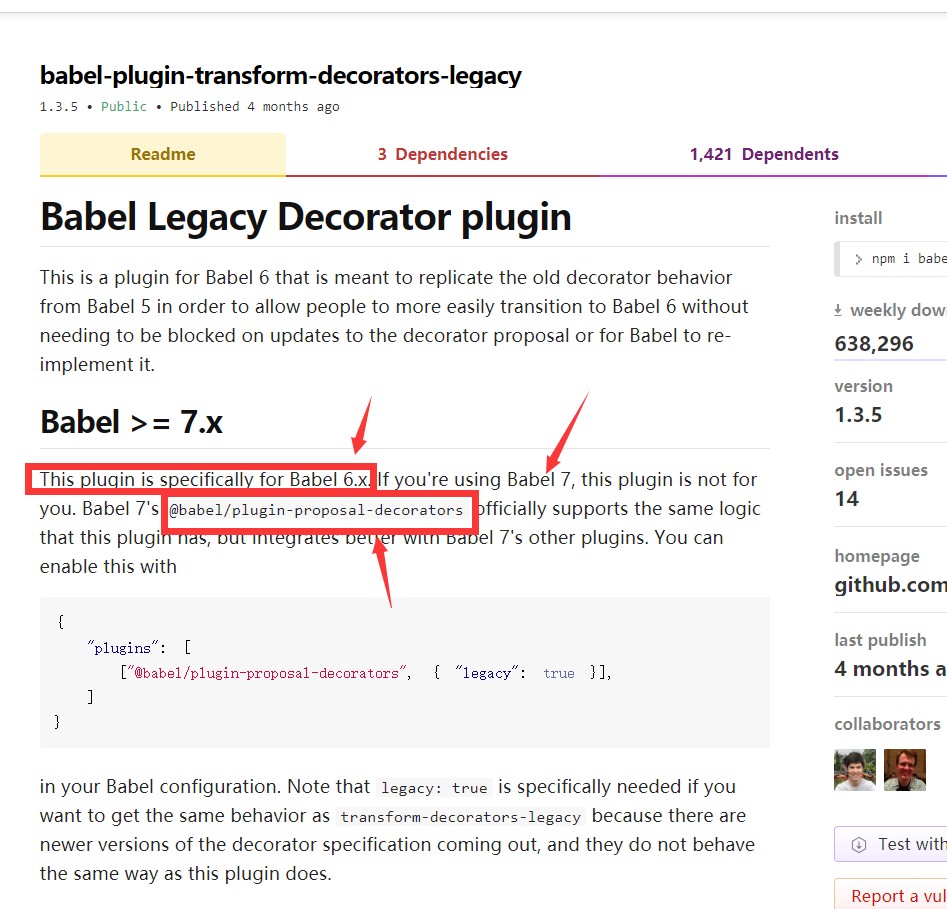
注意红色的字 这个transform是专门给babel6的
7就安装下面的
{
  "plugins": [
    ["@babel/plugin-proposal-decorators", { "legacy": true }],
  ]
}
这么写
npm install
就好了
还是要详细的看文档
 kalaersun
on 7 Oct 2018
kalaersun
on 7 Oct 2018
遇到问题的朋友可以试下 [email protected],亲自试了下可以解决这个问题。
 chenguihua1005
on 27 Oct 2018
chenguihua1005
on 27 Oct 2018
[email protected] works for me.
 aleafo
on 18 Dec 2018
aleafo
on 18 Dec 2018
在项目中使用[email protected] 测试版是不是八成要废啊,会有什么影响么@sorrycc
m26597
on 18 Feb 2019
已解决:
npm set registry https://registry.npmjs.org/
rm -rf node_modules/
npm cache clean --force
npm cache verify
npm install
已解决:使用 cnpm 出现, 删除 node_modules 所有文件再使用 npm 重新安装依赖。
 wteam-xq
on 21 Feb 2019
wteam-xq
on 21 Feb 2019
我也出现了这个问题,我用官方的脚手架生成的packa.json文件里面有@babel/core和babel-core都有,只需要把babel-core卸载就可以了,用npm un babel-core
 18011904
on 1 Mar 2019
18011904
on 1 Mar 2019
新入职公司,是用 pro 魔改的项目,里面还用什么 antd-bsc,升级以后也是报这个错误,采用上面@kateli的方法,删除了npm cache 以后,用 npm 安装就好了~
 guozhengzhongGit
on 30 Mar 2019
guozhengzhongGit
on 30 Mar 2019
@sorrycc
👍
 Renee98
on 10 Jan 2020
Renee98
on 10 Jan 2020
Related issues
 cheung1111
·
3Comments
cheung1111
·
3Comments
 renyi818
·
3Comments
renyi818
·
3Comments
 zhuanglong
·
3Comments
zhuanglong
·
3Comments
 yaoleiroyal
·
3Comments
yaoleiroyal
·
3Comments
 ghost
·
3Comments
ghost
·
3Comments
Most helpful comment
遇到问题的朋友可以试下
[email protected]。