{
      name: '详情页',
      path: 'profile',
      icon: 'profile',
      children: [{
        name: '基础详情页',
        path: 'basic',
        component: BasicProfile,
      }, {
        name: '高级详情页',
        path: 'advanced',
        component: AdvancedProfile,
      }],
}
nav 配置中 需要制定一个传参的 路由
/profile/basic/121313
这样 该如何配置
 yishenggudou
All 33 comments
{
name: '查询',
path: 'table',
icon: 'profile',
children: [{
name: '记录',
path: 'records',
children: [{
path: '',
component: Records,
}, {
path: ':id',
component: Record,
}]
}
具体可以参考dva的Route。获取参数的方法比较僵硬,antd-admin那边给出的方案是用正则匹配。
 Kroderia
on 4 Nov 2017
Kroderia
on 4 Nov 2017
实验了一下,ant-design-pro并不能正确处理好这个路由参数的问题,主要表现在pageTitle和breadCrumb显示错误。修复不难,就是麻烦。
Kroderia
on 4 Nov 2017
@ddcat1115 我们之前貌似没考虑到这种情况,需要搞一个示范。
 afc163
on 5 Nov 2017
afc163
on 5 Nov 2017
我也需要用到了这个功能,发现代码没有这块的实现
 gebilaoman
on 5 Nov 2017
gebilaoman
on 5 Nov 2017
怎么办怎么办,没有使用antd-admin中的机制是有什么考虑麽。
通过专门的menu数组和routes数组来构建菜单项。
非菜单跳转路由直接用routes数组就可以了。
而不用现在代码里面的
`
const routeData = getRouteData('BasicLayout');
const menuData = getNavData().reduce((arr, current) => arr.concat(current.children), []);
const breadcrumbNameMap = {};
routeData.concat(menuData).forEach((item) => {
breadcrumbNameMap[item.path] = item.name;
});
`
简直太暴力了,求速回复,谢谢
@nikogu
gebilaoman
on 6 Nov 2017
- breadcrumb 的问题在这里修复过 https://github.com/ant-design/ant-design-pro/commit/c771ea290e22c80355bbfe361ca111b5a78c43c7
- pageTitle 是手抖了,已修改 https://github.com/ant-design/ant-design-pro/commit/e21642b3de61263c5f916a17ce07ee80be068d84
这两个问题下次发布应该都能修复
带参数的这样配置: /profile/basic/:xx xx为参数名,这块是应该增加一个示例
 ddcat1115
on 6 Nov 2017
ddcat1115
on 6 Nov 2017
@ddcat1115 这块最快什么时间能发布,现在做项目,有点急
gebilaoman
on 6 Nov 2017
@gebilaoman 可以直接看 master 的代码就好,这里的 发布,指的是对外站点和线上的预览地址
 nikogu
on 6 Nov 2017
nikogu
on 6 Nov 2017
【
breadcrumb 的问题在这里修复过 c771ea2
pageTitle 是手抖了,已修改 e21642b
】这俩我已经同步了
【带参数的这样配置: /profile/basic/:xx xx为参数名,这块是应该增加一个示例】
这块的代码没有找到,我这次真的是从头跟着你们项目走了
gebilaoman
on 6 Nov 2017
@gebilaoman 因为目前还没有带参数路由的示例,所以代码里没有配置。你可以自己加上配置试下
{
name: '测试页',
path: '/profile/basic/:xx',
component: AdvancedProfile, // for test,or your new Component
}
react-router4改动太大,在一个文件里完成全部路由配置有点困难了,得根据实际需求拆分,其实布局这个概念再完善下挺好的
 liumin1128
on 6 Nov 2017
liumin1128
on 6 Nov 2017
路由可以放在一起,但是菜单其实可以拆解出来,再用到渲染菜单的时候,再跟路由进行合并。
而且参数路由需要尽快解决,做不下去了
gebilaoman
on 6 Nov 2017
我改了一版本,能够实现参数路由。代码改动如下:
nav.js
      {
        name: '报表方案',
        path: 'data_report',
        icon: 'appstore-o',
        children: [
          {
            name: '开发报表组件',
            path: 'dev_report_component',
            component: DevReportComponent,
            children: [
              {
                path: '/:id/develop_mode',
                component: DevReportMode,
              },
            ],
          },
          {
            name: '可视化报表方案',
            path: 'visual_report_design',
            // component: ResourceTable,
          },
        ],
      },
utils.js
function getPlainNode(nodeList, parentPath = '') {
  const arr = [];
  nodeList.forEach((node) => {
    const item = node;
    item.path = `${parentPath}/${item.path || ''}`.replace(/\/+/g, '/');
    item.exact = true; // _.get(node, 'exact', true);
    if (item.component) {
      arr.push(item);
    }
    if (item.children) {
      arr.push(...getPlainNode(item.children, item.path));
    }
  });
  return arr;
}
主要改动在下面这块,这块是获取路由列表的,所以应该支持children与component同时存在的。因为带参数路由并不是菜单项,但是确实属于(开发报表组件)下的子路由。
   if (item.component) {
      arr.push(item);
    }
    if (item.children) {
      arr.push(...getPlainNode(item.children, item.path));
    }
问题:
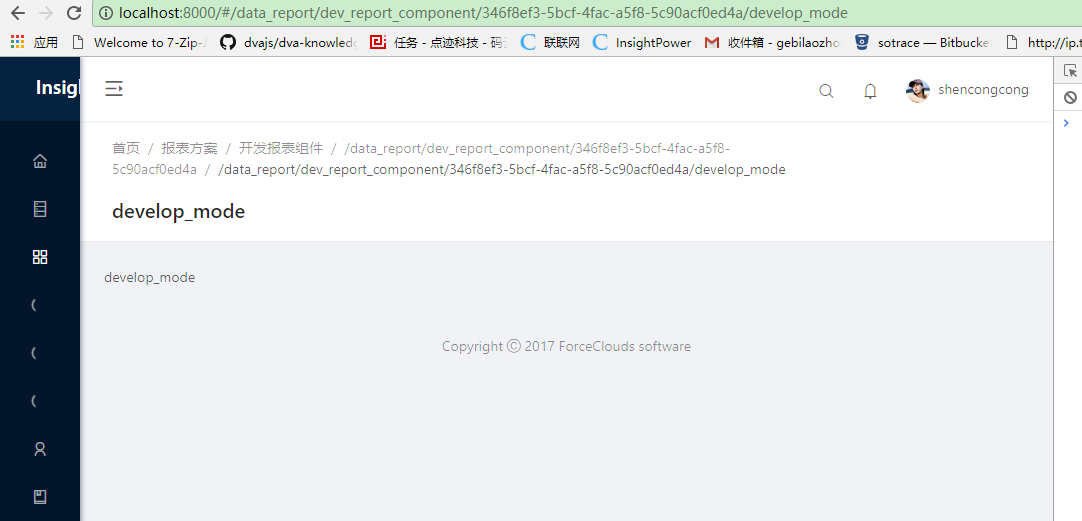
1、路由面包屑现在不支持name为空的情况,PageHeaderLayout呈现出来的是路由url地址
2、需要支持一个isMenu:false的属性,来过滤渲染属性。
3、参数路由,PageHeaderLayout会拆分成多个路由面包屑
gebilaoman
on 6 Nov 2017
if (item.component) {
  arr.push(item);           // first time push
}
if (item.children) {
  arr.push(...getPlainNode(item.children, item.path));
} else {
  if (item.children && item.component) {
    item.exact = false;
  }
  arr.push(item);     // duplicate push
}
这段有一点问题,有 component 但没有 children 的元素会被重复 push。
而且如果元素有 component 且有 children,应该在 component 里面适当位置自己获取 children 信息生成 Route 列表,否则子组件没法渲染到指定位置,这点跟 react-router@3 不太一样
ddcat1115
on 7 Nov 2017
@ddcat1115 我今天早晨刚改了一下,修复了一下。
而且这块,还是想着把menu和routes分割开来。
routes是一个没有层级结构的列表。routes是一个json tree,里面会带着父子关系。
gebilaoman
on 7 Nov 2017
如果你需要的菜单和路由有非常大的区别,是可以考虑分开维护的
ddcat1115
on 7 Nov 2017
@ddcat1115 今天会更新吗, 以及, 示例在那里~
 xoptimal
on 10 Nov 2017
xoptimal
on 10 Nov 2017
还有个问题, 菜单的子类 children , 如果有同名key children 会点亮所有同名的, 按道理是需要判断当前的 父组件,
xoptimal
on 10 Nov 2017
const data = [{
  component: BasicLayout,
  layout: 'BasicLayout',
  name: '首页', // for breadcrumb
  path: '',
  children: [
    {
      name: '交易员管理',
      path: 'traders',
      icon: 'table',
      children: [
        {
          name: '交易员',
          path: 'list',
          component: TraderList,
        }

      ]
    },
    {
      name: '交易员查询',
      path: 'traderQuery',
      icon: 'table',
      children: [
        {
          name: '交易员',
          path: 'list',
          component: TraderList,
        },

      ]
    }
}]
2个菜单都标识选中了, 应该还要再判断上一层 ~ @ddcat1115
xoptimal
on 10 Nov 2017
@xoptimal 默认情况下会取 path 作为 MenuItem/SubMenu 的 key,菜单项的 key 必须在整颗 Menu树中保持唯一,如果确实需要不同父菜单下采用同名 path,可以另外设置 key 属性。我刚才试了下,当key和path不同名时无法高亮这个菜单,这个问题会尽快修复。
之前关于带参数路由的问题在代码中均已修复,按照这样配置即可
{
  name: '测试页',
  path: ':xx',
  component: AdvancedProfile,    // for test,or your new Component
}
@ddcat1115 当前版本: version": "0.2.3-rc.0",
已知: 菜单存在 SubMenu , 面包屑显示异常, 三层以上, 例如: home -> setting -> /setting/list -> list
尝试路由配置, 那参数该怎么传递呢,
例如: path: '/profile/basic/:type', 我应该是在菜单里配置成
{
  name: '测试页',
  path: '/profile/basic/1',    // 我应该是配置成这样,
                               // 但是我不清楚 path: '/profile/basic/:type 在哪里写, 还请指教
  component: AdvancedProfile,    // for test,or your new Component
}
@xoptimal
{
  name: '测试页',
  path: ':type',                             // type 为参数名
   component: AdvancedProfile,
}
https://github.com/ant-design/ant-design-pro-site/commit/4e1809b8794c90d4554397d73b29dc0ca7470fb4
ddcat1115
on 10 Nov 2017
抱歉, 因为看不懂你们说的解决方式, 才想进步再了解的,
eg.
const data = [
  {
    component: BasicLayout,
    layout: 'BasicLayout',
    name: '首页', // for breadcrumb
    path: '',
    children: [
       {
          path: '/profile/basic/:type',
          component: AdvancedProfile
       },
      {
         name: '测试页面'
          path: '/profile/basic/1',
          component: AdvancedProfile
       },
   ]
}.
参数路由那么重要的功能,不修复……都一周了
gebilaoman
on 11 Nov 2017
just haven't provided an example @gebilaoman
 guozhiqiangha
on 11 Nov 2017
guozhiqiangha
on 11 Nov 2017
@xoptimal
const data = [
  {
    component: BasicLayout,
    layout: 'BasicLayout',
    name: '首页', // for breadcrumb
    path: '',
    children: [
       {
          path: '/profile/basic/:type',          // type就是参数名,这样可以匹配任何带这个参数的路由
          component: AdvancedProfile
       },
      {
         name: '测试页面'
          path: '/profile/basic/1',              // 这是不带参数的,只能匹配这一条 /profile/basic/1
          component: AdvancedProfile
       },
   ]
}.
@gebilaoman 参数路由一周前已经支持了 https://github.com/ant-design/ant-design-pro/issues/104#issuecomment-342032273 你更新 master 代码就可以看到 https://github.com/ant-design/ant-design-pro/issues/104#issuecomment-342035019
ddcat1115
on 13 Nov 2017
请问,路由中的可选参数有支持方案么?
 nanmu42
on 10 Dec 2017
nanmu42
on 10 Dec 2017
@nanmu42
复杂吗?
如果复杂可以看看 location.state
 chenshuai2144
on 10 Dec 2017
chenshuai2144
on 10 Dec 2017
很有启发,感谢。
之前我是设了两个地址(其中一个带参数,并且在菜单中隐藏),指向同一页面。
nanmu42
on 11 Dec 2017
https://pro.ant.design/docs/router-and-nav-cn#%E8%B7%AF%E7%94%B1 写的什么鬼 根本看不懂
 wingyiu
on 22 Jan 2018
wingyiu
on 22 Jan 2018
目前跟一樓一樣需要用到路由參數的功能
情境如下
/a/b -> 顯示list 頁面
/a/b/:orderid -> 顯示 orderID 的詳情頁
目前參照document 內的教學 無法達成想要的功能
router.js
'/a/b': {
   component: A component,
'/a/b/:orderid': {
   component:  B component,
A component 內 透過Link 轉向到 /a/b/1234
並不會顯示 B component
而是一樣待在A component
不知道是不是我哪裡理解錯誤了?
 kennedy0527
on 21 Jun 2018
kennedy0527
on 21 Jun 2018
A 中使用 this.props.children
chenshuai2144
on 21 Jun 2018
Related issues
 zhongjiewu
·
3Comments
zhongjiewu
·
3Comments
 Jerry-goodboy
·
3Comments
Jerry-goodboy
·
3Comments
 gaoqiang19514
·
3Comments
gaoqiang19514
·
3Comments
 952425340
·
3Comments
952425340
·
3Comments
 happier2
·
3Comments
happier2
·
3Comments
Most helpful comment
我改了一版本,能够实现参数路由。代码改动如下:
nav.js
utils.js
主要改动在下面这块,这块是获取路由列表的,所以应该支持children与component同时存在的。因为带参数路由并不是菜单项,但是确实属于(开发报表组件)下的子路由。
问题:
1、路由面包屑现在不支持name为空的情况,PageHeaderLayout呈现出来的是路由url地址
2、需要支持一个isMenu:false的属性,来过滤渲染属性。
3、参数路由,PageHeaderLayout会拆分成多个路由面包屑