Ant-design-mobile: 为什么只有InputItem组件不能引用
报错如下
./node_modules/antd-mobile/lib/input-item/style/index.less
Module build failed:
    &.keyboard-delete {
      .encoded-svg-background('input_item_kb_backspace');
    ^
Inline JavaScript is not enabled. Is it set in your options?
in D:\Work\Work_Midai_H5\src\jiebei-h5\node_modules\antd-mobile\lib\input-item\style\custom-keyboard.less (line 136, column 10)
 lgp2016
All 5 comments
Translation of this issue:
Why only the InputItem component can't reference
The error is as follows
./node_modules/antd-mobile/lib/input-item/style/index.less
Module build failed:
&.keyboard-delete {
.encoded-svg-background('input_item_kb_backspace');
^
Inline JavaScript is not enabled. Is it set in your options?
In D:\Work\Work_Midai_H5\src\jiebei-h5\node_modules\antd-mobile\lib\input-item\style\custom-keyboard.less (line 136, column 10)
 ant-design-bot
on 5 Jul 2018
ant-design-bot
on 5 Jul 2018
Hello @lgp2016. Please provide a re-producible demo: https://codepen.io/pen?template=LWpaKe&editors=0010
ant-design-bot
on 5 Jul 2018
@ziluo 已经知道问题出在哪里,如下
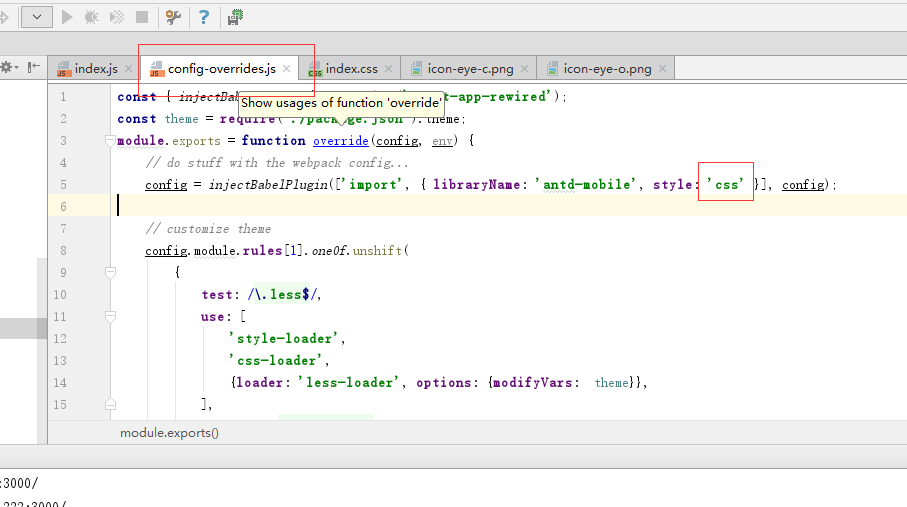
如果设置成ture,就不能引用InputItem;
但是我需要设置成true,来定制主题,真的好尴尬
lgp2016
on 5 Jul 2018
请提供一下 less 的版本。
尝试在 less-loader 里添加一个配置开启 Inline JavaScript:
{ loader: 'less-loader', options: { modifyVars: true, javascriptEnabled: true }}
参考文档:
 micooz
on 5 Jul 2018
micooz
on 5 Jul 2018
@micooz
"less": "^3.0.4",
"less-loader": "^4.1.0",
试过了,成功了,可以调用了,谢谢回复
lgp2016
on 5 Jul 2018
Related issues
 zhoujingchao
·
3Comments
zhoujingchao
·
3Comments
 dongchuanlei
·
4Comments
dongchuanlei
·
4Comments
 lixiaoyang1992
·
3Comments
lixiaoyang1992
·
3Comments
 zhangshuaidan
·
3Comments
zhangshuaidan
·
3Comments
 ArtemSerga
·
3Comments
ArtemSerga
·
3Comments
Most helpful comment
请提供一下 less 的版本。
尝试在 less-loader 里添加一个配置开启
Inline JavaScript:参考文档: