Anki-android: Crash after "Check database"
Reproduction Steps
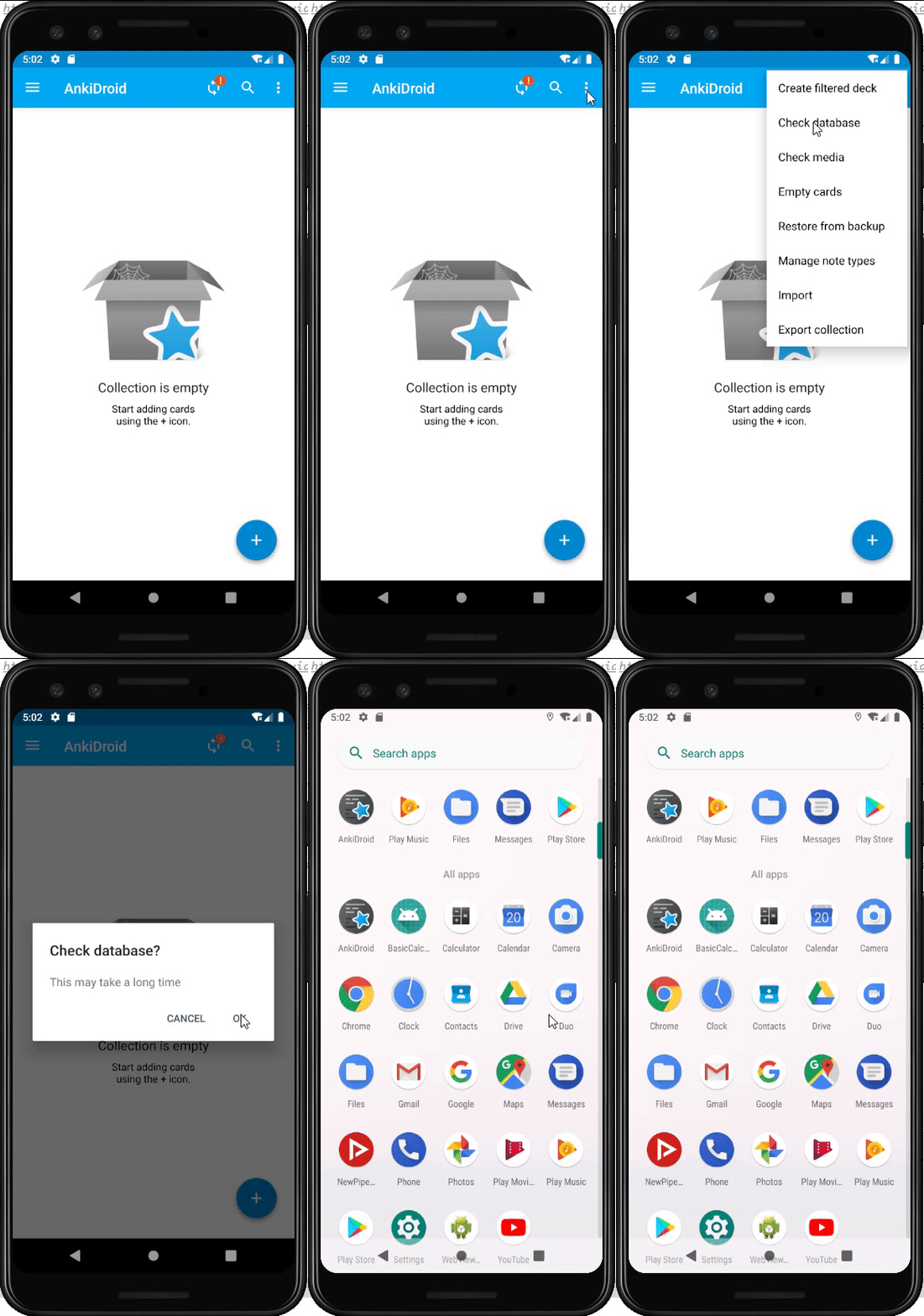
- Install AnkiDroid
- Select "Check database"
- Select "OK"
Actual Result
Crashed.
Debug Info
AnkiDroid Version = 2.15alpha17
Android Version = 9
ACRA UUID = 741efefa-e3a5-4eef-a2e8-e5032cead758
Scheduler = std
Crash Reports Enabled = true
Happened both on my Honor phone and the emulator Pixel 3 API 28.
Demo
 Sunt-ing
All 13 comments
Hello! 👋 Thanks for logging this issue. Please remember we are all volunteers here, so some patience may be required before we can get to the issue. Also remember that the fastest way to get resolution on an issue is to propose a change directly, https://github.com/ankidroid/Anki-Android/wiki/Contributing
![welcome[bot] picture](https://avatars0.githubusercontent.com/in/4141?v=4&s=40) welcome[bot]
on 20 Dec 2020
welcome[bot]
on 20 Dec 2020
Hi there!
Why would you use 2.14alpha18? We are on 2.15alpha now
Also, you do not include the crash UUID so we can't trace this
we can reopen if you reproduce this with the latest alpha and you include the UUID with crash reporting enabled so we can locate the stack trace to fix it
 mikehardy
on 20 Dec 2020
mikehardy
on 20 Dec 2020
I pulled the latest updates from the master branch just now, and find the problem is still here.
Also, as you advised, I have shown all the debug info.
Please tell me what I still need to add if there is.
@mikehardy
Sunt-ing
on 20 Dec 2020
Strange - I'm unable to see any crash reports for that user id
I think with from-source-code and alpha builds you may need to go into settings -> advanced and turn on crash reporting for it to send them - can you try that? then I can search for this ACRA UUID again and try to get the crash report
We turn off crash reports by default on source code builds because we expect crashes during development and don't want to send reports for them normally. You have to enable it every time the app restarts
mikehardy
on 20 Dec 2020
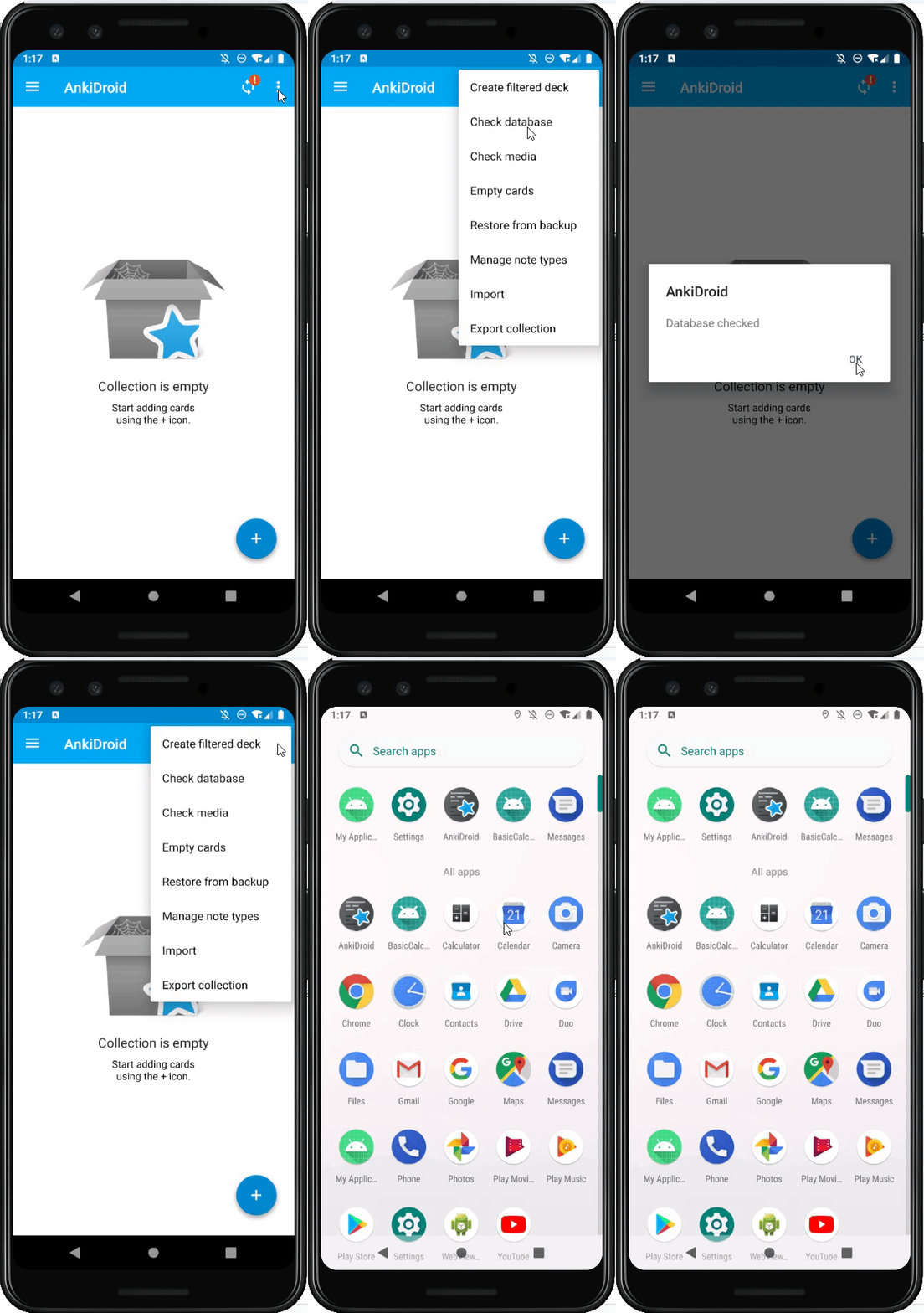
- After pulled the master branch I tried reproducing it but failed. However, when I taped "Manage note types", it crashed again. This works both on my cell phone and my emulator. And I reported it.
- All the debug info has been updated.
AnkiDroid Version = 2.15alpha17
Android Version = 9
ACRA UUID = 741efefa-e3a5-4eef-a2e8-e5032cead758
Scheduler = std
Crash Reports Enabled = true
demo:
Sunt-ing
on 21 Dec 2020
I continue to have no crash reports for this device. I must see the crash trace in order to debug it.
You are running an emulator, so you may capture (and paste in here) the crash reports yourself, that would be an incredible help.
If you could follow adb logcat while creating the crash and paste the trace we can probably fix it almost immediately
mikehardy
on 21 Dec 2020
Please use triple-backticks to enclose text like that, it really helps :-). But! Thank you for the stack trace that helps
mikehardy
on 21 Dec 2020
2020-12-21 22:06:25.589 13144-13144/com.ichi2.anki E/AndroidRuntime: FATAL EXCEPTION: main
    Process: com.ichi2.anki, PID: 13144
    java.lang.RuntimeException
        at com.ichi2.anki.ModelBrowser$LoadingModelsHandler.actualOnPostExecute(ModelBrowser.java:119)
        at com.ichi2.anki.ModelBrowser$LoadingModelsHandler.actualOnPostExecute(ModelBrowser.java:101)
        at com.ichi2.async.TaskListenerWithContext.onPostExecute(TaskListenerWithContext.java:50)
        at com.ichi2.async.CollectionTask.onPostExecute(CollectionTask.java:250)
        at android.os.AsyncTask.finish(AsyncTask.java:695)
        at android.os.AsyncTask.access$600(AsyncTask.java:180)
        at android.os.AsyncTask$InternalHandler.handleMessage(AsyncTask.java:712)
        at android.os.Handler.dispatchMessage(Handler.java:106)
        at android.os.Looper.loop(Looper.java:193)
        at android.app.ActivityThread.main(ActivityThread.java:6669)
        at java.lang.reflect.Method.invoke(Native Method)
        at com.android.internal.os.RuntimeInit$MethodAndArgsCaller.run(RuntimeInit.java:493)
        at com.android.internal.os.ZygoteInit.main(ZygoteInit.java:858)
2020-12-21 22:06:25.590 13144-13144/com.ichi2.anki D/UsageAnalytics: sendAnalyticsException() description/fatal: java.lang.RuntimeException/true
2020-12-21 22:06:25.591 13144-13144/com.ichi2.anki E/ACRA: ACRA caught a RuntimeException for com.ichi2.anki
    java.lang.RuntimeException
        at com.ichi2.anki.ModelBrowser$LoadingModelsHandler.actualOnPostExecute(ModelBrowser.java:119)
        at com.ichi2.anki.ModelBrowser$LoadingModelsHandler.actualOnPostExecute(ModelBrowser.java:101)
        at com.ichi2.async.TaskListenerWithContext.onPostExecute(TaskListenerWithContext.java:50)
        at com.ichi2.async.CollectionTask.onPostExecute(CollectionTask.java:250)
        at android.os.AsyncTask.finish(AsyncTask.java:695)
        at android.os.AsyncTask.access$600(AsyncTask.java:180)
        at android.os.AsyncTask$InternalHandler.handleMessage(AsyncTask.java:712)
        at android.os.Handler.dispatchMessage(Handler.java:106)
        at android.os.Looper.loop(Looper.java:193)
        at android.app.ActivityThread.main(ActivityThread.java:6669)
        at java.lang.reflect.Method.invoke(Native Method)
        at com.android.internal.os.RuntimeInit$MethodAndArgsCaller.run(RuntimeInit.java:493)
        at com.android.internal.os.ZygoteInit.main(ZygoteInit.java:858)
2020-12-21 22:06:25.677 13144-13239/com.ichi2.anki W/VideoCapabilities: Unrecognized profile 4 for video/hevc
2020-12-21 22:06:25.696 13144-13239/com.ichi2.anki I/VideoCapabilities: Unsupported profile 4 for video/mp4v-es
2020-12-21 22:06:25.737 13144-13248/com.ichi2.anki E/AcraAnalyticsInteraction: ACRA handling crash, sending analytics exception report
2020-12-21 22:06:25.739 13144-13248/com.ichi2.anki D/UsageAnalytics: sendAnalyticsEvent() category/action/value/label: ACRA Crash Handler/UUID 741efefa-e3a5-4eef-a2e8-e5032cead758/-2147483648/null
2020-12-21 22:06:25.739 13144-13248/com.ichi2.anki D/UsageAnalytics: getOptIn() status: true
2020-12-21 22:06:25.805 13144-13214/com.ichi2.anki D/EGL_emulation: eglMakeCurrent: 0xe36b4f40: ver 2 0 (tinfo 0xd1047880)
2020-12-21 22:06:27.756 13144-13144/com.ichi2.anki I/Process: Sending signal. PID: 13144 SIG: 9
Do you have a collection.apkg you could export (and change filename to .zip for upload here) that you could share so we could reproduce?
mikehardy
on 21 Dec 2020
Sunt-ing
on 21 Dec 2020
I can reproduce. I'll take a look at it
 Arthur-Milchior
on 21 Dec 2020
Arthur-Milchior
on 21 Dec 2020
@Sunt-ing your help was vital in finding and fixing this issue thank you! I will have a new alpha out shortly with the fix, but it is already merged into the main branch
mikehardy
on 21 Dec 2020
@Sunt-ing your help was vital in finding and fixing this issue thank you! I will have a new alpha out shortly with the fix, but it is already merged into the main branch
Oh, that's great!
Sunt-ing
on 22 Dec 2020
Related issues
 david-allison-1
·
5Comments
david-allison-1
·
5Comments
 tingsu
·
5Comments
tingsu
·
5Comments
 SimonePols
·
3Comments
mikehardy
·
4Comments
david-allison-1
·
4Comments
SimonePols
·
3Comments
mikehardy
·
4Comments
david-allison-1
·
4Comments
Most helpful comment
I can reproduce. I'll take a look at it