I'd like an option to hide the chosen answer feedback to get rid of the top bar completely. If you second the idea I might provide a pull request for that change.
 malnvenshorn
All 40 comments
Hi there! Is this in addition to all of the immersive mode stuff that already exists?
Specifically, have you enabled immersive mode? Because if you do that everything is gone and it's just you and your cards - no status bar distractions.
If you enable gestures you can even get rid of the answer buttons and just swipe...
https://docs.ankidroid.org/manual.html#_display
I'm going to close this tentatively because I think it's all handled, but re-open if it is not on target
 mikehardy
on 15 Jun 2019
mikehardy
on 15 Jun 2019
I'm not talking about the system bar. I mean the bar below that. You can disable the card count and timer but not the answer card feedback. I already started a fork with some extensions and I'm going to remove that bar and maybe add a progress bar instead because the current card count can spoil the answer. Just though there might be interest upstream.
malnvenshorn
on 15 Jun 2019
Adding a progress bar sounds cool, could you post a rough outline of what you had in mind for the design?
 timrae
on 15 Jun 2019
timrae
on 15 Jun 2019
I agree - progress bar is something lots of people like, and this is different then the immersive mode
mikehardy
on 15 Jun 2019
I haven't thought about it that much yet. Currently there are two points which bother me:
- With the current card count you can see what kind of card it is (e.g. learning) which can spoil the answer
- You cannot see if there are cards that will be due in the next minutes [*]
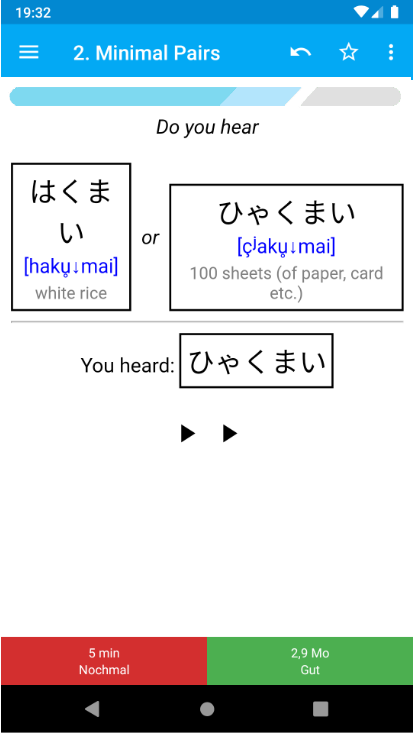
My first thought was just to put a new bar below the current top bar, therefore my question to also hide answer button feedback and if all elements are hidden to also hide that entire bar. But if there is interest in merging this upstream I might replace the current bar with a progress bar.
The card count would not be based on the currently available learning, review count or card steps (see point two) but on the number of cards with an interval below 1 day. This might require some bigger changes (haven't looked at the source code yet). To make this useful the progress bar will be also added to the deck selection.
Because the progress bar would correspond to the current card count I would remove that from the bar. Actually I would only leave the timer in the center of the progress bar (if enabled).
Just another thought that comes to my mind. The progress bar could be colored depending on the pressed answer button to provide a better visual feedback instead of the small dots.
[*] Some more explanations: First I don't use the learn ahead feature, because there is no point in seeing a card again when you just saw it a minute ago or something like that. Second I only use one interval step which is shorter than a day (usually 15 or 20 min), because there is no benefit in just refreshing the short term memory. Because of those points I would like to see if there are still cards coming up (where I hit again) after I finished all reviews or if I'm done for that day.
malnvenshorn
on 15 Jun 2019
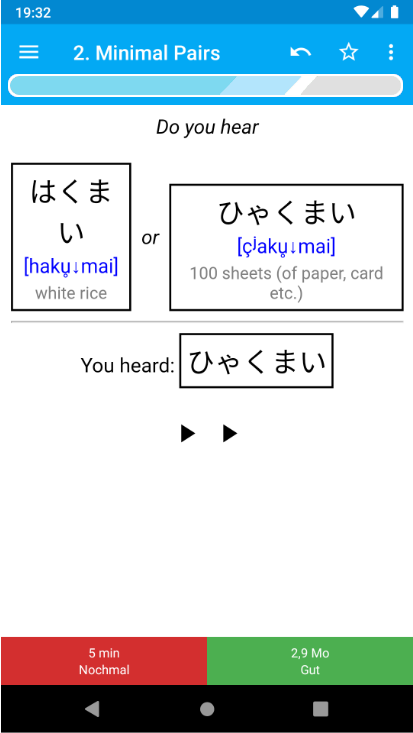
This is how it could look like. Left side progress of currently due cards. Right side (gray) not due but scheduled for today, e.g. relearning card.
malnvenshorn
on 16 Jun 2019
It looks like you're suggesting to render the progress bar inside the webview? Or would that be a layout sitting between the webview and the toolbar?
timrae
on 17 Jun 2019
It would be between the toolbar and the webview.
malnvenshorn
on 17 Jun 2019
Just wanted to say that it's a fantastic idea to have progress bar like that.
The default numbers are too small and their information is not as quick (and useful) for the eye as a visual feedback like a progress bar.
Furthermore the default AnkiDroid numbers are the "due today" numbers, not the "due now" numbers. That repeatedly causes confusion for users since their review session "ends" before all numbers are 0 0 0. So having a visual distinction between "due now" and "due today" in the progress bar would be a great feature.
 Anthropos888
on 17 Jun 2019
Anthropos888
on 17 Jun 2019
Ok so basically you just want to replace the current topbar with something more informative and visually appealing, right?
timrae
on 17 Jun 2019
Furthermore the default AnkiDroid numbers are the "due today" numbers, not the "due now" numbers.
Actually it's quite the opposite. It shows the number of cards which are due right now.
@timrae Yes that sums it up. Additionally I would like to add the progress bar also to the deck screen.
malnvenshorn
on 17 Jun 2019
Due numbers:
Deck list + AnkiDroid widget = "due now"
Deck overview (tap on the numbers in the deck list) + Review/Study screen = "due today"
That's where the confusion comes from.
Anthropos888
on 17 Jun 2019
The numbers are consistent for me (using the alpha version).
malnvenshorn
on 17 Jun 2019
Only if you set a high "learn ahead limit" (settings > reviewing) and your "again" count (deck options > lapses > time steps) is always within that limit.
Otherwise you will see your lapses later that day and not now. That's why the "due today" and "due now" count differs.
Anthropos888
on 17 Jun 2019
Otherwise you will see your lapses later that day and not now. That's why the "due today" and "due now" count differs.
Yes that's correct but AnkiDroid shows only the number of cards which are due right now. I'm confused :confused:
malnvenshorn
on 17 Jun 2019
Exactly, most people are confused about that As I wrote above, during reviews and in the deck overview you'll see the cards "due today" (latest alpha). In the deck list and the widget you'll see the cards "due now".
Anthropos888
on 17 Jun 2019
Ah now I got you. You are absolutely right!
But the values are consistent. The "due today" needs just to be renamed to "due now" or something similar.
malnvenshorn
on 17 Jun 2019
I started implementing the progress bar and it's working how I want it, but it requires a few small changes to the scheduler because the return value of the counts() method needs to include the number cards scheduled for today which are not due yet.
I know from a previous ticket that you want to stay as close as possible to the original code to keep it easy to maintain. Therefore I would like to know how you feel about such modifications.
malnvenshorn
on 18 Jun 2019
Well, changing existing public function signatures inside libanki should be avoided, but adding new functions that aren't in libanki is ok if it adds a lot of value. What exactly are you proposing to change?
Are you planning to integrate the visual feedback (when a card is answered) from the current top-bar into your new design? How would that look?
timrae
on 18 Jun 2019
I introduced a new variable mSchedTodayCount. counts() will return int[] counts = {mNewCount, mLrnCount, mRevCount, mSchedTodayCount}. mSchedTodayCount needs to be modified in _resetLrnCount() and _rescheduleLrnCard().
Are you planning to integrate the visual feedback (when a card is answered) from the current top-bar into your new design? How would that look?
Still thinking about that.
I'm also not sure about whether or not the progress bar should be reset after restarting the app. At the moment the bar shows the progress of the whole day.
malnvenshorn
on 18 Jun 2019
Are there any alternative ways to get that value, without modifying the counts() function interface?
timrae
on 18 Jun 2019
I could use a separate function which returns the value.
malnvenshorn
on 18 Jun 2019
That sounds better in principle, would need to see the code to comment on specifics
timrae
on 18 Jun 2019
Are you planning to integrate the visual feedback (when a card is answered) from the current top-bar into your new design? How would that look?
Haven't found a good solution for it yet, so I'm open for suggestions.
Alternatives:
Keeping the old bar (with an option to hide it completely)
Using some some other kind of visualization, e.g.

malnvenshorn
on 18 Jun 2019
I was thinking maybe you could change the colour of the white border around
the progress bar to flash the same colour as the dots in the current bar?
On Wed., 19 Jun. 2019, 2:53 am Sven Lohrmann, notifications@github.com
wrote:
Are you planning to integrate the visual feedback (when a card is
answered) from the current top-bar into your new design? How would that
look?Haven't found a good solution for it yet, so I'm open for suggestions.
Alternatives:
1.
Keeping the old bar
2.Using some some other kind of visualization, e.g.
[image: ezgif-3-d94ea8e59d2d]
https://user-images.githubusercontent.com/13801805/59707302-a954af00-9202-11e9-8062-c8e97c881f72.gif—
You are receiving this because you were mentioned.
Reply to this email directly, view it on GitHub
https://github.com/ankidroid/Anki-Android/issues/5330?email_source=notifications&email_token=AAVQBYROEQES4TZLEWAP5M3P3EOKZA5CNFSM4HYOVHE2YY3PNVWWK3TUL52HS4DFVREXG43VMVBW63LNMVXHJKTDN5WW2ZLOORPWSZGODX7OEQQ#issuecomment-503243330,
or mute the thread
https://github.com/notifications/unsubscribe-auth/AAVQBYSONVAMAJRDAK2YIGDP3EOKZANCNFSM4HYOVHEQ
.
timrae
on 18 Jun 2019
Keeping the existing bar could be another option for people that still want
to see the numbers and dots too.
On Wed., 19 Jun. 2019, 5:23 am Tim Rae, perceptualchaos2@gmail.com wrote:
I was thinking maybe you could change the colour of the white border
around the progress bar to flash the same colour as the dots in the current
bar?On Wed., 19 Jun. 2019, 2:53 am Sven Lohrmann, notifications@github.com
wrote:Are you planning to integrate the visual feedback (when a card is
answered) from the current top-bar into your new design? How would that
look?Haven't found a good solution for it yet, so I'm open for suggestions.
Alternatives:
1.
Keeping the old bar
2.Using some some other kind of visualization, e.g.
[image: ezgif-3-d94ea8e59d2d]
https://user-images.githubusercontent.com/13801805/59707302-a954af00-9202-11e9-8062-c8e97c881f72.gif—
You are receiving this because you were mentioned.
Reply to this email directly, view it on GitHub
https://github.com/ankidroid/Anki-Android/issues/5330?email_source=notifications&email_token=AAVQBYROEQES4TZLEWAP5M3P3EOKZA5CNFSM4HYOVHE2YY3PNVWWK3TUL52HS4DFVREXG43VMVBW63LNMVXHJKTDN5WW2ZLOORPWSZGODX7OEQQ#issuecomment-503243330,
or mute the thread
https://github.com/notifications/unsubscribe-auth/AAVQBYSONVAMAJRDAK2YIGDP3EOKZANCNFSM4HYOVHEQ
.
timrae
on 18 Jun 2019
Suggestions for the visual feedback after answering a card:
1) the whole progress bar (including the progress bar background but not the border) is flashing red/green/gray or blue according to the color of the answer button.
This could be 2 short flashes with maybe 80% opacity (to not complety hide the current progress of the bar). Or a short fade in and out (0% to 100% to 0% opacity) in the same color as the answer button.
2) show the same visual feedback as it is implemented now, but within the progress bar (centered) and with bigger dots (maybe 70% the height of the progress bar).
3) show the plain text "again", "good", "hard" or "easy" centered within the progress bar. Text color could correspondent with the answer button color plus a text shadow to distinguish it from the progress bar background
Anthropos888
on 19 Jun 2019
I was thinking maybe you could change the colour of the white border around
the progress bar to flash the same colour as the dots in the current bar?
That's how this looks like: https://streamable.com/u56rh
(uploaded a video, the gifs from the android emulator are kinda crappy)
- show the same visual feedback as it is implemented now, but within the progress bar (centered) and with bigger dots (maybe 70% the height of the progress bar).
- show the plain text "again", "good", "hard" or "easy" centered within the progress bar. Text color could correspondent with the answer button color plus a text shadow to distinguish it from the progress bar background
My first attempt was to include the same information from the current bar to the progress bar (remaining card count, dot indicator and timer) but found the result overloaded.
Because at least the timer needs to find a place within the progress bar (keeping a second bar just for the timer isn't a great solution in my opinion) I wouldn't add more information to keep it simple.
malnvenshorn
on 19 Jun 2019
Keeping the existing bar could be another option for people that still want
to see the numbers and dots too.
@timrae Which configuration options do you have in mind?
malnvenshorn
on 19 Jun 2019
Changes required for the v2 scheduler:
https://github.com/malnvenshorn/Anki-Android/commit/3c780f857c311cc0027ca7abcc48603cc4c8833b#diff-7f010620d726ffe711b87a36f86ae4fb
Haven't looked at the v1 scheduler yet.
malnvenshorn
on 21 Jun 2019
Hello 👋, this issue has been opened for more than 2 months with no activity on it. If the issue is still here, please keep in mind that we need community support and help to fix it! Just comment something like _still searching for solutions_ and if you found one, please open a pull request! You have 7 days until this gets closed automatically
![github-actions[bot] picture](https://avatars2.githubusercontent.com/in/15368?v=4&s=40) github-actions[bot]
on 3 Jun 2020
github-actions[bot]
on 3 Jun 2020
I'd like to see this in, let's give it another 2 months.
 david-allison-1
on 10 Jun 2020
david-allison-1
on 10 Jun 2020
This is going to be perfect for a script chunk in the WebView with info from javascript interface, IMHO. People want it in the Preview as well
mikehardy
on 10 Jun 2020
I have implemented this in https://github.com/infinyte7/Anki-Custom-Card-Layout
using JS & CSS
I stored total count at starting of review using Anki-persistence.
total = AbkiDroidJS.ankiGetNewCardCount() +
AbkiDroidJS.ankiGetLrnCardCount() + AbkiDroidJS.ankiGetRevCardCount();
Then,
progressBarPercentage = currentCardCount / total * 100;
Now that value can be used to show progress bar.
May be more good implementation can be done.
 infinyte7
on 10 Jun 2020
infinyte7
on 10 Jun 2020
I've implemented it for my needs, but there is some work to do before creating a pull request and I've no time for this.
What's missing:
- [ ] Theme support (only works with the default theme at the moment)
- [ ] Support for the v1-scheduler (I'm exclusively using the v2-scheduler with other improvements)
- [ ] Visual feedback for card answers (I don't need this)
malnvenshorn
on 13 Jun 2020
Hello 👋, this issue has been opened for more than 2 months with no activity on it. If the issue is still here, please keep in mind that we need community support and help to fix it! Just comment something like _still searching for solutions_ and if you found one, please open a pull request! You have 7 days until this gets closed automatically
github-actions[bot]
on 12 Aug 2020
I guess now it's possible for all users to implement a progress bar by themselves using the new JS API?
Anthropos888
on 12 Aug 2020
@Anthropos888 it should be https://github.com/ankidroid/Anki-Android/wiki/AnkiDroid-Javascript-API#available-information-about-current-cards-in-webview
The experience isn't great yet, I think the next step in the evolution of the feature is to make it so that some javascript is "generally available" and applied to all cards, so that you can install scripts implementing features like this like add-ons work on desktop (or fonts etc)
mikehardy
on 12 Aug 2020
Progress bar implementation. May be more better implementation can be done.
https://github.com/ankidroid/Anki-Android/wiki/AnkiDroid-Javascript-API#adding-progress-bar-to-card-template
infinyte7
on 14 Aug 2020
Oh that is cool, that's the sort of thing I was hoping for with the JS API, really exciting that it is possible
mikehardy
on 15 Aug 2020
Related issues
david-allison-1
·
5Comments
 SimonePols
·
3Comments
SimonePols
·
3Comments
 noamraph
·
3Comments
mikehardy
·
5Comments
noamraph
·
3Comments
mikehardy
·
5Comments
 homocomputeris
·
5Comments
homocomputeris
·
5Comments
Most helpful comment
Progress bar implementation. May be more better implementation can be done.
https://github.com/ankidroid/Anki-Android/wiki/AnkiDroid-Javascript-API#adding-progress-bar-to-card-template