Anki-android: Material Design Update 2018
Redesign progress
_(Updated on January 3, 2019)_
The goal with this fork's branch is to redesign AnkiDroid by following the latest Material Design Guidelines released by Google. This redesign was initially created for my own personal use, but I thought I'd share it in case anyone was interested. This project started here: #4998.

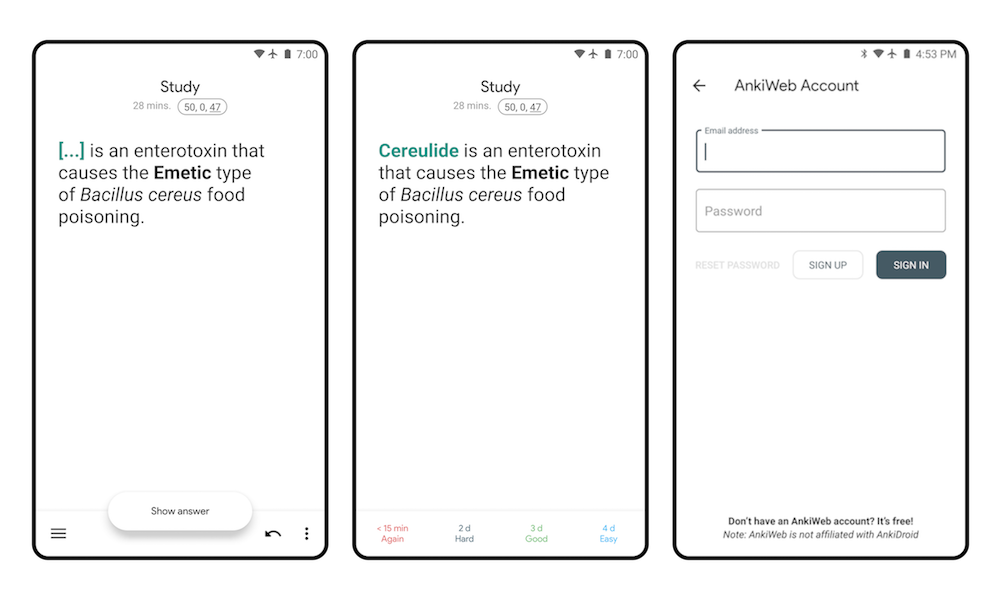
(Above) The flashcard reviewer page has moved all controls to the bottom. In addition, the "Show answer" button animates on and off the screen. Buttons have also been changed to have less color in order to focus the user on the flashcards. The account pages have been updated to include more Material components, including text input fields and buttons.
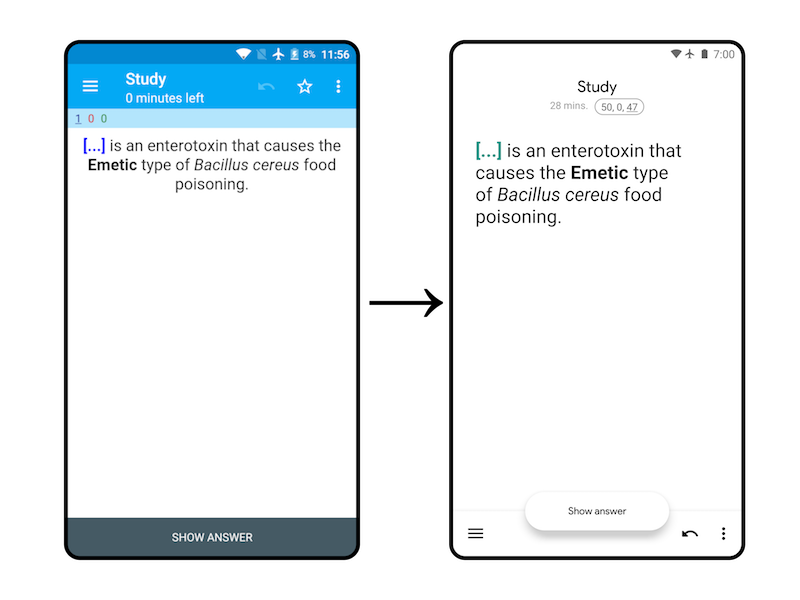
(Above) Before and After for the Reviewer page.
Implementation
I've tried my best to maintain the overall architecture of the app, although changing the UI required heavily editing the current theme system, so there could be a few hiccups if we decide to commit these changes in the future.
There are some smaller changes we could add in incremental updates, including updated iconography, the new white theme, animations, and individual screens.
[x] I have read the support page and am reporting a bug or enhancement request specific to AnkiDroid
[x] I have checked the manual and the FAQ and could not find a solution to my issue
[x] I have searched for similar existing issues here and on the user forum
 nickdvlpr
All 25 comments
I hope this button bar thingie will be configurable, otherwise it would be easy to click on it instead of the answer buttons. And colorless answer buttons should be configurable too, not everyone has good eyes.
+IMO this top lines with numbers (8 minutes, 95 new, 25 learned..) unnecessary take too much space. On your screenshots you have only 2/3 of the screen for the card, for the stuff we actually need.
 tico-tico
on 22 Nov 2018
tico-tico
on 22 Nov 2018
@tico-tico
Thanks for the feedback! Yes, the button bar at the bottom will still be configurable. You bring up a good point with the colorless answer buttons and I'm still not entirely satisfied with the way they look either. I'll work on those some more.
I completely agree about the top lines taking up too much space, I got a little carried away with the changes. We can revert those back to the basic colored numbers.
Do you have any other suggestions? Any problems with the current (published) design that you want to see changed?
nickdvlpr
on 22 Nov 2018
Yes, the button bar at the bottom will still be configurable.
Just to avoid misunderstanding, I meant control buttons (undo, three dots and so on). I prefer it to be on top and answer buttons on the bottom.
Do you have any other suggestions?
Nope, I actually knows nothing about GUI design, just some common sense. Maybe someone else has something more to say.
tico-tico
on 22 Nov 2018
Hey everybody!
Here is the latest fork of the redesign on GitHub if you would like to try it out. My original intent with this fork was to redesign the app for my own personal use, so it was not intended to be implemented in the main branch. It is more of a proof of concept than anything. That being said, it is a fully functional redesign so committing it would be possible if people show interest in the future.
Redesigning the app in small pieces would probably be a better route to take (e.g. the login page shown below, then the theme changes, etc.).
Main changes:
- Bottom app bar
- White theme with dark text (instead of every theme having light text)
- Updated iconography for toolbars
- Updated font
- Flashcards take up the vast majority of the Reviewer screen.
- "Show answer" button is now an animated FAB that shrinks and enlarges.
- "Black" theme optimized.
- Only the "Light" theme and "Black" theme have been updated thus far ("Plain" and "Dark" will likely have errors).
nickdvlpr
on 3 Jan 2019
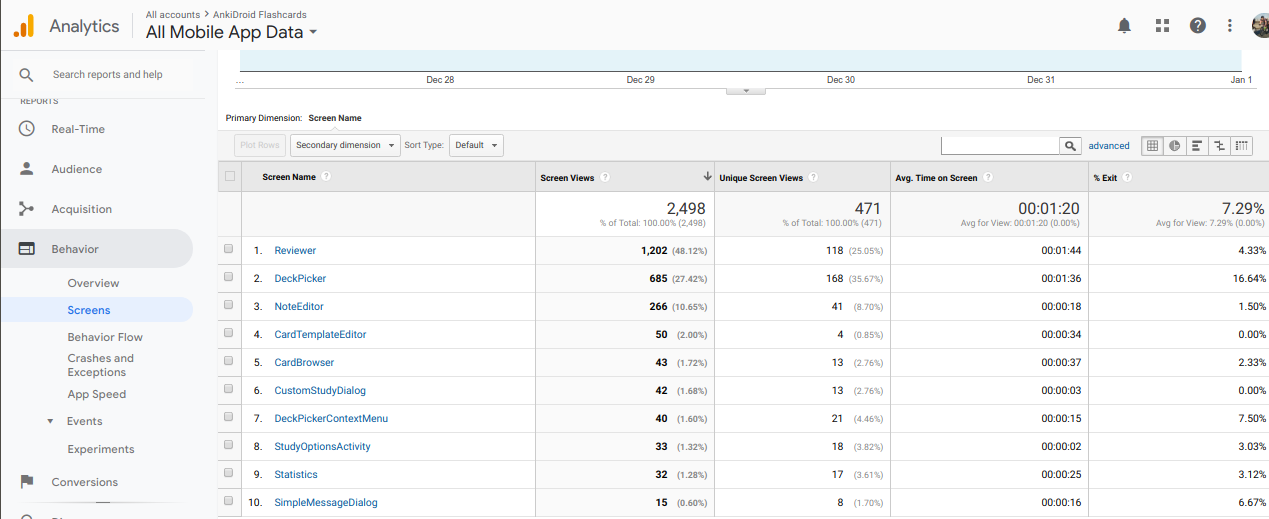
I still like the idea of some form of redesign because it does look a little like we are stuck in the 1980s :-) and it is a frequent complaint. But I also know that UI/UX redesigns are where committees go to debate forever, and where good engineers go to their graves ;-). I don't have the time for either so I can't champion one but this looks good and I'm +1 at any rate. I thought it would be useful to show the current analytics from the alpha series for your information though - with the idea that until you touch one of the "hot" screens, no one will care and any feedback you get will be of value, but not of too much value. Doing one of those screens (like review) and making sure it is solid is the key win to get the whole thing done then, I think.
 mikehardy
on 3 Jan 2019
mikehardy
on 3 Jan 2019
Thanks for the data! You bring up some good points.
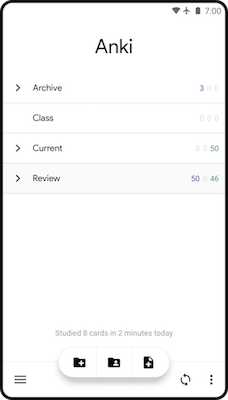
I may not have been clear in my previous posts, but the entire app has the new white + BottomAppBar theme. The only screens I have made major layout changes to are the Reviewer (first two images in above comment), the Account Login screen (third image in above comment), and the DeckPicker (shown below).
nickdvlpr
on 3 Jan 2019
Hey @nickdvlpr - I'll happily pull your changes and use them for a bit as a guinnea pig, but can you do the work on a topic branch in your fork? That will also make eventual merge more clean as it is the way we work (so I'm really familiar with it). It will also help you as you keep up with master (your 52 commits behind right now :-) ).
I think to make that happen (and pardon me please if your git-kung-fu is already strong! I share what I know since I always need tips...) - is to do a git co -b material-design-2018 (or whatever you want to call it) right now in your checkout, then after that a git co master, a git fetch upstream && git rebase --hard upstream/master && git push then a git co material-design-2018 && git rebase master. Fingers crossed on the last one - it's where you'll get conflicts if they're going to happen. Then git push and you're all clean on master to track upstream master with a tidy branch for others to test or merge later...
mikehardy
on 4 Jan 2019
@mikehardy I'll be honest, I'm brand new to git and only started learning with GitHub Desktop for this project. Unfortunately I don't think I'll have enough free time to work on this either, as I start my next semester on Monday.
If you don't think it would take too long and can explain in more detail what those git commands do, then I might be able to find some time this weekend to work on it.
nickdvlpr
on 5 Jan 2019
Ah, no worries then - we can handle it on the main repo side, focus on the work then
mikehardy
on 5 Jan 2019
I pulled the design update branch and ran through it on video here: https://youtu.be/7d8IAN8Shzo (@timrae want to check the video demo real quickly? 2 mins)
Thoughts:
- of course it isn't finished, so I went outside the updated areas a bit (then came back) and saw some dialog text color issues but I don't really care about that - just wanted to mention to others looking that they'll see the action bar move around but that isn't the point.
- for the screens with the action bar moved, for people that want a bottom bar, I think this is great - and that has been a request
- the review screen is definitely more "card focused" which I also like. Is it necessary to even have the "Study" at the top?
- the FAB for the answer buttons will actually be a problem for non-animated screens (we work on e-readers as well) so I'm iffy on that but it's a cool visual effect. I think it may collide with people that want to put lots of action buttons in the action bar as well - those are the power users so will likely generate complaints - just the way things like that go
- those are the negatives, as for the positives, it looks very clean, in general I do like the feel of it, even though I've burned in the old UI/UX with around 150,000 reviews at this point..
mikehardy
on 5 Jan 2019
As a test (and maybe for future developers) I attempted a rebase to upstream/master with a local pull of this fork, it's up to date (as I type this, anyway) here: https://github.com/mikehardy/Anki-Android/tree/material-design-2018
@nickdvlpr on the command line you can pull this into a local branch so you can edit safely like so:
git remote add mikehardy https://github.com/mikehardy/Anki-Android.git
git fetch mikehardy
git co -b material-design-2018 mikehardy/material-design-2018
Verify the thing still works etc, and assuming it does then you will have a fully up to date local branch called "material-design-2018" and you won't have to be careful with your master branch etc.
mikehardy
on 5 Jan 2019
@mikehardy Thank you for doing that. I'm certain it would have taken me ten times as long so I appreciate it.
Thoughts:
- Good catch - I think I know where that dialog text color can be found.
- Glad you like it!
> The review screen is definitely more "card focused" which I also like. Is it necessary to even have the "Study" at the top? - Oops. "Study" is actually just a temporary fix for my own use of the app. It's a single textview that covers the Deck Name. The reason I hid the deck name was because I have a deck with multiple subdecks, and when I do flashcards from the encompassing large deck, the subdeck name would show which made the flashcards too easy. Perhaps this is grounds for a new Issue thread.
- Yeah, I couldn't think of a good way to keep the FAB for "Show answer" when there are multiple toolbar icons. It's a bummer but I agree that we'll have to look into a different solution.
nickdvlpr
on 5 Jan 2019
For deck name hiding, you might like full screen mode, esp with gestures enabled (so it goes full full screen). Might be interesting to see how that interacts with your changes actually
mikehardy
on 5 Jan 2019
@mikehardy
I've been reading more about the GitHub workflow, but could you clarify how I should work on this branch going forward? I apologize if this is a simple question.
Should I clone this new "material-design-2018" branch and edit that in Android Studio?
I guess I am unclear on how I should make commits.
Currently, I am using GitHub Desktop and committing everything to my "master" branch, which was a fork of Anki-Android back in November. I wasn't sure how to stay up to date with changes in the official Anki-Android which is how my fork ended up 53 commits behind.

Now, I entered the git commands you posted,
git remote add mikehardy https://github.com/mikehardy/Anki-Android.git
git fetch mikehardy
git co -b material-design-2018 mikehardy/material-design-2018
so now I have this in GitHub Desktop:

but I can't commit to it (because it's your branch, I presume).
If I clone your branch, then will I be able to make commits? And how will I stay up to date with the other commits being submitted to Anki-Android?
nickdvlpr
on 5 Jan 2019
@mikehardy
I've been reading more about the GitHub workflow, but could you clarify how I should work on this branch going forward? I apologize if this is a simple question.
I can try! And no apology needed, I was at zero for git last year and learned it for AnkiDroid basically, with help from others. So I'm paying back karma :-)
Should I clone this new "material-design-2018" branch and edit that in Android Studio?
I believe because you did those commands on the command line you already have 1) a connection to my repo in your workspace locally and 2) a copy of my work there
I guess I am unclear on how I should make commits.
So I believe what needs to happen to make commits is you need to take your copy of my work, and connect it to your repo now. That should be some version of a "set upstream" command to change where things should go, then a push to get it up to github.com.
it should be git push --set-upstream origin material-design-2018
...that will all at once say "hey git, I want to push these changes, but instead of trying to send them to the spot I got them from (mikehardy), I want you to set the upstream pointer to origin (that's my personal github repo) with the branch name material-design-2018"
And future pushes will keep going to origin/material-design-2018 so you can commit away happily
Currently, I am using GitHub Desktop and committing everything to my "master" branch, which was a fork of Anki-Android back in November. I wasn't sure how to stay up to date with changes in the official Anki-Android which is how my fork ended up 53 commits behind.
how will I stay up to date with the other commits being submitted to Anki-Android?
This is the trick - I find it hard sometimes to mix "getting work done" and "staying up to date", so I like to keep development changes and upstream changes separate by having development always be on a branch with pull requests via github to merge to master upstream, and then to receive upstream changes always one-way coming down to me from master. Conceptually in my personal fork it is a circle then - upstream/master on github -> my fork/master local machine -> my fork / my dev branches local machine -> push to github my fork / my dev branches -> pull request on github to upstream/master
So you've got committing to a local branch down (you were using 'master' but it's the same to any branch - now you can use a separate one), to keep things up to date you need to get the github upstream/master changes local (this is a 'git fetch upstream'), and you need to integrate them with your clean master branch (this is a 'git co master && git rebase upstream/master'), then you need to get your dev changes replayed on top of whatever upstream changes came in (that's a 'git co material-design-2018 && git rebase master').
The last bit is where you'll get conflict notices if they're going to happen. Those are always a messy hands-on thing to fix unfortunately - so it's always best to stay up to date to minimize them. For me on the command line conflict resolution starts when the last git rebase fails with a conflict message, then I edit the file(s) in my editor to fix them, 'git add -A' to tell git everything's fine, and 'git rebase --continue' to tell it to keep moving forward, repeat as needed...
Hope this helps? For me it only became easy with practice. There wasn't really an a-ha moment, just a lot of repetition and now I get it.
mikehardy
on 5 Jan 2019
@mikehardy Thanks so much! Let me see if I understand.
Creating the branch worked successfully using
git push --set-upstream origin material-design-2018
So now I need to change my "master" to be up-to-date with the latest commits from "upstream/master" (Anki-Android), then take my newly up-to-date master and pass those changes down to the "material-design-2018" branch with the respective rebase commands so as to not overwrite my design work?
- Step 1: switching to my "master" and running
git fetch upstream? - Step 2: staying in my "master" and running
git co masterfollowed bygit rebase upstream/master? - Step 3: switching to my "material-design-2018" and running
git co material-design-2018 && git rebase master?
Then the idea going forward is to have my "master" be the same as "upstream/master" (official Anki-Android) so that I can pass the latest commits to my new "material-design-2018" branch?
- But if something upstream like theme_light is different than theme_light in my branch, won't my branch changes be overwritten? Is this what the "rebase" command solves or where I make manual changes each time?
Lastly, after I push commits to my branch, then master, how do I push these changes to your "material-design-2018" branch (assuming my master is fully up-to-date)? Do I submit a pull request?
Thanks again, this has been very helpful.
nickdvlpr
on 5 Jan 2019
@mikehardy Thanks so much! Let me see if I understand.
Creating the branch worked successfully using
git push --set-upstream origin material-design-2018
Awesome - so now your work (already happily rebased to upstream/master as of this morning) is safely stored in a branch on github.
So now I need to change my "master" to be up-to-date with the latest commits from "upstream/master" (Anki-Android), then take my newly up-to-date master and pass those changes down to the "material-design-2018" branch with the respective
rebasecommands so as to not overwrite my design work?
Yes - right now your master has all this dev / non-master stuff in it, so you'll want to clean that out so you've got separation
- Step 1: switching to my "master" and running
git fetch upstream?
Yep - that's git co master && git fetch upstream - this just gets you ready locally, nothing has happened yet
- Step 2: staying in my "master" and running
git co masterfollowed bygit rebase upstream/master?
Here, in order to clean out master since local and upstream have diverged, you need to be fairly forceful. This is destructive (of local changes) so be wary, but after step 1 above, and assuming 'upstream' is a remote pointing to https://github.com/ankidroid/Anki-Android.git this should be:
git reset --hard upstream/master && git push origin +master
That "--hard" says "clobber my local master with whatever is in upstream/master" then that "+" sign says "clobber origin/master with whatever is local right now".
This pushes whatever is in upstream/master straight through local and back up to github in your personal fork. So master will be very clean after that
- Step 3: switching to my "material-design-2018" and running
git co material-design-2018 && git rebase master?
The "git co masterial-design-2018" is the switch, so it should be checked out after, and then use, a "git rebase master" will get you up to date. You should be able to see it with "git log" showing you the state of the your upstreams compared to local.
Then the idea going forward is to have my "master" be the same as "upstream/master" (official Anki-Android) so that I can pass the latest commits to my new "material-design-2018" branch?
Exactly
- But if something upstream like theme_light is different than theme_light in my branch, won't my branch changes be overwritten? Is this what the "rebase" command solves or where I make manual changes each time?
The "git rebase master" just says "take every commit I've made since the last one that was also in master, pull it off to the side, and store it for a second. Now pull in all the new commits from master, and now one by one replay my commits as if I was making them against the master with the new changes"
So you shouldn't have to redo changes, but you may find the same lines of code were edited in both places, resulting in the dreaded merge conflict. No way around that unfortunately - it's a communication issue so should be a conversation in real life, plus some hand-editing of files to fix things up before you "git add -A && git rebase --continue" to fix things and rebase fully.
Lastly, after I push commits to my branch, then master, how do I push these changes to your "material-design-2018" branch (assuming my master is fully up-to-date)? Do I submit a pull request?
The workflow for gettings things integrated upstream is not to push them to your master. Once you've pushed them to your branch, you make a PR on github from that branch, and we review and integrate (to upstream/master).
Then you git fetch upstream && git co master && git rebase upstream/master && git co whatever-branch && git rebase master
...and that finishes the circle that changes go through, in my mind
Thanks again, this has been very helpful.
Hope so - and feel free to holler if you have any other questions or the explanation was confusing or anything. I'll try to help
mikehardy
on 5 Jan 2019
Oh - I should mention that any time you rebase from upstream/master and then rebase that into your dev branches, you have essentially diverged from what github was expecting and you have to "force-push" (i.e., clobber) the branch on github with a "git push origin +whatever-branch" - it's a bit harsh and others have different styles but it's how I do it at least in the workflow I use for AnkiDroid
mikehardy
on 5 Jan 2019
Got it.
After doing the last command, I did a "Pull origin" from my "material-design-2018" followed by a "Push origin" back (not sure why the Desktop app suggested I push, but everything looks okay). I think everything worked because I'm now seeing this option on github.com:

Just to clarify, was the "Pull origin" what changed my local copy on my computer?
The "git rebase master" just says "take every commit I've made since the last one that was also in master, pull it off to the side, and store it for a second. Now pull in all the new commits from master, and now one by one replay my commits as if I was making them against the master with the new changes"
Awesome explanation. That's what I was hoping it did but it seemed too good to be true!
So you shouldn't have to redo changes, but you may find the same lines of code were edited in both places, resulting in the dreaded merge conflict. No way around that unfortunately - it's a communication issue so should be a conversation in real life, plus some hand-editing of files to fix things up before you "git add -A && git rebase --continue" to fix things and rebase fully.
I'm not seeing any merge conflicts, although I may not be looking in the right place. Where can I do this comparison? Also, what does that git add -A && git rebase --continue command do?
nickdvlpr
on 5 Jan 2019
After doing the last command, I did a "Pull origin" from my "material-design-2018" followed by a "Push origin" back (not sure why the Desktop app suggested I push, but everything looks okay). I'm assuming the changes took effect on my local copy since I'm now seeing this option on github.com:
Yep! That means github sees you have a branch with some fresh changes vs upstream/master - you can click that to see what it thinks the changes are and what a PR looks like, as long as you don't hit save it won't actually create the PR
Awesome explanation. That's what I was hoping it did but it seemed too good to be true!
git rebase is kind of magical. Wait till you try a git rebase -i (interactive? Yes, you can edit and alter or drop individual local commits as you rebase...neat?)
I'm not seeing any merge conflicts, although I may not be looking in the right place. Where can I do this comparison? Also, what does that
git add -A && git rebase --continuecommand do?
There are no merge conflicts because I cleaned them when I pulled your changes into my fork (which you then pulled from), it was already clean. The last command (the add/continue) is what you do after rebase stops because of a conflict and you've edited the files to fix the conflict. Then you add the files you just changed (that git was conflicted about), and tell git to get moving with the rebase again.
mikehardy
on 5 Jan 2019
git rebase is kind of magical. Wait till you try a git rebase -i (interactive? Yes, you can edit and alter or drop individual local commits as you rebase...neat?)
git as a whole amazes me so I'll save that one for the professionals.
There are no merge conflicts because I cleaned them when I pulled your changes into my fork (which you then pulled from), it was already clean. The last command (the add/continue) is what you do after rebase stops because of a conflict and you've edited the files to fix the conflict. Then you add the files you just changed (that git was conflicted about), and tell git to get moving with the rebase again.
Ah, right! Well once again, thank you so much for teaching me git and for your work on this app. I'm a little disappointed I won't be able to contribute for the foreseeable future, but hopefully I'll have time to finish up this redesign after my board exam (which this app is helping me study for!)
If I do have time for a few changes here and there, I'll keep my fork updated so everyone can see the progress.
nickdvlpr
on 5 Jan 2019
Sounds good to me, and if AnkiDroid helps make you a doctor, and I've helped AnkiDroid do that, I'm plenty happy. Good luck!
mikehardy
on 6 Jan 2019
Any update on this? Would it be possible to build and use this version? This looks really cool and I'd be very interested in trying it out.
 TesseractCat
on 29 Jan 2019
TesseractCat
on 29 Jan 2019
@TesseractCat yes - since this is all developed in the open with GitHub you can check out anyone's work any time. A guide to running the main code is here https://github.com/ankidroid/Anki-Android/wiki/Development-Guide#running-ankidroid-from-within-android-studio and the same thing will work if you add @nickdvlpr's repository as a remote, check his work out and compile it
mikehardy
on 29 Jan 2019
Hello 👋, this issue has been opened for more than 2 months with no activity on it. If the issue is still here, please keep in mind that we need community support and help to fix it! Just comment something like _still searching for solutions_ and if you found one, please open a pull request! You have 7 days until this gets closed automatically
![github-actions[bot] picture](https://avatars2.githubusercontent.com/in/15368?v=4&s=40) github-actions[bot]
on 3 Jun 2020
github-actions[bot]
on 3 Jun 2020
Related issues
 SimonePols
·
3Comments
SimonePols
·
3Comments
 littlefoodt
·
4Comments
littlefoodt
·
4Comments
 kanjieater
·
4Comments
mikehardy
·
4Comments
mikehardy
·
5Comments
kanjieater
·
4Comments
mikehardy
·
4Comments
mikehardy
·
5Comments
Most helpful comment
I hope this button bar thingie will be configurable, otherwise it would be easy to click on it instead of the answer buttons. And colorless answer buttons should be configurable too, not everyone has good eyes.
+IMO this top lines with numbers (8 minutes, 95 new, 25 learned..) unnecessary take too much space. On your screenshots you have only 2/3 of the screen for the card, for the stuff we actually need.