Animation_nodes: Can't install Animation Nodes.
The following guide provides the installation instruction for installing Animation Nodes and the troubleshooting guide to troubleshoot your installation.
How to install Animation Nodes?
- Disable then uninstall any version of Animation Nodes already installed.
- Download a build of Animation Nodes from the Animation Nodes website.
- Go to User Preferences -> Add-ons.
- Press install and choose the build you downloaded.
Animation Nodes should now be installed and can be enabled. If you encounter any errors or unexpected behavior during the installation process, read the troubleshooting section below.
Troubleshooting
If an installation error occurred, Animation Nodes should show an error message with a description of the issue that occurred. Below, we present a number of issues the could occur and the procedure to fix them.
Can't find Animation Nodes in the add-ons list
The installed Animation Nodes build is corrupted. First delete the animation_nodes folder from the add-ons directories. See Appendix I. Then follow the installation instructions above.
There are multiple versions of Animation Nodes installed
Multiple version of Animation Nodes can't coexist. To fix this, remove all versions of Animation Nodes. You may need to manually remove the animation_nodes folder from the add-ons directories. See Appendix I. Then follow the installation instructions above.
Import Error: DLL load failed
Install vc_redist.x64 from microsoft's support center.
libpython3.x : Can't Open Shared Object File
Animation Nodes needs the python dynamic library in order to work. Install python3.x or/and libpython3.x from your package manager of choice.
Ubuntu
Ubuntu users may install libpython3.x from the deadsnakes PPA using the following commands. (Making sure to replace x with the target version.)
sudo add-apt-repository ppa:deadsnakes/ppa
sudo apt update -y && sudo apt upgrade
sudo apt install libpython3.x
This build does not work at the moment
This could be caused due to a number of issue:
- The build you are using was not built for the platform you are using. Download and install an appropriate build as described above.
- You don't have the
vc_redist.x64library. See the section about "Import Error: DLL load failed" above. - You don't have the python shared libraries. See the section about "libpython3.x : Can't Open Shared Object File" above.
Animation Nodes depends on Numpy
Animation Nodes needs the numpy python module to operate. Install numpy to your python environment through your package manager or through other means. Official Blender builds have numpy installed by default, so you may also use the latest official Blender build to avoid the issue.
Animation Nodes needs at least Blender 2.80
The latest version of Animation Nodes only works with Blender 2.80. Install a newer Blender build.
Animation Nodes is built for another OS
An Animation Nodes build is built for a certain platform and will only work on this platform. Download an Animation Nodes build that is built for your platform.
There is a python version mismatch
An Animation Nodes build is built for a certain python version and will only work on this python version. The official Animation Nodes builds provided are built against the python version used by the official Blender builds. If your Blender build uses a different version, you will have to use a custom Animation Nodes build or build Animation Nodes yourself. Notice that Animation Nodes exists in the AUR for Arch users.
This is just the source code of Animation Nodes
The installed Animation Nodes build is corrupted. First delete the animation_nodes folder from the add-ons directories. See Appendix I. Then follow the installation instructions above.
Still can't install Animation Nodes
If you still can't install Animation Nodes, add a comment to this issue detailing the issue you are having and we will help you resolve your issue.
Appendix I
It is sometimes necessary to delete Animation Nodes from the file system yourself by deleting the animation_nodes folder in the add-ons directories. There are many directories in which add-ons can be installed, you have to go through all of them and remove the animation_nodes folder. The directories at listed in the Blender documentation.
 OmarEmaraDev
All 63 comments
@3DSinghVFX If you have the time, we need to debug the daily builds and see why they are not working with Ubuntu. Can you provide any information on the issue? Did the daily builds ever work on ubuntu?
OmarEmaraDev
on 6 Dec 2019
Sure :) I do not remember the exact date but this problem has been happening for the end of October. Tomorrow, I'll try to install AN from the daily build on the different Blender versions 2.80 to 2.8x and report back about this issue.
 3DSinghVFX
on 6 Dec 2019
3DSinghVFX
on 6 Dec 2019
@OmarEmaraDev
- When I try to install AN from the daily build then it gave this error during enabling in the addon menu,
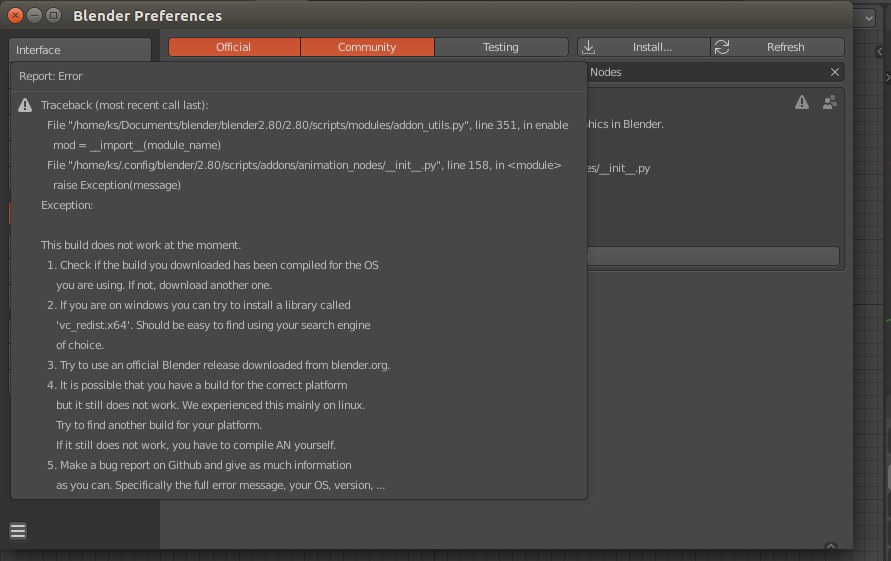
Next, I replaced the
test_compile.cpython-37m-x86_64-linux-gnu.sowith the file from the compiled build AN on my pc. Then it gave this error,

If I replaced the compiled files in the
algorithms/hashing/with the files from the compiled build AN on my pc, then it gave this error in the file in another folder,

It looks like there is missing python lib (libpython3.7m.so.1.0) in the online AN daily build.
3DSinghVFX
on 7 Dec 2019
Can you try installing the libpython3.7 package then? Looking at an installation of Ubuntu 19.04, I can see the following files:

What is the default system python in Ubuntu 19.04?
OmarEmaraDev
on 7 Dec 2019
@OmarEmaraDev I have installed python3.7 (which that libpython3.7) then daily online build of AN worked without any error.
But I do not understand this problem. Does the daily online build of AN's lib path set to /usr/lib and the AN compiled on my pc with _anaconda_ has lib path to lib-directory of the _anaconda_?
3DSinghVFX
on 7 Dec 2019
@3DSinghVFX Is libpython3.7 a dependency of python3.7? Also, is python3.7 readily available from the official Ubuntu repository?
I don't fully understand the issue as well, but maybe the linker added the directory to the rpath of the library.
OmarEmaraDev
on 7 Dec 2019
Yes, libpython3.7 comes with python3.7. I do not know, maybe the latest version (18.04 or higher) of Ubuntu comes with python3.7 or python3.8.
3DSinghVFX
on 7 Dec 2019
Ok. Thanks for helping with this! We will add that to the installation guide until we figure out a way to statically link Animation Nodes.
OmarEmaraDev
on 7 Dec 2019
Okay.
3DSinghVFX
on 7 Dec 2019
Trying to update Animation Nodes from master zip, remove the old, bring the new, and after installing the module, cannot see it under addon list. What's wrong with Animation Nodes add-on installation, it seems problematic :(
I have Blender 2.81 and 2.82 alpha in separate folder. Trying to make this latest version running on Blender 2.82 alpha.
 enzyme69
on 20 Dec 2019
enzyme69
on 20 Dec 2019
Hi @enzyme69
From where you download the master zip file? I think you have installed the source code of AN by mistake. You can download the latest AN build zip file from https://animation-nodes.com/ or https://github.com/JacquesLucke/animation_nodes/releases
3DSinghVFX
on 20 Dec 2019
So i am running 2.81, on windows 10, with AN downloaded from animation-nodes.com and i also have the latest vc_redist, and this is the error message i get when i try to activate AN after i instal the addon.
" bpy.data.window_managers["WinMan"].addon_search = "ani"
bpy.context.space_data.bookmarks_active = 1
Modules Installed (animation_nodes) from 'E:\Design\Resources\Blender Resources\Add+Ons\animation_nodes_v2_1_windows_py37.zip' into 'C:\Users\lasse\AppData\Roaming\Blender Foundation\Blender\2.81\scripts\addons'
Traceback (most recent call last):
File "E:\Apps\Blender\2.81\scripts\modules\addon_utils.py", line 351, in enable
mod = __import__(module_name)
File "C:\Users\lasse\AppData\Roaming\Blender Foundation\Blender\2.81\scripts\addonsanimation_nodes__init__.py", line 166, in
auto_load.init()
File "C:\Users\lasse\AppData\Roaming\Blender Foundation\Blender\2.81\scripts\addonsanimation_nodes\auto_load.py", line 23, in init
modules = get_all_submodules(Path(__file__).parent)
File "C:\Users\lasse\AppData\Roaming\Blender Foundation\Blender\2.81\scripts\addonsanimation_nodes\auto_load.py", line 51, in get_all_submodules
return list(iter_submodules(directory, directory.name))
File "C:\Users\lasse\AppData\Roaming\Blender Foundation\Blender\2.81\scripts\addonsanimation_nodes\auto_load.py", line 55, in iter_submodules
yield importlib.import_module("." + name, package_name)
File "E:\Apps\Blender\2.81\python\lib\importlib__init__.py", line 127, in import_module
return _bootstrap._gcd_import(name[level:], package, level)
File "C:\Users\lasse\AppData\Roaming\Blender Foundation\Blender\2.81\scripts\addonsanimation_nodes\libs\FastNoiseSIMD__init__.py", line 1, in
from . node_base import Noise3DNodeBase
File "C:\Users\lasse\AppData\Roaming\Blender Foundation\Blender\2.81\scripts\addonsanimation_nodes\libs\FastNoiseSIMD\node_base.py", line 6, in
from . wrapper import (
ImportError: DLL load failed: module not found.
bpy.context.area.ui_type = 'INFO' "
 limkork
on 2 Feb 2020
limkork
on 2 Feb 2020
@limkork Are you sure you have the vc_redist.x64 2019 one?
OmarEmaraDev
on 3 Feb 2020
yes, I just double-checked and downloaded it again, same problem :(
limkork
on 4 Feb 2020
quick update, i got it working, i did two things:
one, i went in to C/appdata/blender/addons and removed the AnimationNodes folder from there, and i also redownloaded vc_redist for the third time, but this time i installed as administrator.
Im not sure which one of those cracked it, but at least it works!
limkork
on 8 Feb 2020
Can't enable the addon (git 9d39fa7fdf295a680567b914f86ed6ce8f6409e8) in Blender 2.83 alpha:
Traceback (most recent call last):
File "/home/etaernis/blender-git/build_linux/bin/2.83/scripts/modules/addon_utils.py", line 330, in enable
importlib.reload(mod)
File "/home/etaernis/blender-git/build_linux/bin/2.83/python/lib/python3.8/importlib/__init__.py", line 169, in reload
_bootstrap._exec(spec, module)
File "
File "
File "
File "/home/etaernis/.config/blender/2.83/scripts/addons/animation_nodes/__init__.py", line 166, in
auto_load.init()
File "/home/etaernis/.config/blender/2.83/scripts/addons/animation_nodes/auto_load.py", line 23, in init
modules = get_all_submodules(Path(__file__).parent)
File "/home/etaernis/.config/blender/2.83/scripts/addons/animation_nodes/auto_load.py", line 51, in get_all_submodules
return list(iter_submodules(directory, directory.name))
File "/home/etaernis/.config/blender/2.83/scripts/addons/animation_nodes/auto_load.py", line 55, in iter_submodules
yield importlib.import_module("." + name, package_name)
File "/home/etaernis/blender-git/build_linux/bin/2.83/python/lib/python3.8/importlib/__init__.py", line 127, in import_module
return _bootstrap._gcd_import(name[level:], package, level)
File "
File "
File "
File "
File "
File "
File "/home/etaernis/.config/blender/2.83/scripts/addons/animation_nodes/nodes/gpencil/gp_frame_from_strokes.py", line 5, in
from ... data_structures import GPFrame
ImportError: cannot import name 'GPFrame' from 'animation_nodes.data_structures' (/home/etaernis/.config/blender/2.83/scripts/addons/animation_nodes/data_structures/__init__.py)
 eTaernis
on 22 Feb 2020
eTaernis
on 22 Feb 2020
@eTaernis I can't replicate the issue. Can you manually remove the animation_nodes folder in /home/etaernis/.config/blender/2.83/scripts/addons/ then reinstall the addon?
OmarEmaraDev
on 22 Feb 2020
@OmarEmaraDev That did not work, so I deleted everything, re-cloned the repo and compiled, now it works - thank you! git status did not show any problems, but it seems like there was something wrong with extranodes - sorry, my bad.
eTaernis
on 23 Feb 2020
- removed animation nodes
- downloaded
animation_nodes_v2_1_macOS_py37.zipfrom https://animation-nodes.com/#download - tried to install it, but it fails silently
console says:
fake_module: addon missing 'bl_info' gives bad performance!: '/Users/freder/Library/Application Support/Blender/2.82/scripts/addons/operators.py'
Traceback (most recent call last):
  File "/Applications/blender.app/Contents/Resources/2.82/scripts/startup/bl_operators/userpref.py", line 690, in execute
    shutil.copyfile(pyfile, path_dest)
  File "/Applications/blender.app/Contents/Resources/2.82/python/lib/python3.7/shutil.py", line 120, in copyfile
    with open(src, 'rb') as fsrc:
IsADirectoryError: [Errno 21] Is a directory: '/Users/freder/Downloads/'
- blender 2.82
- macos 10.14.6
UPDATE:
I had tried ↑ a number of times; and now it worked all of the sudden.
 freder
on 7 Mar 2020
freder
on 7 Mar 2020
This issue has been automatically marked as stale because it has not had recent activity. It will be closed if no further activity occurs. Thank you for your contributions.
![stale[bot] picture](https://avatars3.githubusercontent.com/in/1724?v=4&s=40) stale[bot]
on 6 Apr 2020
stale[bot]
on 6 Apr 2020
Hey @JacquesLucke could you please upload version 2.1 compiled with python 3.7 for linux also? I'm having an issue when trying to compile it myself Cython is not installed for this Python version. Despite having installed Cython for python 3. I'm on Ubuntu 19.04.
 jack1223233244
on 26 Apr 2020
jack1223233244
on 26 Apr 2020
@jack1223233244 The builds we offer are already compiled for 3.7:
https://animation-nodes.com/
OmarEmaraDev
on 26 Apr 2020
@OmarEmaraDev The "v2.1 Blender 2.7x*" and "v2.0 Blender 2.7x" builds seem to have been compiled for version 3.6.
jack1223233244
on 3 May 2020
@jack1223233244 The 2.7x series used 3.6, so that's why we built against Python 3.6.
OmarEmaraDev
on 3 May 2020
This issue has been automatically marked as stale because it has not had recent activity. It will be closed if no further activity occurs. Thank you for your contributions.
stale[bot]
on 2 Jun 2020
hi. sorry strange english. i used blender2.79 latest release. 2019-06-27 so blender latest official version.
i can't install animation node. on you site or github have animation node, 2.1 and 2.0. that is py36 or 3.5.3 for linux or other OS. you said blender 2.7x no need py37. that different. i get to install is error.
your blender build uses3.7.0 animation node has been compiled for 3.5.3
ok i searched solved method. but no where explanation link and no how to answer for 2. compile animation nodes yourself using the correct python version.
blender 2.79 latest, animation node is need py37. but how get to py37 animation node for blender27 on linux ubuntu20.04?
 ghost
on 25 Jun 2020
ghost
on 25 Jun 2020
@ferweer I guess you have the same issue as #1452?
OmarEmaraDev
on 25 Jun 2020
@OmarEmaraDev yea maybe? but that is blender2.8. and i don't know how install python3.7 and libpython3.7. my ubuntu system python to 3.8.2.
and i try researched how compile animation node to blender2.7 in linux. but first. i resolved this issue.
1 i found can install animation node for blender2.79 last official build
Animation Nodes + Extra Nodes for Blender 2.79 - Linux OS
so i think. you can add this download link to you site download page. i couldn't find this result yesterday ago.
2 i found to how to compile animation node for blender2.79 and linux?
Setup Environment on Windows
yes that version for windows OS. no result on linux page. but i did this.
sudo apt install cython3
that command in animation node sources directory.
python3 setup.py build --export --noversioncheck
but have problems, made animation node to version py38. =(
latest blender2.79 is python3.7. ok i checked python3.7 install. but sorry i tired for altinstall doesn't work on my system. method is Python-3.7.5.tgz using.
sudo make altinstall
but doesn't help anymore. you can get error on ubuntu 20.04.
make: *** No rule to make target 'altinstall'. Stop.
so if any people want to animation node on blender2.79 in ubuntu 2x.xx. that use python 3x,4x. that need must build. for blender2.79 on python3x,4x. or wait for new animation node version with new python. i can't build blender, because i get build error. but i try maybe sometimes. sorry longer text.
ghost
on 26 Jun 2020
Hi, i compiled animation nodes successfully but can't enable it . It throws this error

i use blender 2.83 on Ubuntu 20.04
 JessyOasis
on 2 Jul 2020
JessyOasis
on 2 Jul 2020

Cant install Animation nodes in blender 2.80, 2.81, 2.82, 2.83, 2.90, 2.91 on Ubuntu 20.04 all the blender versions gives the same error.
Please Help.
 shridhar2011
on 9 Aug 2020
shridhar2011
on 9 Aug 2020
@shridhar2011 Did you check the section about Ubuntu above?
OmarEmaraDev
on 9 Aug 2020
@shridhar2011 Did you check the section about Ubuntu above?
Yes but no use. Same issue.
I am new to ubuntu so probabally i did something wrong.
But i have installed this as above.
[Ubuntu
Ubuntu users may install libpython3.x from the deadsnakes PPA using the following commands. (Making sure to replace x with
the target version.)
sudo add-apt-repository ppa:deadsnakes/ppa
sudo apt update -y && sudo apt upgrade
sudo apt install libpython3.x]
and my terminal shows python3.7 is already the newest version (3.7.8-1+focal1)
Please help.
shridhar2011
on 9 Aug 2020
@shridhar2011 Did you make sure to replace the x in libpython3.x? It should be:
sudo add-apt-repository ppa:deadsnakes/ppa
sudo apt update -y && sudo apt upgrade
sudo apt install libpython3.7
@shridhar2011 Does this command find /usr/lib/ -name 'libpython*.so' print anything?
OmarEmaraDev
on 9 Aug 2020

shridhar2011
on 9 Aug 2020

This is in Ubuntu 20.04 and the previous pic is Ubuntu Studio 18.04 both have same issues.
shridhar2011
on 9 Aug 2020
libpython3.7 is obviously not there. Can you execute those again and show us the output?
sudo add-apt-repository ppa:deadsnakes/ppa
sudo apt update -y && sudo apt upgrade
sudo apt install libpython3.7

shridhar2011
on 9 Aug 2020

After installation of python3.7

Still dont work in Ubuntu Studio 18.04
shridhar2011
on 9 Aug 2020
@3DSinghVFX Can you look into this?
OmarEmaraDev
on 9 Aug 2020
@3DSinghVFX Can you look into this?
Okay.
@shridhar2011 Hi. What version of Animation Nodes are you using for Blender 2.79 and Blender 2.83?
3DSinghVFX
on 9 Aug 2020
@3DSinghVFX
Ubuntu Studio 18.04 - Blender 2.79 - Animation Nodes - v2.1 for Blender 2.79 (Python 3.7) - https://blender.community/c/graphicall/vdbbbc/ [https://blender.community/5cfaa62b5996560e48f0fc58/download/5e0f50e79c12211d51eb46b7] - Animation Nodes + Extra Nodes for Blender 2.79 - Linux OS
Ubuntu Studio 18.04 - Blender 2.83.4 - Animation Nodes - v2.1 for Blender 2.83 LTS (Python 3.7) - Link https://blender.community/c/graphicall/tdbbbc/ [https://blender.community/5cfaa3695996560e73217cf2/download/5f2fb6ef9c122148adbc8fb5] - Animation Nodes + Extra Nodes for Blender 2.83 - Linux OS
shridhar2011
on 9 Aug 2020
@shridhar2011 I have tested those builds for Blender 2.79 and Blender 2.83 on Ubuntu 16.04, they are working.
Did you remove the old AN before installation?
Did you try the latest build of AN https://github.com/JacquesLucke/animation_nodes/releases/tag/v2.1-for-blender-v2.83-cd-build?
Can you please run the Blender from the terminal, and show the screenshot of the terminal (error)?
3DSinghVFX
on 9 Aug 2020
@shridhar2011 I think you're using 32-bit OS, is it?
3DSinghVFX
on 9 Aug 2020
We no longer maintain builds for Blender 2.79.
For Blender 2.83+:
- Does the error occur?
- Is
libpython3.7installed? - What does
ldd test_compile.cpython-37-x86_64-linux-gnu.soprint? This file is available in the root of the Animation Nodes add-on directory.
OmarEmaraDev
on 9 Aug 2020
I had the same "This build does not work at the moment" error on a linux system running python3.8.
The problem is that you need to compile AN with python3.7, and even though the official blender builds come with their own python3.7, they lack libpython3.7m.so.1.0, which is required by test_compile.
In other words, the only way to have AN running on a linux system is to have python3.7 installed, plus blender and its own python3.7.
"Animation Nodes needs the python dynamic library in order to work. Install python3.x or/and libpython3.x from your package manager of choice."
This is not entirely correct: you need python3.7 and not python3.x.
Luckily in my system libreoffice comes with libpython3.7m.so.1.0 so I just run this command to have AN working:
ln -s /usr/lib64/libreoffice/program/libpython3.7m.so.1.0 /usr/lib64/libpython3.7m.so.1.0
just a workaround.
Anyway the AN developers should fix this problem or stop distributing builds that work only in a specific environment (it is not really nice to have this page, a closed issue, indicated in the manual as a guide for troubleshooting a problem which has not been even addressed).
Hope this helps,
andrea
ps: this part of the error message is funny, though: "It is possible that you have a build for the correct platform but it still does not work. We experienced this mainly on linux."
 arossato
on 20 Aug 2020
arossato
on 20 Aug 2020
Yes, that is correct. The right steps that worked for us:
- Download v2.1 for Blender 2.83 LTS (Python 3.7) and add in add on folder
- Install python 3.7 but you would need to change bashrc to make it use only 3.7. Else, it doesn't work
- Install libpython3.7
- ./blender -b --python-console
- Import bpy
- bpy.ops.preferences.addon_install(filepath='animation_nodes/__init__.py')
- bpy.ops.preferences.addon_enable(module='animation_nodes')
 tsharmamba2014
on 21 Aug 2020
tsharmamba2014
on 21 Aug 2020
The latest version of AN 2.2 cant be installed with 2.91 on Linux (Debian). Blender 2.83 and AN LTS version works on the same system so it seems to me that either Blender 2.91 is the issue or AN 2.2 compilation is the issue, at least on Debian Sid.
 gerroon
on 28 Oct 2020
gerroon
on 28 Oct 2020
@gerroon Any errors? How is it not working exactly?
OmarEmaraDev
on 28 Oct 2020
Hi sorry i did not provide an error
I get pretty much the same thing OP gets except that it is for 2.91
https://user-images.githubusercontent.com/30294746/70368976-3fc37c80-18d8-11ea-8f99-337d9c5423cd.png
gerroon
on 29 Oct 2020
@gerroon Do you have libpython3.7 installed? Is it linked correctly?
OmarEmaraDev
on 29 Oct 2020
Debian Testing does not come with libpython3.7 unfortunately nowadays, and I looked around to see how I can get it, it seems not easy to install it without breaking stuff.
In any case though, if libpython is the issue how come AN 2.1 (Python3.7) LTS works with 2.83 on the same system? These are still Python3.7
I am using Blender zip installs, not systemwide install so it is using Blender's own Pyt distribution.
gerroon
on 29 Oct 2020
@gerroon Can you try the AN 2.1 version with Blender 2.91? It should work. That should tell us if the problem is about Blender or AN.
OmarEmaraDev
on 29 Oct 2020
@OmarEmaraDev
2.1 works in 2.91 Linux Beta
gerroon
on 29 Oct 2020
@gerroon Can you try builds here? Click on Artifacts to download the builds.
OmarEmaraDev
on 29 Oct 2020
It is still not loading
Read prefs: /home/USER/.config/blender/2.91/config/userpref.blend
found bundled python: /home/USER/Downloads/blender-2.91.0-edf4378c442a-linux64/2.91/python
Registered Animation Nodes
Unregistered Animation Nodes
Writing userprefs: '/home/USER/.config/blender/2.91/config/userpref.blend' ok
addon_utils.disable: animation_nodes not loaded
Modules Installed (animation_nodes) from '/home/USER/Downloads/test/animation_nodes_v2_2_linux_py37.zip' into '/home/USER/.config/blender/2.91/scripts/addons'
module changed on disk: '/home/USER/.config/blender/2.91/scripts/addons/animation_nodes/__init__.py' reloading...
Traceback (most recent call last):
  File "/home/USER/Downloads/blender-2.91.0-edf4378c442a-linux64/2.91/scripts/modules/addon_utils.py", line 330, in enable
    importlib.reload(mod)
  File "/home/USER/Downloads/blender-2.91.0-edf4378c442a-linux64/2.91/python/lib/python3.7/importlib/__init__.py", line 169, in reload
    _bootstrap._exec(spec, module)
  File "<frozen importlib._bootstrap>", line 630, in _exec
  File "<frozen importlib._bootstrap_external>", line 728, in exec_module
  File "<frozen importlib._bootstrap>", line 219, in _call_with_frames_removed
  File "/home/USER/.config/blender/2.91/scripts/addons/animation_nodes/__init__.py", line 166, in <module>
    auto_load.init()
  File "/home/USER/.config/blender/2.91/scripts/addons/animation_nodes/auto_load.py", line 23, in init
    modules = get_all_submodules(Path(__file__).parent)
  File "/home/USER/.config/blender/2.91/scripts/addons/animation_nodes/auto_load.py", line 51, in get_all_submodules
    return list(iter_submodules(directory, directory.name))
  File "/home/USER/.config/blender/2.91/scripts/addons/animation_nodes/auto_load.py", line 55, in iter_submodules
    yield importlib.import_module("." + name, package_name)
  File "/home/USER/Downloads/blender-2.91.0-edf4378c442a-linux64/2.91/python/lib/python3.7/importlib/__init__.py", line 127, in import_module
    return _bootstrap._gcd_import(name[level:], package, level)
  File "<frozen importlib._bootstrap>", line 1006, in _gcd_import
  File "<frozen importlib._bootstrap>", line 983, in _find_and_load
  File "<frozen importlib._bootstrap>", line 967, in _find_and_load_unlocked
  File "<frozen importlib._bootstrap>", line 670, in _load_unlocked
  File "<frozen importlib._bootstrap>", line 583, in module_from_spec
  File "<frozen importlib._bootstrap_external>", line 1043, in create_module
  File "<frozen importlib._bootstrap>", line 219, in _call_with_frames_removed
ImportError: libpython3.7m.so.1.0: cannot open shared object file: No such file or directory
@gerroon I don't understand why 2.2 doesn't work while 2.1 does. But the problem seems to be clear. libpython3.7 needs to be available. I don't use Debian unfortunately, so I can't help with the installation procedure. Maybe somebody else can help with this.
OmarEmaraDev
on 29 Oct 2020
@gerroon Did you ever get animation nodes working 2.1 or 2.2? It no longer works with Ubuntu 20.04 and the new Blender 2.91.0 (final) Everyone says everyone else needs to include libpython3.7 but no one wants to include it. I've asked Blender, Snap, Flatpak, and AN. Not sure what changed so drastically to cause such an issue. (Installing python ppa's are known to break more than it fixes)
Issue: with history
https://github.com/JacquesLucke/animation_nodes/issues/1595
 stillpointx
on 3 Dec 2020
stillpointx
on 3 Dec 2020
@stillpointx You need to build libpython3.7 yourself unfortunately. I am also not sure why this sudden need occured.
gerroon
on 3 Dec 2020
@gerroon thanks for the information, that's really unfortunate, oh well it was fun while it lasted (I guess all things must come to an end ahhh 2020 just keeps getting better) not many people will know how to build libpython3.7 (me being one) .
@3DSinghVFX Do you know if Animation Nodes + Extra Nodes has the same issues / requirements to build libpython3.7 to work in Ubuntu 20.04 and Blender 2.91.0?
stillpointx
on 4 Dec 2020
@stillpointx Hi...
If Blender 2.91 is using Python 3.7 (that comes with the build) on Ubuntu 20.04 LTS (has Python 3.8), then you need to build Animation Nodes.
So, to build AN,
- Install the Anaconda (Python 3.8).
- Create a new environment (say myenv) and activate the myenv.
- Then install Python 3.7 and Cython using the conda commands.
- Now, go to the AN source code directory and build AN using the command
python3.7 setup.py build --export. - Do step 4 to build AN+EN.
3DSinghVFX
on 4 Dec 2020
WOW!!! that is a lot. Something major must have changed (Due to the fact that Animation Nodes works with Ubuntu 20.04 and Blender 2.8x "out-of-the-box" but not with Ubuntu 20.04 and Blender 2.9x).
stillpointx
on 8 Dec 2020
I am using Blender 2.9 I have created successfully downloaded and utilized the animation nodes add on to create an animation, however whenever I hit the render button Blender crashes, I have a RTX 2070 and am saving the image sequence to a brand new 8TB external hard drive so I know the hardware is not the issue, furthermore the crash file indicates there is an issue with the add on, and I have no problems rendering when the add on is disabled via preferences. Any help troubleshooting so I can actually render what I have created using the add on?
thanks,
Halluc1nations
 Halluc1nations
on 7 Jan 2021
Halluc1nations
on 7 Jan 2021
Related issues
 dimitripaiva
·
6Comments
dimitripaiva
·
6Comments
 juangea
·
10Comments
juangea
·
10Comments
 collinizhou
·
10Comments
collinizhou
·
10Comments
 meikasahara
·
10Comments
meikasahara
·
10Comments
 benthillerkus
·
7Comments
benthillerkus
·
7Comments
Most helpful comment
I had the same "This build does not work at the moment" error on a linux system running python3.8.
The problem is that you need to compile AN with python3.7, and even though the official blender builds come with their own python3.7, they lack libpython3.7m.so.1.0, which is required by test_compile.
In other words, the only way to have AN running on a linux system is to have python3.7 installed, plus blender and its own python3.7.
"Animation Nodes needs the python dynamic library in order to work. Install python3.x or/and libpython3.x from your package manager of choice."
This is not entirely correct: you need python3.7 and not python3.x.
Luckily in my system libreoffice comes with libpython3.7m.so.1.0 so I just run this command to have AN working:
just a workaround.
Anyway the AN developers should fix this problem or stop distributing builds that work only in a specific environment (it is not really nice to have this page, a closed issue, indicated in the manual as a guide for troubleshooting a problem which has not been even addressed).
Hope this helps,
andrea
ps: this part of the error message is funny, though: "It is possible that you have a build for the correct platform but it still does not work. We experienced this mainly on linux."