Angularfire: analytics: tracking deployments and version adoption not working
Version info
Angular: 9.1.6 or 10.0.0-rc.0
Firebase: 7.14.5
AngularFire: 6.0.0
Other (e.g. Ionic/Cordova, Node, browser, operating system):
Angular CLI: 10.0.0-rc.0
Node: 12.16.1
OS: darwin x64

Angular: 10.0.0-rc.0
... animations, cli, common, compiler, compiler-cli, core, forms
... language-service, platform-browser, platform-browser-dynamic
... router, service-worker
Ivy Workspace: <error>

Package                           Version
-----------------------------------------------------------
@angular-devkit/architect         0.1000.0-rc.0
@angular-devkit/build-angular     0.1000.0-rc.0
@angular-devkit/build-optimizer   0.1000.0-rc.0
@angular-devkit/build-webpack     0.1000.0-rc.0
@angular-devkit/core              9.1.6
@angular-devkit/schematics        9.1.6
@angular/cdk                      10.0.0-next.1
@angular/fire                     6.0.0
@angular/material                 10.0.0-next.1
@ngtools/webpack                  10.0.0-rc.0
@schematics/angular               9.1.6
@schematics/update                0.1000.0-rc.0
rxjs                              6.5.5
typescript                        3.9.3
webpack                           4.43.0
How to reproduce these conditions
Failing test unit, Plunkr, or JSFiddle demonstrating the problem
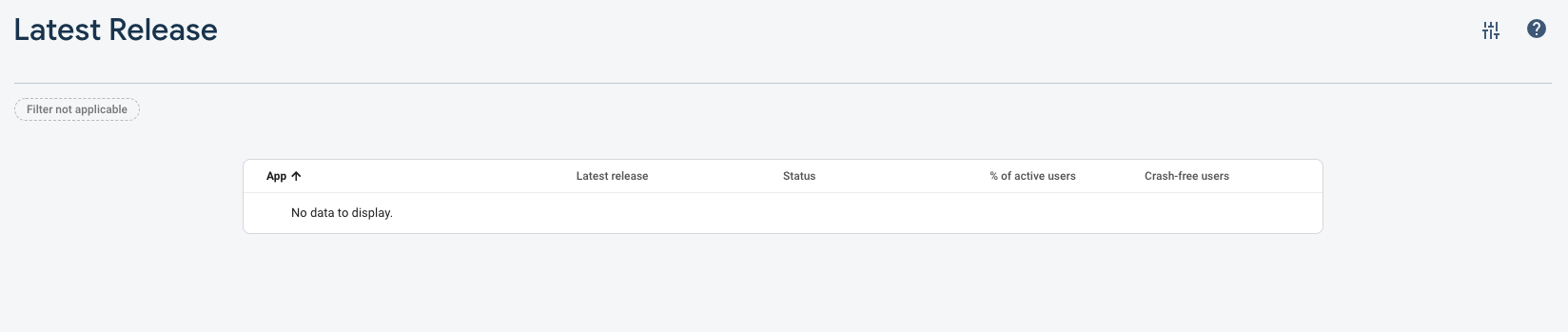
Not viable as I would have to create a Firebase Project and then give you permission to view the "Latest Release" section of Analytics.
Steps to set up and reproduce
app.module.ts
  providers: [
    ScreenTrackingService,
    UserTrackingService,
    { provide: APP_NAME, useValue: environment.firebase.projectId },
    { provide: APP_VERSION, useValue: environment.version }
  ],
environment.prod.ts
import { version } from '../../package.json';

export const environment = {
  production: true,
  firebase: {
    apiKey: '...',
    authDomain: 'myapp.firebaseapp.com',
    databaseURL: 'https://myapp.firebaseio.com',
    projectId: 'myapp',
    storageBucket: 'myapp.appspot.com',
    messagingSenderId: '...',
    appId: '...',
    measurementId: '...',
  },
  version
};
tsconfig.json
{
  "compilerOptions": {
    ...
    "resolveJsonModule": true
    ...
  }
}
Sample data and security rules
N/A
Debug output
N/A
* Screenshots *
Expected behavior
The docs state
If you provide APP_NAME and APP_VERSION (default: undefined) you will be able to track version adoption of your PWA.
After deploying my app and using it myself and having users visit the site for a day or two, I would expect to see data on the Analytics->Latest Release page.
Actual behavior
3-5 days after setting this up and deploying it, I'm not seeing any data in the Analytics->Latest Release page.
Am I missing a step here? Is this working for anyone else?
 Splaktar
All 9 comments
This is not working for me either on firebase 6.0.3 with latest angular and firebase versions. Although analytics in general is working with 6.0.3.
 JasonTenBarge
on 11 Oct 2020
JasonTenBarge
on 11 Oct 2020
I am seeing the same behavior as @JasonTenBarge in 6.0.3, Analytics is collecting data but this issue is still a problem as the "Latest Releases" page says "No data to display".
Splaktar
on 12 Oct 2020
Yeah, I think something changed with the App+Web Analytics API there; let me ping some folk on my side and see if we can get this sorted out.
 jamesdaniels
on 14 Oct 2020
jamesdaniels
on 14 Oct 2020
Yep, looks like this was moved to the screen_view event rather than a property at some point. Will experiment with a fix.
jamesdaniels
on 15 Oct 2020
Hoping this was addressed in 6.1.0-rc.3, I'm waiting for my test events to soak in now
jamesdaniels
on 14 Nov 2020
So while I appear to be logging everything as documented this appears to not be fixed still... Going to close here. Seems to be a console / backend bug 😞
jamesdaniels
on 18 Nov 2020
Thank you for investigating! OK is there a public issue tracking that issue or is this an internal issue? Do I need to open a support ticket?
Splaktar
on 19 Nov 2020
Please open a support ticket, feel free to send me the ID so I can track internally. Perhaps we can get a public ticket to track internal use of app_name and app_version on a screen_view event too. FWIW I'm also seeing that use of the provided screen_name and screen_class are pretty inconsistent in the console... which is a shame cause it took a lot of engineering effort to get everything looked up right in the Router code. I find that I often have to navigate to the GA pane of glass to see strings that make sense.
As these arguments are documented in the Firebase JS SDK types, perhaps it's worth filing an issue there too?
Frankly I burnt myself out on analytics a bit...
jamesdaniels
on 19 Nov 2020
I've just resorted to looking at my data from ScreenTrackingService in BigQuery, which is why I put a lot of effort into matching that Firebase Analytics schema.
jamesdaniels
on 19 Nov 2020
Related issues
 itisparas
·
3Comments
itisparas
·
3Comments
 StephenFluin
·
3Comments
StephenFluin
·
3Comments
 goekaypamuk
·
3Comments
goekaypamuk
·
3Comments
 jteplitz
·
3Comments
jteplitz
·
3Comments
 harrylincoln
·
3Comments
harrylincoln
·
3Comments
Most helpful comment
Yep, looks like this was moved to the screen_view event rather than a property at some point. Will experiment with a fix.