Angularfire: Angular 6 getDownloadURL() error can't catch
I'm facing issue when getDownloadURL() to no exist file.
Version info
Angular:"^6.0.2"
Firebase:"^5.0.4"
AngularFire:"^5.0.0-rc.10"
*Other (e.g. Ionic/Cordova, Node, browser, operating system):
Node: v9.11.1
*
How to reproduce these conditions
Failing test unit, Plunkr, or JSFiddle demonstrating the problem
const ref = this.storage.ref(`images/${fileName}`);
const sub = ref.getDownloadURL()
.subscribe( data => {
  sub.unsubscribe();
},
err => {
  console.log(err);
});
Debug output
I can get below error on console.----marked the project name.
GET https://firebasestorage.googleapis.com/v0/b/**/o/images%2F5b235f661d846a06747da60e 404 ()
FirebaseStorageError {code_: "storage/object-not-found", message_: "Firebase Storage: Object 'images/5b235f661d846a06747da60e' does not exist.", serverResponse_: "{↵ "error": {↵ "code": 404,↵ "message": "Not Found. Could not get object"↵ }↵}", name_: "FirebaseError"}
Expected behavior
Only get error message as:
FirebaseStorageError {code_: "storage/object-not-found", message_: "Firebase Storage: Object 'images/5b235f661d846a06747da60e' does not exist.", serverResponse_: "{↵ "error": {↵ "code": 404,↵ "message": "Not Found. Could not get object"↵ }↵}", name_: "FirebaseError"}
Actual behavior
Still throw below error since I have catch the error:
GET https://firebasestorage.googleapis.com/v0/b/**/o/images%2F5b235f661d846a06747da60e 404 ()
How can I know if the file is not exist? Or give a way to catch the error?
 FergusZhou
All 13 comments
According to this
https://stackoverflow.com/questions/43911080/return-the-download-url-of-a-file-uploaded-to-firebase/50448571#50448571
You can do the following
import { from } from 'rxjs';

const storageRef = firebase.app().storage().ref();

from(storageRef.child(this.storageUrl).getDownloadURL()).subscribe(
          download => );
It did work for me
 mohamedaboelmagd
on 20 Jun 2018
mohamedaboelmagd
on 20 Jun 2018
is it work @FergusZhou ?
 hiepxanh
on 21 Jun 2018
hiepxanh
on 21 Jun 2018
@mohamedaboelmagd Thanks for your kindly help. I still can get 404 error in console.
What I need is that catch the Firebase errors log and not output in console. I found that there is a similar issue https://github.com/angular/angularfire2/issues/595 here. It looks like it can't implement?
FergusZhou
on 21 Jun 2018
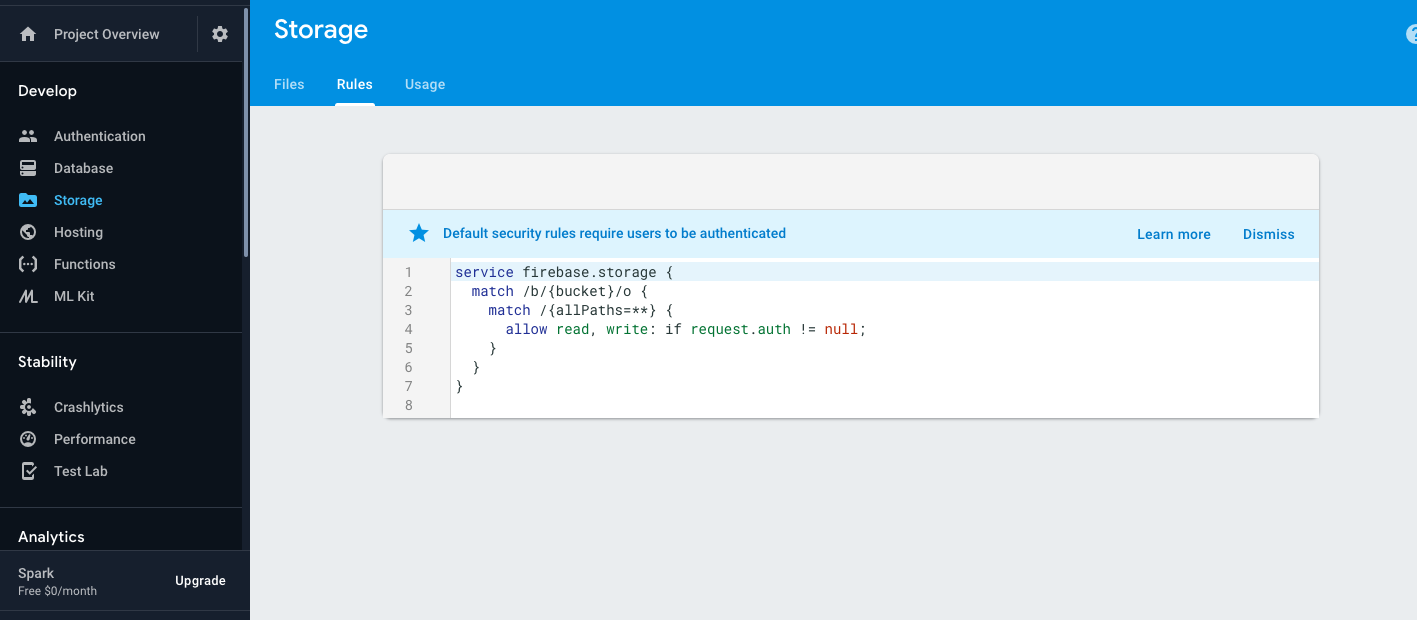
can you show your firebase console, I believe that your problem is. Your bucket not public for reading. You should change it like me @FergusZhou Fer
hiepxanh
on 21 Jun 2018
Actually I am facing the issue of properly handle 404 log message in web browser console, when I trying to getDownloadURL of none exist file in the firebase storage. The issue is very similar with Unable to keep Firebase exceptions from logging. We tried several ways to catch this error, but no lucky to find the solution.
We have fixed this by modified our code base. So I think that I am cool now.
Thanks for your guys help. @hiepxanh @mohamedaboelmagd
FergusZhou
on 21 Jun 2018
yeah, good to know that. Can you show us how can you catch that error? I'm facing that too. Maybe you can help me and someone else having the same problem ? @FergusZhou
hiepxanh
on 22 Jun 2018
Is there any known solution to this?
 rfreethy
on 27 Jun 2018
rfreethy
on 27 Jun 2018
Also facing this issue!!!
Tried the hardest to kill the 404 exceptions logged in the console. No luck. This is an actual issue. If the file doesn't exist, yes throw an exception, but don't log it regardless.
 KgotsoK
on 7 Jul 2018
KgotsoK
on 7 Jul 2018
+1
 ahayder
on 30 Sep 2018
ahayder
on 30 Sep 2018
This is the solution
https://stackoverflow.com/questions/49585742/catch-in-angularfire2-v5-error
ahayder
on 30 Sep 2018
Use finalize operator to unsubscribe, like this
  setAvatar(uid: string, file: File) {
    const profileRef = this.afs.doc(`users/${uid}`)
    return new Promise((resolve, reject) => {
      const path = `users/${uid}/${file.name}`
      const ref = this.storage.ref(path)
      const upload = ref.put(file)
      const sub = upload.snapshotChanges().pipe(
        finalize( async () => {
          try {
            const photoURL = await ref.getDownloadURL().toPromise()
            const updated = await profileRef.update({ photoURL })
            resolve({ photoURL })
          } catch (err) {
            reject(err)
          }
          sub.unsubscribe()
        })
      ).subscribe((data) => {
        console.log('storage: ', data)
      })
    })
  }
 guiseek
on 28 Jul 2019
guiseek
on 28 Jul 2019
@KgotsoK if it is matter to avoid 404 in console, Try check for the file or files u need in the directory before getDownloadURL() =>
import * as firebase from 'firebase/app';
defer(() => firebase.storage().ref(%%PATH%%).listAll())
      .pipe(delay(1000), skipWhile(%%CONDITION%%), repeat(), take(1))
      .tap(() => this.fireStorage.ref(%%PATH%%).getDownloadURL() ...etc);
 TarekMadady
on 4 Oct 2019
TarekMadady
on 4 Oct 2019
Hi, this is still an issue in Angular 9.
when writing a simple getDownloadUrl().toPromise().then().catch() the error is logged in the console.
It doesn't pose an experience problem since the cath() function handles the error, but it provides 404 error to the user which I would like to avoid.
Any solution?
 mikgross
on 13 Mar 2020
mikgross
on 13 Mar 2020
Related issues
 jteplitz
·
3Comments
jteplitz
·
3Comments
 StephenFluin
·
3Comments
StephenFluin
·
3Comments
 DennisSmolek
·
3Comments
DennisSmolek
·
3Comments
 harrylincoln
·
3Comments
harrylincoln
·
3Comments
 aucevica
·
3Comments
aucevica
·
3Comments
Most helpful comment
Hi, this is still an issue in Angular 9.
when writing a simple getDownloadUrl().toPromise().then().catch() the error is logged in the console.
It doesn't pose an experience problem since the cath() function handles the error, but it provides 404 error to the user which I would like to avoid.
Any solution?