Angularfire: FireStore timestampsInSnapshots
Version info
*Angular:5.2.10
*Firebase:4.13.0
**AngularFire:5.0.0-rc.5-next
Debug output
* Errors in the JavaScript console *
* Screenshots *
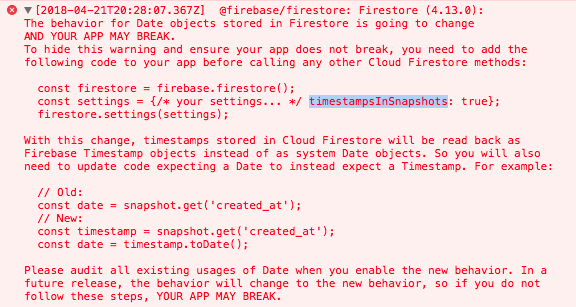
Steps to set up and reproduce
For now, i solve it like this;
https://firebase.google.com/support/release-notes/js
export class CoreModule {

  constructor( ...,
               private afs: AngularFirestore) {

    const settings = {timestampsInSnapshots: true};
    afs.app.firestore().settings(settings);

   ...
  }
}
 egaviriarestrepo
All 17 comments
I am not able to use your temporary solution when i have AngularFirestoreModule.enablePersistence()
Error i get:
ERROR Error: Firestore has already been started and its settings can no longer be changed. You can only call settings() before calling any other methods on a Firestore object.
 tgangso
on 24 Apr 2018
tgangso
on 24 Apr 2018
I have the same issue and the temporary fix didn't work for me
 software770-2
on 27 Apr 2018
software770-2
on 27 Apr 2018
Sorry it's working, just put it in the config too and had to remove it from there:
var firebaseConfig = {
...
timestampsInSnapshots: true
};
software770-2
on 27 Apr 2018
the same problem as @tgangso
 abdellatifLabr
on 30 Apr 2018
abdellatifLabr
on 30 Apr 2018
@tgangso
I have the same issue here.
Please have more details of how is it working. I've checked FirebaseAppConfig interface
and it seems not having "timestampsInSnapshots"
export interface FirebaseAppConfig {
apiKey?: string;
authDomain?: string;
databaseURL?: string;
storageBucket?: string;
messagingSenderId?: string;
projectId?: string;
}
I use the code below:
AngularFireModule.initializeApp({...firebaseconfig, timestampsInSnapshots: true}),
and it's not working. Please let me know how to add correct config to it. Thank you.
 nathanfan46
on 2 May 2018
nathanfan46
on 2 May 2018
try something like this:
@NgModule( {
imports: [
...,
AngularFireModule.initializeApp( environment.firebase, 'XXX' ),
],
declarations: [
...
],
providers: [
...
]
} )
export class CoreModule {
constructor( @Optional() @SkipSelf() parentModule: CoreModule,
private afs: AngularFirestore ) {
const settings = { timestampsInSnapshots: true };
afs.app.firestore().settings( settings );
...
}
}
if u need, use AppModule instead of CoreModule
egaviriarestrepo
on 2 May 2018
@egaviriarestrepo
Thank you, but my issue is that our app need to enable offline support.
So if I add "AngularFirestoreModule.enablePersistence(),"
I will get this error:
console.error: Unhandled Promise rejection: Firestore has already been started and its settings can no longer be changed. You can only call settings() before calling any other methods on a Firestore object.
`
@NgModule( {
imports: [
...,
AngularFireModule.initializeApp( environment.firebase, 'XXX' ),
AngularFirestoreModule.enablePersistence(),
],
declarations: [
...
],
providers: [
...
]
} )
export class CoreModule {
constructor( @Optional() @SkipSelf() parentModule: CoreModule,
private afs: AngularFirestore ) {
const settings = { timestampsInSnapshots: true };
afs.app.firestore().settings( settings );
...
}
}
`
nathanfan46
on 2 May 2018
you can try, but i dont know if it work :
    afs.app.firestore().settings( settings );
    afs.app.firestore().enablePersistence();
and comment:
AngularFirestoreModule.enablePersistence()
egaviriarestrepo
on 2 May 2018
@egaviriarestrepo
Thank you, it works.
Import AngularFirestoreModule instead of AngularFirestoreModule.enablePersistence() then it's working.
nathanfan46
on 2 May 2018
@egaviriarestrepo Thank you made it work also like @nathanfan46 sais you have to remove enablePersistence from module load.
tgangso
on 2 May 2018
This solution isn't working for me. I've modified my app.module.ts to look like this:
import { AngularFirestoreModule, AngularFirestore } from 'angularfire2/firestore';
...
  imports: [
    ...,
    AngularFireModule.initializeApp(environment.firebase, 'test-app'),
    AngularFirestoreModule
  ]
...
export class AppModule {
  constructor( @Optional() @SkipSelf() parentModule: AppModule,
                 private afs: AngularFirestore ) {

      const settings = { timestampsInSnapshots: true };
      afs.app.firestore().settings( settings );
    }
}
But I get the error error TS2339: Property 'app' does not exist on type 'AngularFirestore'.
 ziftytodd
on 4 May 2018
ziftytodd
on 4 May 2018
@ziftytodd Try afs.firestore.settings({timestampsInSnapshots: true});, that's what worked for me when I got that error.
 pshields
on 4 May 2018
pshields
on 4 May 2018
Just
import { AngularFirestoreModule, AngularFirestore } from 'angularfire2/firestore';
in your app.module
then also in your app.module
export class AppModule {
   constructor(private afs: AngularFirestore) {
    afs.firestore.settings({
      timestampsInSnapshots: true,
    });
    afs.firestore.enablePersistence();
  }
 }
And we are fine since the dependency injector will always inject the configured instance
thanks for all the suggestions. This one is working for me
(Angular 6)
 SaHeinem
on 11 May 2018
SaHeinem
on 11 May 2018
Fixed in angularfire2@next
 jamesdaniels
on 13 May 2018
jamesdaniels
on 13 May 2018
Thank you so much @SaHeinem , worked well for me!!!
 suvedhaGanapathy
on 18 May 2018
suvedhaGanapathy
on 18 May 2018
and if I have active AngularFireAuthModule
imports: [
...
AngularFireModule.initializeApp(firebaseConfig),
// AngularFirestoreModule.enablePersistence(),
AngularFireAuthModule,
...
],
 josejaner
on 23 May 2018
josejaner
on 23 May 2018
export class AppModule {
constructor(private afs: AngularFirestore) {
afs.firestore.settings({
timestampsInSnapshots: true,
});
afs.firestore.enablePersistence();
}
}
Doesn't work for me with [email protected].
I get:
"ERROR Error: Uncaught (in promise): FirebaseError: [code=failed-precondition]: Firestore has already been started and persistence can no longer be enabled. You can only call enablePersistence() before calling any other methods on a Firestore object"
The same rearranging to enable persistence before applying settings: "Firestore already started, and settings cannot be changed anymore..."
I'm in a loop and cannot update to >rc.7 due to other dependencies in project not yet updated to use firebase >5.0.0
Any help?
 pdela
on 23 May 2018
pdela
on 23 May 2018
Related issues
 jnupeter
·
3Comments
jnupeter
·
3Comments
 Maistho
·
3Comments
Maistho
·
3Comments
 Sun3
·
3Comments
Sun3
·
3Comments
 sharomet
·
3Comments
sharomet
·
3Comments
 cre8
·
3Comments
cre8
·
3Comments
Most helpful comment
you can try, but i dont know if it work :
and comment:
AngularFirestoreModule.enablePersistence()