Angular2-jwt: Authorization header not being sent - Angular 5
I am having this same issue consistently in a prod environment using Angular 5 but It works completely fine locally!
I installed using this command: npm install @auth0/angular-jwt
For a tl;dr - I was previously using Angular 4.4.6 with angular2-jwt, but now that http is deprecated, I am using HttpClient with this newer version of angular-jwt.
Here is what I have done:
My app.module.ts looks as follows (showing both the inline function and a custom factory syntax that I tried)
// app.module.ts
import { NgModule } from '@angular/core';
import { HttpClientModule } from '@angular/common/http';
import { JwtModule, JWT_OPTIONS } from '@auth0/angular-jwt';
import { TokenService } from './_services/token.service';

export function jwtOptionsFactory(tokenService) {
  return {
    tokenGetter: () => {
      return tokenService.get();
    },
    whitelistedDomains: ['budgetivity.com', 'budgetivity.local']
  };
}

@NgModule({
  declarations: [
    AppComponent
  ],
  imports: [
    ...
    HttpClientModule,
    JwtModule.forRoot({
      config: {
        tokenGetter: () => {
          return sessionStorage.getItem('token');
        },
        whitelistedDomains: ['budgetivity.com', 'budgetivity.local']
      }
      // jwtOptionsProvider: {
      //   provide: JWT_OPTIONS,
      //   useFactory: jwtOptionsFactory,
      //   deps: [TokenService]
      // }
    }),
I am using full IIS locally with my host file pointing to 127.0.0.1 for budgetivity.local
When I run locally, I am building for dev and I use the ng-build command and my environment.ts looks as follows:
export const environment = {
    ...
  baseUrl: 'http://budgetivity.local',
    ...
};
When I build for prod I use ng build --env=prod and my environment.prod.ts looks as follows:
export const environment = {
    ...
  baseUrl: 'https://www.budgetivity.com',
    ...
};
But - when running a ng-build --prod command I get an error if I am using the function syntax instead of the custom service syntax.
"Error encountered resolving symbol values statically. Function calls are not supported."
So when using the ng-build --prod command I must switch the code to only use the custom service syntax.
When running locally, my requests are sucessfully sent to my local API and have an appropriate Authorization: Bearer XXXX (token)
When built for and deployed to Prod, the requests do not have an Authorization header at all.
I have even built for dev but used the Prod baseUrl - when that is deployed to Prod that also does not send the Authorization header in any of the requests.
For sake of completeness here is my tokenService and a method that calls my API:
// token.service.ts
import { Injectable } from '@angular/core';

@Injectable()
export class TokenService {

  public get(): string {
    return sessionStorage.getItem('token');
  }

  public set(token: string): void {
    sessionStorage.setItem('token', token);
  }

  public deleteToken(): void {
    sessionStorage.removeItem('token');
  }
}
// session.service.ts
import { environment } from '../../environments/environment';
...
  public isSessionValid(): Observable<any> {
    return this.http.get(`${environment.baseUrl}/api/v1/sessions`)
      .catch((error: Response) => {
        return Observable.throw(error);
      });
  }
...
Here is what my local call looks like:
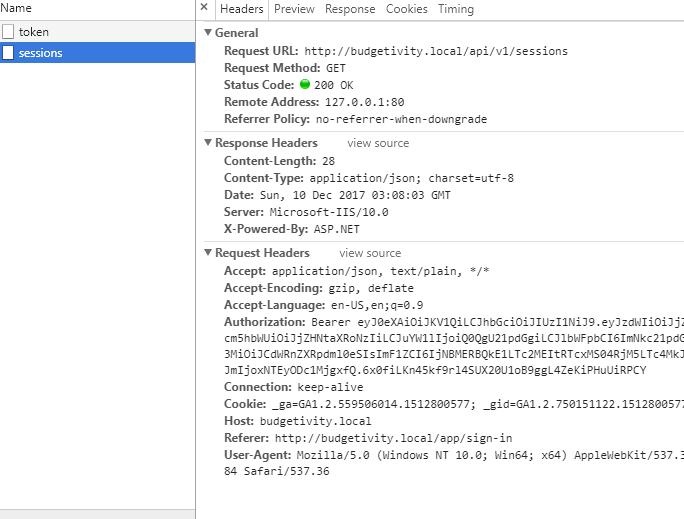
and here is what it looks like on Prod:

 alfalfastrange
All 18 comments
For what it's worth, I ended up ditching this library altogether.
For determining if a user is still logged in instead of decoding the token on the front end I send a request to my API to a SessionsController that is authorized and simply returns Ok if the authorization attribute logic passes - determines that the token exists in the DB, hasn't expired and hasn't been administratively deactivated. This is much safer and gives the server control of determining if the session is actually valid or not. If it's not valid it returns a 401 and my guard informs the user and signs them out.
// secure.guard.ts
...
@Injectable()
export class SecureGuard implements CanActivate {
constructor(private router: Router,
private alertService: AlertService,
private sessionService: SessionService) { }
public canActivate() {
return this.serverSessionIsValid();
}
public serverSessionIsValid(): Observable<boolean> {
return Observable.create((observer) => {
this.sessionService.isSessionValid().subscribe(
() => {
observer.next(true);
observer.complete();
},
() => {
observer.next(false);
observer.complete();
this.sessionService.clearSession();
this.router.navigate(['/sign-in']);
this.alertService.alert(AlertType.error, 'Your session has expired, you will need to log in.');
});
});
}
...
For adding the authorization header, I just add it to the necessary calls like so:
// session.service.ts
...
public get authHeader(): string {
return `Bearer ${sessionStorage.getItem('token')}`;
}
...
public isSessionValid(): Observable<any> {
return this.http.get(`${environment.baseUrl}/api/v1/sessions`, {
headers: new HttpHeaders().set('Authorization', this.authHeader)
})
.catch((error: Response) => {
return Observable.throw(error);
});
}
...
I am running into same problem.
 mamdi52
on 31 Jan 2018
mamdi52
on 31 Jan 2018
Me too 😢
 eddiejaoude
on 1 Feb 2018
eddiejaoude
on 1 Feb 2018
Me three 😭
 samsop
on 4 May 2018
samsop
on 4 May 2018
+1
 nickob2000
on 4 May 2018
nickob2000
on 4 May 2018
Same here
 abalone49
on 22 May 2018
abalone49
on 22 May 2018
+1
 G-Nantel
on 30 May 2018
G-Nantel
on 30 May 2018
Hey! I had the same issue where token wasn't being passed to the server on production. But my issue got resolved by updating the whitelistedDomains array.
JwtModule.forRoot({
      config: {
        tokenGetter: tokenGetter,
        whitelistedDomains: ['localhost:8000','prod-1.app.io','api.prod-2.app.io'],
        authScheme: 'JWT '
      }
    })
 hemangsk
on 12 Jun 2018
hemangsk
on 12 Jun 2018
I'm also getting same problem
 ahsishphp
on 27 Jun 2018
ahsishphp
on 27 Jun 2018
I'm also experiencing the same issue
 lucasalvarezlacasa
on 27 Jun 2018
lucasalvarezlacasa
on 27 Jun 2018
I am also having the same issue on production with Angular 5. Any solutions?
 gitSambhal
on 13 Jul 2018
gitSambhal
on 13 Jul 2018
Solutions that worked for me:
- Use interceptor https://stackoverflow.com/a/45363296
- Use HttpClient module instead of Http
gitSambhal
on 19 Jul 2018
HT to @sambhalgithub. If you're using Angular 6 you have to switch from Http to HttpClient or the authorization header is not appended.
Auth0, it would help if you updated the Readme.MD to specify this.
 jelling
on 11 Sep 2018
jelling
on 11 Sep 2018
For anyone still getting this issue when building for production:
I was using a regex replace to remove the protocol from the environment variable. After removing the regex the problem vanished.
// apiEndpoint:https://foo.com
// whitelistedDomains: [ environment.apiEndpoint.replace(/^https?\:\/\//i, '') ]
// apiHost: foo.com
whitelistedDomains: [ environment.apiHost ]
 ghry5
on 27 Sep 2018
ghry5
on 27 Sep 2018
Just configure your app module by this way:
...
import {JwtInterceptor, JwtModule} from '@auth0/angular-jwt';
...
@NgModule({
imports: [
...
JwtModule.forRoot({
config: {
tokenGetter: () => localStorage.getItem('varName'),
whitelistedDomains: ['foo.bar']
}
})
],
providers: [
{ provide: HTTP_INTERCEPTORS, useClass: JwtInterceptor, multi: true}
...
],
...
})
 oyepez003
on 14 Feb 2019
oyepez003
on 14 Feb 2019
Hey! I had the same issue where token wasn't being passed to the server on production. But my issue got resolved by updating the whitelistedDomains array.
JwtModule.forRoot({
      config: {
        tokenGetter: tokenGetter,
        whitelistedDomains: ['localhost:8000','prod-1.app.io','api.prod-2.app.io'],
        authScheme: 'JWT '
      }
    })
Thaaanks @hemangsk
whitelistedDomains should be without "http://" or "https://", this was my issue
 youssef-ali
on 13 Jun 2019
youssef-ali
on 13 Jun 2019
Heyy @woloski i am still getting this error while ng build --aot
ERROR in Error during template compile of 'AppModule'
Function expressions are not supported in decorators in 'ɵ0'
'ɵ0' contains the error at src\app\app.module.ts(228,22)
Consider changing the function expression into an exported function
at
JwtModule.forRoot({
config: {
tokenGetter: () => localStorage.getItem('token'),
whitelistedDomains: ['localhost:4200','domain','domain'],
// authScheme: 'JWT '
}
}),
please help me
 riyaagarwal2111
on 18 Jun 2019
riyaagarwal2111
on 18 Jun 2019
Thaaanks @youssef-ali
whitelistedDomains should be without "http://" or "https://", this was my issue
 evthulasiram
on 12 Jul 2019
evthulasiram
on 12 Jul 2019
Related issues
 JaxonWright
·
4Comments
JaxonWright
·
4Comments
 mahendra2125
·
4Comments
mahendra2125
·
4Comments
 tekkudoc
·
5Comments
tekkudoc
·
5Comments
 hang321
·
4Comments
hang321
·
4Comments
 sfabriece
·
4Comments
sfabriece
·
4Comments
Most helpful comment
Hey! I had the same issue where token wasn't being passed to the server on production. But my issue got resolved by updating the whitelistedDomains array.