Angular: Function calls are not supported in decorators when fullTemplateTypeCheck is not specified and @dynamic has no effect
I'm submitting a...
[X] Regression (a behavior that used to work and stopped working in a new release)
[ ] Bug report
[ ] Performance issue
[ ] Feature request
[ ] Documentation issue or request
[ ] Support request => Please do not submit support request here, instead see https://github.com/angular/angular/blob/master/CONTRIBUTING.md#question
[ ] Other... Please describe:
Current behavior
When building a library and specifying both skipTemplateCodegen and strictMetadataEmit to true, and you try to call a method inside the ngModule decorate example RouterModule.forChild([]) this will cause a compilation error Function calls are not supported in decorators but 'RouterModule' was called.
When adding fullTemplateTypeCheck to true the error is not emitted.
Also, @dynamic seems not to have any effect in this particular case.
Expected behavior
No error emitted, or at least that it can be suppressed with the @dynamic.
I also expect that setting fullTemplateTypeCheck doesn't have any effect here as this flag relates more to binding in templates.
Minimal reproduction of the problem with instructions
Create a file example
import { NgModule } from '@angular/core';
import { RouterModule } from '@angular/router';

@NgModule({
  imports: [
    RouterModule.forChild([])
  ]
})
export class LibModule { }
Have tsconfig set with the following options;
  "angularCompilerOptions": {
    "skipTemplateCodegen": true,
    "strictMetadataEmit": true
  }
When transpiling this will emit an error;
Error during template compile of 'LibModule' Function calls are not supported in decorators but 'RouterModule' was called.
Note when adding "fullTemplateTypeCheck": true no error is emitted. (Though this is kinda weird as I don't think this shouldn't have any effect)
Reproduction repo: https://github.com/alan-agius4/angular-issue-23609
What is the motivation / use case for changing the behavior?
No error was emitted in NG 5
Environment
Angular version: 6.0.0-rc-6
Related issues:
https://github.com/dherges/ng-packagr/issues/822
https://github.com/dherges/ng-packagr/issues/778
https://github.com/dherges/ng-packagr/issues/727
https://github.com/dherges/ng-packagr/issues/765
https://github.com/dherges/ng-packagr/issues/767
https://github.com/dherges/ng-packagr/issues/885
 alan-agius4
All 106 comments
Added a small repo reproducing this.
From my quick debug, It looks like the static_reflector is not resolving members / statics properly. As for instance the RouterModule should have a forChild member.

alan-agius4
on 30 Apr 2018
I have this problem too. I tried fullTemplateTypeCheck in lib/tsconfig.json and it made no difference.
My repro:
git clone https://github.com/johnpapa/angular-ngrx-data.git ngrx-data-FAIL
cd ngrx-data-FAIL
git checkout ng-v6-FAIL
npm install
Now attempt to build the ngrx-data library
npm run build-lib
The build fails. The console says
BUILD ERROR
Error during template compile of 'NgrxDataModule'
Function calls are not supported in decorators but 'StoreModule' was called.
...
Comment out the two ngrx imports in NgrxDataModule (leaving the FooModule) and try building again.
This time the build succeeds and generates a package in dist.
Note that FooModule is just fine.
 wardbell
on 5 May 2018
wardbell
on 5 May 2018
Regarding Ward's repro: @wardbell
The build will succeed / fail depending on the combination of angularCompilerOptions. Added one example in this repro
Build success
    "skipTemplateCodegen": true,
    "strictMetadataEmit": true,
    "fullTemplateTypeCheck": true
    "skipTemplateCodegen": false,
    "strictMetadataEmit": false
    "skipTemplateCodegen": false,
    "strictMetadataEmit": true,
    // fullTemplateTypeCheck omitted (= default value)
Build failures
    "skipTemplateCodegen": true,
    "strictMetadataEmit": true,
    // fullTemplateTypeCheck omitted (= default value)
    "skipTemplateCodegen": true,
    "strictMetadataEmit": false
    // fullTemplateTypeCheck omitted (= default value)
Observation
In Ward's example, setting "skipTemplateCodegen": true requires that "fullTemplateTypeCheck": true is also enabled to get a success build from ngc.
Side notes / other thoughts
My experience is that the issue goes down to "everything statically analyzable for AoT" (see "need for static value resoltion" in the compiler docs). Imo, something is broken around the strictMetadataEmit option or my understanding of the option is horribly broken 😆
From my experience I can tell that the issue is often produced in static forRoot(): ModuleWithProviders, sometimes depending on one line of code that becomes or becomes not "statically analyzable". Of course, I don't have reliable repros and I also don't want to speculate on some vague memories of code that I've seen working / non-working.
Can ngc improve the error message?
What will help that ngc prints out the line number in the source code that triggers the error.
 dherges
on 6 May 2018
dherges
on 6 May 2018
Thanks, @dherges, for figuring out a combination that succeeds. I'm clearly flailing with no clue what these flags are doing to help or hurt.
This issue should remain open until Angular makes these choices intelligible and documents appropriately.
wardbell
on 7 May 2018
Can anyone tell a nub what should I do for now to workaround this issue?
ng build --prod
I'm using ngx-progressbar
and i get : "Function calls are not supported in decorators but 'NgProgressModule' was called."
 iamimbohacker
on 9 May 2018
iamimbohacker
on 9 May 2018
Are you using the latest angular cli, with a library tsconfig? If not I
suggest to either update to that or update to ng-packagr v3.0.0-rc.3
On Wed, 09 May 2018 at 15:47, iamimbohacker notifications@github.com
wrote:
Can anyone tell a nub what should I do for now to workaround this issue?
I receive it when ng build --prod
i'm using ngx-progressbar
and i get : "Function calls are not supported in decorators but
'NgProgressModule' was called."—
You are receiving this because you authored the thread.
Reply to this email directly, view it on GitHub
https://github.com/angular/angular/issues/23609#issuecomment-387743732,
or mute the thread
https://github.com/notifications/unsubscribe-auth/AQv-WtOWkvdrrvf6luk2S0wYaFWeLaejks5twvNugaJpZM4TsqoI
.
alan-agius4
on 9 May 2018
I'm using Angular CLI 6.0.0 only. I do not use ng-packagr
iamimbohacker
on 9 May 2018
@dherges I have these

but I still get the error when I use the module in AOT
 MurhafSousli
on 9 May 2018
MurhafSousli
on 9 May 2018
For more information on why the metadata is elided, as shown in @alan-agius4's screenshot I have a detailed description over at dherges/ng-packagr#860.
 JoostK
on 11 May 2018
JoostK
on 11 May 2018
For the record, I have this problem with latest angular and ng-packagr (3.0.0) and the three aforementioned parameters are set to true (this is the default when generating a library with angular-cl).
So I'm not sure the PR you made @JoostK actually fixes this problem… or something new appeared with latest versions.
This is really a pain in the ass because there is no way to understand why something works or not (at one point I made it work, but I am unable to know why or how I can go back to this working state), I second @dherges request to have better error output…
EDIT: I found the source of my problem, it was a wrong paths declaration in tsconfig preventing metadata to be found. Neverttheless, we are really missing something to diagnose those problems…
 victornoel
on 29 May 2018
victornoel
on 29 May 2018
I think I had the same issue. In my case the metadata of the used library was not generated correctly:
``` library.metadata.json looked like this
"metadata": {}
Then I changed the public_api.ts in the library project:
from
export * from './lib/auth';
to
export * from './lib/auth/index';
```
Now it works fine. Maybe this helps to resolve the issue?
 ReToCode
on 5 Jun 2018
ReToCode
on 5 Jun 2018
Why the function calls are not supported in decorators? What impacts it may cause? Its not clear of the thought process behind it.. The available docs doesn't provide much details.. For e.g. The compiler throws error for the below code.
@NgModule({})
export class MyStoreModule {
static forRoot(): ModuleWithProviders {
return StoreModule.forRoot(reducers);
}
constructor(private store: Store
console.log("initialized application store ---> ", this.store);
}
}
@NgModule({
imports: [
StateProviderModule.forRoot(),
],
providers: [
]
})
export class ABCModule { }
Error during template compile of 'ABCModule'
Function calls are not supported in decorators but 'StoreModule' was called in 'MyStoreModule'
'MyStoreModule' calls 'StoreModule'.
A direct referencing of these classes in ABCModule resolves the issues.. But will be against the standard of 'separation of concerns'. Any thoughts??
 snarun
on 14 Jun 2018
snarun
on 14 Jun 2018
I am also facing this issue, however, I have a slightly different case:
I am defining my Routes as a tree, to show them in a hierarchical structure in a sidenav.
For the RouterModule instead, I need to provide a flattened version of this tree.
Example:
export const ROUTE_TREE: RouteTree = [
{
path: PATH_PARENT,
component: ParentComponent,
treeChildren: [
{
path: PATH_CHILD_1,
component: ChildComponent,
data: {
num: 1
},
},
path: PATH_CHILD_2,
component: ChildComponent,
data: {
num: 2
},
}
]
}
];
should become:
export const ROUTE_TREE: RouteTree = [
{
path: PATH_PARENT,
component: ParentComponent
},
{
path: PATH_CHILD_1,
component: ChildComponent,
data: {
num: 1
},
},
path: PATH_CHILD_2,
component: ChildComponent,
data: {
num: 2
},
}
];
for the RouterModule.
As I don't want to change the Routes twice, if I change, add or remove something, I wrote a "flattening" function for my tree and use it in the RouterModuleforRoot-Method.
JIT works fine, but AOT gives me an error, saying Function calls are not supported in decorators.
I will probably try to go the other way and define the Routes flat and try to convert it to a tree programatically.
 Springrbua
on 18 Jun 2018
Springrbua
on 18 Jun 2018
@Springrbua I think in your case an error is actually the correct behaviour. If you are using a flattening function inside a decorator.
alan-agius4
on 18 Jun 2018
@alan-agius4 I was expecting that, but I don't really understand why. Also, I can't find a simple workaround for my case...
Springrbua
on 18 Jun 2018
That is because metadata needs to be resolved at compile time, not runtime.
alan-agius4
on 18 Jun 2018
@alan-agius4 thanks for the information, now that I know it, it seems obvious...
Springrbua
on 18 Jun 2018
Any update on this? I'm having quite a few errors here: https://github.com/formly-js/ngx-formly/issues/996.
 danielmhair
on 27 Jun 2018
danielmhair
on 27 Jun 2018
Would luuuuv to see this fixed :-)
 maurei
on 29 Jun 2018
maurei
on 29 Jun 2018
I wanted to comment again, because I have came into this error for the 5th time while updating all my demo apps, main app and libraries (3 demos, 1 main app, and 3 libraries). I receive these errors in various modules. One was referenced above (formly-js/ngx-formly#996) and then another that I just receive from @ngrx/core, where it says the same error:
Error during template compile of 'CoreStoreModule'
Function calls are not supported in decorators but 'StoreModule' was called.
The other 3 are from forRoot methods in my own modules. The common theme with all these, is that they all use InjectionTokens. I'm quite convinced that this is only related to modules that use forRoot methods providing a value for an InjectionToken.
This is forcing me to copy all that is in those forRoot methods and paste them into the module I need them in. This is becoming very taxing, especially when those InjectionTokens are from libraries I don't maintain.
Anyway, I really appreciate all the effort that has gone into resolving this error. If there is anything I can do to help with this, I'm open to help. I'm not really sure what to do, to help with this one. Seems like its pinned down on what is happening. Hopefully it can get resolved soon.
danielmhair
on 29 Jun 2018
After moving the providers from forRoot for StoreModule, the same happened to EffectsModule.forRoot (@ngrx/effects) and StoreDevtoolsModule.instrument() (@ngrx/store-devtools).
Looks like EffectsModule and StoreDevtoolsModule have InjectionTokens as well.
This error turned a clean module file:
@NgModule({
imports: [
StoreModule.forRoot(prmCoreActionReducers, { initialState: initialPrmCoreState }),
EffectsModule.forRoot([ApiEffects, GridEffects]),
StoreDevtoolsModule.instrument(),
],
})
export class PrmCoreStoreModule { }
Into a mess:
@NgModule({
providers: [
// STORE DEV TOOLS MODULE instrument() Temporary Fix
DevtoolsExtension,
DevtoolsDispatcher,
StoreDevtools,
{
provide: INITIAL_OPTIONS,
useValue: {},
},
{
deps: [REDUX_DEVTOOLS_EXTENSION, STORE_DEVTOOLS_CONFIG],
provide: IS_EXTENSION_OR_MONITOR_PRESENT,
useFactory: createIsExtensionOrMonitorPresent,
},
{
provide: REDUX_DEVTOOLS_EXTENSION,
useFactory: createReduxDevtoolsExtension,
},
{
deps: [INITIAL_OPTIONS],
provide: STORE_DEVTOOLS_CONFIG,
useFactory: createConfig,
},
{
deps: [StoreDevtools],
provide: StateObservable,
useFactory: createStateObservable,
},
{
provide: ReducerManagerDispatcher,
useExisting: DevtoolsDispatcher,
},
// EFFECTS MODULE forRoot Temporary Fix
EffectsRunner,
EffectSources,
Actions,
ApiEffects,
GridEffects,
{
deps: [ApiEffects, GridEffects],
provide: ROOT_EFFECTS,
useFactory: createSourceInstances,
},
// STORE MODULE forRoot Temporary Fix
{ provide: _INITIAL_STATE, useValue: initialPrmCoreState },
{
deps: [_INITIAL_STATE],
provide: INITIAL_STATE,
useFactory: _initialStateFactory,
},
{ provide: _INITIAL_REDUCERS, useValue: prmCoreActionReducers },
{
provide: _STORE_REDUCERS,
useExisting: prmCoreActionReducers instanceof InjectionToken ? prmCoreActionReducers : _INITIAL_REDUCERS,
},
{
deps: [Injector, _INITIAL_REDUCERS, [new Inject(_STORE_REDUCERS)]],
provide: INITIAL_REDUCERS,
useFactory: _createStoreReducers,
},
{
provide: META_REDUCERS,
useValue: [],
},
{
provide: _REDUCER_FACTORY,
useValue: combineReducers,
},
{
deps: [_REDUCER_FACTORY, META_REDUCERS],
provide: REDUCER_FACTORY,
useFactory: createReducerFactory,
},
ACTIONS_SUBJECT_PROVIDERS,
REDUCER_MANAGER_PROVIDERS,
SCANNED_ACTIONS_SUBJECT_PROVIDERS,
STATE_PROVIDERS,
STORE_PROVIDERS,
],
})
export class PrmCoreStoreModule { }
As a note, I am now hitting another module with a forRoot that uses Angular's APP_INITIALIZER InjectionToken from ConfigModule from the package @ngx-config/core and have had to do the same thing like the above modules.
danielmhair
on 29 Jun 2018
+1
For now, it's fine to leave provide configuration inside the module which is using my lib, but in the future would be great if someone could come and say the status of this fix.
 guilhermewaess
on 2 Jul 2018
guilhermewaess
on 2 Jul 2018
Any update ? It's blocking our migration from angular 5 to 6. Our libraries contains 3 forRoot. I don't like the solution to copy the forRoot code of the external libraries to our project.
 jfpicard1
on 3 Jul 2018
jfpicard1
on 3 Jul 2018
Agreed. We have a task to revert once this is fixed.
danielmhair
on 3 Jul 2018
@jfpicard1, that flag is not related to angular compiler and this error.
alan-agius4
on 4 Jul 2018
I had a similar error which only happened using yarn link.
I fixed it by installing from the source.
 shairez
on 8 Jul 2018
shairez
on 8 Jul 2018
+1 Any update on this issue?
 lechu1985
on 18 Jul 2018
lechu1985
on 18 Jul 2018
@shairez I wonder if it is that issue. My problem is, due to my mono-repo, I need to link my libraries to my application via npm link. Hopefully there is another solution.
danielmhair
on 18 Jul 2018
From the reference to ngx-api-utils, perhaps these are related to only tokens that are not using the options in the InjectionToken providedIn and factory?
See https://github.com/ngx-api-utils/ngx-api-utils/commit/276f50afb7d2d6884047adc78b5888026080574e
danielmhair
on 20 Jul 2018
@danielmhair I have followed your comment above https://github.com/angular/angular/issues/23609#issuecomment-401456878 and refactor the code to avoid having forRoot that provides InjectionToken and it worked, of course loosing the convenience of the forRoot that I really miss!
I wanted to say that I didn't get the chance to dig deeper and confirm is it the InjectionToken alone or there is something else e.g. there is a RegExp passed through those https://github.com/ngx-api-utils/ngx-api-utils/commit/276f50afb7d2d6884047adc78b5888026080574e#diff-c70648b85de41ca753b77ffeb09409a0L38
I really hope this issue gets fixed as soon as possible or reasonable amount of light on the topic gets to us!
 smoke
on 20 Jul 2018
smoke
on 20 Jul 2018
Yeah, I do miss the forRoot for sure. I really hate this bypass. Everything has worked with this solution, except for one. I'm still tracking it down, but it's with ngrx, it doesn't seem to work.
In fact, it's erroring out from what I posted here: https://github.com/angular/angular/issues/23609#issuecomment-401460241. Perhaps I didn't copy everything over from the forRoots of the following:
StoreModule.forRoot(prmCoreActionReducers, { initialState: initialPrmCoreState }),
EffectsModule.forRoot([ApiEffects, GridEffects]),
StoreDevtoolsModule.instrument(),
Basically, the redux devtools chrome extension is showing that there is no redux active, meaning StoreDevtoolsModule.instrument is not working properly. And the others I use in order to do GETs for my grid and my grids are not displaying any information. So I'm assuming, currently, that it stems from not using the forRoot. We shall see.
danielmhair
on 20 Jul 2018
I recommend to not use symlinks (and npm link and yarn link). I prefer to copy folders to node_modules - it is the same was npm install does when it unpacks the tarballs.
dherges
on 22 Jul 2018
You said not to use yarn link. I assume that is the same as yarn add @my/lib@link:../dist/my-lib is the same, right? This adds to package.json "@my/lib": "link:../dist/my-lib". That is why I said I use npm link in my previous comment. It seems like it results in the same thing. It's just convenient this way so when I run yarn, it will add those links.
So you just have an automation process to copy the folders over, @dherges?
Also, what about when your build process updates dist, it will have to copy over dist every time, which is why I preferred linking because you didn't have to copy anything. And what about ensuring dependencies of other libraries?
For example, I have:
Lib 1
Lib 2 depends on lib 1
Lib 3 depends on lib 1
One demo for each lib
My main app depends on lib 1, lib 2, and lib 3.
I suppose I will just have a mapping to their dependencies. And then when I publish, just manually add those to the package.json.
And have a post install script to copy those over. Or postbuild script.
danielmhair
on 22 Jul 2018
@dherges what about installing the dependencies of my library in my app?
It will work well to copy the library from dist/my-lib to my-app/node_modules/@my/lib, but what about installing the dependencies of my-lib in my-app/node_modules?
danielmhair
on 23 Jul 2018
Okay, @dherges I found out the best way to do this. In dist/my-lib, I run npm pack, then run yarn add @my/lib@file:../dist/my-lib/my-lib-3.0.0.tgz on my-app, which copies over the dist folder (just like copying over the files), but I'm still getting this error, so in my case, yarn link is not the issue.
danielmhair
on 23 Jul 2018
Any update on this issue? This seems to be a core angular idiom and has been broken for almost 3 months now. Why hasn't this been marked as a blocking bug and prioritized before new feature implementations? Projects are implementing rather ugly work arounds for this and this has been a blocker for migration to Angular 6 for many,
 mkdropbox
on 23 Jul 2018
mkdropbox
on 23 Jul 2018
The problem with index.ts files not being followed should be fixed in 6.0.8 release (see https://github.com/angular/angular/pull/22856).
I don't know if some other things creates the symptoms described it here though, it would be interesting that people test.
victornoel
on 23 Jul 2018
I found another workaround that isn't as ugly as my prior workaround. You can see where I found this, here:
https://github.com/dschnelldavis/angular2-json-schema-form/issues/273#issuecomment-407184242. So, here is my workaround for the example I gave above with ngrx.
export const storeModuleForRoot: ModuleWithProviders = StoreModule.forRoot(prmCoreActionReducers, { initialState: initialPrmCoreState })
export const effectsModuleForRoot: ModuleWithProviders = EffectsModule.forRoot([ApiEffects, GridEffects])
export const storeDevToolsModuleForRoot: ModuleWithProviders = StoreDevtoolsModule.instrument()
@NgModule({
imports: [
effectsModuleForRoot,
storeModuleForRoot,
storeDevToolsModuleForRoot,
],
})
export class PrmCoreStoreModule { }
Please note that you must declare ModuleWithProviders, otherwise, another error occurs.
danielmhair
on 23 Jul 2018
I see [email protected] is released have someone checked if this problem is fixed?
smoke
on 26 Jul 2018
I have placed an easy to reproduce branch here https://github.com/ngx-api-utils/ngx-api-utils/pull/14 using newly released Angular 6.1.0
smoke
on 26 Jul 2018
After some struggle it seems that forRoot must be a function with a return statement and nothing more.
This menas that, variables and functions can not be used inside the method.
WORKS
public static forRoot(config: ITimoneerTab[]): ModuleWithProviders {
return {
ngModule: TabsModule,
providers: [
[...]
{
provide: APPLICATION_TABS,
useValue: config
}
]
};
}
DOESNT WORK
Storing the object in a variable, or using any function breaks the build.
public static forRoot(config: ITimoneerTab[]): ModuleWithProviders {
const output = {
ngModule: TabsModule,
providers: [
[...]
{
provide: APPLICATION_TABS,
useValue: config
}
]
};
return output;
}
Commit fixing this in Timoneer
ng build --prod
ERROR in Error during template compile of 'AppTabsModule'
Function calls are not supported in decorators but 'TabsModule' was called.
A good example is the RouterModule
 leonardochaia
on 12 Aug 2018
leonardochaia
on 12 Aug 2018
@leonardochaia that is correct, because it must be a completely static function, including what it returns, which is why it cannot have a const in there.
danielmhair
on 13 Aug 2018
After reading @leonardochaia 's answer I just fixed this error on my lib import.. by removing a console.log() statement from the forRoot method declaration
 alsco77
on 14 Aug 2018
alsco77
on 14 Aug 2018
How should shared modules that use data passed in from the Application context for initialization be handled? I am trying the solution suggested in https://github.com/angular/angular-cli/issues/9358#issuecomment-373053053, but unsuccessfully.
My scenario is as below:
> ng --version
Angular CLI: 6.1.4
Node: 10.4.1
OS: win32 x64
Angular: 6.1.4
... animations, cli, common, compiler, compiler-cli, core, forms
... http, language-service, platform-browser
... platform-browser-dynamic, router
Package Version
------------------------------------------------------------
@angular-devkit/architect 0.7.4
@angular-devkit/build-angular 0.7.4
@angular-devkit/build-ng-packagr 0.7.5
@angular-devkit/build-optimizer 0.7.4
@angular-devkit/build-webpack 0.7.4
@angular-devkit/core 0.7.4
@angular-devkit/schematics 0.7.4
@angular/cdk 6.4.6
@angular/flex-layout 6.0.0-beta.17
@angular/material 6.4.6
@ngtools/json-schema 1.1.0
@ngtools/webpack 6.1.4
@schematics/angular 0.7.4
@schematics/update 0.7.4
ng-packagr 3.0.6
rxjs 6.2.2
typescript 2.7.2
webpack 4.9.2
My Code:
import { NgModule, ModuleWithProviders, InjectionToken } from '@angular/core';
import { CommonModule } from '@angular/common';
import { AppSettingsService } from './services/app-settings.service';
export const AppSettingsObject = new InjectionToken('AppSettingsObject');
export function createAppSettingsService(settings) {
return new AppSettingsService(settings);
}
@NgModule({
imports: [
CommonModule
]
})
export class AppSettingsModule {
static forRoot(config: Object): ModuleWithProviders {
return {
ngModule: AppSettingsModule,
providers: [
{ provide: AppSettingsObject, useValue: config },
{
provide: AppSettingsService,
useFactory: (createAppSettingsService),
deps: [AppSettingsObject]
}
]
};
}
}
Error:
> ng build my-app --prod
Date: 2018-08-29T
Hash: saghsh4ty463f34r4fef
Time: 8585ms
chunk {0} runtime.xxx.js (runtime) 1.05 kB [entry] [rendered]
chunk {1} styles.xxx.css (styles) 102 kB [initial] [rendered]
chunk {2} polyfills.xxx.js (polyfills) 130 bytes [initial] [rendered]
chunk {3} main.xxx.js (main) 128 bytes [initial] [rendered]
ERROR in Error during template compile of 'MyAppModule'
Function calls are not supported in decorators but 'AppSettingsModule' was called.
Any help?
 kiranjholla
on 29 Aug 2018
kiranjholla
on 29 Aug 2018
I would suggest my fix. Its temporary, but not overbearing in how bad it looks. Not sure if it will help, but it helped me in about 5 scenarios quite like this.
In MyAppModule, when you call forRoot, have it be exported into a const variable such as:
export const appSettingsModuleForRoot: ModuleWithProviders = AppSettingsModule.forRoot(yourConfig)
...
imports: [
...,
appSettingsModuleForRoot,
],
...
Make sure you import ModuleWithProviders from @angular/core and that you put it as a typing. It might not work if you do not type the appSettingsModuleForRoot variable.
danielmhair
on 29 Aug 2018
@danielmhair Thanks! I actually had tried your fix too and that too had not worked for me.
However, I have now discovered that the problem wasn't in this piece of code or the fixes that had been suggested here, but rather in a different piece of my code. It was in the way I was deriving the config object that was being passed into this forRoot method when importing the AppSettingsModule.
The Problem
/**
* main.module.ts
*
// Angular & Lodash
import { BrowserModule } from '@angular/platform-browser';
import { NgModule } from '@angular/core';
import { assign } from 'lodash';
// Application Modules
import { coreConfig } from '../modules/core';
import { userConfig } from '../modules/user';
// Components
import { MainComponent } from './components/main.component';
const appConfig = assign({}, coreConfig, userConfig); // <--- This is where the problem came from!!
@NgModule({
declarations: [
MainComponent
],
imports: [
BrowserModule,
// Application-specific modules
AppSettingsModule.forRoot(appConfig)
],
providers: [],
bootstrap: [MainComponent]
})
export class MainModule { }
The Fix
To fix this, I replaced this with
/**
* main.module.ts
*
@NgModule({
declarations: [
MainComponent
],
imports: [
BrowserModule,
// Application-specific modules
AppSettingsModule.forRoot(coreConfig, userConfig)
],
providers: [],
bootstrap: [MainComponent]
})
export class MainModule { }
/**
* app.settings.module.ts
*
export const CoreSettingsObject = new InjectionToken('CoreSettingsObject');
export const UserSettingsObject = new InjectionToken('UserSettingsObject');
export function createAppSettingsService(core, user) {
return new AppSettingsService(assign({}, core, user));
}
@NgModule({
imports: [
CommonModule
]
})
export class AppSettingsModule {
static forRoot(core: Object, user: Object): ModuleWithProviders {
return {
ngModule: AppSettingsModule,
providers: [
{ provide: CoreSettingsObject, useValue: core },
{ provide: UserSettingsObject, useValue: user },
{
provide: AppSettingsService,
useFactory: (createAppSettingsService),
deps: [CoreSettingsObject, UserSettingsObject]
}
]
};
}
}
The trick seems to be to ensure that there is absolutely no code-execution necessary before the forRoot is invoked. All executable code should be only within the factory. The forRoot method can only deal with completely static values.
kiranjholla
on 30 Aug 2018
OK, I spoke too soon.; this is like peeling an onion! This issue is still not completely fixed.
Context
The AppSettingsModule that I keep referring to in my previous posts in the thread above are actually part of a different Library application within the same Angular CLI workspace.
As I was working on this project, to investigate another issue, I had temporarily updated my tsconfig.json to point to the Library application directly instead of via the dist folder.
Original tsconfig.json settings
{
...
"paths": {
"my-lib": [
"dist/my-lib"
],
"my-lib/*": [
"dist/my-lib/*"
]
}
}
Modified tsconfig.json settings
{
...
"paths": {
"my-lib": [
"projects/my-lib"
],
"my-lib/*": [
"projects/my-lib/*"
]
}
}
With the above modified settings, the build works just fine.
However, if I revert the tsconfig.json to the original settings, the build fails.
I have now created a github repo to illustrate this problem. If you clone that repo and run npm run repro, you will see the error I am referring to.
kiranjholla
on 30 Aug 2018
Thanks to help from @samherrmann, I have been able to get my code working.
It appears that the AOT-enabled compilation process has problems dealing with import statements that rely on index.ts files inside directories.
Firstly, an explicit export statement for the Angular Modules was necessary within the library public_api.ts file to get rid of the error Function calls are not supported in decorators but 'Module' was called..
But even after that, all directory-based import statements within the library code, which rely on index.ts files within those directories to export the other modules, had to be changed to import directly from the module files themselves.
i.e. change:
import { TestService } from './services';
to
import { TestService } from './services/test.service';
Look at https://github.com/kiranjholla/ng-issue-23609-repro/issues/1#issuecomment-417449088 for details.
kiranjholla
on 30 Aug 2018
Any update on this issue?
 albanx
on 10 Oct 2018
albanx
on 10 Oct 2018
I solved by moving all function calls to normal functions (ex. function x() {}, and not const x = () =>{}
albanx
on 14 Oct 2018
@albanx can you paste your code snippet ?
 yogeshgadge
on 15 Oct 2018
yogeshgadge
on 15 Oct 2018
@yogeshgadge In *.module.ts (including the routing modules) files replaces eventual arrow functions with normal functions and put and export this functions in external files:
Example in App.module.ts I had:
imports: [
//....
StoreModule.forRoot(reducers, {
initialState: () => { //some fun }
}),
Changed to
import loadFromFunction from 'utils';
imports: [
//....
StoreModule.forRoot(reducers, {
initialState: loadFromFunction
}),
and utils.ts
export function loadFromFunction() {
}
Hopes this gives the idea
albanx
on 20 Oct 2018
I started getting this issue in one of my libraries once I repackaged it with Angular 7.0 (up from 6.x). Tried every applicable suggestion in this thread with no luck. My forRoot is as static as they get.
Library
./misc/injection-tokens.ts
import {InjectionToken} from '@angular/core';
import {NgForageOptions} from '../config/ng-forage-options';
export const DEFAULT_CONFIG = new InjectionToken<NgForageOptions>('Default NgForage config');
NgForage.module.ts
import {ModuleWithProviders, NgModule} from '@angular/core';
import {NgForageOptions} from './config/ng-forage-options';
import {DEFAULT_CONFIG} from './misc/injection-tokens';
/**
* NgForage core module
*/
@NgModule({})
export class NgForageModule {
public static forRoot(config: Partial<NgForageOptions>): ModuleWithProviders<NgForageModule> {
return {
ngModule: NgForageModule,
providers: [
{
provide: DEFAULT_CONFIG,
useValue: config
}
]
};
}
}
Test app
import { BrowserModule } from '@angular/platform-browser';
import { NgModule, ModuleWithProviders } from '@angular/core';
import { NgForageModule } from 'ngforage';
import { AppComponent } from './app.component';
const ngfm: ModuleWithProviders<NgForageModule> = NgForageModule.forRoot({});
@NgModule({
declarations: [
AppComponent
],
imports: [
BrowserModule,
ngfm
],
providers: [],
bootstrap: [AppComponent]
})
export class AppModule { }
Related bug reports in the library repo:
- Alorel/ngforage#107
- Alorel/ngforage#102
 Alorel
on 26 Oct 2018
Alorel
on 26 Oct 2018
This is like being around 4ever. Can't use AOT at all :((
 trsh
on 10 Nov 2018
trsh
on 10 Nov 2018
Looks like something between 7.0.2 and 7.0.3 has reintroduced this bug again.
The error I get is:
[INFO] chunk {0} runtime.ec2944dd8b20ec099bf3.js (runtime) 1.41 kB [entry] [rendered]
[ERROR] Function calls are not supported in decorators but 'ɵmakeDecorator' was called in 'Injectable'
[INFO] chunk {1} main.9868d9b237c3a48c54da.js (main) 128 bytes [initial] [rendered]
[ERROR] 'Injectable' calls 'ɵmakeDecorator'.
Doesn't really tell me anything, how can I debug this?
 inthegarage
on 13 Nov 2018
inthegarage
on 13 Nov 2018
This is the second highest commented issue in the past year, second only to the Ivy tracking issue. It's a fundamental problem with AOT and its status is backlog. Can we "needsTriage" this?
mkdropbox
on 15 Nov 2018
I think the answer will always be the same...
Will be much easier to fix once ivy is out™
Let's just brace ourselves and wait for ivy to come 🤷🏻♂️
 IlCallo
on 15 Nov 2018
IlCallo
on 15 Nov 2018
I bisected this issue down between changes between branch 6.0.0-beta.7 and 6.0.0-beta.8 using Alan's reproduction repo at https://github.com/alan-agius4/angular-issue-23609
specifically
package.json in https://github.com/alan-agius4/angular-issue-23609 that WORKS without compilation errors
{
"name": "angular-function-calls-decorators",
"version": "1.0.0",
"private": true,
"description": "",
"main": "index.js",
"scripts": {
"build": "ngc",
"test": "echo \"Error: no test specified\" && exit 1"
},
"author": "",
"license": "ISC",
"devDependencies": {
"@angular/core": "6.0.0-beta.7",
"@angular/common": "6.0.0-beta.7",
"@angular/compiler": "6.0.0-beta.7",
"@angular/compiler-cli": "6.0.0-beta.7",
"@angular/router": "6.0.0-beta.7",
"rxjs": "^5.5.8",
"zone.js": "^0.8.26"
},
"dependencies": {
"typescript": "~2.6.2"
}
}
and package.json in https://github.com/alan-agius4/angular-issue-23609 that has the "Function calls are not supported in decorators" error
{
"name": "angular-function-calls-decorators",
"version": "1.0.0",
"private": true,
"description": "",
"main": "index.js",
"scripts": {
"build": "ngc",
"test": "echo \"Error: no test specified\" && exit 1"
},
"author": "",
"license": "ISC",
"devDependencies": {
"@angular/core": "6.0.0-beta.8",
"@angular/common": "6.0.0-beta.8",
"@angular/compiler": "6.0.0-beta.8",
"@angular/compiler-cli": "6.0.0-beta.8",
"@angular/router": "6.0.0-beta.8",
"rxjs": "^5.5.8",
"zone.js": "^0.8.26"
},
"dependencies": {
"typescript": "~2.7.2"
}
}
specifically I think commit 6ef9f2278f64697920df8ecaf79293a7eef7e0ab introduced the issue but that's uncertain of course.
mkdropbox
on 16 Nov 2018
@mgechev I see this issue gets closed saying its compiler problem. So, when we can expect the resolution of this means in which release? This appeared after i migrated all applications, packages, generators on the latest version angular 7. Earlier it was fine! Should I revert the change, what do you suggest!
 rahulsahay19
on 18 Dec 2018
rahulsahay19
on 18 Dec 2018
@rahulsahay19 see the comments in the issue for workarounds.
 mgechev
on 18 Dec 2018
mgechev
on 18 Dec 2018
I have the same problem and can not get a working version with any workarounds.
Angular Library PageModule
@NgModule({
imports: [
CommonModule,
RouterModule
],
exports: [
RouterModule,
DcPage,
DcPageFooter,
DcPageNavbar,
DcPageSidebarDirective,
DcPageSidebarElement
],
declarations: [
DcPage,
DcPageFooter,
DcPageNavbar,
DcPageSidebarDirective,
DcPageSidebarElement
],
providers: []
})
export class DcPageModule {
static forRoot(pageService: any): ModuleWithProviders {
return {
ngModule: DcPageModule,
providers: [
{provide: 'pageService', useClass: pageService}
]
};
}
}
Test App, which implements DcPageModule.
@NgModule({
imports: [
BrowserModule,
CommonModule,
FormsModule,
ContractsRoutingModule,
DcPageModule.forRoot(PageService),
... other stuff ...
],
declarations: [
...
],
providers: [
...
]
})
export class ContractsModule {}
Have anyone an idea and can help me?
 Willyisback
on 18 Dec 2018
Willyisback
on 18 Dec 2018
@mgechev Well tried all the workarounds. But neither of them works! I see this issue was originally opened for angular 6 versions, but with angular 6 every thing worked well for me. it started failing with angular 7 release. Nothing changed from code perspective, its just plain migration! And it is now blocker for us. So, if workarounds is the only way to resolve this, then i need to downgrade back to angular 6 version!
rahulsahay19
on 18 Dec 2018
@rahulsahay19 honestly? You are screwed, this is hell and nobody care :) I've stopped trying to solve the problem.
The only thing that I found to work is to not use forRoot at all and to duplicate in each module that use your module the content of the providers map of forRoot. But your mileage may vary :)
victornoel
on 18 Dec 2018
@victornoel well in my case, I don't have routing stuff at package level. that is at application level. and my packages started failing with the very reason. My only concern is we should not be tweaking our code for migrations unless it makes sense. And in fact, error which ngc is producing is kind of vague not pinpointing on the issue. That's why now I am thinking to switch back to previous version!
rahulsahay19
on 18 Dec 2018
@rahulsahay19 the error is definitely not ideal and this is an issue we should fix; sorry for your frustration. If downgrading to version 6 would be the easiest workaround for you, you can go ahead. We didn't do major changes between v6 and v7.
mgechev
on 18 Dec 2018
@mgechev Thanks for the info!
rahulsahay19
on 18 Dec 2018
For error message
Error during template compile of ... Function calls are not supported in decorators but 'ɵmakeDecorator' was called in 'NgModule'
Make sure your AOT build has only _one_ version of @angular/core installed. This should find just one module, not multiple below various subdirectories:
find .|grep modules/@angular/core/package.json
I had the error when one module in a lerna project was using 7.2.4 and others 7.2.5.
 okko
on 18 Feb 2019
okko
on 18 Feb 2019
How should shared modules that use data passed in from the Application context for initialization be handled? I am trying the solution suggested in angular/angular-cli#9358 (comment), but unsuccessfully.
My scenario is as below:
> ng --version Angular CLI: 6.1.4 Node: 10.4.1 OS: win32 x64 Angular: 6.1.4 ... animations, cli, common, compiler, compiler-cli, core, forms ... http, language-service, platform-browser ... platform-browser-dynamic, router Package Version ------------------------------------------------------------ @angular-devkit/architect 0.7.4 @angular-devkit/build-angular 0.7.4 @angular-devkit/build-ng-packagr 0.7.5 @angular-devkit/build-optimizer 0.7.4 @angular-devkit/build-webpack 0.7.4 @angular-devkit/core 0.7.4 @angular-devkit/schematics 0.7.4 @angular/cdk 6.4.6 @angular/flex-layout 6.0.0-beta.17 @angular/material 6.4.6 @ngtools/json-schema 1.1.0 @ngtools/webpack 6.1.4 @schematics/angular 0.7.4 @schematics/update 0.7.4 ng-packagr 3.0.6 rxjs 6.2.2 typescript 2.7.2 webpack 4.9.2My Code:
import { NgModule, ModuleWithProviders, InjectionToken } from '@angular/core'; import { CommonModule } from '@angular/common'; import { AppSettingsService } from './services/app-settings.service'; export const AppSettingsObject = new InjectionToken('AppSettingsObject'); export function createAppSettingsService(settings) { return new AppSettingsService(settings); } @NgModule({ imports: [ CommonModule ] }) export class AppSettingsModule { static forRoot(config: Object): ModuleWithProviders { return { ngModule: AppSettingsModule, providers: [ { provide: AppSettingsObject, useValue: config }, { provide: AppSettingsService, useFactory: (createAppSettingsService), deps: [AppSettingsObject] } ] }; } }Error:
> ng build my-app --prod Date: 2018-08-29T Hash: saghsh4ty463f34r4fef Time: 8585ms chunk {0} runtime.xxx.js (runtime) 1.05 kB [entry] [rendered] chunk {1} styles.xxx.css (styles) 102 kB [initial] [rendered] chunk {2} polyfills.xxx.js (polyfills) 130 bytes [initial] [rendered] chunk {3} main.xxx.js (main) 128 bytes [initial] [rendered] ERROR in Error during template compile of 'MyAppModule' Function calls are not supported in decorators but 'AppSettingsModule' was called.Any help?
Have you fix this?
 YealZoy
on 20 Feb 2019
YealZoy
on 20 Feb 2019
I had an issue with this and solved it. It killed a whole day (thanks for that...) but it looks like I got around it.
(For the record, no amount of jiggling around angularCompilerOptions, or exported functions, etc, had any effect).
My issue was, that I wanted to import a module, in a module that was imported by a lazy loaded module, based on the environment data fed in from the top level application. The lazy loaded module can be used in any application in the repo, so the environment data needs to always come from whatever app.module is doing the lazy loading (so the environment data can change).
I figured forRoot was the way to go about it, so did my thing (simplified code below). Note that the class containing the forRoot function does NOT have an ngModule deco (since I'm returning the one from the forRoot function, which is complete, believe it or not the approach came from my "working without TS" angular days, where you didn't have all the fancy decos):
static forRoot ( environment ): ModuleWithProviders {
@NgModule ( {
imports: [ environment.production ? ThisModule : ThatModule ],
providers: [ Provider1, Provider2 ]
} )
class ConfiguredMod {}
return { ngModule: ConfiguredMod }
}
Worked like a charm...until --prod. Then the horrible error we all see here.
After reading everything there is to read on the subject (including the entire Angular Compiler doc), I came up with this, and it worked. Not pretty but was critical, a big part of my "super tooled mono repo" strategy depends on it.
In the module file:
@NgModule ( {
imports: [ THISModule ],
providers: [ Provider1, Provider2 ]
} )
export class ConfiguredTHISMod {}
@NgModule ( {
imports: [ THATModule ],
providers: [ Provider1, Provider2 ]
} )
export class ConfiguredTHATMod {}
....
static forRoot ( environment ) {
return { ngModule: ( environment.production ? ConfiguredTHISMod : ConfiguredTHATMod ) };
}
If I did this:
static forRoot ( environment ) {
const mod = environment.production ? ConfiguredTHISMod : ConfiguredTHATMod;
return { ngModule: mod };
}
Or any manner of checking that incoming environment object, like this:
static forRoot ( environment ) {
environment = ( environment && 'production' in environment ? environment : { production : false } );
return { ngModule: ( environment.production ? ConfiguredTHISMod : ConfiguredTHATMod ) };
}
It broke again.
I have some suspicions as to why this works, in a way I think it makes sense based on what I read in the compiler docs, and although it's not typically done I suspect maybe typing the environment object might have some effect, but I'd have to admit I'd be taking educated guesses at best, so I'll forego the rationale. At this point I'm just happy I figured it out before having to go into overtime.
Hope that helps somebody out there.
 tcoz
on 21 Feb 2019
tcoz
on 21 Feb 2019
That's still open on Angular 5.2.11 ... any news on this?
@alan-agius4
Is the prio for this bug to low?
 pawsaw
on 6 Mar 2019
pawsaw
on 6 Mar 2019
They probably won't fix this until Ivy is stable and enabled by default (Angular 9). Based on their estimations, don't expect a fix before 2020 🙃
IlCallo
on 6 Mar 2019
I saw something interesting about this problem.
Nebular/auth package using a function inside a forRoot and it works. How did they do that ? I created a library from this package and I've got the error... I don't understand what I missed.
Nebular/auth git :
https://github.com/akveo/nebular/blob/master/src/framework/auth/auth.module.ts
Any idea why it works for this package ?
 stoto34
on 12 Mar 2019
stoto34
on 12 Mar 2019
@stoto34 ... they are using exported factories. Where do you see that they are using directly functions or so?
 mlc-mlapis
on 12 Mar 2019
mlc-mlapis
on 12 Mar 2019
@mlc-mlapis When you use the package. Here an sample of my app.module (I use nebular auth for authentication oauth2) :
stoto34
on 13 Mar 2019
@stoto34 ... this is the difference environment.BASE_URI + environment.ENDPOINT_CONFIGS.ADMIN and environment.BASE_URI + environment.ENDPOINT_CONFIGS.GRAPHQL.
mlc-mlapis
on 13 Mar 2019
@mlc-mlapis I'm sorry but I don't understand your answer. These are just environment values, why the aot build will be break because of that ?
NbOAuth2AuthStrategy.setup function takes object too and it works. Look at app.module code
stoto34
on 13 Mar 2019
@stoto34 ... because environment.BASE_URI + environment.ENDPOINT_CONFIGS.ADMIN is an expression ... which has to be evaluated somehow to get result ... and AOT compiler doesn't run any code to get any result. It has to understand what is the result just from the pure code.
mlc-mlapis
on 13 Mar 2019
@mlc-mlapis I replaced the expression by string directly. Still the same problem, the aot build failed with the same error message. I don't think the problem is here even if you are right about expression and aot build.
stoto34
on 13 Mar 2019
@stoto34 ... ahh, and what this ... again, use exported function.
provide: NB_AUTH_TOKEN_INTERCEPTOR_FILTER, useValue: function (req: HttpRequest<any>) {...}
Thank you @dherges. I just ran into this problem again after solving it for myself a year ago. I made minor changes (literally minor) to the structure of my library and suddenly this error cropped up again as I am using AgGridModule which has a function for it's module import. I was able to solve it by simply adding ...
"angularCompilerOptions": {
"fullTemplateTypeCheck": true
}
... to my tsconfig.json file. The documentation for this has the following line ...
Note: It is recommended to set this to true because this option will default to true in the future.
So, I feel good about this solution at least, and hope that it is buried forever. :)
 crowmagnumb
on 15 Mar 2019
crowmagnumb
on 15 Mar 2019
So I went to apply my changes to a second library I have and I discovered something disturbing and "explains" why my minor change to my setup above started behaving differently. My minor change above was mostly just that I added a different tsconfig.json file for building vs. serving. So for building I added the --ts--config <tsconfig.json> to the build. I ran into a different error now on this other library and discovered in trying to debug it that ...
ng build
and
ng build --ts-config tsconfig.json
give different results! What? I'm passing it the default json file and the first works fine and the second gives me my error. What the heck is going on with that?
crowmagnumb
on 15 Mar 2019
For my other library, which worked fine using the default tsconfig.json file, but failed when passing the json file as a parameter, I needed the following settings to solve my issue ...
"angularCompilerOptions": {
    "skipTemplateCodegen": true,
    "strictMetadataEmit": true,
    "fullTemplateTypeCheck": true
}
... please don't ask because I have no idea why. :) The error I got if I didn't have them set was different but was this one.
fullTemplateTypeCheck: Cannot read property 'type' of null
@crowmagnumb I guess this is because the default file of your lib is not the root tsconfig.json, but the child lib/tsconfig.lib.json
It looks like this one: https://github.com/angular/angular-cli/blob/a13924364482cbf9a61ba4c3ac1171d3feaf8034/tests/angular_devkit/build_ng_packagr/ng-packaged/projects/lib/tsconfig.lib.json
{
"extends": "./tsconfig.dist.json",
"compilerOptions": {
// ...
},
"angularCompilerOptions": {
"annotateForClosureCompiler": true,
"skipTemplateCodegen": true,
"strictMetadataEmit": true,
"fullTemplateTypeCheck": true,
"strictInjectionParameters": true,
"enableResourceInlining": true
},
 Toub
on 3 Apr 2019
Toub
on 3 Apr 2019
every angular version, i have to patch angular compiler to suppress this error.
enable-angular-compiler-annotation.5.2.9.patch
enable-angular-compiler-annotation.5.2.10.patch
enable-angular-compiler-annotation.6.0.1.patch
enable-angular-compiler-annotation.6.0.2.patch
enable-angular-compiler-annotation.6.1.10.patch
enable-angular-compiler-annotation.7.1.0.patch
the patch file almost like this
Index: node_modules/@angular/compiler/bundles/compiler.umd.js
IDEA additional info:
<+>UTF-8
===================================================================
--- node_modules/@angular/compiler/bundles/compiler.umd.js (date 1543397797000)
+++ node_modules/@angular/compiler/bundles/compiler.umd.js (date 1543398810000)
@@ -24526,6 +24526,14 @@
this._registerDecoratorOrConstructor(this.findDeclaration(ANGULAR_CORE, 'Self'), createSelf);
this._registerDecoratorOrConstructor(this.findDeclaration(ANGULAR_CORE, 'SkipSelf'), createSkipSelf);
this._registerDecoratorOrConstructor(this.findDeclaration(ANGULAR_CORE, 'Optional'), createOptional);
+ this._registerDecoratorOrConstructor(this.findDeclaration('@pkg/transform-proxy', 'TPProxyParam'), makeMetadataFactory('TPProxyParam'));
+ this._registerDecoratorOrConstructor(this.findDeclaration('@pkg/transform-proxy', 'TPProxyRequestBody'), makeMetadataFactory('TPProxyRequestBody'));
+ this._registerDecoratorOrConstructor(this.findDeclaration('@pkg/transform-proxy', 'TPProxyRequest'), makeMetadataFactory('TPProxyRequest'));
};
...
...
...
sh.exec(patch -p0 -i tools/cli-patches/version/enable-angular-compiler-annotation.${version}.patch);
 LinBoLen
on 22 May 2019
LinBoLen
on 22 May 2019
@LinBoLen may be you can propose a PR then
 aguacongas
on 22 May 2019
aguacongas
on 22 May 2019
I gues the annotation check is used for build optimistic.
maybe should provide a build optimistic whitelist(enable list) to angular compiler options ?.
LinBoLen
on 23 May 2019
It helps me
import { someCoreModule } from '@myPackage/core';
export const someCoreModuleforRoot = someCoreModule.forRoot(); // Without "export" build will crash
@NgModule({
imports: [
someCoreModuleforRoot
]
})
export class MyModule {
}
"ng-packagr": "4.2.0"
"@angular/cli": "7.3.8"
 alxpsr
on 12 Jul 2019
alxpsr
on 12 Jul 2019
I drew inspiration from the conversations above, and it seems AOT build passes without the fullTemplateTypeCheck options. https://github.com/Saad-Amjad/session-manager And the code's breakdown here: https://medium.com/monstar-lab-bangladesh-engineering/making-configurable-angular-feature-modules-using-strategy-pattern-b8f43340550a
 Saad-Amjad
on 21 Aug 2019
Saad-Amjad
on 21 Aug 2019
I've managed to fixed this by re-exporting the actual file in public_api.ts
Example of the issue:
File ~/lib/index.ts
export * from './sample/data.component';
File ~/public_api.ts
export * from './lib';
This would work on ng build --prod --aot=false, but it won't build to ng build --prod...
to fix:
File ~/public_api.ts
export * from '.lib/sample/data.component;'
 ghost
on 27 Aug 2019
ghost
on 27 Aug 2019
Hi,
I had the same error and none of the above solution worked... The problem was that I had a module with a static forRoot method. In this method I was setting a private static field in the module to verify that the forRoot method was called on the first import of the module.
Anyway, this static field was the cause of the error, I removed it and now it works correctly.
 BobBDE
on 27 Nov 2019
BobBDE
on 27 Nov 2019
@apascual-pl
I worked after fixed change my public_api
But i think if i make it export every component, service in the public_api will be dirty
How do you think?
--aot=false vs export all of module in the public_api
I believe AOT has a lot of benefit, for which having a few extra export statements in the public_api.ts file is a small price to pay.
Also, I don't believe you need to export every component & service in the public_api.ts file.
I typically organize my Library code into "module-folders" with each having an Angular module and associated components, services, etc. Each module-folder has one index.ts file that exports all components, services, etc., from that folder.
The public_api.ts file typically only has two exports per module-folder. Something like this:
// public_api.ts
// Export from the Dialog module-folder
export * from './my-dialog-module/'; // Export all components, services, etc.
export * from './my-dialog-module/my-dialog.module'; // Export the Angular module
// Export from the Auth module-folder
export * from './my-auth-module/'; // Export all components, services, etc.
export * from './my-auth-module/my-auth.module'; // Export the Angular module
Barrel files to export "all" (usually with the intention of allowing an "import all" with a single line) has caused some headaches for me in AOT building. Depending how they are used, you can end up with circular reference warnings or build failures. I've seen people work around the build failures using things like forwardRef and such (which does not eliminate the warning), but overall, I would not recommend the use of index.ts in this manner, other than as a top-level library export.
Whenever I've seen this (and I've seen it quite a bit, usually when tasked with reengineering an older app or lib of some kind, or in a codebase where the dev has ignored the general wisdom of avoiding barrel files), I engineer them out by converting index files to named module files, and changing any "all" imports to individually import the required assets.
For instance, in the above, there would be a my-dialog-module file, which individually exports the assets. Any component assets are exported in the usual [exports] API, and anything else (say if I have an enum or something I'd like to make available) would be exported individually (export * from my.enum.ts).
Not saying it can't work, but the convenience of barrel files can cause problems difficult to foresee.
tcoz
on 1 Dec 2019
To the next poor soul who comes across this ridiculously long chain of comments, and historically difficult compile error to resolve. I hope you find this comment, and it helps you.
My library uses a forRoot() static function to provide a configuration. This library compiles fine and had no issues working with an Angular application compiled with 8.2 or lower, but this error appears as soon as I started using 8.3 or higher to compile an application that uses the library.
The error specifically was this:
ERROR in Error during template compile of 'MainModule'
Function calls are not supported in decorators but 'LoggerModule' was called.
Unexpected value 'undefined' imported by the module 'MainModule in src/app/main/main.module.ts'
Error during template compile of 'MainModule'
Function calls are not supported in decorators but 'LoggerModule' was called.
The MainModule is in my application, and LoggerModule was in the library. The library was compiled with 8.0 and works fine with apps upto 8.2, but breaks with 8.3 or higher.
Here are the steps that you can try if this happens to you:
Make sure that your tsconfig.lib.json has the following
"angularCompilerOptions": {
"annotateForClosureCompiler": true,
"skipTemplateCodegen": true,
"strictMetadataEmit": true,
"fullTemplateTypeCheck": true,
"strictInjectionParameters": true,
"enableResourceInlining": true
},
Now for the NgModule that has the static function it's really important to do the following things:
- you can not have any source code inside the function. It can only contain a
returnstatement that yields aModuleWithProvidersobject. - you can not use an arrow function with any
providers - any functions used in any
providersshould have anexportbut don't have to be exposed in yourpublic_api - I had to add a
// @dynamicabove my@NgModule() - you can not use any source code to dynamically generate the array of
providers - I don't think this helps, but I added a generic type for the return value
ModuleWithProviders<LoggerModule>
The above restrictions complicated things fo mer, because I had to figure out how to fix this issue while remaining compatible with everyone who was using the library.
This is what the LoggerModule ended up being, and this works for me:
export const LOGGER_OPTIONS: InjectionToken<LoggerConfig> = new InjectionToken<LoggerConfig>('LOGGER_OPTIONS');
export function LogServiceFactory(
levels: LOGGER_LEVEL,
console: ConsoleMethods<void>,
prefixService: PrefixService,
loggerConfig: LoggerConfig
) {
return loggerConfig && loggerConfig.enabled
? new LogConsoleService(levels, console, prefixService)
: new LogNoopService();
}
// @dynamic
@NgModule({})
export class LoggerModule {
public static forRoot(loggerConfig?: LoggerConfig): ModuleWithProviders<LoggerModule> {
return {
ngModule: LoggerModule,
providers: [
{provide: LOGGER_LEVELS, useValue: loggerConfig.levels || LOGGER_ALL},
{provide: LOGGER_TAILS, useValue: loggerConfig.tails || LOGGER_TAILS_DEFAULT},
{provide: LOGGER_CONSOLE, useValue: loggerConfig.console || console},
{provide: LOGGER_OPTIONS, useValue: loggerConfig || {}},
{
provide: LogService,
useFactory: LogServiceFactory,
deps: [LOGGER_LEVELS, LOGGER_CONSOLE, PrefixService, LOGGER_OPTIONS]
}
]
};
}
}
The key things to notice is that the forRoot() is just a function that returns a module metadata, and there is no other source code. The other thing is that this limitation forced me to use a factory, and then figure out how to pass the loggerConfig options to the factory method.
As a comparison, I'll also share below what the original source code was that broke so you can see how dramatically different the fix is from the original. The fact that I got this working is in itself a miracle.
@NgModule()
export class LoggerModule {
public static forRoot(options?: LoggerConfig): ModuleWithProviders {
options = Object.assign({
enabled: true,
levels: LOGGER_ALL,
tails: LOGGER_TAILS_DEFAULT,
console: console
} as LoggerConfig, options || {});
const providers: Provider[] = [
{provide: LOGGER_LEVELS, useValue: options.levels},
{provide: LOGGER_TAILS, useValue: options.tails},
{provide: LOGGER_CONSOLE, useValue: options.console}
];
if (options && options.enabled) {
providers.push({provide: LogService, useClass: LogConsoleService});
} else {
providers.push({provide: LogService, useClass: LogNoopService});
}
return {ngModule: LoggerModule, providers};
}
}
 codemile
on 4 Dec 2019
codemile
on 4 Dec 2019
For me the issue came from some code inside my lib module's constructor:
// app-injector.ts
import { Injector } from '@angular/core';
export let AppInjector: Injector;
export function setAppInjector(injector: Injector) {
AppInjector = injector;
}
// lib.module.ts
import { Injector, ... } from '@angular/core';
import { setAppInjector } from './app-injector';
...
@NgModule()
export class LibModule {
constructor(injector: Injector) {
setAppInjector(injector);
}
}
I couldn't really explain why, but with the following changes I was able to compile:
// app-injector.ts
import { Injector } from '@angular/core';
// @dynamic
export class AppInjector {
private static injector: Injector;
static setInjector(injector: Injector) {
AppInjector.injector = injector;
}
}
// lib.module.ts
import { Injector, ... } from '@angular/core';
import { AppInjector } from './app-injector';
...
@NgModule()
export class LibModule {
constructor(injector: Injector) {
AppInjector.setInjector(injector);
}
}
 jbgtmartin
on 4 Dec 2019
jbgtmartin
on 4 Dec 2019
I first ran into this issue when trying to upgrade to Angular 9. Even after doing all the things @codemile suggested, I still got the error. It turned out to be an issue with Ivy :(
Disabling Ivy in my library's tsconfig.lib.json ended up resolving the issue.
"angularCompilerOptions": {
"skipTemplateCodegen": true,
"strictMetadataEmit": true,
"fullTemplateTypeCheck": true,
"strictInjectionParameters": true,
"enableResourceInlining": true,
"enableIvy": false
},
 collindutter
on 14 Feb 2020
collindutter
on 14 Feb 2020
Toggle Ivy in a library
```
"angularCompilerOptions": {
"skipTemplateCodegen": true,
"strictMetadataEmit": true,
"fullTemplateTypeCheck": true,
"enableResourceInlining": true,
"enableIvy": false
}
"angularCompilerOptions": {
"skipTemplateCodegen": true,
"strictMetadataEmit": true,
"enableResourceInlining": true,
"enableIvy": true
}
```
 alastair-todd
on 17 Feb 2020
alastair-todd
on 17 Feb 2020
This issue is tagged with fixed by Ivy. Ivy has landed.
Can anybody confirm that this issue is resolved?
 DmitryEfimenko
on 5 Mar 2020
DmitryEfimenko
on 5 Mar 2020
I documented my analysis on the root cause of this issue back in 2018 in an ng-packagr PR. With Ivy, none of the metadata is consumed anymore so this is no longer an issue in Angular 9.0 with Ivy.
JoostK
on 15 Mar 2020
Regarding Ward's repro: @wardbell
The build will succeed / fail depending on the combination of
angularCompilerOptions. Added one example in this reproBuild success
"skipTemplateCodegen": true, "strictMetadataEmit": true, "fullTemplateTypeCheck": true"skipTemplateCodegen": false, "strictMetadataEmit": false"skipTemplateCodegen": false, "strictMetadataEmit": true, // fullTemplateTypeCheck omitted (= default value)Build failures
    "skipTemplateCodegen": true,
    "strictMetadataEmit": true,
    // fullTemplateTypeCheck omitted (= default value)
"skipTemplateCodegen": true, "strictMetadataEmit": false // fullTemplateTypeCheck omitted (= default value)Observation
In Ward's example, setting
"skipTemplateCodegen": truerequires that"fullTemplateTypeCheck": trueis also enabled to get a success build from ngc.Side notes / other thoughts
My experience is that the issue goes down to "everything statically analyzable for AoT" (see "need for static value resoltion" in the compiler docs). Imo, something is broken around the
strictMetadataEmitoption or my understanding of the option is horribly broken 😆From my experience I can tell that the issue is often produced in
static forRoot(): ModuleWithProviders, sometimes depending on one line of code that becomes or becomes not "statically analyzable". Of course, I don't have reliable repros and I also don't want to speculate on some vague memories of code that I've seen working / non-working.Can ngc improve the error message?
_What will help that ngc prints out the line number in the source code that triggers the error._
I am using a routing service in order to fetch routes dynamically... but ended in below error(second screenshot)... I have tried exporting it as a function too, still no luck

This is my actual error
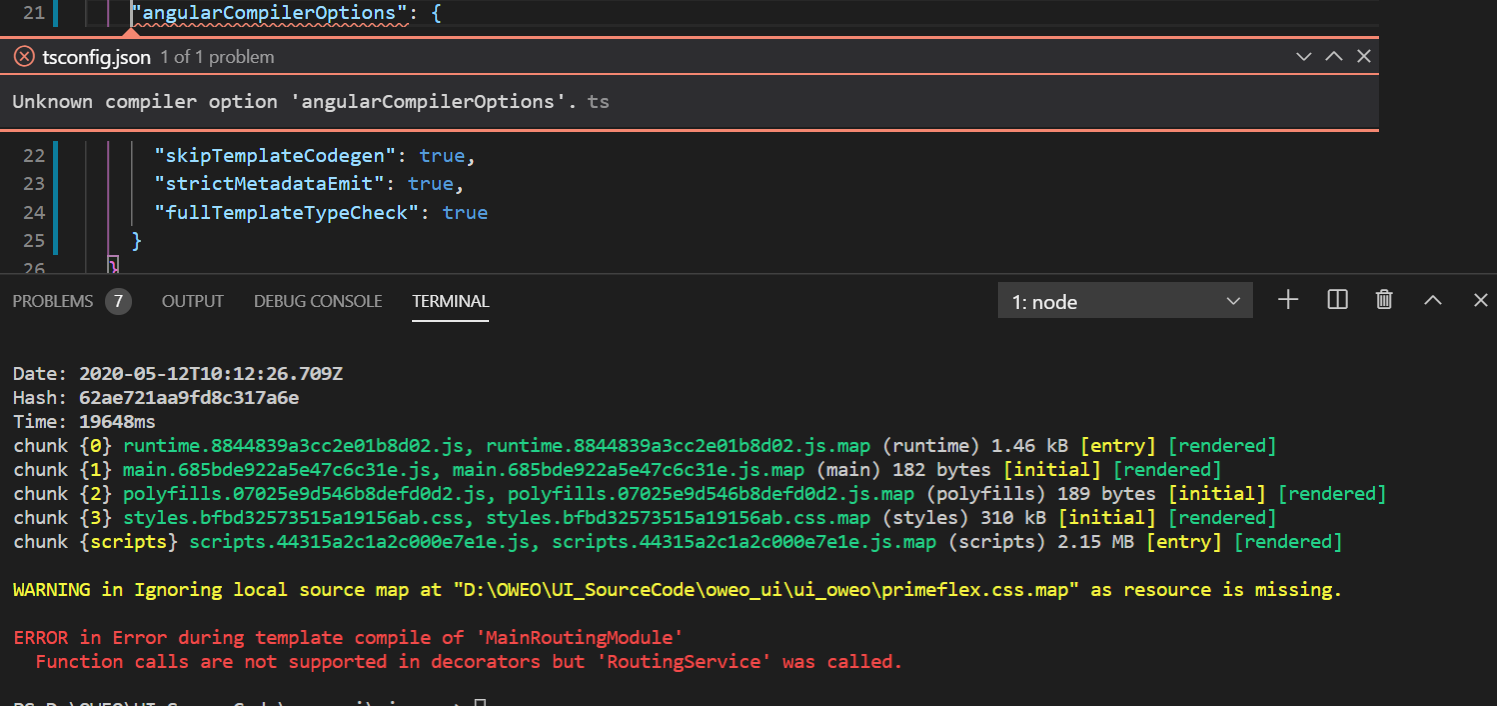
Since the ng build -- prod complies with AOT, Is it not recommended to use services in routes?
 MalliswariKP
on 12 May 2020
MalliswariKP
on 12 May 2020
This is driving me insane. How is a line of the problem code not provided with an error like this? And how is this issue 2 years old? Am I taking crazy pills?
 jpike88
on 13 May 2020
jpike88
on 13 May 2020
@jpike88 these are the only steps that worked for me. Hopefully it would work for you as well https://github.com/angular/angular/issues/23609#issuecomment-561615821
 yahyazini
on 20 May 2020
yahyazini
on 20 May 2020
Hi @jpike88, all.
This is driving me insane. How is a line of the problem code not provided with an error like this?
I agree, it's pretty crazy that no line/column context for the error is provided. Unfortunately it's not an easy fix - the problem is more systemic than adding some missing info to the error message.
ngc (specifically, the View Engine compiler) begins by extracting "metadata" from the source code. Each .ts file becomes a JSON structure describing it. The rest of the compiler operates on this metadata. Contextual information (line/col numbers) are captured for _some_ structures, but not all, as that would greatly increase the metadata size and hurt compiler performance.
The validation done by strictMetadataEmit happens on this metadata, and so whether or not the line/col context of an error can be displayed depends on the type of error and whether the metadata has captured this information in the first place. The two systems are relatively separate, and so it's not always guaranteed that contextual information will be available.
That's also why you see little quality-of-life bugs like this not getting addressed over the last couple years. Rather than try and deal with all of the issues like this individually, we've been focused on replacing the metadata design as a whole with a system that doesn't have these kinds of issues. The Ivy compiler is _incredibly_ good at localizing errors and telling you exactly why something isn't valid, because that has been one of its design goals since day 1.
So that's really our fix for this issue - Ivy will eventually make confusing and inconsistent metadata errors like this a thing of the past. With libraries the situation is a little complicated since for backwards compatibility, they still have to publish in View Engine format and thus deal with strictMetadataEmit for a little longer, but that's going to change sooner rather than later, hopefully.
 alxhub
on 28 May 2020
alxhub
on 28 May 2020
I fixed the error by following https://github.com/angular/angular/issues/23609#issuecomment-561615821
- you can not have any source code inside the function. It can only contain a
returnstatement that yields aModuleWithProvidersobject.
I had to remove this
@NgModule({
    imports: [
        // [...]
    ]
})
export class CoreModule implements OnDestroy {

    private static showUserInfo = true;

    static forRoot(options: CoreOptions = {}): ModuleWithProviders<NextCoreModule> {
        // this line caused the error
        // NextCoreModule.showUserInfo = options.showUserInfo ?? true;

        return {
            ngModule: NextCoreModule,
            providers: [
                {
                    provide: APP_INITIALIZER,
                    useFactory: initialize,
                    deps: [
                        ConfigBuilderService, AppKeyService, TranslateService, Title, coreOptionsToken
                    ],
                    multi: true
                },
                { provide: coreOptionsToken, useValue: options || {} }
            ]
        };
    }

    // [...]
}
 kroeder
on 5 Aug 2020
kroeder
on 5 Aug 2020
@kroeder You, sir, made my day! Thanks!
Does anyone know whether this is documented? And why this happens?
 JustDoItSascha
on 5 Aug 2020
JustDoItSascha
on 5 Aug 2020
@JustDoItSascha
Read #36415 and #37126 for details in the implementation. The reason is the Angular compiler has to exactly understand (by only static analysis) what the code means.
mlc-mlapis
on 5 Aug 2020
I fixed that by replacing import of RouterModule.forChild(routes) with the previously defined constant:
export const routerModule = RouterModule.forChild(routes);
 Adrian1907
on 8 Sep 2020
Adrian1907
on 8 Sep 2020
Related issues
 KarlXOL
·
194Comments
KarlXOL
·
194Comments
 tandu
·
147Comments
tandu
·
147Comments
 netlander
·
103Comments
netlander
·
103Comments
 arpit-agarwal
·
111Comments
arpit-agarwal
·
111Comments
 marvinscharle
·
122Comments
marvinscharle
·
122Comments
Most helpful comment
Regarding Ward's repro: @wardbell
The build will succeed / fail depending on the combination of
angularCompilerOptions. Added one example in this reproBuild success
Build failures
Observation
In Ward's example, setting
"skipTemplateCodegen": truerequires that"fullTemplateTypeCheck": trueis also enabled to get a success build from ngc.Side notes / other thoughts
My experience is that the issue goes down to "everything statically analyzable for AoT" (see "need for static value resoltion" in the compiler docs). Imo, something is broken around the
strictMetadataEmitoption or my understanding of the option is horribly broken 😆From my experience I can tell that the issue is often produced in
static forRoot(): ModuleWithProviders, sometimes depending on one line of code that becomes or becomes not "statically analyzable". Of course, I don't have reliable repros and I also don't want to speculate on some vague memories of code that I've seen working / non-working.Can ngc improve the error message?
What will help that ngc prints out the line number in the source code that triggers the error.