I'm submitting a ... (check one with "x")
[ x] bug report => search github for a similar issue or PR before submitting
[ x] feature request
[ ] support request => Please do not submit support request here, instead see https://github.com/angular/angular/blob/master/CONTRIBUTING.md#question
Current behavior
Expected/desired behavior
Reproduction of the problem
If the current behavior is a bug or you can illustrate your feature request better with an example, please provide the steps to reproduce and if possible a minimal demo of the problem via https://plnkr.co or similar (you can use this template as a starting point: http://plnkr.co/edit/tpl:AvJOMERrnz94ekVua0u5).
http://plnkr.co/edit/YmsQ4L1KKVPnRn72pq6N?p=preview
What is the expected behavior?
Can do this:
RouterModule.forChild([
            {
                path: '', component: OffersDelete, outlet: 'actions'
            }
])
What is the motivation / use case for changing the behavior?
If you have multiple modules that are triggered by aux routing always You have to create a fake component to operate the first route
Please tell us about your environment:
- Angular version: 2.0.0-rc.X
- Browser: [all | Chrome XX | Firefox XX | IE XX | Safari XX | Mobile Chrome XX | Android X.X Web Browser | iOS XX Safari | iOS XX UIWebView | iOS XX WKWebView ]
- Language: [all | TypeScript X.X | ES6/7 | ES5]
 michalstepien
All 113 comments
I don't like to ask for an ETA but this issue is opened since august and it's really a problem to not be able to use auxiliary routes (within a lazy loaded module).
Is there any chance someone looks into it?
 maxime1992
on 8 Jan 2017
maxime1992
on 8 Jan 2017
Any news on that?
It seems #13807 has a complete plunkr to repro this issue :)
What can we do to help fix it? :)
 victornoel
on 20 Feb 2017
victornoel
on 20 Feb 2017
I have the same problem. Lazy modules don't work on aux routes
 SoulOnFire
on 13 Apr 2017
SoulOnFire
on 13 Apr 2017
Any updates on this problem?
 justkevsthlm
on 13 Apr 2017
justkevsthlm
on 13 Apr 2017
It seems that lazy load and auxiliary routes are not widely used together.
We can see a lot of demos, separated but that's it. It's like no one uses it in a medium/large app :open_mouth:
These 2 are killer functionalities and no one seems to care about that issue ¯\_(ツ)_/¯
It's been nearly 8 months now.
_I don't want to put pressure on anyone and I know it's open source. So instead of asking for ETA someone should try to implement it. But the router doesn't seem to be the better things to start digging for the first time in Angular code base. Especially for an issue with lazy loading and auxiliary routes._
That said, I hope someone can take a look into that and I'm sure the 21 people who put a :+1: on my comment would send kudos to our savior :angel: :heart:
_PS : I also created a stackoverflow question (when I thought I was missing something instead of a bug) and it has +100 views._
maxime1992
on 13 Apr 2017
I don't think it wouldn't be wide used if it worked.
I have the same problem, using [email protected] and I have to move forward, so I'm moving the component in question out to it's own separate module with no children paths, to be able to display it in the aux outlet, hopefully lazy-loaded. If that doesn't work I will even make it load normally.
When this is fixed I might change it back, if I have time
Update: It doesn't work with lazy loading because "Promise rejection: Invalid configuration of route 'liveAction': a componentless route cannot have a named outlet set".
It's almost as if they never even thought about using lazy loading and aux outlets together.
 vivanov-dp
on 24 Apr 2017
vivanov-dp
on 24 Apr 2017
Huge chest bump to the Angular team but unfortunately I have to agree. I think the bar was set relatively low by targeting simple router-based apps with named outlets sprinkled in. Not only is lazy routing with named outlets not supported at this time but there is zero guidance on memory management (i.e. module unloading). Hopefully, this will be picked up for NG 5 or a patch. Angular team and community still rock in my world! 👍
 chrisalexander55
on 24 Apr 2017
chrisalexander55
on 24 Apr 2017
Hello, any workaround to fix this issue ?
 gtzinos
on 11 May 2017
gtzinos
on 11 May 2017
@gtzinos I tried to ask on Twitter this morning because I don't know what to do either after 8 months but no luck nor workaround yet
maxime1992
on 11 May 2017
So far I have not found a working demo with lazy loading in a named router outlet e.x. <router-outlet name="view"></router-outlet>. I have made a plunkr to find a way to make it work without success. Any help would be much appreciated.
https://plnkr.co/edit/EW3PZUMC63euf2QYxtW5?p=preview
In the example above View1, View2 and View3 are lazy loaded in the default router-outlet. View3_1 and View3_2 are lazy loaded in the named router-outlet without success.
 nekkon
on 16 May 2017
nekkon
on 16 May 2017
After much frustrating experimentation, I have had success getting nested, lazy-loaded modules to use named router-outlets in an Angular 4.1.0 project. Below is the module and routing hierarchy followed by the route configuration for the first three modules, which required a number of componentless parent routes:
AppModule'/' AppComponent<router-outlet>
StartModule(eager): '/start', StartComponent
- '/start/sign-in', SignInComponent
- 'start-register', RegisterComponent
MainModule(lazy): '/main', MainComponent<router-outlet>LibraryModule(lazy): '/main/library', LibraryComponent:<router-outlet><router-outlet name="detail">
- '/main/library/:manualId'
- '/main/library/:manualId/:sectionId'
- '/main/library/:manualId/:sectionId/:procedureId'
- '/main/library/:manualId/:sectionId/:procedureId/:procedureStepId'
- '/main/library/:manualId/:sectionId/:procedureId/:procedureStepId/:contentId'
AssignmentModule(lazy): InboxComponent:<router-outlet><router-outlet name="detail">
- '/main/inbox/:assignmentId'
- '/main/inbox/:assignmentId/:taskId'
- '/main/inbox/:assignmentId/:taskId/content/:contentId'
- '/main/inbox/:assignmentId/:taskId/comment/:commentId'
- '/main/inbox/:assignmentId/:taskId/feedback/:feedbackId'
ExchangeModule(lazy): ExchangeComponent<router-outlet>
AppRoutingModule:
    const routes: Routes = [
        { path: '', redirectTo: 'start', pathMatch: 'full' },
        { path: 'main', loadChildren: './main/main.module#MainModule' },
        { path: '**', redirectTo: 'start' }
    ];
MainRoutingModule:
    const routes: Routes = [
        {
            path: '', component: MainComponent,
            canActivate: [MainRoutingGuardService],
            children: [
                {path: '', redirectTo: 'library', pathMatch: 'full'}, // @ToDo: change default path to 'inbox' when InboxModule developed
                {path: 'library', loadChildren: '../../library/library.module#LibraryModule'}
            ]
        }];
LibraryRoutingModule:
    const routes: Routes = [
        {   path: '',   component: LibraryComponent, children: [
            { path: ':manualId/:manualSectionId', children: [
                { path: '', component: ProcedureListComponent },
                { path: '', component: ManualDetailComponent, outlet: 'detail' },
            ]},
            { path: ':manualId/:manualSectionId/:procedureId', children: [
                { path: '', component: ProcedureListComponent },
                { path: '', component: ProcedureDetailComponent, outlet: 'detail' },
            ]},
            { path: ':manualId/:manualSectionId/:procedureId/:procedureStepId', children: [
                { path: '', component: ProcedureStepListComponent },
                { path: '', component: ProcedureStepDetailComponent, outlet: 'detail' },
            ]},
            { path: ':manualId/:manualSectionId/:procedureId/:procedureStepId/:contentId', children: [
                { path: '', component: ProcedureStepListComponent },
                { path: '', component: ProcedureStepDetailComponent, outlet: 'detail' },
            ]},
        ]}
    ];
 KeithGillette
on 16 May 2017
KeithGillette
on 16 May 2017
@KeithGillette what did you do exactly to make it work ? Did you have to change anything or is it just working since 4.1.x ? My demo plunkr which is now running on 4.1.2 is still not working.
maxime1992
on 16 May 2017
Hi @maxime1992. I had not tried to get this working prior to using Angular 4.1.0. Things that tripped me up along the way:
- leaving the lazy-loaded modules in the
AppModuleimports - attempting to make the route entries with the named outlets direct children of the path loading the component with the primary and named auxiliary router-outlets
- attempting to name the paths containing the components to load into said router-outlets
On the last two points, note the "extra" componentless route that contains the actual path and groups the unnamed child routes that actually load into the component specified in the unnamed parent route.
KeithGillette
on 16 May 2017
@KeithGillette Where exactly is the outlet named detail? Is is it in LibraryComponent?
nekkon
on 16 May 2017
Correct, @nekkon. Sorry, I hadn't noticed that the Github markdown parser "ate" the outlet definitions in the module and routing hierarchy that I included in my original post. I corrected the markdown to display the router outlets associated with each component.
KeithGillette
on 16 May 2017
@KeithGillette I noticed that the detail outlet are all with an empty path:
{ path: '', component: ProcedureDetailComponent, outlet: 'detail' },
As I tried, this does work. But for a non-empty path, it's not working. That's the problem @maxime1992 has reported in the plunkr.
 royling
on 17 May 2017
royling
on 17 May 2017
Hi, @royling. You are correct, though the path does in effect have a unique name from its componentless parent, which is the only way I could get named outlets to work.
The original post reported that in lazy-loaded modules "[y]ou have to create a fake component to operate the first route" and others on the thread seem unable to get named routing outlets to work in lazy-loaded modules at all. I'm not sure I fully understand the original poster's issue, but in my case, I found no need for fake components to get named outlets in nested lazy-loaded modules to work _if_ they were empty-path child routes of a componentless route, a work-around (unless this is the design?) which may be helpful at least to the others unable to get auxiliary routes working at all.
KeithGillette
on 17 May 2017
@KeithGillette this workaround is helpful only for the scenario that you want to always load the component in the auxiliary outlet. But if you would like to load different routes into this outlet conditionally, you have to name other routes with unique paths, that will not work. I think that's a common use case.
royling
on 18 May 2017
I'm not following you, @royling.
Using the work-around I posted, I can load arbitrary components (or no components at all) into both the primary and named auxiliary outlets conditionally based on unique path, so long as that unique path is specified in a componentless parent route, with the components to load in the given outlets specified as pathless child routes of that uniquely named componentless parent route, as shown.
KeithGillette
on 18 May 2017
@KeithGillette you are my hero. After 3 hours of fighting I stumbled across this post. Sure enough, I was trying to use a named router outlet on the root component of a lazy-loaded module and found myself down the rabbit hole! I can confirm as well that if you add the outlet entry as a child of a named(!) route all works as expected.
Broken
{
    path: '',
    component: ScheduleContainerComponent,
    resolve: {
      loops: LoopsResolve
    },
    children: [
      {
        path: 'addloop',
        component: AddLoopComponent,
        outlet: 'overlay'
      }
    ],
},
Fixed
{
    path: '',
    resolve: {
      loops: LoopsResolve
    },
    children: [
      {
        path: 'show',
        component: ScheduleContainerComponent,
        children: [
          {
            path: 'addloop',
            component: AddLoopComponent,
            outlet: 'overlay'
          },
        ]
      },
    ],
  },
This makes absolutely no sense and I could find no examples of documentation that explains that this exists or a workaround.
 jonesmac
on 19 May 2017
jonesmac
on 19 May 2017
@KeithGillette yes, you are right and the workaround is OK. Thanks!
- >so long as that unique path is specified in a componentless parent route
- >the given outlets specified as pathless child routes of that uniquely named componentless parent route
UPDATE: from my debugging, with this workaround (pathless auxiliary route), the URL is never including aux part, while for a normal path aux route, the URL will include (aux:path). IMHO, this seems like the root cause of the original bug reported. So it sounds like we are working around the bug with the root cause of the bug...
royling
on 22 May 2017
@royling I'm wondering if you tested trying to remove the secondary route component?
Something like:
{ outlets: { aux: null } }
I tried it and that part is still broken for me even with the workaround. Can you let me know if it works for you? I eventually had to move on with a different solution altogether because of this but wanted someone else to verify.
jonesmac
on 22 May 2017
Hi
I have the same issue as mentioned in this post. I have two different applications that need usage of this.I've a question how will the router recognize the route by URL if the named router outlet is not dropping in it?
P.S.
Till today I was thinking that the Angular architecture not allows this. I thought that this is some like an external small application case in your whole application that must be initialized from the start
 Artur93gev
on 22 May 2017
Artur93gev
on 22 May 2017
@jonesmac, I don't think that syntax will work. If you don't want a component to appear in a named secondary/auxiliary outlet, just don't include it as a child route for the given path. For example, in the LibraryRoutingModule routes of my work-around example, for any given componentless parent route that you did not want the named outlet filled, you'd just omit the entire second child route entry that specifies the outlet name.
KeithGillette
on 22 May 2017
@Artur93gev, as shown in the LibraryRoutingModule configuration of my work-around example, the path is provided to the Angular router in the componentless parent path. Its pathless child routes then tell the router what to display in the primary and named/secondary router outlets.
KeithGillette
on 22 May 2017
@jonesmac I also failed to remove the aux outlet...
As @KeithGillette said, the workaround (again) could be create another route w/o the named outlet, and navigate to that one to remove the outlet.
As I have mentioned earlier, IMHO, the expected URL part (aux:path) for an aux outlet should be always included, even for pathless outlet: /parent/(aux:).
royling
on 23 May 2017
any update on this issue?
 marslan2037
on 16 Jun 2017
marslan2037
on 16 Jun 2017
same problem. any new information?
 liuweireign
on 19 Jun 2017
liuweireign
on 19 Jun 2017
I confirm @KeithGillette's solution and @royling's clarifications. I am using angular 4.0.1.
I had success using a blank, parent, component-less route like shown by @jonesmac, then register the original child module root component under a new unique name as a child route of the blank route then things should work.
Also be aware of the more complex [routerLink] syntax.
Parent HTML
<div>
  <router-outlet></router-outlet>
</div>
Parent Routing Config
const rootRoutes: Routes = [
  {
    path: 'submodule1',
    loadChildren: 'app/submodule1/sub1.module#SubModule1'
  }];
Child HTML
<h1>Inner Router</h1>
<router-outlet name="childoutlet"></router-outlet>
Example lazy-loaded, child module routes
const childModuleRoutes: Routes = [
  {
    path: '',
    children: [
      {
        path: 'unique-child-route', component: SubmoduleHomeComponent,
        children: [
          { path: 'sub-component1-route', component: SubComponent1, outlet: 'childoutlet' },
          { path: 'sub-component2-route', component: SubComponent2, outlet: 'childoutlet' }
        ]
      },
      { path: '**', redirectTo: 'unique-child-route' }
    ]
  }
];
Child Navigation Bar
<div class="ui menu">
  <div class="header item">
    SubModule Nav
  </div>
  <a class="item" [routerLink]="[{outlets: {childoutlet:'sub-component1-route'}}]">SubComponent1</a>
  <a class="item" [routerLink]="[{outlets: {childoutlet:'sub-component2-route'}}]" [routerLinkActive]="['active']">SubComponent2</a>
</div>
 kentoj
on 8 Jul 2017
kentoj
on 8 Jul 2017
@nekkon
gtzinos
on 9 Jul 2017
@kentoj were you able to set the secondary outlet to null? I wasn't able to get this part to work.
jonesmac
on 11 Jul 2017
Guys if you will stop using the named outlets (just without names) it working fine.
gtzinos
on 11 Jul 2017
@jonesmac I never tried setting it to null explicitly though I may have done so incidentally by leaving it out of the outlets declaration in the [routerLink] directive declaration.
kentoj
on 11 Jul 2017
May this issue finally get addressed after one year of waiting?
The way I see it, the suggested workaround works only to some extent (there's a way to navigate to a named outlet but there's no way to go back by setting it to null).
 dmitrysteblyuk
on 14 Jul 2017
dmitrysteblyuk
on 14 Jul 2017
I'm somewhat baffled that this is still an open issue... wow.
 andrewjrhill
on 12 Aug 2017
andrewjrhill
on 12 Aug 2017
1 year! Happy birthday! :cake: :birthday: :gift: :balloon: :tada:!!!!

Seriously, I don't understand why this issue is so underrated...
Barely 20 people uses those functionalities together?!
@kara, sorry to ping but vsavkin removed his assignment on this issue and it seems you're the only one from the Angular team. Do you think you might take a look or share it with someone who might? Thanks :smile:
maxime1992
on 22 Aug 2017
It would be awesome to have this fixed before the 2 years celebration 😆
 ivanaguilarc
on 11 Sep 2017
ivanaguilarc
on 11 Sep 2017
I've forked @maxime1992's plnkr, and made it a bit more obvious what's working and what's not working as a repro: http://plnkr.co/edit/9XC0AsHo6mJQN59h27vH?p=preview
Given below HTML for the lazy loaded module default template:
    <div>
      <router-outlet></router-outlet>
      <router-outlet name="aux"></router-outlet>
    </div>
Given below child routes defined within the lazy loaded module:
const routes = [
  {
    path: '',
    component: LazyLoadedComponent,
    children: [
      {
        path: '',
        component: NonAuxComponent
      },
      {
        path: '', // this works on load, when going to the root /lazy route
        component: AuxComponent,
        outlet: 'aux'
      },
      {
        path: 'auxpath', // this does not work
        component: Aux2Component,
        outlet: 'aux'
      }
    ]
  }
]
When navigated to route /lazy using routerLink="lazy"
- NonAuxComponent renders successfully in the primary outlet
- AuxComponent renders successfully in the aux outlet
When navigated to route /lazy/(aux:auxpath) using [routerLink]="[{ outlets: { aux: 'auxpath' } }]:
- NonAux and Aux components remain rendered. The URL doesn't change.
- Console error is thrown:
Error: Uncaught (in promise): Error: Cannot match any routes. URL Segment: 'lazy' Error: Cannot match any routes. URL Segment: 'lazy' - Expected Behavior: URL should change to
/lazy/(aux:auxpath)and AuxComponent should be replaced by Aux2Component
 duluca
on 14 Sep 2017
duluca
on 14 Sep 2017
@duluca nice work and summary!
I edited your plunkr and found a real workaround: only using _non-empty_ paths for your top level routes if it's in a lazy loaded module. See http://plnkr.co/edit/xItG6BCjyFIUzUcd2HhR?p=preview. The only flaw I can see is an additional url segment, so in the example, the full url is /lazy/loaded/(aux:auxpath), that works well! Even clearing aux outlet works, I already added it in the plunkr.
const routes = [
  {
    path: 'loaded', // <---- never use empty path here, or you will run into the problem.
    component: LazyLoadedComponent,
    ...
  }
]
EDIT: I found this workaround when trying to add a test case for this issue in the angular codebase, and by coincidence, I used a non-empty path config, the test passed...😸
UPDATE: Empty path route is by design useful for some use cases, as what @vsavkin has written in the Angular Router book:
By setting ‘path’ to an empty string, we create a route that instantiates a component but does not “consume” any URL segments.
...
Empty path routes can have children, and, in general, behave like normal routes. The only special thing about them is that they inherit matrix parameters of their parents.
Though not sure if matrix param inheritance works in the lazy loading module scenario, we can think this as another flaw of this workaround.
royling
on 17 Oct 2017
See this aged bug #10726 about the aux routes with top-level empty path in routing module...
royling
on 30 Oct 2017
Will it ever be solved?
 indranilmaiti
on 11 Feb 2018
indranilmaiti
on 11 Feb 2018
Running into the same issue, it would be nice to get it fixed.
 seaBubble
on 26 Feb 2018
seaBubble
on 26 Feb 2018
Chalk me up as another user that needs to lazy load a secondary route and component combo.
 photostu
on 27 Feb 2018
photostu
on 27 Feb 2018
I struggled with this again for a bit, and I'm not convinced that there's a bug. Perhaps an issue of documentation. I'm working on a Hands On Angular book. I've created a sample project that demonstrates the concept in use here.
Given the Parent Component and the Router Config below, notice that the routerLink only specifies the detail outlet. When I originally tried to redefine the master outlet in the link, the link simply wouldn't do anything.
_Perhaps this is the issue everyone is running into?_
Parent Component
...
  template: `
    <div class="horizontal-padding">
      <router-outlet name="master"></router-outlet>
      <div style="min-height: 10px"></div>
      <router-outlet name="detail"></router-outlet>
    </div>
  `,
...
Routing Config
...
const routes: Routes = [
  {
    path: '',
    component: ManagerComponent,
    children: [
      { path: '', redirectTo: '/manager/home', pathMatch: 'full' },
      {
        path: 'home',
        component: ManagerHomeComponent,
        canActivate: [AuthGuard],
        data: {
          expectedRole: Role.Manager,
        },
      },
      {
        path: 'users',
        component: UserManagementComponent,
        children: [
          { path: '', component: UserTableComponent, outlet: 'master' },
          {
            path: 'user',
            component: ViewUserComponent,
            outlet: 'detail',
            resolve: {
              user: UserResolve,
            },
          },
        ],
        canActivate: [AuthGuard],
        canActivateChild: [AuthGuard],
        data: {
          expectedRole: Role.Manager,
        },
      },
      { path: 'receipts', component: ReceiptLookupComponent },
    ],
  },
]
...
Navigation
...
<a mat-button mat-icon-button [routerLink]="['/manager/users', { outlets: { detail: ['user', {userId: row.id}] } }]" skipLocationChange>
  <mat-icon>visibility</mat-icon>
</a>
...
I found this in another thread and solved my problem just fine:
https://github.com/angular/angular/issues/12842#issuecomment-270836368
photostu
on 27 Feb 2018
@photostu just to be clear, you had to specify a route for the "master/primary" outlet? In your config, does your "master/primary" have a default (i.e. empty) '' route as mine does above?
duluca
on 27 Feb 2018
This is what my root level routing looks like:
[
  { path: '', redirectTo: '/recipe', pathMatch: 'full' },
  {
    path: 'recipe',
    loadChildren: './recipe/recipe.module#RecipeModule'
  },
  {
    path: 'cart',
    outlet:'sidebar',
    component: ProxyRouteComponent,
    children:[
        {
            path:'',
            loadChildren: './cart/cart.module#CartModule'
        }
    ]
  },
//   { path: '**', component: NotFoundPageComponent },
];
using this I can call a route of /#/recipe(sidebar:cart) and get 2 distinct modules loaded to 2 different router-outlets
photostu
on 28 Feb 2018
I've been reading this thread for a while, and I'm not sure if this is working fine or not. If I leave the lazy route empty, then outlets seem to work fine. This is my config:
// app-routing.module.ts

const appRoutes = [
  {
    path: '', // empty!
    loadChildren: './path/to/my-component.module#MyComponentModule'
  },
  ...
]
// my-component-routing.module.ts

const myComponentRoutes = [
  {
    path: 'my-component', // this is the real route
    component: MyComponent,
    children: [
      {
        path: 'child',
        outlet: 'aux',
        component: ChildComponent
      }
    ]
  }
]
 elclanrs
on 28 Feb 2018
elclanrs
on 28 Feb 2018
Please fix this issue
 olegshestakov
on 1 Mar 2018
olegshestakov
on 1 Mar 2018
Same problem here. It's pretty ugly compared to the global quality of angular.
 knlambert
on 1 Mar 2018
knlambert
on 1 Mar 2018
@elclanrs that could work in a single lazy loaded module case, what if you have multiple lazy loaded modules? I don't think it works.
royling
on 2 Mar 2018
@royling, seems to work with multiple lazy loaded modules too.
elclanrs
on 2 Mar 2018
For anyone with this issue, a workaround is to create a component that uses the Router module to handle the redirection manually in the empty route.
It's ugly, it's not optimal, but unfortunately it's the only thing that works (at least for me) in this situation, and does not crash the app when refreshing on that route.
ivanaguilarc
on 6 Mar 2018
it is ridiculous that they are talking about quality on conferences and noone cares about this elementary problem with router for 2 years LOL.. Angular Material + Angular Router, i will not wonder if there are 2 groups of developers, because quality of Material/Router is terrible compared to angular.
 montella1507
on 7 Mar 2018
montella1507
on 7 Mar 2018
@elclanrs thanks, good to know that, then this looks like another workaround...
royling
on 9 Mar 2018
Please please fix this issue !!!
 SerkanSipahi
on 12 Mar 2018
SerkanSipahi
on 12 Mar 2018
I'm sure this is a common request for med to larger applications. Constrained to one router outlet OR give up lazy loading. This does not seem like a great compromise. I see a lot of great things coming with each release but we need core functionality to be fixed.
 netwobble
on 20 Mar 2018
netwobble
on 20 Mar 2018
Good news from @IgorMinar https://twitter.com/IgorMinar/status/976727622964031488
Bitcollage: hi there, i hope you can hear me despite the huge twitter rush!There is since 2 years a named router outlet bug (https://goo.gl/Gy63e8 ) in combination with "lazyLoad modules"! Is there a plan to fix that issue? Personally i have not the skills for that! #Angular
IgorMinar: I bumped up the priority on that issue. We'll need @jasonaden1 to take a look after he's done with his current RxJS work. Thanks for highlighting this issue.
Backlog
The issue is also labeled (by Igor) an hour ago from medium to high :)
I hope so that will be fixed in shortly :)
SerkanSipahi
on 22 Mar 2018
Perhaps one more hint:
With the following route definition:
export const ROUTES: Routes = [{ path: 'server-worker/create-job', component: CreateJobComponent, outlet: 'details-outlet' }];
and using it like:
this.router.navigate([{outlets: {'details-outlet': ['server-worker/job-details']}} ]);
won't work because the "/" is escaped to "%2F"
When lazy loading modules like:
export const ROUTES: Routes = [{ path: 'server-worker', loadChildren: './modules/server-worker/server-worker.module#ServerWorkerModule' }];
we automatically introduce a relative path which would destroy the "router.navigate" command like above.
 sharpdevel
on 19 Apr 2018
sharpdevel
on 19 Apr 2018
@elclanrs Your solution makes the app run again without errors indeed, however the module does not lazyload but loads at the start of the app so it removes the purpose of lazy loading.
 fritzh321
on 25 Apr 2018
fritzh321
on 25 Apr 2018
Any updates? It's still not working as @duluca summarized here.
 Brampage
on 29 May 2018
Brampage
on 29 May 2018
I'm also facing the same issue.
 tibinthomas
on 31 May 2018
tibinthomas
on 31 May 2018
@IgorMinar sorry that we bother you. Any updates about that issue here?
SerkanSipahi
on 31 May 2018
Just merged #23459 to fix this long-standing issue. If you experience any problems or there are remaining outstanding use cases that aren't fixed, please create a new issue and reference this issue.
 jasonaden
on 13 Jun 2018
jasonaden
on 13 Jun 2018
@nekkon
gtzinos
on 14 Jun 2018

andrewjrhill
on 14 Jun 2018
I am so excited.. I have been starting my every day with checking this issue for last 2 years if it is fixed.. What would I do now? My life is complete yet.Thank you
montella1507
on 14 Jun 2018
Did anyone get this to work with angular6.x?
just trying to use named routed in lazy loaded module but without success. getting same errors as before.
 codefactorydevelopment
on 15 Jun 2018
codefactorydevelopment
on 15 Jun 2018
I've tried it today without any luck! Someone else?
 vottens
on 15 Jun 2018
vottens
on 15 Jun 2018
I think he merged into master and it should be released in shortly.
SerkanSipahi
on 15 Jun 2018
I've tried to load aux routes with version 6.0.5 and with 6.1.0-beta.0. The change log says that these issues are solved, but i still can not get it to work. Any one else tried this?
vottens
on 18 Jun 2018
Read the Changelog, the fix has only been included in 6.1.0-beta.1.
 TomDemulierChevret
on 19 Jun 2018
TomDemulierChevret
on 19 Jun 2018
@TomDemulierChevret 6.1.0-beta.0 was a typo, i meant 6.1.0-beta.1.
I have made a test setup with the beta version.
https://stackblitz.com/edit/lazy-load-auxilary
It's not working!
vottens
on 19 Jun 2018
@vottens
23459 did not fix the issue presented in your stackblitz but situations with routing like this :
{
    path: 'test',
    component: Component,
    children: [
      {
        path: 'aux1',
        outlet: 'aux',
        loadChildren: 'pathToTheModule'
      }
    ]
  }
i'll drop a question here as there is tremendeous amount of confusion around this topic for a long period of time...
is there a way to have named router and auxiliary route completely defined within lazy loaded module?
so, route, outlet, component...everything in lazy loaded module, nothing in core module.
did anyone succeed doing that?
codefactorydevelopment
on 19 Jun 2018
That's probably the case, but that means that there is still a bug with loading aux routes from within lazy modules...
I created a new bug/issue for this:
https://github.com/angular/angular/issues/24562
vottens
on 19 Jun 2018
@codefactorydevelopment For me personal, this should be working, there are so many use cases where this is needed.
vottens
on 19 Jun 2018
@vottens
of course. i have a few usecases where not having this feature forces us into some pretty ugly workarounds.
codefactorydevelopment
on 19 Jun 2018
I got this to work in Angular v 6.1.0 with @kentoj example. Was banging my head against the wall for a while. Working now. Thanks.
 asmith2306
on 16 Aug 2018
asmith2306
on 16 Aug 2018
This is a very complicated topic, there is no single issue here.
Because routing resolution becomes complex quickly (nesting), adding outlets to the mix is even more complex. This is why people experience issues when other found a solution.
The fix the angular team pushed will address the issue where a root route is empty, but there are other scenarios which this won't help with.
For example:
We have 3 modules A, B & C - where A lazy loads B and B lazy loads C.
A is the root module, B has a prefix route of "b" and C has a prefix route of "c".
Now we define an outlet named "myoutlet" in B.
For the outlet to hit (route match) we need to make sure that our primary route points to "b".
/b(myoutlet:something)
But what if we want to show the outlet, but we are in a page defined within C?
/b/c(myoutlet:something)
This will not work because there is no outlet name myoutlet defined for /b/c, it's only define in /b
Of course, we can't remove the segment "c" from the URL, it will make the outlet show but not in the proper primary page.
It actually should work because the "b" route is not defined to match "full", so it should consume this as well.
To make it work we need to alter the URL like so:
/b/(c//myoutlet:something)
What's strange here is that /b/(c//myoutlet:something) EQUALS /b/c(myoutlet:something)...
we only moved the segment "c" into the aux section, but it's resolving this route is the same.
Internally, the UrlTree is a bit different, the regular version has the segments on the primary outlet within the root. The alternate url version has the "b" segment on the primary outlet's root and the "c" segment on the "children" of the root... within another "primary" outlet...
So, I think this is the core issue, if the angular team addresses this we might see most problems gone.
For me, I've built an aux-router service that helps me go from the regular url version to the alternate one... addressing specific outlets.
I hope it helps.
 shlomiassaf
on 15 Sep 2018
shlomiassaf
on 15 Sep 2018
I was able to make auxiliary lazy loaded routes to work (see demo), but I have no luck to setup default route, my scenario is a bit complicated as I am using two "equal" auxiliary outlets, left and right. Think of them as total-commander setup. All children components can appear on left or right. Everything is working for now, except the default route. I am getting unexpected result with redirectTo property.. as I would expect when specifying redirectTo:"person" path to be relatively redirected into /(mySide:person), but instead it redirects to /person. Which is pretty much the same when I use redirectTo:"/person". But IMHO this should be differentiated, and so redirect should be resolved relatively, when omitting /. I have written more on SO for anyone interested. Anyway, thanks for your excellent work on this framework I am really enjoying to work with. Happy coding! :)
 luckylooke
on 26 Sep 2018
luckylooke
on 26 Sep 2018
There is a problem even in less complex example. Auxiliary route cannot be navigated at all. same example but moving the aux route behind named (sagmented) route, now it works! But it certainly should be working also for default routes. Many thanks for looking into issue in advance :)
luckylooke
on 12 Oct 2018
@luckylooke It may be SB but I can't see any lazy-loading going on in any of those examples. I believe any lazy loaded feature would need to have an ng-module. Otherwise it wouldn't be packed up by the CLI as a feature module. I too am roadblocked without being able to lazy-load components without the router.
 BenRacicot
on 22 Oct 2018
BenRacicot
on 22 Oct 2018
@BenRacicot yes, in last comment I am showing that it is even not lazy loading related. I present that for breaking auxiliary navigation it is just enough to have it under nonamed route in root.
EDIT: I have just found that it has its own issue https://github.com/angular/angular/issues/10726
luckylooke
on 23 Oct 2018
I have two router outlets in my application. One is the primary router outlet and other router outlet is in component template which is loaded with lazy loaded module. Name of the router outlet is pr and I have defined path for that route inside the lazy loaded module like this
{outlet:'pr',path: 'students', component: StudentTableComponent, canActivate: [AuthGuard]}
Inside the component I have router link with this.
<button mat-button mat-stroked-button
[routerLink]="[{ outlets: { pr:'students'} }]">View Students
 </button>
In the same component I have put the <router-outlet name="pr"></router-outlet>. After clicking the link app is correctly navigated showing project/132/(pr:students). No errors appears ,although not showing the component. If I put the router outlet in the main component which have primary outlet it loads. Ex:
<router-outlet></router-outlet>

<router-outlet name="pr"></router-outlet>
But after moving outlet elsewhere Angular won't identify the outlet
 lakinduakash
on 24 Oct 2018
lakinduakash
on 24 Oct 2018
I think this is the same issue right?
lakinduakash
on 24 Oct 2018
@luckylooke : why do you use your ProxyComponent twice ? Therefore you have twice : router-outlet
 samfrach
on 15 Nov 2018
samfrach
on 15 Nov 2018
Dear all,
I want to use a outlet named "modal" anywhere in my application .... the main reason is to be able to bookmark the primary URL with the modal window ...
I have a lazy loaded module "ProductsModule" that manages products...
I would like to open a product in my "modal" outlet from anywhere....
The primary outlet URL can be /A/xxx /B/yyy or whatever... I should be able to add "url(modal:/product/33)"
It works great without lazy module....
I define a path for /product/:id with outlet modal in the routing file for root...
But .... when I want to use it in a lazy module... it's dead since I can't place my path /product/:id at the root... if it is defined in my /lazyModule prefix... then it will only work if the primary URL stats with /lazyModule
any idea ? should I give an example or it is understandable ?
samfrach
on 15 Nov 2018
Hi, @samfrach can you point me where am I using proxy component twice? I cannot find it, please link me to example and files. As I have posted multiple examples and don't know which one is one you referred to. Thanks
luckylooke
on 22 Nov 2018
Still not working...
 henrique-barreto
on 25 Nov 2018
henrique-barreto
on 25 Nov 2018
Why was this issue closed?
 javix
on 17 Dec 2018
javix
on 17 Dec 2018
Is it fixed ? In which version number ?
 squelix
on 17 Dec 2018
squelix
on 17 Dec 2018
Is there a StackBlitz example of what isn't working?
http://plnkr.co/edit/YmsQ4L1KKVPnRn72pq6N?p=preview is full of errors
BenRacicot
on 18 Dec 2018
Still, facing this issue in,
Angular CLI: 6.2.8
Node: 10.15.0
OS: win32 x64
Angular: 6.1.10
... animations, common, compiler, compiler-cli, core, forms
... http, language-service, platform-browser
... platform-browser-dynamic, router

Package                           Version
-----------------------------------------------------------
@angular-devkit/architect         0.8.8
@angular-devkit/build-angular     0.8.8
@angular-devkit/build-optimizer   0.8.8
@angular-devkit/build-webpack     0.8.8
@angular-devkit/core              0.8.8
@angular-devkit/schematics        0.8.8
@angular/cli                      6.2.8
@ngtools/webpack                  6.2.8
@schematics/angular               0.8.8
@schematics/update                0.8.8
rxjs                              6.2.2
typescript                        2.9.2
webpack                           4.16.4
Broken
**App Routing:**
 {
    path: '',
    loadChildren: './all/all.module#AllModule'
  },


**AllModule Routes**

const routes: Routes = [
  {
    path: 'all',
    component: AllComponent,
    children: [
      {
        path: 'one',
        component: FirstComponent,
        outlet: 'first'
      },
      {
        path: 'two',
        component: SecondComponent,
        outlet: 'second'
      },
      {
        path: 'three',
        component: ThirdComponent,
        outlet: 'third'
      }
    ]
  }
];

component.html
<p class="pt-5">
   All Components works
</p>
<router-outlet name="first"></router-outlet>
<router-outlet name="second"></router-outlet>
<router-outlet name="third"></router-outlet>
Worked
Here, I have just remove Path Name path : "", But I'm not convinced below working code,Please help me on this
App Routing:
 {
    path: '',
    loadChildren: './all/all.module#AllModule'
  },


AllModule Routes

const routes: Routes = [
  {
    path: 'all',
    component: AllComponent,
    children: [
      {
        path: '', //set empty path
        component: FirstComponent,
        outlet: 'first'
      },
      {
        path: '', //set empty path
        component: SecondComponent,
        outlet: 'second'
      },
      {
        path: '', //set empty path
        component: ThirdComponent,
        outlet: 'third'
      }
    ]
  }
];

<p class="pt-5">
   All Components works
</p>
<router-outlet name="first"></router-outlet>
<router-outlet name="second"></router-outlet>
<router-outlet name="third"></router-outlet>
 gowthaman-i2i
on 7 Jan 2019
gowthaman-i2i
on 7 Jan 2019
I just wanted to say this issue isn't resolved at all.
For everyone wanting to reproduce the problem:
This is working but without Lazy-Loading: https://stackblitz.com/edit/outlet-problem-eager
This is not working but has Lazy-Loading: https://stackblitz.com/edit/outlet-problem-lazy
 domenichelfenstein
on 15 Jan 2019
domenichelfenstein
on 15 Jan 2019
Hi @domenichelfenstein
https://stackblitz.com/edit/outlet-problem-lazy-sigxxx
I made a change to your stackblitz app, now it works!
You have to give your lazy module a named default route, otherwise it won't work.
This is a workarround!
Gr Vincent
vottens
on 15 Jan 2019
You have to give your lazy module a named default route, otherwise it won't work.
Thanks!
Good to see there is a Workaround.
However, I can't just change the existing paths by adding a default route of the lazy-loaded module...
domenichelfenstein
on 15 Jan 2019
I am not sure if this is related, but I just wasted days trying to find a solution to my problem and I stumbled upon the solution by trial and error, so here's how I made it work in my case. I'm working with Angular 7, Router is 7.2.11.
Apparently there's a difference between this:
this.router.navigate(['/a/b', param1, { outlets: { secondary: ['c', param2] } }]);
and this:
this.router.navigate([{ outlets: { primary: ['/a/b', param1], secondary: ['c', param2] } }]);
The first one results in a URL like:
/a/b/1/(secondary:c/2)
which works fine, but the 2nd one results in a URL like:
/a/b/1(secondary:c/2)
which fails. Notice that the difference between the 2 URLs is the slash / between the end of the primary route and the beginning of the secondary route.
 digeomel
on 3 Apr 2019
digeomel
on 3 Apr 2019
@jasonaden Why was this closed because it is still an open issue, as is this https://github.com/angular/angular/issues/23791 and a couple of other issues referenced throughout this thread? Nested routes with outlets at various levels is a crippling issue in Angular and at least for me currently a roadblock -- because everything boils down to hours of trial and error trying to get even basic 2 level scenarios to work.
Also, was this PR merged or wasn't it because it is not immediately obvious from everything that goes on in the comments, people still having issues.
 brgrz
on 11 Apr 2019
brgrz
on 11 Apr 2019
@digeomel What do your routes look like?
 thackerc
on 18 Apr 2019
thackerc
on 18 Apr 2019
I got close but when I navigate, the named outlet is filling but the primary outlet is being cleared. I don't want the primary outlet to change.
The html
<router-outlet></router-outlet>
<router-outlet name="dialogOutlet"></router-outlet>
The route:
 {
    path: 'packoutdialog'
    , children:[
      {path:'', outlet:'dialogOutlet', component: PackoutComponent}]

  },
Either of these will fill the dialogOutlet but clear the primary
 this.router.navigate(['inventory', 'packoutedialog'])
this.router.navigate(['packoutdialog',{outlets:{'dialogOutlet':[]}}],{skipLocationChange: true, relativeTo: this.activatedRoute.parent});
This seems like it should work but does not.
this.router.navigate([{outlets:{'dialogOutlet':['inventory','packoutdialog']}}])
 tburger
on 3 May 2019
tburger
on 3 May 2019
Thanks @digeomel
You saved me some hair :)
/primary/route/(secondary:path/id) works
so I had to trial and error until I get the correct routing array to resolve the primary component correctly.
Also, it seems that the named route needs to match the request exactly, it doesn't match a segment. And I couldn't load a lazy-loaded module in this secondary route, the Router doesn't load component matching the route.
I debugged with RouterModule.forRoot(routes, { enableTracing: true }); in my AppModule and it finds the lazy loaded component, but router-outlet name="secondary" only renders an empty ng-component :(
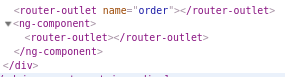
Update:
It seems that EmptyOutletComponent needs to set a named router-outlet, currently, it seems to support a primary outlet only:
 matheo
on 14 May 2019
matheo
on 14 May 2019
Patching the following changes directly into the compiled version of the router (from node_modules) completely fixed the issue for me :raised_hands: https://github.com/angular/angular/pull/25483
It's definitely not the right way of doing things but it feels so much simpler in that case than breaking some of my routes or have non empty routes for a workaround.
I hope that PR gets merged at some point.
maxime1992
on 23 May 2019
I created a further stackblitz as a further playground for this issue. Please fork it as you wish.
https://stackblitz.com/edit/angular-router-auxilary-issue
It moves between panel b and c in panel a. Thanks to several posters here it has helped solve my panel in panel problem.
 inthegarage
on 20 Jun 2019
inthegarage
on 20 Jun 2019
Hey guys, I've created a workaround for loading a lazy module's component through custom named outlets routing. Please have a look and hope this is useful.
 Jonathan002
on 20 Jul 2019
Jonathan002
on 20 Jul 2019
I have a menu that opens modal windows, where each could contain quite a bit of code: my goal was to lazy load the modals on demand when needed, which I was able to get to work like so:
app.component:
    <router-outlet></router-outlet>
    <router-outlet name="modal"></router-outlet>
link:
<a [routerLink]="['', { outlets: { modal: ['tools', 'view-stuff'] } }]">View Stuff</a>
added this to the root routes:
{
  path: 'tools',
  outlet: 'modal',
  children: [
    {
      path: 'view-stuff',
      loadChildren: () => import('app/tools/view-stuff/tools-view-stuff.module').then(m => m.ToolsViewStuffModule)
    }
  ]
}
view-stuff-module
@Component({
  selector: 'app-view-stuff-launcher-component',
  template: ''
})
export class ToolsViewStuffLauncherComponent implements OnInit, OnDestroy {
  modal!: ModalInstance<ToolsViewStuffModalComponent>;

  constructor(private modalService: ModalService) {}

  ngOnInit() {
    this.modal = this.modalService.open(ToolsViewStuffModalComponent);
  }

  ngOnDestroy() {
    this.modal.dismiss();
  }
}

const routes: Routes = [
  {
    path: '',
    component: ToolsViewStuffLauncherComponent
  }
];

@NgModule({
  imports: [RouterModule.forChild(routes), CommonModule, SharedModule],
  providers: [ModalService],
  declarations: [ToolsViewStuffLauncherComponent, ToolsViewStuffModalComponent],
  entryComponents: [ToolsViewStuffModalComponent]
})
export class ToolsViewStuffModule {}
Editing to include modal close logic when the outlet is set to null
 jayoungers
on 23 Jul 2019
jayoungers
on 23 Jul 2019
@jayoungers that is awesome! Could you setup a StackBlitz for us?
BenRacicot
on 23 Jul 2019
Any updates on this?
 asvishnyakov
on 7 Aug 2019
asvishnyakov
on 7 Aug 2019
I think I've got the same problem. The router-outlet doesn't work when I lazy-load its parent.
 Mark12870
on 30 Aug 2019
Mark12870
on 30 Aug 2019
ToolsViewStuffModalComponent
@jayoungers
I tried your solution but strangely, I get "No component factory found for ToolsViewStuffModalComponent" even though it's defined in entryComponents. Any idea?
 patachon
on 7 Sep 2019
patachon
on 7 Sep 2019
@patachon - I don't know which modal library you're using, but generally in order for them to work properly you need to add the modal service as a provider in your secondary module (even though you likely have it imported or provided in a primary module as well)
jayoungers
on 7 Sep 2019
@jayoungers You're right! I'm using Angular Material and imported MatDialogModule in the lazy-loaded module as well. Now I can see the dialog opens!
Thank you very much! 👍
patachon
on 7 Sep 2019
This issue has been automatically locked due to inactivity.
Please file a new issue if you are encountering a similar or related problem.
Read more about our automatic conversation locking policy.
_This action has been performed automatically by a bot._
![angular-automatic-lock-bot[bot] picture](https://avatars0.githubusercontent.com/in/40213?v=4&s=40) angular-automatic-lock-bot[bot]
on 8 Oct 2019
angular-automatic-lock-bot[bot]
on 8 Oct 2019
Related issues
 HitomiTenshi
·
139Comments
HitomiTenshi
·
139Comments
 altreze
·
201Comments
altreze
·
201Comments
 alexeagle
·
105Comments
alexeagle
·
105Comments
 kdawg1406
·
123Comments
kdawg1406
·
123Comments
 lacolaco
·
183Comments
lacolaco
·
183Comments
Most helpful comment
1 year! Happy birthday! :cake: :birthday: :gift: :balloon: :tada:!!!!
Seriously, I don't understand why this issue is so underrated...
Barely 20 people uses those functionalities together?!
@kara, sorry to ping but vsavkin removed his assignment on this issue and it seems you're the only one from the Angular team. Do you think you might take a look or share it with someone who might? Thanks :smile: