Angular-tree-component: scrollIntoView doesn't work properly for some cases
@adamkleingit
Hi there,
I found one issue with the API call - scrollIntoView. For my case, it works most time with a small tree, but does not work for the large tree. So I created my own local function based on the source code below.
TreeNode.prototype.scrollIntoView = function () {
        if (this.elementRef) {
            var nativeElement = this.elementRef.nativeElement;
            nativeElement.scrollIntoViewIfNeeded && nativeElement.scrollIntoViewIfNeeded();
            return this;
        }
    };
I am using scrollIntoView instead of scrollIntoViewIfNeeded, which is also suggested by
https://developer.mozilla.org/en-US/docs/Web/API/Element/scrollIntoViewIfNeeded
My code:
        if (this.focusedNode) {
          if (this.focusedNode.elementRef) {
            let nativeElement = this.focusedNode.elementRef.nativeElement;
            nativeElement.scrollIntoView();
          }
        };
It works for both small and large trees.
I hope my finding and solution will be helpful to others.
Best
-John
 johnking
All 12 comments
The best way would be to actually add a boolean to the scrollIntoView function which if true will force to scroll with scrollIntoView(), otherwise use scrollIntoViewIfNeeded.. I also have the same problem.. when I dynamically add a new node and update the tree, I can call focus() and it works fine, but scrollingIntoView doesnt
For now, when I initialize the app I override this one like that and seems to be okay
 denkomanceski
on 3 Dec 2016
denkomanceski
on 3 Dec 2016
Fixed in 2.8.0.
Can you verify?
 adamkleingit
on 3 Feb 2017
adamkleingit
on 3 Feb 2017
Hi @adamkleingit,
I am using 4.1.0, and it doesn't work in my project, I tried both cases:
- virtualScroll mode and
- non virtualScroll mode
Since the elementRef is not supported any more, my own implementation with it is also broken.
-John
johnking
on 1 Sep 2017
Hi @adamkleingit,
We can recover this issue easily either by
- limiting the width of tree panel or
- making the display field longer than the width of the tree panel.
I even use the full-tree example to recover this issue.
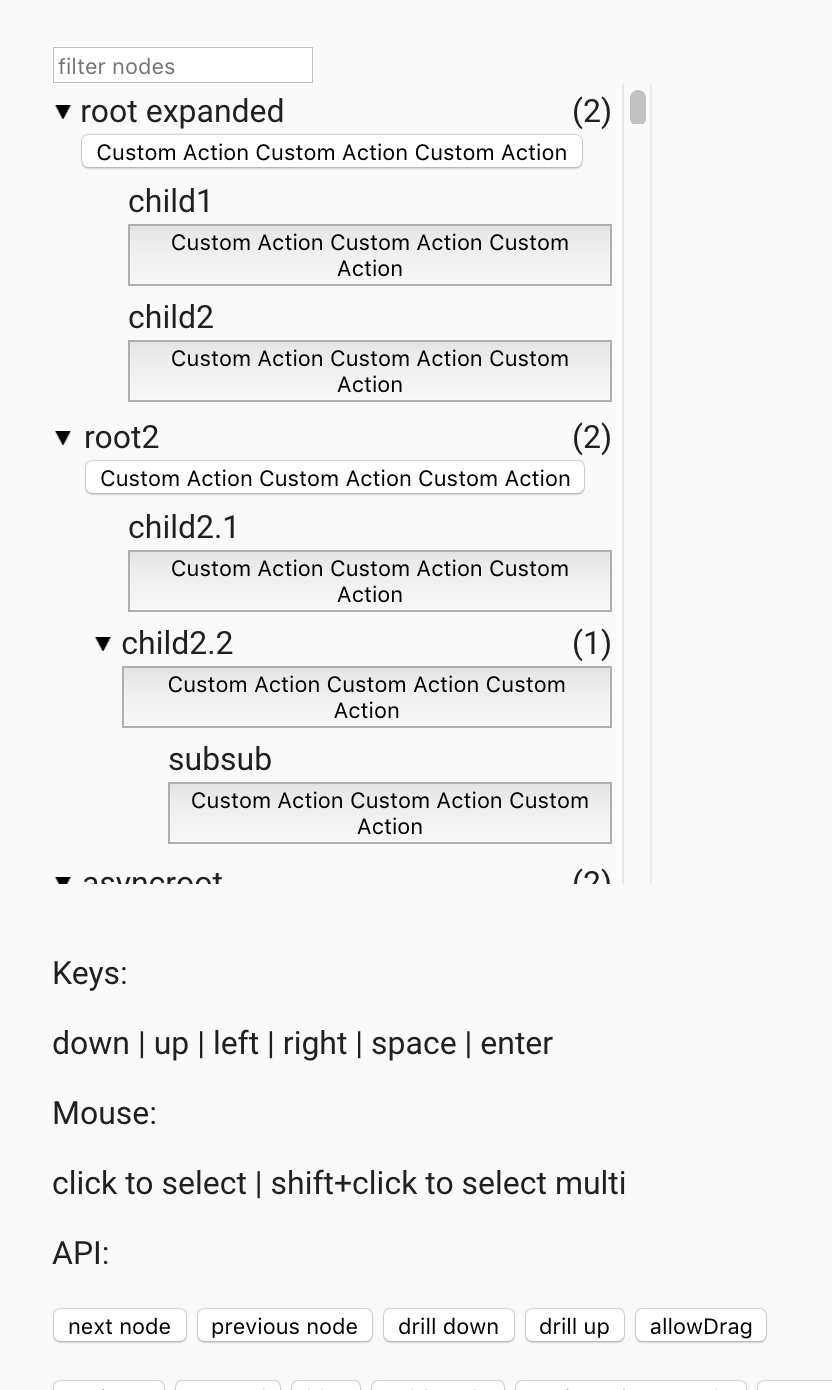
I hope my findings can help you to fix the issue.
thanks
-John
johnking
on 6 Sep 2017
I've got the same issue. scrollIntoView works in Firefox and IE11 for my application, but not in Chrome.
I can't seem to reproduce a working example to show here though.
Here is a broken example where scrollIntoView doesn't work in any browser I've tried with.
 ottosson
on 11 Feb 2018
ottosson
on 11 Feb 2018
Having same issue as ottoson. scrollIntoView does not scroll to my node with Chrome
 phoude
on 11 May 2018
phoude
on 11 May 2018
This is not a chrome problem (in the latest version), it happens because currently scrolling into view only works if the tree itself is rendered within a container that is limited in height and has overflow hidden. This is because the scrolling happens inside a viewport element that is part of the tree. If the scroller is on an external element then this will (currently) not work.
The solution I will implement is to add a scrollContainer option that will allow you to specify which scrollContainer. Will publish in coming version and update docs
adamkleingit
on 11 May 2018
Published 7.2.0
adamkleingit
on 11 May 2018
Hi, I might not understand how the scrollContainer is supposed to be set but here is an example where I can't get scrollIntoView to work: https://stackblitz.com/edit/angular-twwypu?file=src%2Fapp%2Fscroll-container.component.ts
phoude
on 7 Jun 2018
I don't see how this issue is resolved. Check this updated version using v8: https://stackblitz.com/edit/angular-jqayg3
phoude
on 7 Aug 2018
Hi,
You have 2 options:
1) Give a fixed height and overflow: auto to the scrollcontainer element.
2) Set:
// css:
html {
  height: 100%;
  overflow: auto;
}

// ts:
options = {
  scrollContainer: document.documentElement
}
https://angular-cds4dx.stackblitz.io
Can you try?
adamkleingit
on 12 Aug 2018
It did the trick. Thanks!
phoude
on 13 Aug 2018
Related issues
 snstarosciak
·
5Comments
snstarosciak
·
5Comments
 AbhiThakare
·
5Comments
AbhiThakare
·
5Comments
 anoop-chauhan
·
3Comments
anoop-chauhan
·
3Comments
 Gillardo
·
5Comments
Gillardo
·
5Comments
 CC84
·
4Comments
CC84
·
4Comments
Most helpful comment
I've got the same issue. scrollIntoView works in Firefox and IE11 for my application, but not in Chrome.
I can't seem to reproduce a working example to show here though.
Here is a broken example where scrollIntoView doesn't work in any browser I've tried with.