Angular-oauth2-oidc: Angular 7 Upgrade
Hello,
After upgrade to Angular 7 I´m seeing a very strange behavior.
Before, the auth server was sending the REDIRECTURL#AccessToken=. When the app was loading, the access tokes was being removed from the URL and the login finalized. And I had the old URL back.
Now, after the login, My Url keeps this way
Example: (replaced real information with ???)
http://localhost:4200/home#access_token=???&code=???&state=???&token_type=Bearer&expires_in=7199
Im using Implicit flow.
This is my configuration
  this.oauthService.configure(authConfig.authenticationConfig);
     this.oauthService.oidc = true;
     this.oauthService.setStorage(localStorage);
     this.oauthService.tokenValidationHandler = new JwksValidationHandler();
     console.log('before load');
     this.oauthService.loadDiscoveryDocument().then(() => {
       this.oauthService.tryLogin().then(() => {
        console.log(this.oauthService.getAccessToken());
        console.log(this.oauthService.getIdToken());
        }
     }
Look at Output console. I can see the library loading the access token with the "tryLogin", but when I request using getAccessToken, it is null.

This is my routing config
 { path: 'home', component: HomeComponent },
  { path: '', redirectTo: 'home', pathMatch: 'full' },
  { path: '**', redirectTo: 'home' }
I Really appreciate any help in this case!
 prmces
All 21 comments
That's some strange behavior. Some questions to clarify:
- What version of the library are (and were) you using?
- What other log output do you see? (E.g. using this kind of setup)
- Is your problem that the hash fragment isn't cleared, that the
getAccessTokenreturnsnull, or both?
Finally, it would help if you could create a minimal repro, e.g. a StackBlitz example, so we can more easily help investigate.
 jeroenheijmans
on 11 Nov 2018
jeroenheijmans
on 11 Nov 2018
We are having the same type of issue after the Angular 7 upgrade. We are finding that the access token and id token are not getting stored and are returning null. We see the hash fragment in the URL and then it dissappears as if its getting pulled down and stored but afterward we are not able to grab. Previously we were using 4.0.3.
 kzettlmeier
on 15 Nov 2018
kzettlmeier
on 15 Nov 2018
@kzettlmeier Ooh that doesn't sound right indeed. Do you have a minimal repro (e.g. on StackBlitz) that demonstrates the bug, perchance?
jeroenheijmans
on 16 Nov 2018
same issue for me.
test @ (use safari to produce consistently. with chrome it works first time and fail next)
https://xmlking.github.io/ngx-starter-kit/
click 'Get started' button , when prompted, try login with keyclock button (ImplicitFLow)
example code
https://github.com/xmlking/ngx-starter-kit/blob/develop/libs/auth/src/lib/oauth.init.ts#L26
 xmlking
on 26 Nov 2018
xmlking
on 26 Nov 2018
We are also strugling with this problem. Is there any feedback or a solution?
 jeboersema
on 15 Dec 2018
jeboersema
on 15 Dec 2018
Hi @kzettlmeier, @prmces
In your initial routing module add this to stop the url hash from being cleared before the idtoken is processed
RouterModule.forRoot(appRoutes, {
initialNavigation: false
}as ExtraOptions)
 svw88
on 15 Dec 2018
svw88
on 15 Dec 2018
for my case, I am using default LocationStrategy with Angular 7
I have to use initialNavigation: true to make it work.
my AuthConfig:
const authConfig: AuthConfig = {
  redirectUri: baseUrl + 'dashboard',
  postLogoutRedirectUri: baseUrl + 'home',
}
@xmlking Hi.
I am using the same strategy.
If you change your redirect uri to only baseurl without the + dashboard then in your initial component eg. app.component.ts you navigate to baseurl + 'dashboard' with set initial navigation to false it should work.
*You might have to setup your allowed redirect uri on your login server to only be baseurl and not baseurl+dashboard.
- The routing code is to inject Router into app.component.ts and then after you have done your idtoken validation you either route to your login page or call the implicitflow method if the token is not valid or navigate to 'dashboard' if it is valid after the check
If I may something that has helped me a lot with an identity server auto redirect for login setup so much that I have come to call it a best practice when using the combination is to have only my router outlet in my app.component.html. I then do all my identity setup and checks in my appcomponent without calling my own api as of yet. After the checks I then route to my initial page of my application such as the dashboard and only there I make my first api calls at which time I will already have my bearer token if it was able to reach that point. This stands true for all urls as the app.component always initializes first and you are able to even put an *ngIf on the router outlet if needed.
Kind Regards
svw88
on 17 Dec 2018
Hey Guys!!!
My redirect URL on the server was http://server/home and I was facing the issue.
{ path: 'home', component: HomeComponent },
 { path: '', redirectTo: 'home', pathMatch: 'full' },
 { path: '**', redirectTo: 'home' }
Once I change what @svw88 suggested ,redirecting to http://server(base url), the login started to work.
Thanks to All.
prmces
on 19 Dec 2018
Hey @svw88, do you have a concrete example you can share?
 dalelotts
on 28 May 2019
dalelotts
on 28 May 2019
I'm having the same issue with seeing the return token in the url, but when checked with hasValidAccessToken() it returns null. I tried the solution from @svw88 but my token still ends up null. Commenting out my canactivate authguard successfully redirects and I'm able to reference my token, but then I have no authguard which is a problem.
 coronary
on 22 Jul 2019
coronary
on 22 Jul 2019
Hi.
@coronary Are you referring to your initial navigation having the authgaurd? Without any user action? It sounds like your navigation is being hit before the url has been processed. The easiest way to confirm this is to check both your authservice and method result by putting a debugger where hasvalidaccesstoken is called. One way of working around this is to have an ngif="authservice != undefined" or a variant of that on your router outlet based on your own criteria where an initial isloaded also works that you set to true once all initial setup such as auth etc has completed. That way it will only evaluate your route and authguard once the authservice has been instantiated and token url processed.
@dalelotts My apologies I only saw this notification now. I am currently on my phone but will put together an example project asap.
*Update - I have put together a very simplified example let me know if it helps you.
------ https://github.com/svw88/AngularOAuthAutoRedirectExample
svw88
on 22 Jul 2019
Thank you @svw88 ! My app redirects correctly now! The problem seemed to be in my app.component.ts. In your example you have the arrow function with loadDiscoveryDocumentAndTryLogin to make sure the user has a valid token before routing which solved my issue.
coronary
on 23 Jul 2019
Does anyone involved have a way to reproduce the original issue? I'm trying to assess if we still need to craft a fix in the library, or if the workarounds and solutions posted above are enough to close this issue for now...
jeroenheijmans
on 4 Aug 2019
@jeroenheijmans I will recreate the original issue using the latest angular version and post my findings tomorrow by this time
svw88
on 4 Aug 2019
@jeroenheijmans Apologies for the delay.
This is still an issue and can be seen if you look at the example project posted above and set the initial navigation to true instead of false in the app.routing.ts file.
What happens is that when you have initial navigation set to true the app navigates before the library has processed the id token from the URL thus losing the URL token data leaving the library with nothing to process. This then causes a login loop if you have any code to login if there is no valid id token in your store.
I would however not call this a bug with the library as from my perspective angular has catered for when you need to delay initial navigation giving you the option to call initial navigation from the router once all configuration has completed. From what I can see to fix this within the library the token url will need to be processed before automatic initial navigation is called within the angular library itself.
From my experience it is better practice to delay initial navigation until full setup has completed not only for tokens but also for anything else that needs to be loaded for you app to function correctly.
I would however suggest adding it to the documentation if this is deemed to be the accepted solution as initially I was only able to figure out what was going on by stepping into the libraries code and it was not obvious to me what was happening until I had done so.
svw88
on 6 Aug 2019
Thanks for you prompt response!
I would however not call this a bug with the library as from my perspective angular has catered for when you need to delay initial navigation giving you the option to call initial navigation from the router once all configuration has completed.
and
I would however suggest adding it to the documentation if this is deemed to be the accepted solution
both make sense to me, so let's keep this issue open as a reminder to do just that!
jeroenheijmans
on 6 Aug 2019
Hello @svw88
Your example works fine, but I'm using Azure AD.. I explain myself:
This is where you configure the redirect url in Azure AD:
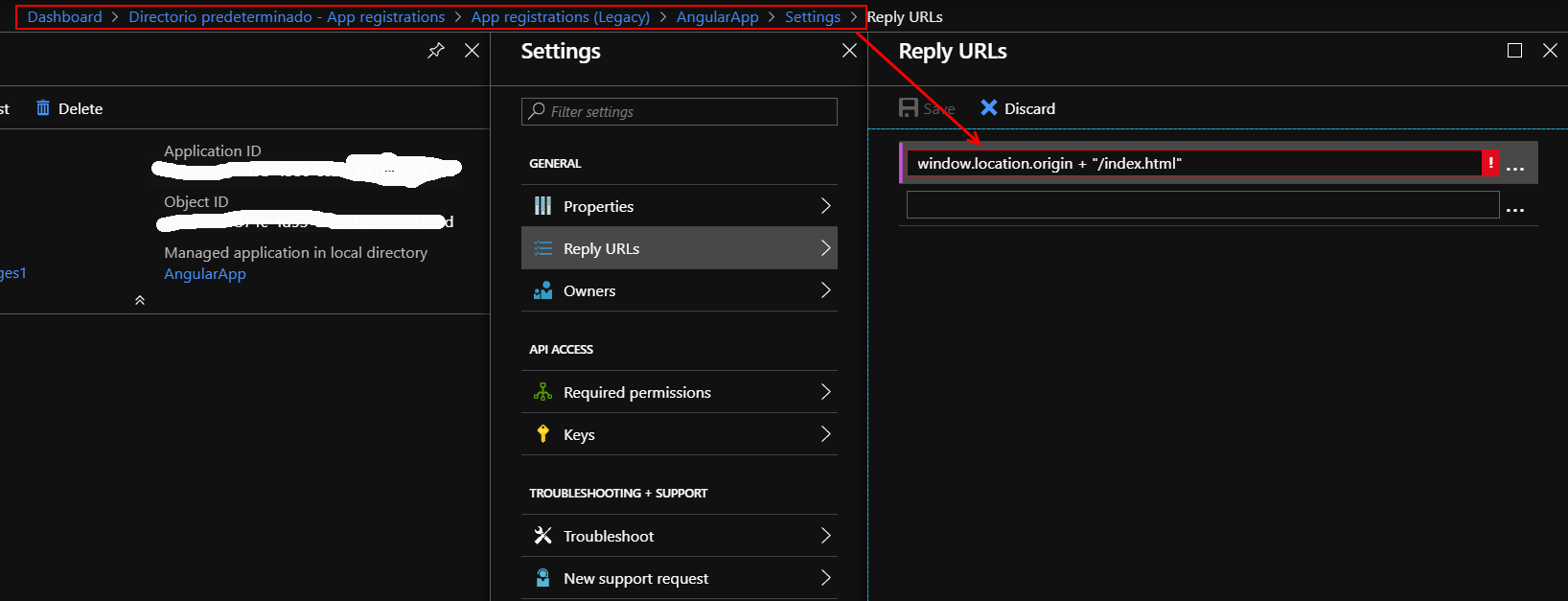
So, I can't assign:
config.redirectUri = window.location.origin + "/index.html";
Any suggestions? Thanks!
 ccruza
on 21 Aug 2019
ccruza
on 21 Aug 2019
@ccruza the window.location.origin + index.html part is just to connect to manfreds demo identity server. Commonly you would have your own setup which I'm guessing is what the azure ad is in your case. I have never used it however the redirect url in your database should be your own website url. Such as http://localhost:4200 or https://example.domainname.com for example. I just had a quick read and looks like you can put a wildcard such as a * there which may help just to get things going. However I would highly advise against this for a production environment as it allows all redirect urls.
svw88
on 21 Aug 2019
@svw88 Thanks for your advise.
Anyway I'm still facing the issue with the url:
http://localhost:4200/home#access_token=???&code=???&state=???&token_type=Bearer&expires_in=7199
Even when I've achieve to redirect to: http://localhost:4200 (simply)
Thanks in advance
ccruza
on 21 Aug 2019
There's various different things going on in this thread, super hard to untangle what the leftover problems and issues are, if any.
Going to clean up and close this issue (it's still available for discussion and people that need info from here). If you have still a clear open bug in latest versions, please open a fresh issue with a minimal repro, so we can have a focused look at it! Thx!
jeroenheijmans
on 8 Mar 2020
Related issues
 andrea-spotsoftware
·
3Comments
prmces
·
4Comments
andrea-spotsoftware
·
3Comments
prmces
·
4Comments
 godhar
·
3Comments
godhar
·
3Comments
 Swissbite
·
4Comments
jeroenheijmans
·
3Comments
Swissbite
·
4Comments
jeroenheijmans
·
3Comments
Most helpful comment
Hi @kzettlmeier, @prmces
In your initial routing module add this to stop the url hash from being cleared before the idtoken is processed
RouterModule.forRoot(appRoutes, {
initialNavigation: false
}as ExtraOptions)