Angular-gridster2: Preview of element when added by drag&drop
Is it possible to get a preview of a new gridster element which is added by drag n drop.
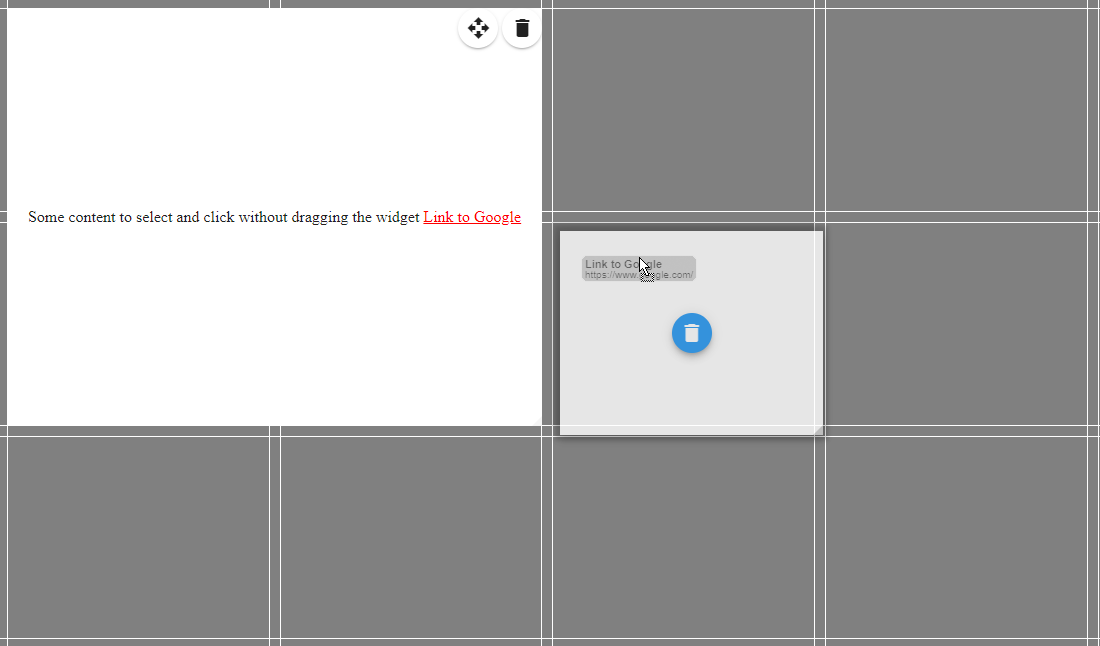
eg when dragging the link ("Link to Google") in the demo (add by drop enabled) a new preview element should be added and moveable when holding the mouse down and moved over the grid.
I tried to illustrated it here in the following image:
 Konstruktour
All 5 comments
Hi @Konstruktour ,
If you are refering of the native drag and drop from outside the grid.
Tried that is very laggy when I use the dragOver callback
https://developer.mozilla.org/en-US/docs/Web/Events/dragover
Will try again in version 5 maybe it will move better.
 tiberiuzuld
on 22 Feb 2018
tiberiuzuld
on 22 Feb 2018
Added in v5.0
The normal gridster-preview will appear when using HTML5 drag and drop.
The fix for the lag was from NgZone, dragOver is now executed outsideAngular.
tiberiuzuld
on 4 Mar 2018
Do we have sample code snippet that shows on how to drag from outside and drop inside gridster
 anji405
on 4 Jul 2018
anji405
on 4 Jul 2018
Would it also be possible that a new gridster element is shown instead of the gridster-preview (background)? Also the behaviour of the temporary new element would be the same as the elements which are already part of the gridster. (so eg that the drag element also pushes or swapes other elements)
Konstruktour
on 31 Jul 2018
Sign that - would be great if we could actually define a clone to be dragged (some sort of custom element) and if the behaviour of that drag-element would match the already existing items within the grid (e.g. pushing existing items away) like Konstruktour suggested.
 MCKogler
on 1 Aug 2018
MCKogler
on 1 Aug 2018
Related issues
 matpag
·
3Comments
matpag
·
3Comments
 dhaniksahni
·
4Comments
dhaniksahni
·
4Comments
 CollinGraf314
·
3Comments
CollinGraf314
·
3Comments
 dnbo
·
4Comments
tiberiuzuld
·
3Comments
dnbo
·
4Comments
tiberiuzuld
·
3Comments
Most helpful comment
Added in v5.0
The normal gridster-preview will appear when using HTML5 drag and drop.
The fix for the lag was from NgZone, dragOver is now executed outsideAngular.