Angular-gridster2: Get coordinates for first/last available position
Hi, is it possible to upgrade the library with two additional methods to return coordinates of first available position and coordinates of last available position? Something like getFirstAvailablePostion() and getLastAvailablePostion(). getNextPossiblePosition() returns only if there _is_ an available position, but not where it is. I've looked into source code, and I think that it could be done by modifying this code to:
    for (; rowsIndex < this.rows; rowsIndex++) {
      newItem.y = rowsIndex;
      colsIndex = 0;
      for (; colsIndex < this.columns; colsIndex++) {
        newItem.x = colsIndex;
        if (!this.checkCollision(newItem)) {
          return [newItem.x, newItem.y]; // <- actual modification
        }
      }
    }
For last item, newItem x and y could start with max values, and then decrement in for loops.
I would actually try to do and test this myself, but I'm noob and couldn't figure out why this.options.api.getNextPossiblePosition({ ... }) throws an error (Object is possibly undefined) and won't compile in the cloned repo.
Also, thanks for the library. It's a life saver, and really easy to use.
 petarGitNik
All 6 comments
Hi @petarGitNik ,
Why would you need last available position?
The getNextPossiblePosition the argument requires newItem: GridsterItemS.
I should change it to normal GridsterItem.
At first it was not meant to be used from outside so thats why requires a strict item which has the properties.
Will have it fixed in 5.0
 tiberiuzuld
on 16 Feb 2018
tiberiuzuld
on 16 Feb 2018
Hi @tiberiuzuld
I use small fixed grid that is mostly populated with widgets and have an item that I always want to put on the end of the "queue" i.e. to be the in the last position available (but not necessarily last empty position in the grid). I hope this sketch clarifies what I mean (case when GridsterItem is 1x1). Sorry for my poor art skills :)
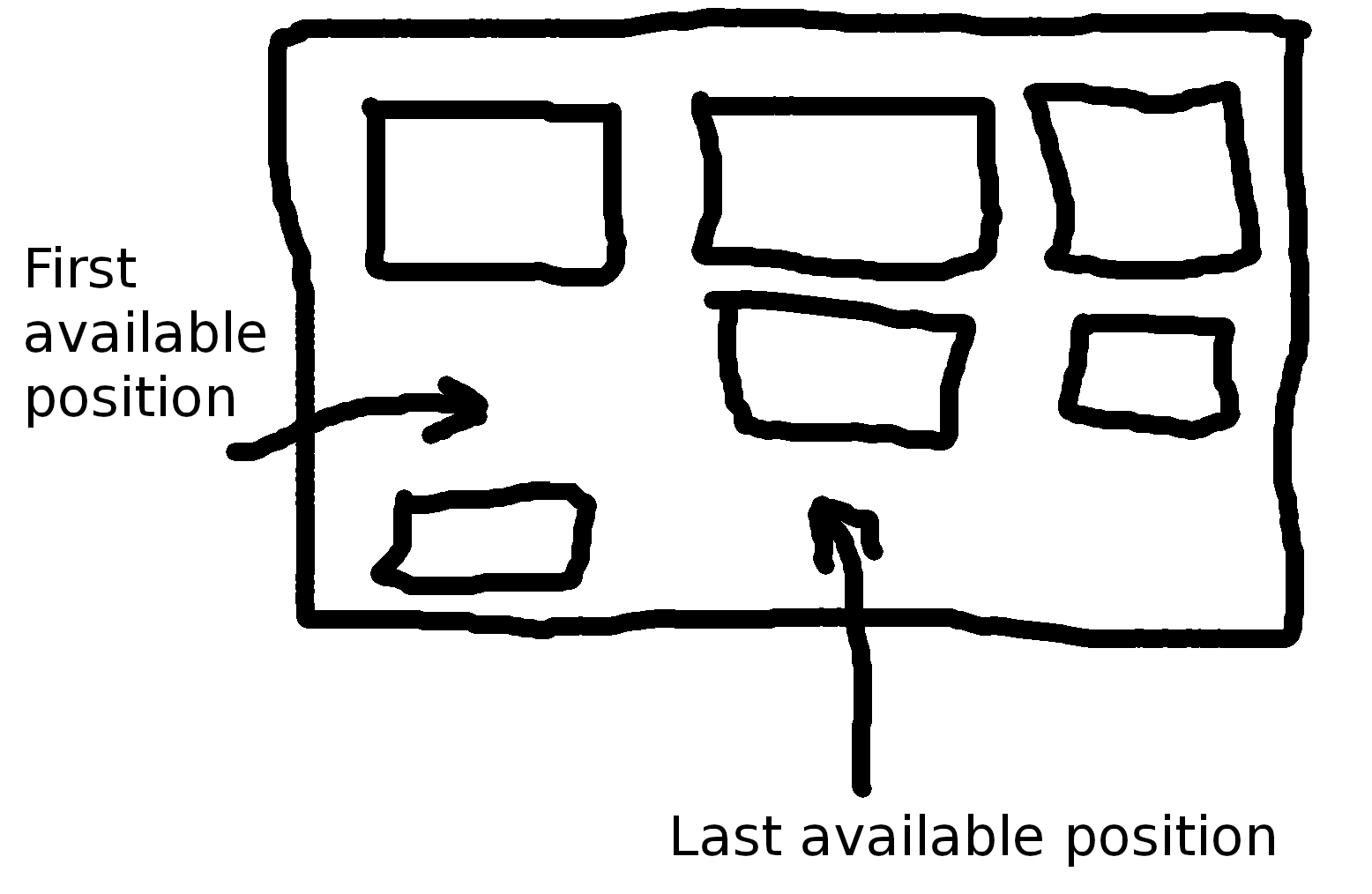
Although, come to think of it, it can be done by just removing and re-appending an item to the grid using some callback.
petarGitNik
on 16 Feb 2018
Ok will try to add last available position callback in version 5.0
tiberiuzuld
on 19 Feb 2018
Neat. Thank you very much :)
petarGitNik
on 20 Feb 2018
Hi @petarGitNik ,
This feature was added in v4.7.0
Thanks to @NoMercy235
tiberiuzuld
on 27 Feb 2018
Hi all. Thank you very much @NoMercy235 and @tiberiuzuld
:1st_place_medal:
petarGitNik
on 27 Feb 2018
Related issues
tiberiuzuld
·
3Comments
 marco-martins
·
4Comments
marco-martins
·
4Comments
 HighSoftWare96
·
4Comments
HighSoftWare96
·
4Comments
 Abdullah-96
·
5Comments
petarGitNik
·
3Comments
Abdullah-96
·
5Comments
petarGitNik
·
3Comments
Most helpful comment
Ok will try to add last available position callback in version 5.0