Angular-gridster2: cannot call service inside gridster item callback functions (itemResize,etc)
I am calling a service method from itemResize event but it is not working on aot build.
Trying to execute a method which updates the updated item information.
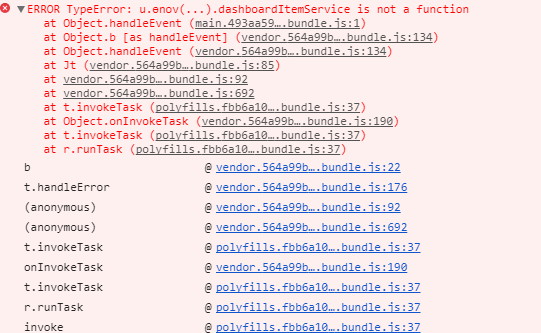
Getting below error in aot build, dashboardItemService is the service that we created
 jtushar53
All 12 comments
Hi @jtushar53
If You call from this is wrong this inside the callback is the gridster. You need to make an outside variable for this or to bind this on callback.
Let me know if this fixed your problem.
Thanks
 tiberiuzuld
on 24 Aug 2017
tiberiuzuld
on 24 Aug 2017
@tiberiuzuld is right, i solved it with an Output() event syntax and it work like a charm! 🎉
Another question:
Is it possible to display the hover drop area with an dashed frame? Like drag n drop a gridsterItem?
 WhatzzUp
on 26 Aug 2017
WhatzzUp
on 26 Aug 2017
Hi @WhatzzUp ,
Yes, but tried that when I implement drag and drop and was a bit laggy and didn't liked that.
Will try to implement it again maybe will find a better way.
Thanks
tiberiuzuld
on 26 Aug 2017
Hai @tiberiuzuld yeah, i tried it yesterday and it was ... very ... very laggy.
Nevertheless good job! angular-gridster2 works like a charm!
WhatzzUp
on 27 Aug 2017
made it work using Output,
Thanks @tiberiuzuld for angular-gridster2
and thanks @WhatzzUp for pointing out @Output
jtushar53
on 12 Sep 2017
Could someone please post the working solution using Output?
 ndunas
on 4 Oct 2017
ndunas
on 4 Oct 2017
@ndunas and for others to refer to:
private static changed: Subject<string> = new Subject<string>();
Have the above in your component or service and call next on it when itemResize or itemChanged callback or executed, then subscribe to the subject to do what you want
 srivathsah
on 12 Oct 2017
srivathsah
on 12 Oct 2017
@jtushar53, @srivathsah, @tiberiuzuld. can you guys help me to understand this solution?
i declared two @Outputs:

then i set it in the template:

create the funtions:
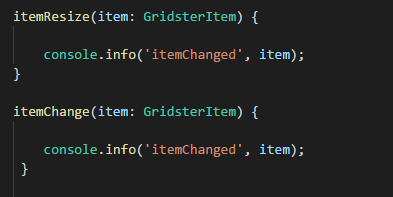
and wait for it...... nothing happens! :/
 the80
on 8 Jan 2018
the80
on 8 Jan 2018
Hi @the80 ,
I removed the @Output options from gridster-item in 4.3 forgot to remove them from Readme.md
Sorry about that but there where some memory leaks with them.
You need to use the options callbacks itemChangeCallback, itemResizeCallback.
Let me know if this will be ok for you.
Thanks
tiberiuzuld
on 8 Jan 2018
Thanks for the information @tiberiuzuld
But I m facing the same problem as @jtushar53 posted:

my function:
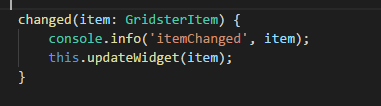
Anything i use is undefined, as you said above, anything inside options is gridster...

the80
on 9 Jan 2018
Try this.changed.bind(this)
tiberiuzuld
on 9 Jan 2018
@tiberiuzuld it works!
Thank you very much.
the80
on 9 Jan 2018
Related issues
 CollinGraf314
·
3Comments
CollinGraf314
·
3Comments
 ddegasperi
·
4Comments
tiberiuzuld
·
3Comments
ddegasperi
·
4Comments
tiberiuzuld
·
3Comments
 leandro-ali-elel
·
4Comments
leandro-ali-elel
·
4Comments
 MaiGhoneem
·
4Comments
MaiGhoneem
·
4Comments
Most helpful comment
Try
this.changed.bind(this)