Angular-cli: Are there any plans for @ngtools/webpack to support Webpack 5?
🚀 Feature request
Command (mark with an x)
- [ ] new
- [x] build
- [ ] serve
- [ ] test
- [ ] e2e
- [ ] generate
- [ ] add
- [ ] update
- [ ] lint
- [ ] extract-i18n
- [ ] run
- [ ] config
- [ ] help
- [ ] version
- [ ] doc
Description
I tried to use @ng-tools/webpack with Webpack 5 but it doesn't seem to work.
According to Webpack-team the fault might be loader. I can't explain in detail whats wrong since I don't have a deep understanding of the loader nor Webpack. But there seem to be some issue with how caching is implemented.

Please see this issue for more info: https://github.com/webpack/webpack-cli/issues/1985
I tried to create create a minimal reproduction but it only happens with our full monorepo setup. When using the repro I don't end up in the ResolverCachePlugin with the Angular files at all, and I don't know how to force it either.
Maybe someone in the team can share some light on what's happening?
Describe the solution you'd like
Sorry. I'm no help here.
Describe alternatives you've considered
The alternative is to stay with Webpack 4.x.x
 JonWallsten
All 16 comments
Which version of the plugin are you using?
 alan-agius4
on 12 Nov 2020
alan-agius4
on 12 Nov 2020
@alan-agius4: Sorry for not mentioning that. Last time I tried it I used 11.0.0-rc.1. It was a week ago or so.
JonWallsten
on 12 Nov 2020
Can you try to use version 11 final please? If the problem persists kindly provide a minimal reproduction. Thanks.
In version 11, there is experimental support for Webpack 5.
alan-agius4
on 12 Nov 2020
I'll do my best to recreate it. However I would really appreciate if someone could help me explain in short what ResolverCachePlugin is and why files end up there is some cases, and in some not. I've added a
JonWallsten
on 12 Nov 2020
ResolverCachePlugin is part of Webpack (code) and is used when the new Webpack 5 caching is enabled. As to why Webpack is crashing in that plugin, this is currently under investigation. However, it is currently recommended to disable the new caching via the cache: false option in the Webpack configuration.
 clydin
on 12 Nov 2020
clydin
on 12 Nov 2020
ResolverCachePluginis part of Webpack (code) and is used when the new Webpack 5 caching is enabled. As to why Webpack is crashing in that plugin, this is currently under investigation. However, it is currently recommended to disable the new caching via thecache: falseoption in the Webpack configuration.
Thanks for the reply. I'm currently trying to reproduce the issue in a small repo but I'm unable to. It however crashes every single build in our main repo. I've stripped down our repo to bare minimum and adding generic test components so that I don't have to upload company property. I've been importing @angular/material/dialog in components, in services, in route guards and every single place where I can think of, but I still can't reproduce the error in our main repo.
When logging out all resolved files in the ResolveCachePlugin I can see that app.module.ts is trying to resolve ./__ivy_ngcc__/fesm2015/dialog.js multiple times even though I don't have any direct import in app.module.ts to that file. I don't know why app.module.ts would be the issuer for that file. According to a member of the Webpack-team this is a bug in AngularCompilerPlugin and as here, without a repro they don't wanna investigate. I've been trying for a long time creating a simple repro. But I'm unable to.
I've pasted my findings in this ticket:
https://github.com/webpack/webpack-cli/issues/1985
JonWallsten
on 12 Nov 2020
Thank you for looking deeper into this issue. Our investigation has been focused on attempting to ascertain how the ResolverCachePlugin has entered an invalid state as well as whether this is indeed an invalid state. However, the new caching code is quite complex and the call stacks are non-trivial so the investigation may take some time.
clydin
on 12 Nov 2020
@clydin: Let me know if you need any assistance. Do you guys have a repo where you can reproduce the issue? In that case I won't try to create a minimal repo.
JonWallsten
on 12 Nov 2020
@clydin: The problem is a race condition. The same issuer, app.module.ts, is trying to resolve ./__ivy_ngcc__/fesm2015/dialog.js twice in a very short time and since the resolver is async the second one is triggered before the first one in done, but after the first one is triggered, so the cache is not ready. After the first one is done it sets callbacks to false. So when the second request is done we get the error when it tries to iterate callbacks which is false.
I've stepped through the code with a delay for each file and the problem goes away,
The issuer, app.module.ts, has no direct import of the file that fails, so it might be because how Angular imports other modules? Although that's not the whole truth, because in my repro, I import a module that export both components and other modules using material, and I still don't get that issue.
I have been trying to find any information about the source of the import, but the only information I can find is app.module.ts, and like I said it doesn't even import @angular/material/dialog directly.
JonWallsten
on 13 Nov 2020
I'm looking at the TypeScript output for app.module.ts in both our projects (real monorepo and repro monorepo).
Can someone explain to me why and how the i0, i1 and i2 are added?
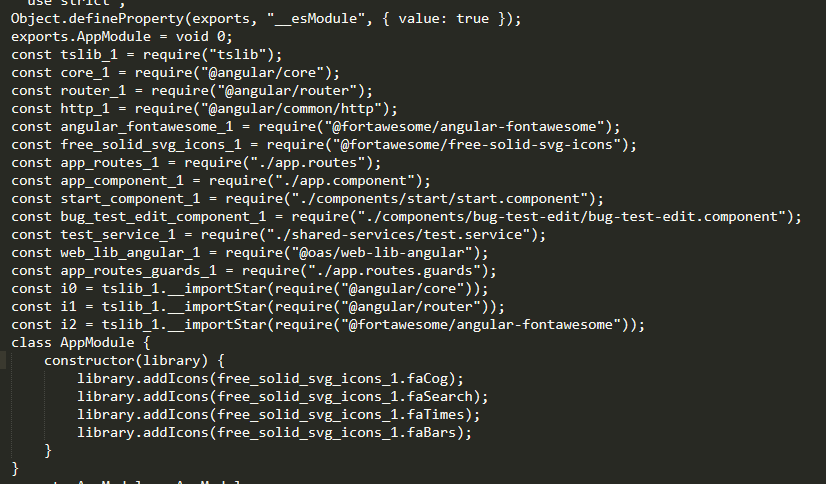
In the real monorepo where this fails I have a lot more of them, including our internal lib.
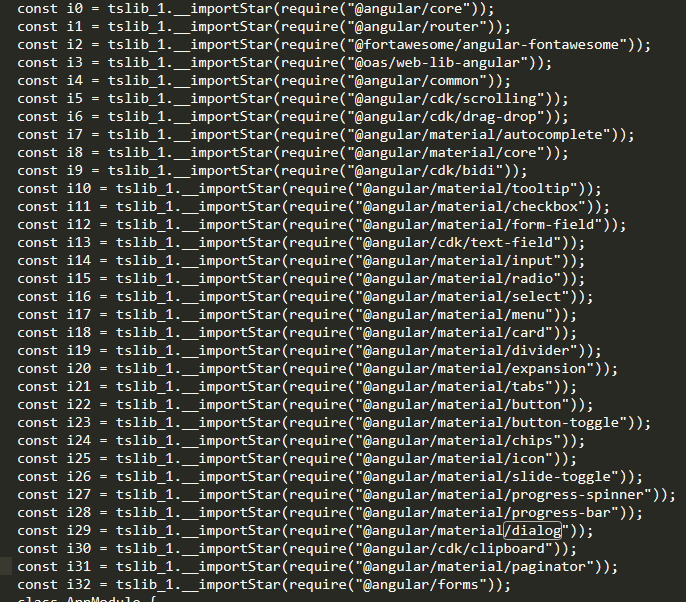
I know for a fact the for example @angular/material/dialog and our internal lib @oas/web-lib-angular is used in our component's in both repos. So why are they just imported by app.module.ts in one of the cases?
The follow up is obviously then why ./__ivy_ngcc__/fesm2015/dialog.js is being resolved twice from app.module.ts.
@alxhub: Any ideas?
JonWallsten
on 16 Nov 2020
Finally figured out the Angular side of the issue. The issue occur for me when "remote scoping" used.
Read about it here: https://github.com/angular/angular/blob/master/packages/core/test/bundling/cyclic_import/README.md
We have this "render component" that renders other components dynamically with an ngSwitch. And our group components (tables, sections, lists, etc) can render child components. So in this case the "render component" has a reference to the table in it's template, and the table has a reference to the "render component" so it can render child components in the table dynamically.
I still don't know why this causes cache issues, but at least I know how to reproduce it in a small repo. Will be done with the repro really soon.
JonWallsten
on 17 Nov 2020
@alan-agius4:
Repro here: https://github.com/JonWallsten/monorepo-new/tree/webpack-5-issue
It's private since I don't want to expose company stuff, but anyone that want to look into this let me know and I'll provide access.
JonWallsten
on 17 Nov 2020
After spending some time in the debugger, this does appear to be a Webpack defect. The code in question in the ResolverCachePlugin is used to merge requests for identical identifiers. However, in certain cases it appears to not properly merge the requests and results in an internal state mismatch that leads to the aforementioned crash.
By making the following changes to the ResolverCachePlugin, the crash no longer occurs. Manual inspection via the debugger also indicates that identical requests are being merged with the changes. All webpack tests also continue to pass with the changes.
@@ -202,23 +202,23 @@ class ResolverCachePlugin {
                                    request,
                                    !cacheWithContext
                                )}`;
-                               const activeRequest = activeRequests.get(identifier);
-                               if (activeRequest) {
-                                   activeRequest.push(callback);
+                               let callbacks = activeRequests.get(identifier);
+                               if (callbacks) {
+                                   callbacks.push(callback);
                                    return;
+                               } else {
+                                   callbacks = [callback];
+                                   activeRequests.set(identifier, callbacks);
                                }
                                const itemCache = cache.getItemCache(identifier, null);
-                               let callbacks;
                                const done = (err, result) => {
-                                   if (callbacks === undefined) {
+                                   activeRequests.delete(identifier);
+                                   if (callbacks.length === 1) {
                                        callback(err, result);
-                                       callbacks = false;
                                    } else {
                                        for (const callback of callbacks) {
                                            callback(err, result);
                                        }
-                                       activeRequests.delete(identifier);
-                                       callbacks = false;
                                    }
                                };
                                /**
@@ -277,10 +277,6 @@ class ResolverCachePlugin {
                                    }
                                };
                                itemCache.get(processCacheResult);
-                               if (callbacks === undefined) {
-                                   callbacks = [callback];
-                                   activeRequests.set(identifier, callbacks);
-                               }
                            }
                        );
                    }
I'll quote @sokra from my Webpack issue:
The diff is interesting. The code was written in previous way to avoid allocating an array when resolve result can be provided synchronous from cache. Maybe something tries to resolve within the resolver so it's kind of nested. Maybe delaying the real resolve call with process.nextTick can also fix it without the additional allocation in the cached case.
JonWallsten
on 19 Nov 2020
@clydin: Great news! Bug is fixed in https://github.com/webpack/enhanced-resolve/releases/tag/v5.3.2
JonWallsten
on 20 Nov 2020
Closing as issue appears to have been solved upstream.
alan-agius4
on 21 Nov 2020
Related issues
 JanStureNielsen
·
3Comments
JanStureNielsen
·
3Comments
 purushottamjha
·
3Comments
purushottamjha
·
3Comments
 ericel
·
3Comments
ericel
·
3Comments
 daBishMan
·
3Comments
daBishMan
·
3Comments
 hartjo
·
3Comments
hartjo
·
3Comments
Most helpful comment
@clydin: Great news! Bug is fixed in https://github.com/webpack/enhanced-resolve/releases/tag/v5.3.2