Angular-cli: AOT compilation script reference missing
🐞 bug report
In AOT compilation script reference missing
Description
In development build sample render properly but production build not render properly.
Production Build
Value not binded properly
"build:prod": "node_modules/.bin/ng build --prod --aot --source-map=false --vendor-chunk=true --output-hashing none"

Development Build
Value is properly binding
"build:dev": "node_modules/.bin/ng build --source-map=false --vendor-chunk=true --output-hashing none"

 SathishKumarRajendran
All 11 comments
Hi @SathishKumarRajendran, please share the full output of ng version?
In case you are on Angular 8 or lower, kindly update to Angular 9 and verify if the problem persists. If you are already on Angular 9 please setup a minimal repro please.
You can read here why this is needed. A good way to make a minimal repro is to create a new app via ng new repro-app and adding the minimum possible code to show the problem. Then you can push this repository to github and link it here.
This might be related to your directory structure so its really important to get an accurate repro to diagnose this.
 alan-agius4
on 8 Apr 2020
alan-agius4
on 8 Apr 2020
HI @alan-agius4 ,
Due to this issue, we have changed our mixin method like below:
export function applyMixins(derivedClass, baseClass) {
    baseClass.forEach(function (baseClass) {
        Object.getOwnPropertyNames(baseClass.prototype).forEach(function (name) {

if (!derivedClass.prototype.hasOwnProperty(name) || baseClass.prototype.constructor.name === 'FormBase') {`
                derivedClass.prototype[name] = baseClass.prototype[name];
            }
        });
    });
}
But this change working fine in development mode, but when we run application in prod mode it affects my form base components value binding
 kumaresan-subramani
on 8 Apr 2020
kumaresan-subramani
on 8 Apr 2020
Hi @kumaresan-subramani, can you please share a reproduction containing the least amount of code to reproduce the problem and push the repository to github and link it here please.
Can you confirm if turning Build Optimizer off fixes the problem?
alan-agius4
on 8 Apr 2020
Hi @alan-agius4
Can you confirm if turning Build Optimizer off fixes the problem?
Yes if turning build optimizer off, it is working fine.
Repro steps
Sample :
https://github.com/SathishKumarRajendran/angular-reactive-form.git
1), sample
2), npm i
3), ng serve --prod
Output of prod mode
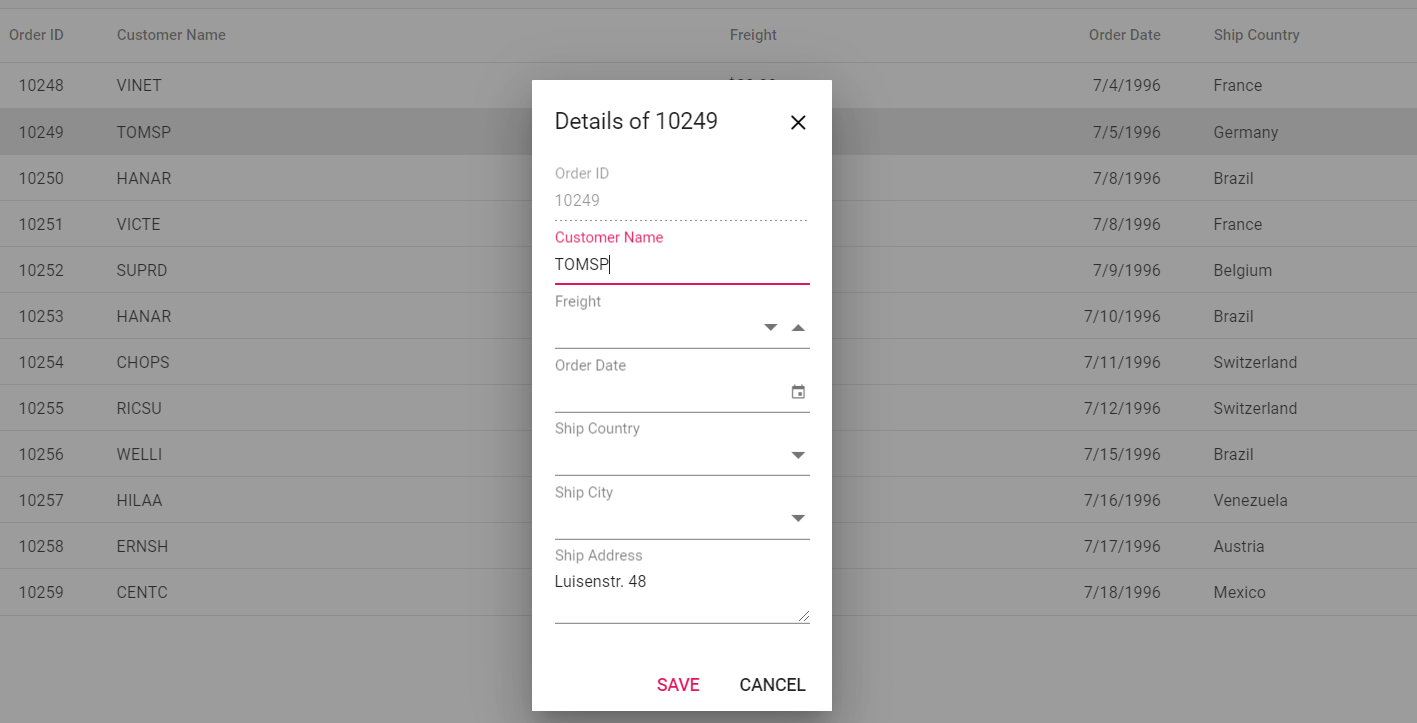
4), ng serve
Output of dev mode

SathishKumarRajendran
on 9 Apr 2020
Hi @SathishKumarRajendran, I just tried to use your reproduction, however I am getting installations errors such as Couldn't find any versions for "@syncfusion/ej2-angular-calendars" that matches "^18.1.43"
Also it looks like the application was generated using Angular CLI version 8. Can you please update the reproduction to use the current latest stable version (9.1)?
Thanks
alan-agius4
on 9 Apr 2020
Hi @alan-agius4 ,
We have resolved installation issue, please follow same steps again
https://github.com/angular/angular-cli/issues/17421#issuecomment-611313272
since we need to get this application work in angular 8,
if error occurs due to devkit/build-optimizer package, we will increase this articular package version as per your suggestion
kumaresan-subramani
on 9 Apr 2020
Hi @kumaresan-subramani, I tried to take a look at the reproduction again. However, it is still not in a working state.
I am getting the below errors;
ERROR in src/app/app.module.ts:6:41 - error TS2307: Cannot find module '@syncfusion/ej2-angular-inputs'.

6 import { NumericTextBoxAllModule } from '@syncfusion/ej2-angular-inputs';
                                          ~~~~~~~~~~~~~~~~~~~~~~~~~~~~~~~~
src/app/app.module.ts:7:37 - error TS2307: Cannot find module '@syncfusion/ej2-angular-calendars'.

7 import { DatePickerAllModule } from '@syncfusion/ej2-angular-calendars';
                                      ~~~~~~~~~~~~~~~~~~~~~~~~~~~~~~~~~~~
src/app/app.module.ts:8:39 - error TS2307: Cannot find module '@syncfusion/ej2-angular-dropdowns'.

8 import { DropDownListAllModule } from '@syncfusion/ej2-angular-dropdowns';
                                        ~~~~~~~~~~~~~~~~~~~~~~~~~~~~~~~~~~~

ERROR in src/app/app.module.ts(17,9): Error during template compile of 'AppModule'
  Could not resolve @syncfusion/ej2-angular-inputs relative to [object Object]..
src/app/app.module.ts(17,34): Error during template compile of 'AppModule'
  Could not resolve @syncfusion/ej2-angular-calendars relative to [object Object]..
src/app/app.module.ts(17,55): Error during template compile of 'AppModule'
  Could not resolve @syncfusion/ej2-angular-dropdowns relative to [object Object]..
src/app/app.module.ts(17,9): Error during template compile of 'AppModule'
  Could not resolve @syncfusion/ej2-angular-inputs relative to [object Object]..
src/app/app.module.ts(17,34): Error during template compile of 'AppModule'
  Could not resolve @syncfusion/ej2-angular-calendars relative to [object Object]..
src/app/app.module.ts(17,55): Error during template compile of 'AppModule'
  Could not resolve @syncfusion/ej2-angular-dropdowns relative to [object Object]..
: 'ejs-numerictextbox' is not a known element:
1. If 'ejs-numerictextbox' is an Angular component, then verify that it is part of this module.
2. If 'ejs-numerictextbox' is a Web Component then add 'CUSTOM_ELEMENTS_SCHEMA' to the '@NgModule.schemas' of this component to suppress this message. ("       <div class="form-row">
                <div class="form-group col-md-6">
                    [ERROR ->]<ejs-numerictextbox [(ngModel)]="orderData.Freight" name="Freight" id="Freight" placeholder="Freight"")
: 'ejs-datepicker' is not a known element:
1. If 'ejs-datepicker' is an Angular component, then verify that it is part of this module.
2. If 'ejs-datepicker' is a Web Component then add 'CUSTOM_ELEMENTS_SCHEMA' to the '@NgModule.schemas' of this component to suppress this message. ("
                </div>
                <div class="form-group col-md-6">
                    [ERROR ->]<ejs-datepicker id="OrderDate" name="OrderDate" required [(ngModel)]="orderData.OrderDate" placeholde")
: Can't bind to 'dataSource' since it isn't a known property of 'ejs-dropdownlist'.
1. If 'ejs-dropdownlist' is an Angular component and it has 'dataSource' input, then verify that it is part of this module.
2. If 'ejs-dropdownlist' is a Web Component then add 'CUSTOM_ELEMENTS_SCHEMA' to the '@NgModule.schemas' of this component to suppress this message.
3. To allow any property add 'NO_ERRORS_SCHEMA' to the '@NgModule.schemas' of this component. ("          <ejs-dropdownlist id="ShipCountry" name="ShipCountry" [(ngModel)]="orderData.ShipCountry" [ERROR ->][dataSource]='shipCountryDistinctData' [fields]="{text: 'ShipCountry', value: 'ShipCountry' }" placeh")
: Can't bind to 'fields' since it isn't a known property of 'ejs-dropdownlist'.
1. If 'ejs-dropdownlist' is an Angular component and it has 'fields' input, then verify that it is part of this module.
2. If 'ejs-dropdownlist' is a Web Component then add 'CUSTOM_ELEMENTS_SCHEMA' to the '@NgModule.schemas' of this component to suppress this message.
3. To allow any property add 'NO_ERRORS_SCHEMA' to the '@NgModule.schemas' of this component. ("ntry" name="ShipCountry" [(ngModel)]="orderData.ShipCountry" [dataSource]='shipCountryDistinctData' [ERROR ->][fields]="{text: 'ShipCountry', value: 'ShipCountry' }" placeholder="Ship Country" popupHeight='300px")
: 'ejs-dropdownlist' is not a known element:
1. If 'ejs-dropdownlist' is an Angular component, then verify that it is part of this module.
2. If 'ejs-dropdownlist' is a Web Component then add 'CUSTOM_ELEMENTS_SCHEMA' to the '@NgModule.schemas' of this component to suppress this message. ("       <div class="form-row">
                <div class="form-group col-md-6">
                    [ERROR ->]<ejs-dropdownlist id="ShipCountry" name="ShipCountry" [(ngModel)]="orderData.ShipCountry" [dataSource")
: Can't bind to 'dataSource' since it isn't a known property of 'ejs-dropdownlist'.
1. If 'ejs-dropdownlist' is an Angular component and it has 'dataSource' input, then verify that it is part of this module.
2. If 'ejs-dropdownlist' is a Web Component then add 'CUSTOM_ELEMENTS_SCHEMA' to the '@NgModule.schemas' of this component to suppress this message.
3. To allow any property add 'NO_ERRORS_SCHEMA' to the '@NgModule.schemas' of this component. ("                   <ejs-dropdownlist id="ShipCity" name="ShipCity" [(ngModel)]="orderData.ShipCity" [ERROR ->][dataSource]='shipCityDistinctData' [fields]="{text: 'ShipCity', value: 'ShipCity' }" placeholder="Sh")
: Can't bind to 'fields' since it isn't a known property of 'ejs-dropdownlist'.
1. If 'ejs-dropdownlist' is an Angular component and it has 'fields' input, then verify that it is part of this module.
2. If 'ejs-dropdownlist' is a Web Component then add 'CUSTOM_ELEMENTS_SCHEMA' to the '@NgModule.schemas' of this component to suppress this message.
3. To allow any property add 'NO_ERRORS_SCHEMA' to the '@NgModule.schemas' of this component. (" id="ShipCity" name="ShipCity" [(ngModel)]="orderData.ShipCity" [dataSource]='shipCityDistinctData' [ERROR ->][fields]="{text: 'ShipCity', value: 'ShipCity' }" placeholder="Ship City" popupHeight='300px' floatLa")
: 'ejs-dropdownlist' is not a known element:
1. If 'ejs-dropdownlist' is an Angular component, then verify that it is part of this module.
2. If 'ejs-dropdownlist' is a Web Component then add 'CUSTOM_ELEMENTS_SCHEMA' to the '@NgModule.schemas' of this component to suppress this message. ("
                </div>
                <div class="form-group col-md-6">
                    [ERROR ->]<ejs-dropdownlist id="ShipCity" name="ShipCity" [(ngModel)]="orderData.ShipCity" [dataSource]='shipCi")
After installing the missing modules, I get more errors;
ERROR in src/app/template-driven.html(14,32): : Property 'OrderID' does not exist on type 'object'.
src/app/template-driven.html(24,32): : Property 'CustomerID' does not exist on type 'object'.
src/app/template-driven.html(35,41): : Property 'Freight' does not exist on type 'object'.
src/app/template-driven.html(38,78): : Property 'OrderDate' does not exist on type 'object'.
src/app/template-driven.html(43,75): : Property 'ShipCountry' does not exist on type 'object'.
src/app/template-driven.html(46,69): : Property 'ShipCity' does not exist on type 'object'.
src/app/template-driven.html(52,35): : Property 'ShipAddress' does not exist on type 'object'.
src/app/template-driven.html(14,32): : Property 'OrderID' does not exist on type 'object'.
src/app/template-driven.html(24,32): : Property 'CustomerID' does not exist on type 'object'.
src/app/template-driven.html(35,41): : Property 'Freight' does not exist on type 'object'.
src/app/template-driven.html(38,78): : Property 'OrderDate' does not exist on type 'object'.
src/app/template-driven.html(43,75): : Property 'ShipCountry' does not exist on type 'object'.
src/app/template-driven.html(46,69): : Property 'ShipCity' does not exist on type 'object'.
src/app/template-driven.html(52,35): : Property 'ShipAddress' does not exist on type 'object'.
src/app/template-driven.html(1,50): : Property 'pageSettings' does not exist on type 'AppComponent'.
Hi @alan-agius4
Sorry for inconvenience, We are now resolved above mentioned two issues. Could you please repeat that repro steps again.
Thanks
SathishKumarRajendran
on 10 Apr 2020
Hi @alan-agius4
Any updates on this?
SathishKumarRajendran
on 23 Apr 2020
Hi @SathishKumarRajendran,
I looked at the reproduction provided and the problem is caused the the following
function applyMixins(derivedClass, baseClass) {
    baseClass.forEach(baseClass => {
        Object.getOwnPropertyNames(baseClass.prototype).forEach(name => {
            if (!derivedClass.prototype.hasOwnProperty(name) || baseClass.prototype.constructor.name === 'FormBase') {
                derivedClass.prototype[name] = baseClass.prototype[name];
            }
        });
    });
}
The below, is the problematic statement, because class names are mangled when using optimizations (aka production builds), this means that it the result will also be false.
baseClass.prototype.constructor.name === 'FormBase'
There are a couple of things you can do there:
- You can disable mangling by extending the build pipeline using ngx-build-plus, though this will take you on the unsupported path.
- Another approach would be to add a static property in the
FormBaseclass and in the mixin check for that.
export class FormBase {
  static readonly isFormBase = true;
}


export function applyMixins(derivedClass, baseClass) {
    baseClass.forEach(function (baseClass) {
        Object.getOwnPropertyNames(baseClass.prototype).forEach(function (name) {
            if (!derivedClass.prototype.hasOwnProperty(name) || baseClass.isFormBase) {
                derivedClass.prototype[name] = baseClass.prototype[name];
            }
        });
    });
}
This issue has been automatically locked due to inactivity.
Please file a new issue if you are encountering a similar or related problem.
Read more about our automatic conversation locking policy.
_This action has been performed automatically by a bot._
![angular-automatic-lock-bot[bot] picture](https://avatars0.githubusercontent.com/in/40213?v=4&s=40) angular-automatic-lock-bot[bot]
on 24 May 2020
angular-automatic-lock-bot[bot]
on 24 May 2020
Related issues
 sysmat
·
3Comments
sysmat
·
3Comments
 rajjejosefsson
·
3Comments
rajjejosefsson
·
3Comments
 5amfung
·
3Comments
5amfung
·
3Comments
 daBishMan
·
3Comments
daBishMan
·
3Comments
 donaldallen
·
3Comments
donaldallen
·
3Comments
Most helpful comment
Hi @alan-agius4
Sorry for inconvenience, We are now resolved above mentioned two issues. Could you please repeat that repro steps again.
Thanks