Angular-cli: ng serve does not recognize "Accept: */*" header and returns a 404 for requests with route fragments
Bug Report or Feature Request (mark with an x)
- [X] bug report -> please search issues before submitting
- [ ] feature request
Command (mark with an x)
- [ ] new
- [ ] build
- [X] serve
- [ ] test
- [ ] e2e
- [ ] generate
- [ ] add
- [ ] update
- [ ] lint
- [ ] xi18n
- [ ] run
- [ ] config
- [ ] help
- [ ] version
- [ ] doc
Versions
Angular CLI: 6.0.5
Node: 8.11.3
OS: linux x64
Angular: 6.0.5
Repro steps
curl -sv "http://angular-app/someRoute" -H "Accept: text/html" returns 200
curl -sv "http://angular-app/someRoute" -H "Accept: */*" returns 404
run ng serve and try accessing the site in IE using short form for the url
Caveats
Do not use FQDN
Use a route fragment
Investigation
IE in some cases enforces compatibility mode for intranet sites.
Short form domain name makes IE think it's an intranet site
IE sends different Accept header in compatibility mode, but it does include a */* fallback
ng serve express middleware does some content negotiation and seems to ignore */* prefering text/html
The log given by the failure
No log. if DEBUG="*" ng serve is used, I can see the middleware sending 404.
Desired functionality
Content negotiation should correctly recognize the */* fallback
 vsviridov
All 11 comments
Is this still an issue?
 billwagner3
on 22 Jan 2019
billwagner3
on 22 Jan 2019
I'm in the process of upgrading our app to Angular 7, so I could probably test tomorrow, once I get it to build...
vsviridov
on 22 Jan 2019
Still seems to be an issue.
vsviridov
on 23 Jan 2019
Did you test it in Angular 7? If you can supply exactly what you did to
reproduce the error with Angular 7, that would be great.
On Wed, Jan 23, 2019 at 2:32 PM Vasili Sviridov notifications@github.com
wrote:
Still seems to be an issue.
—
You are receiving this because you commented.
Reply to this email directly, view it on GitHub
https://github.com/angular/angular-cli/issues/12613#issuecomment-456992313,
or mute the thread
https://github.com/notifications/unsubscribe-auth/ANDOpqSEqk9-q7kGDMWGcIPCYCMrejLTks5vGOLigaJpZM4XgU02
.
billwagner3
on 23 Jan 2019
Basically same steps:
ng serve --host="0.0.0.0" --disable-host-checkcurl -sv "http://angular-app/someRoute" -H "Accept: text/html"=> 200curl -sv "http://angular-app/someRoute" -H "Accept: */*"=> 404
vsviridov
on 23 Jan 2019
Angular CLI: 7.2.2
Node: 10.14.2
OS: linux x64
Angular: 7.2.1
... animations, cdk, common, compiler, compiler-cli, core, forms
... http, language-service, platform-browser
... platform-browser-dynamic, platform-server, router

Package                           Version
-----------------------------------------------------------
@angular-devkit/architect         0.12.2
@angular-devkit/build-angular     0.12.2
@angular-devkit/build-optimizer   0.12.2
@angular-devkit/build-webpack     0.12.2
@angular-devkit/core              7.2.2
@angular-devkit/schematics        7.2.2
@angular/cli                      7.2.2
@ngtools/webpack                  7.2.2
@schematics/angular               7.2.2
@schematics/update                0.12.2
rxjs                              6.3.3
typescript                        3.2.4
webpack                           4.28.4
And this is a Linux box? Are you using an IDE?
On Wed, Jan 23, 2019 at 2:43 PM Vasili Sviridov notifications@github.com
wrote:
Angular CLI: 7.2.2
Node: 10.14.2
OS: linux x64
Angular: 7.2.1
... animations, cdk, common, compiler, compiler-cli, core, forms
... http, language-service, platform-browser
... platform-browser-dynamic, platform-server, routerPackage Version
@angular-devkit/architect 0.12.2
@angular-devkit/build-angular 0.12.2
@angular-devkit/build-optimizer 0.12.2
@angular-devkit/build-webpack 0.12.2
@angular-devkit/core 7.2.2
@angular-devkit/schematics 7.2.2
@angular/cli 7.2.2
@ngtools/webpack 7.2.2
@schematics/angular 7.2.2
@schematics/update 0.12.2
rxjs 6.3.3
typescript 3.2.4
webpack 4.28.4—
You are receiving this because you commented.
Reply to this email directly, view it on GitHub
https://github.com/angular/angular-cli/issues/12613#issuecomment-456995485,
or mute the thread
https://github.com/notifications/unsubscribe-auth/ANDOpiUiLmkB-BTlc2O6qKmq-kiynZDeks5vGOWAgaJpZM4XgU02
.
billwagner3
on 23 Jan 2019
This is a VM running Ubuntu 17.10. No IDE.
vsviridov
on 23 Jan 2019
I am running into a similar issue, i just recently upgraded from 7.0.4 to 7.2.2. This was the state of my application before upgrade
@angular-devkit/build-angular ^0.10.6 → ^0.12.3
filesize ^3.6.1 → ^4.0.0
@types/jasmine ^2.8.11 → ^3.3.8
karma ^3.1.1 → ^4.0.0
ts-node ^7.0.1 → ^8.0.2
tslint ~5.11.0 → ~5.12.1
The following dependencies are satisfied by their declared version range, but the installed versions are behind. You can install the latest versions without modifying your package file by using npm update. If you want to update the dependencies in your package file anyway, run ncu -a.
@angular/animations ^7.0.4 → ^7.2.2
@angular/cdk ^7.0.4 → ^7.2.2
@angular/common ^7.0.4 → ^7.2.2
@angular/compiler ^7.0.4 → ^7.2.2
@angular/core ^7.0.4 → ^7.2.2
@angular/forms ^7.0.4 → ^7.2.2
@angular/http ^7.0.4 → ^7.2.2
@angular/material ^7.0.4 → ^7.2.2
@angular/platform-browser ^7.0.4 → ^7.2.2
@angular/platform-browser-dynamic ^7.0.4 → ^7.2.2
@angular/router ^7.0.4 → ^7.2.2
@okta/okta-signin-widget ^2.13.0 → ^2.15.0
core-js ^2.5.7 → ^2.6.3
node-sass ^4.10.0 → ^4.11.0
zone.js ^0.8.26 → ^0.8.29
@angular/cli ^7.0.6 → ^7.2.3
@angular/compiler-cli ^7.0.4 → ^7.2.2
@angular/language-service ^7.0.4 → ^7.2.2
@types/node ^10.12.8 → ^10.12.18
karma-jasmine ^2.0.0 → ^2.0.1
protractor ^5.4.1 → ^5.4.2
typescript ^3.1.6 → ^3.2.4
After that i upgraded all the packages to their latest version
I started ng serve and got the following output without any errors
* Angular Live Development Server is listening on localhost:4500, open your browser on http://localhost:4500/ *
Date: 2019-01-27T00:41:19.572Z
Hash: 29e9ab9105684e6ee4bb
Time: 18995ms
chunk {main} main.js, main.js.map (main) 2.51 MB [initial] [rendered]
chunk {polyfills} polyfills.js, polyfills.js.map (polyfills) 236 kB [initial] [rendered]
chunk {runtime} runtime.js, runtime.js.map (runtime) 6.08 kB [entry] [rendered]
chunk {scripts} scripts.js, scripts.js.map (scripts) 1.31 MB [entry] [rendered]
chunk {styles} styles.js, styles.js.map (styles) 3.44 MB [initial] [rendered]
chunk {vendor} vendor.js, vendor.js.map (vendor) 9.17 MB [initial] [rendered]
i 「wdm」: Compiled successfully.
I opened up chrome and navigated to localhost:4500 and I get a blank screen and these errors in the console

And here's the Network tab
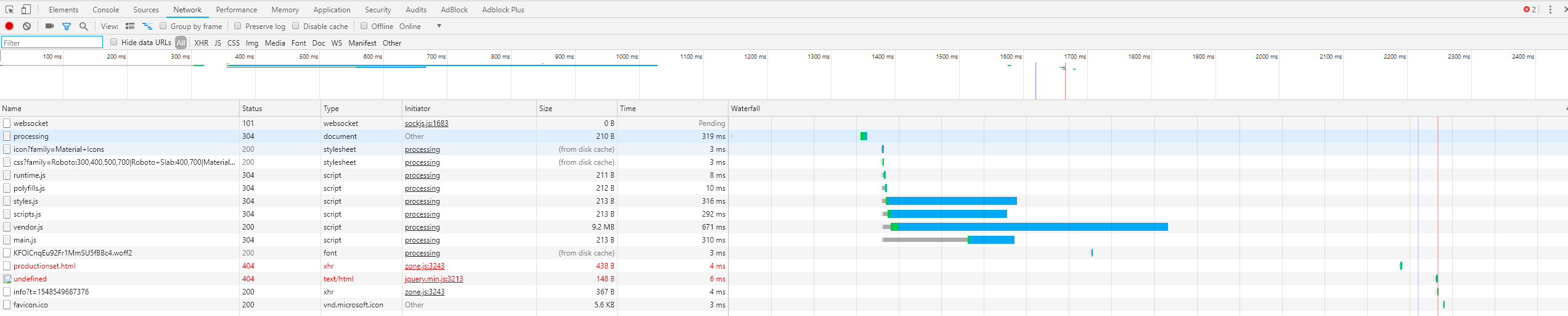
If i downgrade the package @angular-devkit/build-angular to version 0.10.7 the application works fine with all the packages at their latest version it works fine

Any other version above 0.10.7 breaks the application with the screenshots shown above.
I have done the following (This is a desktop with Windows 10 using Visual Studio 2017) and updating all packages to the latest and nothing worked.
a) deleted the node_modules in the application folder and npm installed everything.
b) deleted the node_modules in the application folder, npm cache clear --force and npm installed everything.
c) deleted the node_modules in the application folder, uninstalled node.js using the instructions on this page https://stackoverflow.com/questions/20711240/how-to-completely-remove-node-js-from-windows and installed nodejs 10.15.0 (includes npm 6.4.1) and latest packages.
d) deleted the node_modules in the application folder, uninstalled node.js using the instructions on this page https://stackoverflow.com/questions/20711240/how-to-completely-remove-node-js-from-windows and installed nodejs 11.8.0 (includes npm 6.5.0) and latest packages
So far the only workaround seems to be using the 0.10.7 version of the package @angular-devkit/build-angular (which i believe npm flags as having a severe vulnerability).
Please let me know if you need me to provide any other logs or information.
 karat713
on 27 Jan 2019
karat713
on 27 Jan 2019
I am using angular 9 and I have this issue. The workaround by @karat713 does not appear to work anymore.
 leeahoward
on 17 Apr 2020
leeahoward
on 17 Apr 2020
I was able to workaround by setting up a proxyconfig.json to serve all routes from the base. my base href is /elite
{
  "/elite/courses": {
    "target": "http://localhost:3000",
    "secure": false,
    "changeOrigin": false,
    "pathRewrite": {
      "^/elite/courses": "/elite"
    }
  }
}
Related issues
 5amfung
·
3Comments
5amfung
·
3Comments
 ericel
·
3Comments
ericel
·
3Comments
 hartjo
·
3Comments
hartjo
·
3Comments
 brtnshrdr
·
3Comments
brtnshrdr
·
3Comments
 NCC1701M
·
3Comments
NCC1701M
·
3Comments
Most helpful comment
I'm in the process of upgrading our app to Angular 7, so I could probably test tomorrow, once I get it to build...