Angular-cli: Angular 6 Documentation For Building Production App Shell
Versions
Angular CLI: 6.0.1
Node: 9.11.1
OS: darwin x64
Angular: 6.0.2
... animations, common, compiler, compiler-cli, core, forms
... http, language-service, platform-browser
... platform-browser-dynamic, platform-server, router
... service-worker

Package                           Version
-----------------------------------------------------------
@angular-devkit/architect         0.6.1
@angular-devkit/build-angular     0.6.1
@angular-devkit/build-optimizer   0.6.1
@angular-devkit/core              0.6.1
@angular-devkit/schematics        0.6.1
@angular/cli                      6.0.1
@angular/pwa                      0.6.1
@ngtools/webpack                  6.0.1
@schematics/angular               0.6.1
@schematics/update                0.6.1
rxjs                              6.1.0
typescript                        2.7.2
webpack                           4.6.0
Repro steps
- Create a new project with routing
ng new app-shell-test --routing - Add app shell to project
ng g app-shell --universal-project=app-shell-test --client-project=app-shell-test - Build project with app-shell
ng run app-shell-test:app-shell
Observed behavior
Project is built for dev environment.
Desired behavior
Documentation for how to build app-shell for production environment.
 collindutter
All 7 comments
Try changing browserTarget in the angular.json by adding :production to it. E.g.
"app-shell": {
"builder": "@angular-devkit/build-angular:app-shell",
"options": {
"browserTarget": "landing-page:build:production", <-- here
"serverTarget": "landing-page:server",
"route": "/shell"
}
}
 devoto13
on 17 May 2018
devoto13
on 17 May 2018
Unfortunately it looks like it's still producing a dev build..
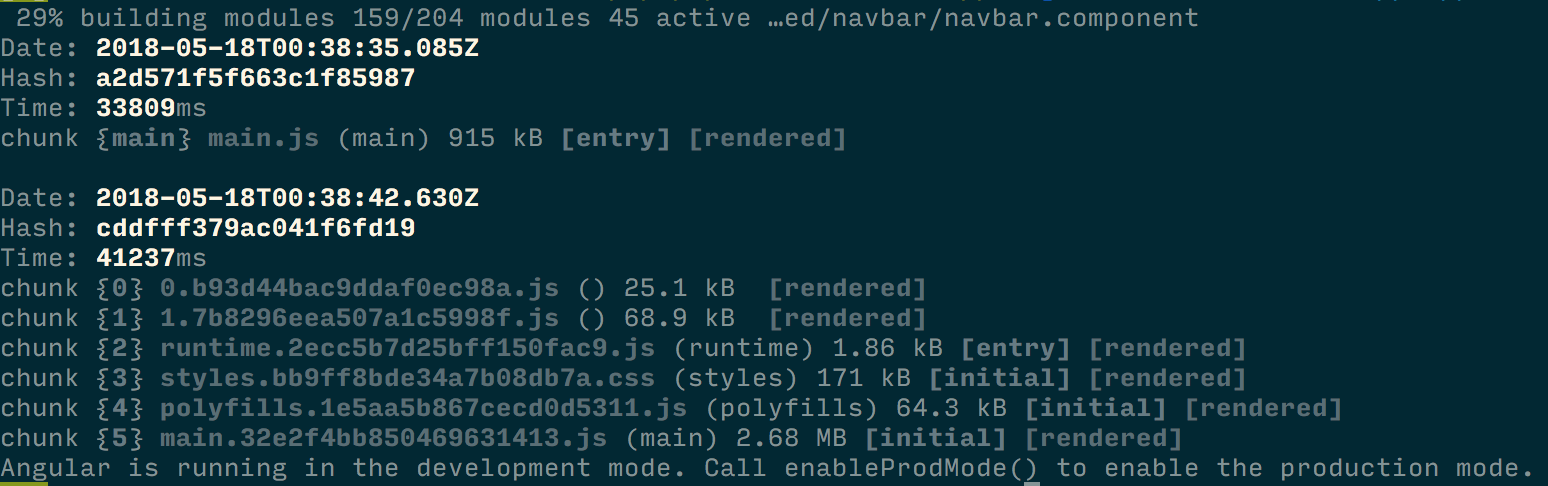
collindutter
on 18 May 2018
It is producing dev build for the server bundle and prod build for client bundle. For my project it didn't really matter, because app shell is very simple, so dev server bundle rendered it correctly. You can probably add configurations section to universal section (similar to build section) and link to it in a similar way from serverTarget, but I haven't tried it.
devoto13
on 18 May 2018
Got it, thanks!
collindutter
on 30 May 2018
I submitted a PR on the docs: https://github.com/angular/angular-cli/pull/12577
 juristr
on 13 Oct 2018
juristr
on 13 Oct 2018
Just for anyone looking at this in the future.
To build a production version of the app-shell you shouldn't be doing any changes to the angular.json. When the app-shell is added via a schematic, it will include both a dev and production configuration similar to the browser and serve builders.
The configuration generated will be as below;
"app-shell": {
  "builder": "@angular-devkit/build-angular:app-shell",
  "options": {
    "browserTarget": "app-shell-test:build",
    "serverTarget": "app-shell-test:server",
    "route": "shell"
  },
  "configurations": {
    "production": {
      "browserTarget": "app-shell-test:build:production"
    }
  }
}
And thus to trigger a production build all you need to do is run one of the below commands;
ng run <project-name>:app-shell:production
ng run <project-name>:app-shell --configuration production
 alan-agius4
on 13 Oct 2018
alan-agius4
on 13 Oct 2018
This issue has been automatically locked due to inactivity.
Please file a new issue if you are encountering a similar or related problem.
Read more about our automatic conversation locking policy.
_This action has been performed automatically by a bot._
![angular-automatic-lock-bot[bot] picture](https://avatars0.githubusercontent.com/in/40213?v=4&s=40) angular-automatic-lock-bot[bot]
on 8 Sep 2019
angular-automatic-lock-bot[bot]
on 8 Sep 2019
Related issues
 IngvarKofoed
·
3Comments
IngvarKofoed
·
3Comments
 jbeckton
·
3Comments
jbeckton
·
3Comments
 purushottamjha
·
3Comments
purushottamjha
·
3Comments
 rwillmer
·
3Comments
rwillmer
·
3Comments
 5amfung
·
3Comments
5amfung
·
3Comments
Most helpful comment
Just for anyone looking at this in the future.
To build a production version of the app-shell you shouldn't be doing any changes to the angular.json. When the app-shell is added via a schematic, it will include both a dev and production configuration similar to the browser and serve builders.
The configuration generated will be as below;
And thus to trigger a production build all you need to do is run one of the below commands;