Angular-cli: HMR Story Update for 6rc2
Versions
Angular CLI: 6.0.0-rc.2
Node: 9.11.1
OS: darwin x64
Angular: 6.0.0-rc.3
... animations, common, compiler, compiler-cli, core, forms
... http, language-service, platform-browser
... platform-browser-dynamic, router

@angular/cli: 6.0.0-rc.2
@angular-devkit/architect: 0.5.4
@angular-devkit/build-angular: 0.5.4
@angular-devkit/build-optimizer: 0.5.4
@angular-devkit/core: 0.5.4
@angular-devkit/schematics: 0.5.4
@ngtools/json-schema: 1.1.0
@ngtools/webpack: 6.0.0-rc.2.4
@schematics/angular: 0.5.4
@schematics/update: 0.5.4
typescript: 2.7.2
webpack: 4.5.0
Repro steps
- Fresh install using
ng new - Following HMR setup story
yarn run hmr
Changes needed?
Run script
"scripts": {
  ...
  "hmr": "ng serve --hmr -e=hmr"
}
becomes
"scripts": {
  ...
  "hmr": "ng serve --hmr"
}
angular.json
"environmentSource": "environments/environment.ts",
"environments": {
  "dev": "environments/environment.ts",
  "hmr": "environments/environment.hmr.ts",
  "prod": "environments/environment.prod.ts"
},
becomes
"configurations": {
  "hmr": {
    "fileReplacements": [
      {
        "src": "src/environments/environment.ts",
        "replaceWith": "src/environments/environment.hmr.ts"
      }
    ]
  },
  "production": {
  ...
After making the above changes, the app will be served but I get an console error with the following
dev-server.js:60 Uncaught Error: [HMR] Hot Module Replacement is disabled.
    at Object../node_modules/webpack/hot/dev-server.js
 pusherman
All 25 comments
 filipesilva
on 14 Apr 2018
filipesilva
on 14 Apr 2018
This is not fixed.
Angular CLI: 6.0.0-rc.5
Node: 9.10.1
OS: darwin x64
Angular: 6.0.0-rc.5
... animations, cli, common, compiler, compiler-cli, core, forms
... http, platform-browser, platform-browser-dynamic, router
Package Version
-----------------------------------------------------------
@angular-devkit/architect 0.5.7
@angular-devkit/build-angular 0.5.7
@angular-devkit/build-optimizer 0.5.7
@angular-devkit/core 0.5.7
@angular-devkit/schematics 0.5.7
@angular/language-service 6.0.0-rc.1
@ngtools/json-schema 1.1.0
@ngtools/webpack 6.0.0-rc.5
@schematics/angular 0.5.7
@schematics/update 0.5.7
rxjs 6.0.0-uncanny-rc.7
typescript 2.7.2
webpack 4.5.0
Using ng serve --hmr --configuration=hmr with:
angular.json
"build": {
"configurations": {
"hmr": {
"fileReplacements": [
{
"src": "src/environments/environment.ts",
"replaceWith": "src/environments/environment.hmr.ts"
}
]
}
}
}
and
"serve": {
"configurations": {
"hmr": {
"browserTarget": "lighthouse-front-ng6:build"
}
}
},
results in full page reloads on change.
 seanmcintyre
on 18 Apr 2018
seanmcintyre
on 18 Apr 2018
@seanmcintyre
Is the error below thrown when the page loaded in the browser?
dev-server.js:60 Uncaught Error: [HMR] Hot Module Replacement is disabled.
at Object../node_modules/webpack/hot/dev-server.js
If the error isn't thrown: did you notice the [HMR] connected message in the browser's console log?
The pull request angular/devkit#703 fixes that error and not a full page reload problem.
 enten
on 22 Apr 2018
enten
on 22 Apr 2018
No.
[HMR] Waiting for update signal from WDS...
and
[WDS] Hot Module Replacement enabled.
which seems correct.
This issue should not be closed. The original problem of bad documentation for enabling HMR is not solved. @filipesilva
seanmcintyre
on 26 Apr 2018
i have this problem too. it is seems correct, no error, but it will refresh the all page when any changes.

 ycpaladin
on 8 May 2018
ycpaladin
on 8 May 2018
@seanmcintyre @ycpaladin Can you sharing a repository which reproduce that issue? I would like to reproduce that issue.
enten
on 8 May 2018
I'm also trying to make HMR work with Angular but I'm starting to think that there's no proper HMR available for Angular.
The thing is that HMR is activated but it doesn't work as expected. Take the following screenshot as an example:
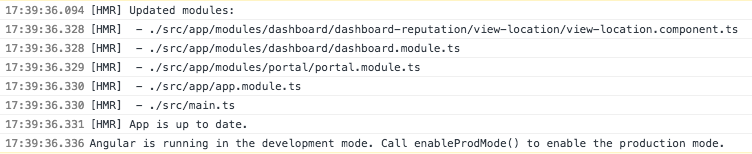
A minor copy update happened inside the view-location component but Angular's HMR replaced the entire tree of components/modules which, in the end, is almost like doing a full page refresh. The expected behaviour, though, is that Angular would only replace the small component being changed while keeping the rest of the application and its state unchanged).
I really wanted to know if this is the expected behaviour of what Angular is calling HMR. If it is, then fine, we can just all move on, but if it should work like HMR works with React for example (which is much better than the behaviour I'm experiencing), than I'd like to know how to fix it.
 rafaelbiten
on 10 May 2018
rafaelbiten
on 10 May 2018
About hmr working
I'm using hmr on both browser and server sides in the same build and it's works very well: https://github.com/enten/angular-universal

About hmr behavior
@rafaelbiten
As the cli says in warning message when hmr is enabled:
NOTICE: Hot Module Replacement (HMR) is enabled for the dev server.
The project will still live reload when HMR is enabled,
but to take advantage of HMR additional application code is required'
(not included in an Angular CLI project by default).'
See https://webpack.js.org/guides/hot-module-replacement
for information on working with HMR for Webpack.
I think using \@angularclass/hmr is like using react-hot-loader: you need to write specific code to intercept hot update propagation earlier. So if you use angularclass/hmr only: the propagation will inevitably be propagated to main.ts because it's here where hot update is handled (by angularclass/hmr).
If you want to stop hot update propagation earlier: you need to write specific code in the right place.
enten
on 10 May 2018
ycpaladin
on 10 May 2018
@ycpaladin you can fix your hmr env with the patch below:
diff --git a/angular.json b/angular.json
index 57201b2..71d5811 100644
--- a/angular.json
+++ b/angular.json
@@ -68,7 +68,7 @@
},
"hmr": {
"hmr": true,
- "browserTarget": "angular-hmr:build"
+ "browserTarget": "angular-hmr:build:hmr"
}
}
},
Explanation:
- In your browser entry _main.ts_ you called your
hmrBootstrapwhenenvironment.hmristrue - In your _package.json_, script
hmrrunng serve --hmr --configuration=hmr --port 4201 --open - And the
hmrconfiguration of targetservereference the"browserTarget": "angular-hmr:build": it's a mistake, you need to reference"angular-hmr:build:hmr"to use thebuildtarget with the correct configuration (which will enable hmr in your code).
Is your issue solved now?
enten
on 10 May 2018
@enten thank you for the extra information. So, what you're saying is that I should wrap the components that I want to be HMRed with the same code that I'm wrapping my AppModule. I'm pretty sure this is not how React's HMR work though, but I'll give it a try. Would you have some piece of code of how you're doing this on a deeply nested component?
Btw, when I read to take advantage of HMR additional application code is required' and then find a page like this: https://github.com/angular/angular-cli/wiki/stories-configure-hmr I just assumed that that was the extra code needed, and not that I'd have to wrap components with extra code (if that's really what you meant).
Thank you again!
rafaelbiten
on 10 May 2018
@rafaelbiten
So, what you're saying is that I should wrap the components that I want to be HMRed with the same code that I'm wrapping my AppModule
No, I'm not said that.
I'm means that if you use [react-hot-loader][https://github.com/gaearon/react-hot-loader), an update will be progate until it reach the AppContainer (or the hot function call) where live the hmr logic. If you use redux in your react app, you need to write hmr logic to tell how the store is reload.
Using angularclass/hmr is the same: you need to write specific hmr logic if you want to handle the hot reloading earlier. To achieve that, you must to be responsive of all side effects needed to hot reload some piece of code.
Webpack HMR isn't a kind of magic. It just fire update from where the file where is the change appended to the main entry point and check if the update was handled.
Some tools (like react-hot-loader and angularclass/hmr) help to setup basic hmr logic. But it can't fit to all use case without writing specific hmr logic.
Btw, when I read to take advantage of HMR additional application code is required' and then find a page like this: https://github.com/angular/angular-cli/wiki/stories-configure-hmr I just assumed that that was the extra code needed, and not that I'd have to wrap components with extra code (if that's really what you meant).
No, it's not that really what I means.
Adding angularclass/hmr is one way to setup a basic hmr logic into your app. It's a first step. Now if you want to handle an update earlier, you need to write specific hmr logic closer where the update is triggered.
Please note that I'm not an angular or webpack expert. It just my professional and personal experience of these tools with universal web application development.
enten
on 10 May 2018
@enten thank you again.
I'll try to read more about this when I have some time. Wish there were more documentation or examples on how to get this working properly with Angular. To be honest, while working with React, I never had to get into the details of how HMR works under the hood. I'd follow the documentation and HMR would work, even on deeply nested components, so I came with some expectations when trying the same with Angular.
rafaelbiten
on 10 May 2018
just modify the angular.json,add "environment.hmr.ts" and “ng serve --hmr --configuration=hmr” like @ycpaladin ;
hmr does not become effective. When I changed the app.compontent.html, the page is reload.
 hyysb
on 14 May 2018
hyysb
on 14 May 2018
@hyysb There was a bug in angular.json of @ycpaladin.
Can you sharing a repo to investigate your issue?
enten
on 14 May 2018
@enten Hi, I have downloaded https://github.com/ycpaladin/angular-hmr, and I have modified it following your instructions. It really works.
Then I created a new project and configured everything as what I did in https://github.com/ycpaladin/angular-hmr . Unexpectedly, it did not works. The error is as follow:

Have you ever got this kind of problem before? Thanks!
 huangshengliang
on 16 May 2018
huangshengliang
on 16 May 2018
@enten https://github.com/hyysb/angular6.git
ng serve --configuration hmr
The whole page changed when I change the file.
hyysb
on 18 May 2018
With Angular Cli 6.0.3
- npm i @types/webpack-env --save-dev
- create file named src/typings.d.ts
- add ‘///
’ line in typings.d.ts
the module wil be find.
 lihuabest
on 18 May 2018
lihuabest
on 18 May 2018
@huangshengliang
As @lihuabest tried to say (I think there is a format problem in its response): your issue may is due to a missing typescript interface.
I think you have the same issue as gdi2290/angular-hmr#74.
You can fix it with npm install --save-dev @types/webpack-env and add the line below into src/typings.d.ts:
///<reference types="webpack-env" />
Is that fixing your error?
@hyysb
As the HMR warning message says: HMR is well enabled, but you need to write some code to take advantage of it.
NOTICE: Hot Module Replacement (HMR) is enabled for the dev server.
The project will still live reload when HMR is enabled,
but to take advantage of HMR additional application code is required'
(not included in an Angular CLI project by default).'
See https://webpack.js.org/guides/hot-module-replacement
for information on working with HMR for Webpack.
The Angular CLI story Configure Hot Module Replacement can help you to setup HMR on the entry component.
You also need to add @types/webpack-env to your src/typings.d.ts to avoid the same issue as @huangshengliang.
And the most important: don't forget the --hmr flag when you start the dev server.
ng serve --hmr --configuration hmr
Below a patch to setup HMR after your revision hyysb/angular6/25cbfc8.
diff --git a/angular6/package-lock.json b/angular6/package-lock.json
index 6102e6c..7498c2d 100644
--- a/angular6/package-lock.json
+++ b/angular6/package-lock.json
@@ -471,6 +471,12 @@
"tslib": "1.9.1"
}
},
+ "@angularclass/hmr": {
+ "version": "2.1.3",
+ "resolved": "https://registry.npmjs.org/@angularclass/hmr/-/hmr-2.1.3.tgz",
+ "integrity": "sha1-NOZY7T2jfyOwogDi2lqJvpK7IJ8=",
+ "dev": true
+ },
"@ngtools/webpack": {
"version": "6.0.3",
"resolved": "http://registry.npm.taobao.org/@ngtools/webpack/download/@ngtools/webpack-6.0.3.tgz",
@@ -540,6 +546,12 @@
"integrity": "sha1-LePXGIGbwgFldUxKWa+36YM/Zwc=",
"dev": true
},
+ "@types/webpack-env": {
+ "version": "1.13.6",
+ "resolved": "https://registry.npmjs.org/@types/webpack-env/-/webpack-env-1.13.6.tgz",
+ "integrity": "sha512-5Th3OsZ4gTRdr9Mho83BQ23cex4sRhOR4XTG+m+cJc0FhtUBK9Vn62hBJ+pnQYnSxoPOsKoAPOx6FcphxBC8ng==",
+ "dev": true
+ },
"@webassemblyjs/ast": {
"version": "1.4.3",
"resolved": "http://registry.npm.taobao.org/@webassemblyjs/ast/download/@webassemblyjs/ast-1.4.3.tgz",
diff --git a/angular6/package.json b/angular6/package.json
index 3ec0c73..ac0dae6 100644
--- a/angular6/package.json
+++ b/angular6/package.json
@@ -25,14 +25,15 @@
"zone.js": "^0.8.26"
},
"devDependencies": {
- "@angular/compiler-cli": "^6.0.0",
"@angular-devkit/build-angular": "~0.6.1",
- "typescript": "~2.7.2",
"@angular/cli": "~6.0.1",
+ "@angular/compiler-cli": "^6.0.0",
"@angular/language-service": "^6.0.0",
+ "@angularclass/hmr": "^2.1.3",
"@types/jasmine": "~2.8.6",
"@types/jasminewd2": "~2.0.3",
"@types/node": "~8.9.4",
+ "@types/webpack-env": "^1.13.6",
"codelyzer": "~4.2.1",
"jasmine-core": "~2.99.1",
"jasmine-spec-reporter": "~4.2.1",
@@ -43,6 +44,7 @@
"karma-jasmine-html-reporter": "^0.2.2",
"protractor": "~5.3.0",
"ts-node": "~5.0.1",
- "tslint": "~5.9.1"
+ "tslint": "~5.9.1",
+ "typescript": "~2.7.2"
}
}
diff --git a/angular6/src/hmr.ts b/angular6/src/hmr.ts
new file mode 100644
index 0000000..6163394
--- /dev/null
+++ b/angular6/src/hmr.ts
@@ -0,0 +1,16 @@
+import { NgModuleRef, ApplicationRef } from '@angular/core';
+import { createNewHosts } from '@angularclass/hmr';
+
+export const hmrBootstrap = (module: any, bootstrap: () => Promise<NgModuleRef<any>>) => {
+ let ngModule: NgModuleRef<any>;
+ module.hot.accept();
+ bootstrap().then(mod => ngModule = mod);
+ module.hot.dispose(() => {
+ const appRef: ApplicationRef = ngModule.injector.get(ApplicationRef);
+ const elements = appRef.components.map(c => c.location.nativeElement);
+ const makeVisible = createNewHosts(elements);
+ ngModule.destroy();
+ makeVisible();
+ });
+};
+
diff --git a/angular6/src/main.ts b/angular6/src/main.ts
index 91ec6da..30a04c9 100644
--- a/angular6/src/main.ts
+++ b/angular6/src/main.ts
@@ -4,9 +4,21 @@ import { platformBrowserDynamic } from '@angular/platform-browser-dynamic';
import { AppModule } from './app/app.module';
import { environment } from './environments/environment';
+import { hmrBootstrap } from './hmr';
+
if (environment.production) {
enableProdMode();
}
-platformBrowserDynamic().bootstrapModule(AppModule)
- .catch(err => console.log(err));
+const bootstrap = () => platformBrowserDynamic().bootstrapModule(AppModule);
+console.log(environment)
+if (environment.hmr) {
+ if (module[ 'hot' ]) {
+ hmrBootstrap(module, bootstrap);
+ } else {
+ console.error('HMR is not enabled for webpack-dev-server!');
+ console.log('Are you using the --hmr flag for ng serve?');
+ }
+} else {
+ bootstrap();
+}
diff --git a/angular6/src/typings.d.ts b/angular6/src/typings.d.ts
new file mode 100644
index 0000000..06e7310
--- /dev/null
+++ b/angular6/src/typings.d.ts
@@ -0,0 +1 @@
+///<reference types="webpack-env" />
The instructions for angular.json in the story are incorrect.
"build": {
  "configurations": {
    "hmr": {
      "fileReplacements": [
        {
          "replace": "src/environments/environment.ts",
          "with": "src/environments/environment.hmr.ts"
        }
      ]
    }
  }
}
"serve": {
  "configurations": {
    "hmr": {
      "hmr": true,
      "browserTarget": "[APP_NAME]:build:hmr"
    }
  }
},
Is there someone to contact to re-open this issue?
seanmcintyre
on 18 May 2018
@enten Thank u for your help. My problem is solved. I want to know how do you know the solution of this question.
hyysb
on 19 May 2018
@hyysb
I know for a long time that webpack HMR isn't a kind of black magic. Webpack HMR only fires changes but it can't figure how apply side effects on runtime to handle them: it's the responsibility of the developer to write additional code for that (as the warn message said when you use the flag --hmr). If you have enough knowledges of how works a tool like Angular, you can write the correct code for HMR. If it's not the case, don't worry, others developers tried to do that in a common way like @angularclass/hmr (or react-hot-loader for a React application).
I know the solution of this question because I tried HMR with Angular 6 during last month (April 2018) and and especially because these last days your not the only one who encountered that kind of mistake/issue.
I'm glad that your issue is fixed.
enten
on 19 May 2018
@enten Thank u. (^~^)
hyysb
on 20 May 2018
This issue has been automatically locked due to inactivity.
Please file a new issue if you are encountering a similar or related problem.
Read more about our automatic conversation locking policy.
_This action has been performed automatically by a bot._
![angular-automatic-lock-bot[bot] picture](https://avatars0.githubusercontent.com/in/40213?v=4&s=40) angular-automatic-lock-bot[bot]
on 8 Sep 2019
angular-automatic-lock-bot[bot]
on 8 Sep 2019
Related issues
 brtnshrdr
·
3Comments
brtnshrdr
·
3Comments
 5amfung
·
3Comments
5amfung
·
3Comments
 hareeshav
·
3Comments
hareeshav
·
3Comments
 daBishMan
·
3Comments
daBishMan
·
3Comments
 gotschmarcel
·
3Comments
gotschmarcel
·
3Comments
Most helpful comment
The instructions for
angular.jsonin the story are incorrect.