Angular-cli: Can not add inline styles in ts files
Versions
Angular CLI: 1.7.1
Node: 9.5.0
OS: darwin x64
Angular: 5.2.5
... animations, common, compiler, core, forms, http
... language-service, platform-browser, platform-browser-dynamic
... router

@angular/cli: 1.7.1
@angular/compiler-cli: 5.2.6
@angular-devkit/build-optimizer: 0.3.2
@angular-devkit/core: 0.3.2
@angular-devkit/schematics: 0.3.2
@ngtools/json-schema: 1.2.0
@ngtools/webpack: 1.10.1
@schematics/angular: 0.3.2
@schematics/package-update: 0.3.2
typescript: 2.5.3
webpack: 3.11.0
Repro steps
- Step 1:
Starting with new sass project addapp-inline.component.scssfile. With something obvious like:
body {
  background-color: red;
}
- Step 2
In theapp.component.tsfile addimport './app-inline.component.scss'; - Step 3
View app usingng serveand the body should be red.
Observed behavior
The styles are not applied.
Desired behavior
The styles should be added like they are when included in the styles.scss file.
Usually when I work on angular projects outside the cli I can import global styles into a component using inline style imports via the style-loader defined in the webpack.config. This is really helpful when a component wraps a 3rd party library that doesn't play nicely with angular's styleUrls field. I may need to add styles to the global scope in order to affect the elements this library adds, but I don't want to add them as globals in the styles.scss since they are part of this component and should only be loaded if this component is imported. It also makes for cleaner code since the styles are contained in the code to where they are used.
In my example I have a component that wraps a QuillJs text editor and I have a few custom styles I want to add to it as well as I would like to import their styles inside this component.
Mention any other details that might be useful (optional)
I wanted to make sure this wasn't intentionally before digging into the issue on my own.
Thanks!
 CodySchaaf
All 6 comments
Hi,
The body is defined on a higher level: usually index.html this is why the CSS selector for body isn't applied on root component level.
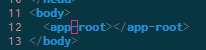
In angular one of the best things (imo) is that the styles are applied to the component itself and won't leak outside.
- As you said, if you want to style the body element
src/styles.scssis the right place. - on the other hand if you want to style the root component or its children elements then you need to specify
app-rootor your custom selector; but not body as there is no body in the root component.
This means you app-root becomes you body.
I hope this will help.
 mboughaba
on 25 Feb 2018
mboughaba
on 25 Feb 2018
Hi @CodySchaaf, the syntax you are describing (import './app-inline.component.scss';) is not something we support at all. That is why it's not working as you expect.
To use global styles you should use the the styles array in .angular-cli.json (see https://github.com/angular/angular-cli/wiki/stories-global-styles for more information). For component styles you have to add them in the stylesUrl array of the component.
 filipesilva
on 26 Feb 2018
filipesilva
on 26 Feb 2018
Hey @filipesilva and @mboughaba Thanks for the response. I understand how it is intended to work, but that won't help me for my use case. Affecting the body was just a simple example and not how I would use this in reality.
In my real situation I'm using a component to wrap the https://quilljs.com/ library. Quill adds a div with the class ql-editor inside my component.
I start with this view:
<div class="container">
    <div id="editor"></div>
</div>
Which then compiles to something like:
<my-app-editor _ngcontent-c0="" _nghost-c1="">
    <div _ngcontent-c1="" class="container">
        <div _ngcontent-c1="" id="editor" class="ql-container ql-snow">
            <div class="ql-editor" data-gramm="false" contenteditable="true"></div>
        </div>
    </div>
</my-app-editor>
Of course I have custom styles I assign to the stylesUrl, but if I were to add
.ql-editor {
  background-color: red;
}
To those rules the compiled styles would look like:
.ql-editor[_ngcontent-c1] {
  background-color: red;
}
Which won't work since quill doesn't add _ngcontent-c1 class to the element.
This is not a global style and so shouldn't be included in the global styles array, since it is restricted to the scope of the component it should be able to be included there. Since angular doesn't use the real shadow dom and just simulates it by adding generated class to the styles the easiest way to achieve this is with an inline import that gets hoisted to the global once it is imported.
My component definition would look something like this:
import './my-quill.scss';

@Component({
  selector: 'my-app-editor,
  templateUrl: './editor.component.html',
  styleUrls: ['./editor.component.scss']
})
export class EditorComponent implements OnInit, AfterViewInit {}
I understand import './my-quill.scss'; isn't currently supported since there are two loader definitions defined in the webpack configs (one for the styles.scss files and one for everything else), but I'm hoping that can either be changed, or for a suggestion on how to achieve something similar can.
Thanks!
CodySchaaf
on 26 Feb 2018
The view encapsulation option is designed to support scenarios such as this.
Try adding the following to the component decorator:
encapsulation: ViewEncapsulation.None
This will cause the component to not use shadow DOM emulation and not alter the style's rules. For more information, the documentation is here: https://angular.io/guide/component-styles#view-encapsulation
 clydin
on 26 Feb 2018
clydin
on 26 Feb 2018
This is great thanks! Also seems like ::ng-deep would have been useful here although it has now been deprecated :-/
CodySchaaf
on 27 Feb 2018
This issue has been automatically locked due to inactivity.
Please file a new issue if you are encountering a similar or related problem.
Read more about our automatic conversation locking policy.
_This action has been performed automatically by a bot._
![angular-automatic-lock-bot[bot] picture](https://avatars0.githubusercontent.com/in/40213?v=4&s=40) angular-automatic-lock-bot[bot]
on 8 Sep 2019
angular-automatic-lock-bot[bot]
on 8 Sep 2019
Related issues
 naveedahmed1
·
3Comments
naveedahmed1
·
3Comments
 jbeckton
·
3Comments
jbeckton
·
3Comments
 IngvarKofoed
·
3Comments
IngvarKofoed
·
3Comments
 hartjo
·
3Comments
hartjo
·
3Comments
 delasteve
·
3Comments
delasteve
·
3Comments
Most helpful comment
The view encapsulation option is designed to support scenarios such as this.
Try adding the following to the component decorator:
encapsulation: ViewEncapsulation.NoneThis will cause the component to not use shadow DOM emulation and not alter the style's rules. For more information, the documentation is here: https://angular.io/guide/component-styles#view-encapsulation