Angular-cli: ng build produces a working dist but has no styles even if they are in the bundle.
Hi everybody, I'm having a weird issue while trying to deploy my angular application with Docker-Compose. The app works just fine and has its styles while developing but when I try to make a dist using ng build --prod and serve it with nginx I get a styleless application.
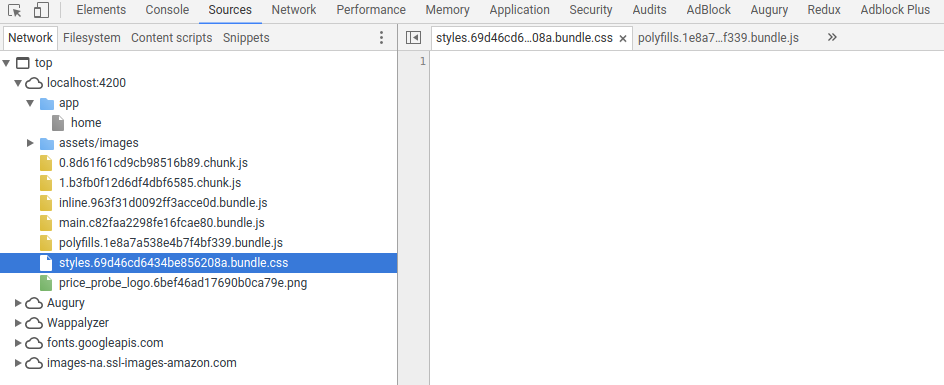
My bundle.css is empty.
Important to mention that I'm using bootstrap, font-awesome and ng-bootstrap.
Also getting Node#moveTo was deprecated. Use Container#append. while running ng build --prod.
package.json:
{
  "name": "price-probe-ui-v2",
  "version": "0.0.0",
  "license": "MIT",
  "scripts": {
    "ng": "ng",
    "start": "ng serve --proxy-config proxy.config.json",
    "build": "ng build",
    "test": "ng test",
    "lint": "ng lint",
    "e2e": "ng e2e"
  },
  "private": true,
  "dependencies": {
    "@angular/animations": "^5.1.0",
    "@angular/common": "^5.1.0",
    "@angular/compiler": "^5.1.0",
    "@angular/core": "^5.1.0",
    "@angular/forms": "^5.1.0",
    "@angular/http": "^5.1.0",
    "@angular/platform-browser": "^5.1.0",
    "@angular/platform-browser-dynamic": "^5.1.0",
    "@angular/router": "^5.1.0",
    "@ng-bootstrap/ng-bootstrap": "1.0.0-beta.9",
    "font-awesome": "4.7.0",
    "rxjs": "^5.5.2",
    "zone.js": "^0.8.19"
  },
  "devDependencies": {
    "@angular/cli": "1.6.4",
    "@angular/compiler-cli": "^5.1.0",
    "@angular/language-service": "^5.1.0",
    "@angular-devkit/schematics": "0.0.43",
    "cssnano": "3.10.0",
    "@types/jasmine": "~2.8.3",
    "@types/jasminewd2": "~2.0.2",
    "@types/node": "~6.0.60",
    "jquery": "3.2.1",
    "popper.js": "1.12.9",
    "bootstrap": "4.0.0-beta.2",
    "codelyzer": "^4.0.1",
    "jasmine-core": "~2.8.0",
    "jasmine-spec-reporter": "~4.2.1",
    "karma": "~2.0.0",
    "karma-chrome-launcher": "~2.2.0",
    "karma-cli": "~1.0.1",
    "karma-coverage-istanbul-reporter": "^1.2.1",
    "karma-jasmine": "~1.1.0",
    "karma-jasmine-html-reporter": "^0.2.2",
    "protractor": "~5.1.2",
    "ts-node": "~3.2.0",
    "tslint": "~5.9.1",
    "typescript": "~2.5.3"
  }
}
.angular-cli.json's styles section:
"styles": [
        "styles.css",
        "../node_modules/bootstrap/dist/css/bootstrap.min.css",
        "../node_modules/font-awesome/css/font-awesome.css"
]
Versions
 - angular/cli: 1.6.4
 - node: 8.9.1
 - npm: 5.5.1
Repro steps
ng build --prodserve dist with nginx on docker-compose
Observed behavior
Just an example, the following session has no color and dimensions rules.
- Working Development Version with Style:

- Working Production Version with no Style:

- Working Production Version with no Style:
Desired behavior
Should keep styles
Mention any other details that might be useful (optional)
Dockerfile:
FROM node:8.9-alpine as angular-built

# Gyp dependencies
RUN apk add --no-cache make gcc g++ python2 && \
  npm install --production --silent && \
  apk del make gcc g++ python2
RUN ln -s /usr/bin/python2.7 /usr/bin/python

# Angular
RUN mkdir -p /usr/local/lib/node_modules/
RUN chown -R $(whoami):$(whoami) /usr/local/lib/node_modules
RUN npm config set user 0
RUN npm config set unsafe-perm true
RUN npm i -g node-gyp
RUN npm i -g node-sass
RUN npm i -g @angular/[email protected]
ADD . /usr/src/app
WORKDIR /usr/src/app
RUN npm i
RUN npm rebuild node-sass
RUN ng build --prod

# Nginx
FROM nginx:alpine
COPY --from=angular-built /usr/src/app/dist /usr/share/nginx/html
COPY nginx.conf /etc/nginx/nginx.conf
EXPOSE 4200
CMD [ "nginx", "-g", "daemon off;" ]
docker-compose.yml:
version: '3'

services:
  frontend:
    image: angular-cli-docker-ootb
    build: .
    environment:
      NODE_ENV: production
    ports:
      - 4200:4200
    command: [nginx-debug, '-g', 'daemon off;']
nginx.conf:
events {
  worker_connections 1024;
}

http {

  index index.html index.htm;

  server {
      listen 4200;
      root /usr/share/nginx/html;

      location /api {
        proxy_pass http://xx.xxx.xxx.xxx:8080/api;
        proxy_set_header X-Forwarded-Host $host;
        proxy_set_header X-Forwarded-Server $host;
        proxy_set_header X-Forwarded-For $proxy_add_x_forwarded_for;
      }

      location / {
        try_files $uri $uri/ /index.html;
      }

  }

}
Chrome Sources:
 andream16
All 12 comments
This issue comes from angular-cli 1.6.4. It worked with 1.6.3
 dgsqrs
on 12 Jan 2018
dgsqrs
on 12 Jan 2018
@dgsqrs Tried that, still same issue.
andream16
on 12 Jan 2018
@AndreaM16
1) Delete node_modules
2) change version '^1.6.X' by '1.6.3' without the ^
It is just a workaround, no the "right" solution. The angular-cli team must have a look on this issue.
dgsqrs
on 12 Jan 2018
Thanks @dgsqrs
Moving all of my code into a new project generated with ng new my_project with angular/[email protected] solves the issue, but I still have the same problem with the latest version.
andream16
on 12 Jan 2018
@AndreaM16 can you provide the build output log?
 clydin
on 12 Jan 2018
clydin
on 12 Jan 2018
any news on this issue ?
dgsqrs
on 20 Jan 2018
@dgsqrs Still having the same issue. I solved it downgrading to 1.6.3.
andream16
on 22 Jan 2018
Also having this on 1.6.6.
Downgrade to 1.6.3 works.
 erwinwildenburg
on 30 Jan 2018
erwinwildenburg
on 30 Jan 2018
Downgrading to 1.6.3 didn't do it for me... to be able to deploy a production version, unfortunately, I'm gonna have to go with https://github.com/angular/angular-cli/issues/8577#issuecomment-360840544
 eestein
on 9 Feb 2018
eestein
on 9 Feb 2018
Great support for the world of open source when everywhere you look you see the words "downgrade to get it to work". Quality control at its finest.
 paulpottertasd
on 20 Feb 2018
paulpottertasd
on 20 Feb 2018
Thanks for reporting this issue. However, you didn't provide sufficient information for us to understand and reproduce the problem. Please check out our submission guidelines to understand why we can't act on issues that are lacking important information.
If the problem persists, please file a new issue and ensure you provide all of the required information when filling out the issue template.
 alan-agius4
on 20 Nov 2018
alan-agius4
on 20 Nov 2018
This issue has been automatically locked due to inactivity.
Please file a new issue if you are encountering a similar or related problem.
Read more about our automatic conversation locking policy.
_This action has been performed automatically by a bot._
![angular-automatic-lock-bot[bot] picture](https://avatars0.githubusercontent.com/in/40213?v=4&s=40) angular-automatic-lock-bot[bot]
on 9 Sep 2019
angular-automatic-lock-bot[bot]
on 9 Sep 2019
Related issues
 donaldallen
·
3Comments
donaldallen
·
3Comments
 hareeshav
·
3Comments
hareeshav
·
3Comments
 jbeckton
·
3Comments
jbeckton
·
3Comments
 ericel
·
3Comments
ericel
·
3Comments
 naveedahmed1
·
3Comments
naveedahmed1
·
3Comments
Most helpful comment
Great support for the world of open source when everywhere you look you see the words "downgrade to get it to work". Quality control at its finest.