Angular-cli: Incosistency of styling between development and production build
Bug encountered:
I'm experiencing an inconsistent behavior regarding the styling of the form fields.
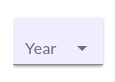
In my application I styled the standard components mat-input-flex mat-form-field-flex class through ::ng-deep like so:
mat-form-field {
  &.mat-form-field {
    font-family: $body_font;
  }

  ::ng-deep .mat-form-field-flex,
  ::ng-deep .mat-input-flex {
    background-color: #f0f0ff !important;
    padding: 0 12px !important;
    box-shadow: 0 3px 1px -2px rgba(0, 0, 0, 0.2), 0 2px 2px 0 rgba(0, 0, 0, 0.14), 0 1px 5px 0 rgba(0, 0, 0, 0.12);
  }
and that works fine in my development environment.
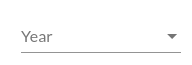
When I do build the application for production (with Angular CLI through ng build --prod) those styles don't get applied anymore.
I'm not entirely sure if it's an issue with material or with the cli.
What is the expected behavior?
The styles produced in development should match the ones in production.
Versions
Tested on Chrome 62 and Firefox Quantum 57
Angular CLI: 1.5.5
Node: 8.9.1
OS: linux x64
Angular: 5.0.5
... animations, common, compiler, compiler-cli, core, forms
... http, language-service, platform-browser
... platform-browser-dynamic, router

@angular/cdk: 5.0.0-rc0
@angular/cli: 1.5.5
@angular/material: 5.0.0-rc0
@angular-devkit/build-optimizer: 0.0.34
@angular-devkit/core: 0.0.22
@angular-devkit/schematics: 0.0.38
@ngtools/json-schema: 1.1.0
@ngtools/webpack: 1.8.5
@schematics/angular: 0.1.8
typescript: 2.4.2
webpack: 3.8.1
 emanuelet
All 17 comments
This may be more of a material issue than a CLI issue. However, can you try running ng build --aot to determine if this is actually AOT related.
 clydin
on 6 Dec 2017
clydin
on 6 Dec 2017
I actually previously opened the issue on the material repository https://github.com/angular/material2/issues/8794.
So I tried to run ng build --aot but the results are the same as the development build.
The issue seems to arise when I use the --prod option. I'm gonna try to use the single options to see if I can find the offender
emanuelet
on 7 Dec 2017
Ok, so I tried turning on and off all the flags that are listed in the wiki to be set by --prod, I also reproduced the entire script
ng build --aot=true --environment=prod --output-hashing=all --named-chunks=false --sourcemaps=false -vendor-chunk=true --extract-css=true --build-optimizer=true
but is still working fine as it is in development.
My guess, is that the offender could be UglifyJS that is the only other thing that gets activated by --prod
emanuelet
on 7 Dec 2017
cssnano is the other plugin that is activated in production and would most likely be the culprit here.
As an experiment, can you go into node_modules/@angular/cli/models/webpack-configs/styles.js and change const minimizeCss = buildOptions.target === 'production'; to const minimizeCss = false;. should be around line 38.
clydin
on 7 Dec 2017
yeah, that does the trick. Good call!
emanuelet
on 7 Dec 2017
What can we do to fix it?
emanuelet
on 11 Dec 2017
I see same problem in one of the apps I'm working on. Dev works fine but --prod build breaks UI.
 bogacg
on 12 Dec 2017
bogacg
on 12 Dec 2017
I have the same issue using angular-cli 1.6.2 and angular/material 5.0.2 .
const minimizeCss = false; not helped
For now I serve app using 'ng serve --aot' which works as expected.
 lukascode
on 29 Dec 2017
lukascode
on 29 Dec 2017
it appears that also 1.6.3 that replaces cssnano with cleancss doesn't fix the issue.
One thing that I noticed tho, is that if I move the styling from the global styles.scss to the component specific scss, it does work as expected
emanuelet
on 29 Dec 2017
@emanuelet that change is not in 1.6.3. Since it is a feature, it will appear in the next minor release.
clydin
on 29 Dec 2017
@clydin has it been resolved with 1.6.5?
emanuelet
on 22 Jan 2018
@emanuelet I have the same problams in 1.6.5. However it works good with options
ng build -prod --extract-css=false
 sergzven
on 24 Jan 2018
sergzven
on 24 Jan 2018
1.7 has a new stylesheet optimization pipeline. You can try it in the current betas (latest is 1.7.0-beta.1).
clydin
on 24 Jan 2018
Yes, in 1.7.0-beta.1 there are no problams with styles.
sergzven
on 24 Jan 2018
I just tested it and I can confirm that 1.7.0-beta.1 fixes the issue. Thank you!
emanuelet
on 24 Jan 2018
I can confirm that ng build --prod --build-optimizer=false works perfectly fine when you struggle to built your ng app with just ng build --prod
 PrinzJuliano
on 9 Feb 2018
PrinzJuliano
on 9 Feb 2018
This issue has been automatically locked due to inactivity.
Please file a new issue if you are encountering a similar or related problem.
Read more about our automatic conversation locking policy.
_This action has been performed automatically by a bot._
![angular-automatic-lock-bot[bot] picture](https://avatars0.githubusercontent.com/in/40213?v=4&s=40) angular-automatic-lock-bot[bot]
on 21 Oct 2019
angular-automatic-lock-bot[bot]
on 21 Oct 2019
Related issues
 IngvarKofoed
·
3Comments
IngvarKofoed
·
3Comments
 NCC1701M
·
3Comments
NCC1701M
·
3Comments
 jbeckton
·
3Comments
jbeckton
·
3Comments
 brtnshrdr
·
3Comments
brtnshrdr
·
3Comments
 purushottamjha
·
3Comments
purushottamjha
·
3Comments
Most helpful comment
I can confirm that
ng build --prod --build-optimizer=falseworks perfectly fine when you struggle to built your ng app with justng build --prod