Angular-cli: ng build --prod crashes at 10%
Bug Report or Feature Request (mark with an x)
- [x] bug report -> please search issues before submitting
- [ ] feature request
Versions.
Angular CLI: 1.5.0
Node: 8.7.0
OS: darwin x64
Angular: 5.0.1
... animations, common, compiler, compiler-cli, core, forms
... http, platform-browser, platform-browser-dynamic, router

@angular/cdk: 5.0.0-rc0
@angular/cli: 1.5.0
@angular/material: 5.0.0-rc0
@angular-devkit/build-optimizer: 0.0.32
@angular-devkit/core: 0.0.20
@angular-devkit/schematics: 0.0.35
@ngtools/json-schema: 1.1.0
@ngtools/webpack: 1.8.0
@schematics/angular: 0.1.2
typescript: 2.6.1
webpack: 3.8.1
Repro steps.
ng build --prod crashes at the following stage:
10% building modules 7/7 modules 0 active
process just exists with no error
The log given by the failure.
Desired functionality.
Mention any other details that might be useful.
 eyalhakim
All 20 comments
:+1:
Seeing same issue, works without --prod flag. Only log seen is:
10% building modules 4/4 modules 0 active
Project: https://github.com/terrandominion/app.angular.cli.ts
Travis log: https://travis-ci.org/terrandominion/app.angular.cli.ts/jobs/299854705
 ghost
on 9 Nov 2017
ghost
on 9 Nov 2017
@kuwas thank you, i thought i was the only one experiencing this, couldn't find any record of this behavior online.
Please let me know if you find a solution, i'll do the same.
eyalhakim
on 10 Nov 2017
For me also sometimes it takes more than 1hr it ill crashes at 92%
 praveenbm9321
on 10 Nov 2017
praveenbm9321
on 10 Nov 2017
Got this issue some days ago with the v1.5.0. (app crash at 10%)
It cames from a directory containing a "." used in an import. In my case it was a typo, i created a directory component.ts..
Fix that and your app will build normally, maybe with a jsheap error but that's a totally different issue :).
 PillowPillow
on 10 Nov 2017
PillowPillow
on 10 Nov 2017
@PillowPillow thank you so much for your answer.
I have many directories containing dots in them such as event-snooze.component.
It's a convention i was exposed to a while ago.
Are you saying this i what's causing the problem?
Anyone from the Angular team that can confirm?
eyalhakim
on 10 Nov 2017
I'm not saying that's not a bug of the new version, this should be fixed asap but yes it seems that using dot in directory break the current build process. You can try easily by creating a new project with a "dot directory". I had to implement one by one all my modules & components to found this issue ^^'.
PillowPillow
on 10 Nov 2017
@PillowPillow i just tested it and it works.
Created a new project. Added a "dot directory", imported the component inside it, build works.
Any idea why that could be?
eyalhakim
on 10 Nov 2017
Erf, your issue is surely related but it seems that directories with dots works if the part after the dot isn't an extension.
I created a repo sample with my issue : repo, it crashes at 10% like yours.
PillowPillow
on 10 Nov 2017
@PillowPillow but for me it takes more than 1 hr to build or it will stops at 92% , is there any solution for that, In V1.4.1 it was taking max of 5 to 10 min
praveenbm9321
on 11 Nov 2017
@PillowPillow i cannot thank you enough!
Found two rouge folders that ended with .ts and once renaming them project builds again!
You are a life saver!
eyalhakim
on 11 Nov 2017
@praveenbm9321 for me the optimization at 92% takes 5 minutes now but before it used to be seconds. Probably depends on the machine and project size but i can tell that something changed there for the worse.
Maybe you should open an issue on that?
eyalhakim
on 11 Nov 2017
@eyalhakim For me also optimization at 92% takse 2 to 3 minutes only but it stucks at 92% and sometime it completes or stops there itself.But before it use complete build withing 5 to 10 min
praveenbm9321
on 11 Nov 2017
@praveenbm9321 try running it with --build-optimizer=false
eyalhakim
on 11 Nov 2017
It doesnt actually have to be a directory inside the project with a period name. In my case the project root directory itself had periods in its name app.angular.cli.ts, so that broke the build too. Renaming the entire project seems to work.
Regardless, period names are perfectly valid directories and should build. This is definitely something that should be fixed.
ghost
on 11 Nov 2017
I've run into this as well, and as far I can tell, I don't have any misnamed folders.
It appears that the files denoted in .angular-cli.json get processed, but then dies after processing those.
 node --max-old-space-size=8192 node_modules/@angular/cli/bin/ng build --prod --build-optimizer=false --verbose && npm run build:build-index
 10% building modules 3/7 modules 4 active ...force-lightning-design-system.min.css
Node#moveTo was deprecated. Use Container#append.
13% building modules 26/27 modules 1 active ...\Desktop\test-updates\src\styles.scss

It will hit 13% and hang. Appears to process the .scss file and leaves 0 active. I had some interesting results removing components from the shared module, which seemed to allow the processing to continue - but with errors resolving types statically in the project - which was expected.
I tried with [email protected] versions, as well as with @[email protected] versions of this project, with the same result.
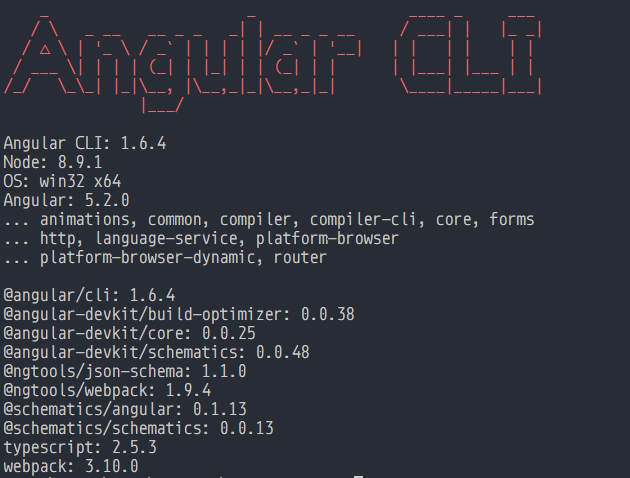
I'm currently locked at @angular/[email protected] because it's working find for my 4.4.6 project. My worry is when we upgrade to 5.x.
 dballance
on 14 Jan 2018
dballance
on 14 Jan 2018
I've been having the same issue (crashing at 10%). Reading at the comments written by the angular team on ./src/app/environment.ts it says that if you run ng build --env=prod it will use environment.prod.ts. So I trie to run ng build --env=prod instead of ng build -prod and work. I hope this to solve your problem, leave me a comment about how it went.
 IpiVasquez
on 22 Jan 2018
IpiVasquez
on 22 Jan 2018
Just to chime in here, I am still seeing an issue with my project build hanging at:
10% building modules 7/7 modules 0 active
This happens anytime I am using --aot, regardless of the environment. I have checked that none of my project folder have dots in them, and that my main project folder doesn't contain a dot. None do. (There are some dot folders in node_modules, but I obviously have limited control over third-party packages like that.)
I have rolled back to every version of angular-cli since 1.5.0 to see if any work, and I simply can't build using --aot at all.
Angular CLI: 1.7.4
Node: 8.9.1
OS: darwin x64
Angular: 5.2.10
... animations, common, compiler, compiler-cli, core, forms
... http, language-service, platform-browser
... platform-browser-dynamic, router

@angular/cli: 1.7.4
@angular-devkit/build-optimizer: 0.3.2
@angular-devkit/core: 0.3.2
@angular-devkit/schematics: 0.3.2
@ngtools/json-schema: 1.2.0
@ngtools/webpack: 1.10.2
@schematics/angular: 0.3.2
@schematics/package-update: 0.3.2
typescript-formatter: 5.2.0
typescript: 2.5.3
webpack: 3.11.0
 omegabane
on 2 May 2018
omegabane
on 2 May 2018
Closing as there haven't been any additional reports for this problem recently, and I cannot reproduce it as well. If you are still experiencing this problem please open a new issue with a reproduction.
 filipesilva
on 28 Jan 2019
filipesilva
on 28 Jan 2019
I face a segmentation fault quite often, but I'm unable to outline the exact reproducing steps.
92% chunk asset optimization TerserPlugin./build.sh: line 16:  3555 Segmentation fault: 11  ng build --prod
Response code: 139
But executing ng build --prod again fixes the problem. I face this issue too randomly.
 saqib-ahmed
on 6 Sep 2019
saqib-ahmed
on 6 Sep 2019
This issue has been automatically locked due to inactivity.
Please file a new issue if you are encountering a similar or related problem.
Read more about our automatic conversation locking policy.
_This action has been performed automatically by a bot._
![angular-automatic-lock-bot[bot] picture](https://avatars0.githubusercontent.com/in/40213?v=4&s=40) angular-automatic-lock-bot[bot]
on 7 Oct 2019
angular-automatic-lock-bot[bot]
on 7 Oct 2019
Related issues
 JanStureNielsen
·
3Comments
JanStureNielsen
·
3Comments
 hareeshav
·
3Comments
hareeshav
·
3Comments
 ericel
·
3Comments
ericel
·
3Comments
 gotschmarcel
·
3Comments
gotschmarcel
·
3Comments
 MateenKadwaikar
·
3Comments
MateenKadwaikar
·
3Comments