Angular-cli: Custom environments flags not working
I'm using Angular-cli 1.4.4, and i'm unable to use environments properly
I have this :
"environments": {
"dev": "environments/environment.ts",
"prod": "environments/environment.prod.ts",
"qa": "environments/environment.qa.ts"
}
When I build with my qa environment it uses prod configuration
I ran this: ng build --env=qa
 AnthonyGiretti
All 14 comments
@AnthonyGiretti can you put up a repository on github that shows this problem happening please? I cannot reproduce locally with the information you have given.
 filipesilva
on 4 Oct 2017
filipesilva
on 4 Oct 2017
Hi @filipesilva thank you for your reply!
Yes you can find it here
https://github.com/AnthonyGiretti/Angular4-IgniteUI.git
Can't wait to hear from you!
Anthony
AnthonyGiretti
on 4 Oct 2017
I am having a similar issue
ng build --env=prod is always picking environment.ts instead of environment.prod.ts is this a bug?
I guess its because main.ts imports environment.ts by default
import { environment } from './environments/environment';
If main.ts imports environment.prod.ts, that gets picked up all the time.
import { environment } from './environments/environment.prod.ts';
https://stackoverflow.com/questions/46573559/angular4-enable-production-mode
 hmajumdar
on 5 Oct 2017
hmajumdar
on 5 Oct 2017
Hi, any update on this?
AnthonyGiretti
on 17 Oct 2017
I'm having the same issue. This was working before I updated to the latest version of angular 4. My project was started in Angular 4.2
I believe as @hmajumdar that the main is not getting overridden.
Example of my setup:
"environmentSource": "environments/environment",
"environments": {
"local-us": "environments/us/environment.local.ts",
"dev-us": "environments/us/environment.dev.ts",
"qa-us": "environments/us/environment.qa.ts",
"prod-us": "environments/us/environment.prod.ts",
"local-au": "environments/us/environment.local.ts",
"dev-au": "environments/au/environment.ts",
"qa-au": "environments/au/environment.qa.ts",
"prod-au": "environments/au/environment.prod.ts"
}
 slucas-nwx
on 17 Oct 2017
slucas-nwx
on 17 Oct 2017
You need to set the envName in the environment Object for all the environments , something like this
export const environment = {
    production: true,
    apiURL : '/offer-screener-web/'
    envName: 'prod'
};
 pearpages
on 23 Oct 2017
pearpages
on 23 Oct 2017
@pearpages Yea I know that. Each file has it's own environment values all with the same object attributes. The CLI just isn't loading the file that is specified in the angular-cli.json
ie. ng build --env=dev-us like I have in my setup. It used to until I updated to the latest version.
slucas-nwx
on 23 Oct 2017
we are using 1.4.9 here and seems that all is ok, and we also use a path mapping on tsconfig too...
      "environmentSource": "environments/environment.ts",
      "environments": {
        "local": "environments/environment.local.ts",
        "dev": "environments/environment.ts",
        "qa": "environments/environment.qa.ts",
        "prod": "environments/environment.prod.ts"
      }
 guilhermejcgois
on 23 Oct 2017
guilhermejcgois
on 23 Oct 2017
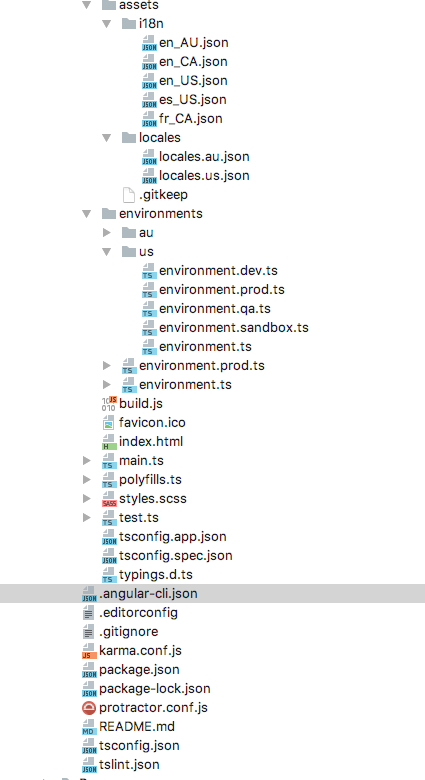
Here's an example of my dev configs.
//"dev-us": "environments/us/environment.dev.ts"
export const environment = {
production: false,
envName: 'dev',
apiUrl: 'https://max.biz/',
translationAssetPath: '/bundles/maxangular/assets/i18n/',
defaultLocale: 'en_US',
supportedLocalesPath: '/bundles/maxangular/assets/locales/locales.us.json'
};
Is there something obviously wrong?
slucas-nwx
on 23 Oct 2017
HI guys,
Sorry for everything, I finally found my issue, after upgrading to angular CLI 1.4.9 I let in my code prod configuration call like this : import { environment } from './../../environments/environment.prod';
With 1.4.9 version I have no longer the issue !!
This topic could be closed I think
AnthonyGiretti
on 25 Oct 2017
@AnthonyGiretti Thats not how it is supposed to work. Ideally one should use import { environment } from './../../environments/environment' and whatever environment name you pass in command line should be used. Search for my comment above.
hmajumdar
on 6 Nov 2017
Hi,
sorry for missunderstanding, i meant I had this issue with older angular-cli version then I upgraded to 1.4.9 and it worked fine, but i have also put import { environment } from './../../environments/environment.prod to execute my website in production mode and i forgot to remove it. sorry lol
Thanks everybody!
AnthonyGiretti
on 8 Nov 2017
Closing as it seems like the issue was sorted.
filipesilva
on 28 Nov 2017
This issue has been automatically locked due to inactivity.
Please file a new issue if you are encountering a similar or related problem.
Read more about our automatic conversation locking policy.
_This action has been performed automatically by a bot._
![angular-automatic-lock-bot[bot] picture](https://avatars0.githubusercontent.com/in/40213?v=4&s=40) angular-automatic-lock-bot[bot]
on 7 Sep 2019
angular-automatic-lock-bot[bot]
on 7 Sep 2019
Related issues
 jmurphzyo
·
3Comments
jmurphzyo
·
3Comments
 daBishMan
·
3Comments
daBishMan
·
3Comments
 MateenKadwaikar
·
3Comments
MateenKadwaikar
·
3Comments
 ericel
·
3Comments
ericel
·
3Comments
 delasteve
·
3Comments
delasteve
·
3Comments
Most helpful comment
@AnthonyGiretti Thats not how it is supposed to work. Ideally one should use
import { environment } from './../../environments/environment'and whatever environment name you pass in command line should be used. Search for my comment above.