Angular-cli: codeCoverage exclude does not appear to be working.
Bug Report or Feature Request (mark with an x)
- [x ] bug report -> please search issues before submitting
- [ ] feature request
Versions.
@angular/cli": "1.0.3",
"@angular/compiler-cli": "4.1.3",
"@types/angular": "^1.6.32",
"@angular/core": "4.1.3",
"jasmine-core": "^2.5.2",
"jasmine-spec-reporter": "4.1.0",
Repro steps.
Using this sample none of my test framework files are excluded from coverage from /src/test
"test": {
"codeCoverage" : {
"exclude": ["**/mocks.ts"]
},
"karma": {
"config": "./karma.conf.js"
}
},
Desired functionality.
files that end in mocks.ts would not be included.
Mention any other details that might be useful.
It would be nice to exclude whole directories as well. Ex. A custom test framework directory would need to be excluded. We currently have an app with 2 main pieces each with a responsible team. We would like to show coverage for each.
 kentonbmax
All 7 comments
"./src/app/feature/*/.*",
that is how I filtered my code coverage excludes
 daBishMan
on 24 Sep 2017
daBishMan
on 24 Sep 2017
@kentonbmax I think the problem with your path is that it's not relative (@daBishMan's path is).
Can you try "exclude": ["./**/mocks.ts"]?
 filipesilva
on 25 Sep 2017
filipesilva
on 25 Sep 2017
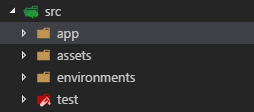
tried both examples modifying to not include app dir. Excluding the test folder would also work. Files in the test folder are common.mocks.ts, service.mocks.ts, etc.
kentonbmax
on 25 Sep 2017
Got it to work. "exclude": ["./src/test/*mocks.ts"] did the trick.
kentonbmax
on 25 Sep 2017
@kentonbmax
Can you please post your whole .angular-cli.json after adding exclude changes ?
I want to know what you have set for "root" config property.
 Abhishek-Kanitkar
on 14 Nov 2017
Abhishek-Kanitkar
on 14 Nov 2017
@filipesilva
Can you please show me a working example of how to exclude for example
abc directory nested under src ?
Abhishek-Kanitkar
on 14 Nov 2017
This issue has been automatically locked due to inactivity.
Please file a new issue if you are encountering a similar or related problem.
Read more about our automatic conversation locking policy.
_This action has been performed automatically by a bot._
![angular-automatic-lock-bot[bot] picture](https://avatars0.githubusercontent.com/in/40213?v=4&s=40) angular-automatic-lock-bot[bot]
on 7 Sep 2019
angular-automatic-lock-bot[bot]
on 7 Sep 2019
Related issues
 jbeckton
·
3Comments
jbeckton
·
3Comments
 hareeshav
·
3Comments
hareeshav
·
3Comments
 ericel
·
3Comments
ericel
·
3Comments
 brtnshrdr
·
3Comments
brtnshrdr
·
3Comments
 MateenKadwaikar
·
3Comments
MateenKadwaikar
·
3Comments
Most helpful comment
@filipesilva
Can you please show me a working example of how to exclude for example
abc directory nested under src ?