Angular-cli: Service Worker doesn't get updated
Bug Report or Feature Request (mark with an x)
- [x ] bug report -> please search issues before submitting
Versions.
@angular/cli: 1.0.0
node: 6.3.1
os: win32 x64
@angular/animations: 4.3.6
@angular/cdk: 2.0.0-beta.10
@angular/common: 4.3.6
@angular/compiler: 4.3.6
@angular/core: 4.3.6
@angular/forms: 4.3.6
@angular/http: 4.3.6
@angular/material: 2.0.0-beta.10
@angular/platform-browser: 4.3.6
@angular/platform-browser-dynamic: 4.3.6
@angular/router: 4.3.6
@angular/service-worker: 1.0.0-beta.16
@angular/cli: 1.0.0
@angular/compiler-cli: 4.3.6
Repro steps.
Adding a service-worker to the project via @angular/serviceworker caches all designated files once. If I change to content of my files no new serviceworker is generated. This leads to a missing update of the cached files. They will never get updated unless pressing ctrl + F5
Desired functionality.
Changing the projects files should lead to a new generated serviceworker with a new timestamp on the next ng build --prod.
 wambowams
All 27 comments
Your CLI is incredibly old since it's on 1.4.0 now. Is it fixed there out of curiosity?
 intellix
on 12 Sep 2017
intellix
on 12 Sep 2017
Updated the cli but the service worker is not getting updated.
My manifest looks like this:
{
"external": {
"urls": [
{
"url": "https://fonts.gstatic.com/s/materialicons/v29/2fcrYFNaTjcS6g4U3t-Y5ZjZjT5FdEJ140U2DJYC3mY.woff2"
},
{
"url": "https://fonts.googleapis.com/icon?family=Material+Icons"
}
]
},
"dynamic": {
"group": [
{
"name": "backend",
"urls": {
"https://example.de": {
"match": "prefix"
}
},
"cache": {
"optimizeFor": "freshness",
"maxAgeMs": 360000000,
"maxEntries": 80,
"strategy": "lru"
}
}
]
},
"routing": {
"index": "/index.html",
"routes": {
"/": {
"match": "exact"
},
"^/.*$": {
"match": "regex"
}
}
},
"static": {
"urls": {
"/data-table.b0aebd744ce7adb780a9.svg": "f1880710c0888c2cbc32311ca20bc3950e38e274",
"/data-table.bce071e976865da51100.eot": "99e68eaef544d4a4eaa307996db55b76ccc349d7",
"/polyfills.3fa65d78a165b27a50f3.bundle.js": "d771a7482637981ab60497b1f56c137871a39ee6",
"/main.6cebc6179a6b9ed9267e.bundle.js": "ea531fed8d33fc68ab03aa8ef1870b22f4a9f207",
"/sw-register.fea8019a86e368e4882f.bundle.js": "7dd8e03d9aecd3fc5e5dd134e771ea7c39b67123",
"/vendor.741eedaa7d18e8b4517a.bundle.js": "faad969582d35414f6dc53ba7d821d14d04c062f",
"/inline.8960eb5a6f05135558a3.bundle.js": "51cceeabb421fde5ee449ef5c9d843b64bb67fde",
"/styles.76b8cebc02c5e934d241.bundle.css": "2caa93b29ec2489e051ed1f8968668da3769a753",
"/assets/kunden.png": "3a2b4ace95e8a0dbd8c615709236f96340292777",
"/assets/statstiken.png": "eee2bb48bca571c96de0deee93f4af2bc71162a4",
"/assets/theme.scss": "6a8698ba0d9a2f7c49978455aaefdfd186db8b93",
"/assets/tickets.png": "08a181131313ae7c9ba194a5a4e33bbc81ee6645",
"/assets/XIBIX-logo.png": "0ef6f94ba6fb0c795fca56afd54887e2bd139ad9",
"/assets/zeiten.png": "49e08ec66fd1edb86c2bc56994798f6dc7ac225b",
"/favicon.ico": "84161b857f5c547e3699ddfbffc6d8d737542e01",
"/index.html": "e8d717f73146f393b3745c50180404aff2dc474e"
},
"_generatedFromWebpack": true
}
}
wambowams
on 12 Sep 2017
I am seeing the same behavior as well.
 dan-waterbly-sos-wa-gov
on 15 Sep 2017
dan-waterbly-sos-wa-gov
on 15 Sep 2017
seeing the same behavior
 MMHossaini
on 16 Sep 2017
MMHossaini
on 16 Sep 2017
Seeing the same behavior with Angular CLI 1.4.9 and Angular 4.4.6.
In Chrome, I am not able to access a new version of my site even after deleting all cached content and repeatedly refreshing and restarting my browser.
In Firefox, I first get the updated version then when I do a hard refresh I get the new version. If I restart Firefox, it loads the old version again.
In Safari, everything works fine as no Service Worker exists.
 bjornharvold
on 22 Oct 2017
bjornharvold
on 22 Oct 2017
I'd suggest switching to the new Service Worker in v5. I haven't been able to properly test this, but this error may be related to the one fixed in https://github.com/angular/angular/commit/396c2417d95639e858f6e11970ded09817e9e01c
 ivancamilov
on 25 Oct 2017
ivancamilov
on 25 Oct 2017
I am experiencing similar problem, service worker updates in some builds while some builds serve same service worker each time.
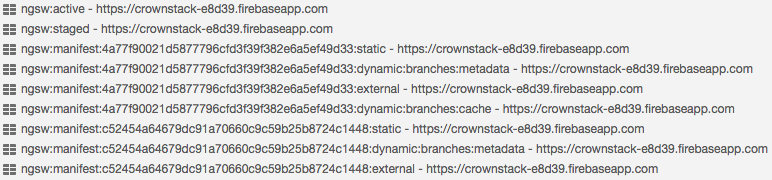
Also taking a look at cache, it seems old caches are not deleted when changes to some chunk are present, any idea where I should look?
app.component.ts@ngOnInit()
...
//sw: NgServiceWorker
this.sw.updates.subscribe(event => {
console.log(event) //<--always gets 'pending' event, never seen log for 'activation' event
if (event.type === 'pending') {
this.sw.activateUpdate(event.version);
} else if (event.type === 'activation') {
location.reload();
}
});
...
 ritikrishu
on 30 Oct 2017
ritikrishu
on 30 Oct 2017
so the problem is that service worker is passing index.html to browser from cache even when internet is connected and file references are not getting updated hence.
If someone can suggest me anything regarding this ASAP, that would be life saving for me. Thanks!
ngsw-manifest.json
...
"routing": {
"index": "/index.html",
"routes": {
"/": {
"match": "exact"
},
"/our-locations": {
"match": "exact"
},
"/branch": {
"match": "exact"
}
}
},
...
I'm experiencing the same problem using @angular/service-worker version 1.0.0-beta.16 which is the latest version supported by @angular-cli.
When I build a new version of the project, the service worker doesn't update the cached files with the new version so my website always displays the first version cached by the ServiceWorker until I force a cache clean and reload the page again.
Unfortunately, this is not the expected behaviour and I cannot deploy something to production using ServiceWorkers at the moment.
 andreasonny83
on 3 Nov 2017
andreasonny83
on 3 Nov 2017
looks like a new version has been published on npm (5.0.0)
is this fixed on v5 ?
 jon301
on 4 Nov 2017
jon301
on 4 Nov 2017
unfortunately @angular/cli doesn't support @angular/service-worker version 5 @jon301
andreasonny83
on 4 Nov 2017
I'm having the same issue with "@angular/cli": "^1.6.0" and "@angular/service-worker": "^5.1.0". With this issue is useless.
 alexruizprado
on 7 Dec 2017
alexruizprado
on 7 Dec 2017
I have the same issue.
@angular/[email protected]
@angular/[email protected]
 AppField
on 12 Dec 2017
AppField
on 12 Dec 2017
I switched to Workbox for generating service worker and it's working excellent for me. Take a look there, might be helpful for you guys as well.
ritikrishu
on 13 Dec 2017
I might actually know why your Service workers don't work as expected.
Turns out @angular/service-worker doesn't magically work out of the box. It does most of it but not everything.
I guess, what you're all missing, is looking for a newer version of your app and ask @angular/service-worker to download the latest available version on page refresh.
Try adding this code to your main AppComponent:
import { SwUpdate } from '@angular/service-worker';

export class AppComponent implements OnInit {
  constructor(private swUpdate: SwUpdate) { }
  ngOninit() {
    this.swUpdate.available.subscribe(event => {
      console.log('A newer version is now available. Refresh the page now to update the cache');
    });
    this.swUpdate.checkForUpdate()
  }
}
Hello everyone! I don't actually think there's an issue with updates getting stuck here, I think the expectations for how it works are a little bit fuzzy.
Whenever you load the page (e.g. refresh), NGSW will serve the latest version of the app it has cached. Therefore, in order to see an update, it must already be cached prior to refreshing.
How does NGSW detect when an update is available, and know to go cache it? It's a tricky process. Currently, it checks for updates _on service worker startup_. The service worker starts when you first load the site. If the page is inactive, the browser may kill the SW for a while, and then it'll be started when the next request is made which requires it.
This means that update checks happen frequently, but also somewhat randomly. Refreshing does _not_ trigger an update check, no matter how many times you refresh. (Issue #20877 exists to make update checks happen on refresh).
Under normal usage, updates should be detected and cached regularly, as the SW gets started and stopped a lot. However, having Developer Tools open in Chrome _keeps the Service Worker alive indefinitely_. That means that with Dev Tools open, _updates will never be detected_. To trigger an update check, go into the Service Worker panel in Dev Tools and stop, then start the worker. You should see it immediately make a request for ngsw.json, followed by caching the new version of the app if it's available. The next refresh should then load the new version.
@andreasonny83's solution is to call checkForUpdate() on application startup, which essentially implements the intent of #20877 from the application side.
 alxhub
on 13 Dec 2017
alxhub
on 13 Dec 2017
Thanks @alxhub for the great explanation.
However, considering the number of people getting confused with this process and reporting phantom bugs, it's clear that Angular team either needs to provide a more detailed documentation about this library or enabling the checkForUpdate() logic by default.
andreasonny83
on 14 Dec 2017
@alxhub So is updating now the default behaviour or not?
Or is the code always needed?
    this.swUpdate.available.subscribe(event => {
      console.log('A newer version is now available. Refresh the page now to update the cache');
    });
    this.swUpdate.checkForUpdate()
 DominicBoettger
on 22 Dec 2017
DominicBoettger
on 22 Dec 2017
There is an issue with server side rendering
 vazgen
on 8 Feb 2018
vazgen
on 8 Feb 2018
I'm running "@angular/service-worker": "5.2.9" with "angular-cli": "1.7.3" and I'm not getting the call for available subscription:
this.swUpdate.available.subscribe(event => {
    alert('onNewVersion');
    this.onNewVersion();
});
I'm debugging ngsw-worker.js on row 2403 function async notifyClientsAboutUpdate() { there's a call to client.postMessage(notice); but my subscription just doesn't get hit.
Regression?
 ranbuch
on 19 Mar 2018
ranbuch
on 19 Mar 2018
Don't know why but it's working now.
ranbuch
on 19 Mar 2018
@ranbuch i'm seeing the exact same behavior as you outlined above, i've attempted a debug of notifyClientsAboutUpdate function and it seems that this code;
const version = this.clientVersionMap.get(client.id);
if (version === undefined) {
                // Unmapped client - assume it's the latest.
                return;
            }
Is responsible for the swUpdate.available subscription not firing. @alxhub Can you explain why the clientVersionMap doesn't contain any entries when an update is detected?
Update:
Through some trial and error and many rebuilds of the app, it seems that just doing a rebuild with no code change, or just a TypeScript change does not result in a swUpdate.available.subscription firing as I would have expected. However (post-build) changing the name of a "dataGroups" object in ngsw.json, makes the subscription fire as expected.
Its worth noting that changing the "configVersion" of the ngsw.json file does not work as a way to test swUpdate.available observable.
 tobyStaff
on 3 May 2018
tobyStaff
on 3 May 2018
This issue is still open, so does that mean that the snippet provided by @andreasonny83 is still needed? (after all it was provided in dec 2017) :)
 mackelito
on 29 Jun 2018
mackelito
on 29 Jun 2018
This ticket has been open for a long time. I would love to have this resolved once and for all as well. Is that possible or will there always be potentials issues with 3rd party libraries?
bjornharvold
on 29 Jun 2018
As described in https://github.com/angular/angular-cli/issues/7665#issuecomment-351519025, the ServiceWorker will now check for updates on every navigation request (see angular/angular#21029).
Closing, since the original issue has been resolved. (If you are still facing other problems, please open separate issues (if they are not reported already).)
 gkalpak
on 9 Jul 2018
gkalpak
on 9 Jul 2018
We're actually using Angular 7.2.2 and Angular CLI 7.2.3 and we have an issue with this. I don't think it has been solved yet or maybe I am missing something. We followed https://angular.io/guide/service-worker-getting-started in order to setup the worker.
NOTE: we are using workbox in 3 others projects without any issue or extra code to check for update
 softmonkeyjapan
on 14 Jul 2019
softmonkeyjapan
on 14 Jul 2019
This issue has been automatically locked due to inactivity.
Please file a new issue if you are encountering a similar or related problem.
Read more about our automatic conversation locking policy.
_This action has been performed automatically by a bot._
![angular-automatic-lock-bot[bot] picture](https://avatars0.githubusercontent.com/in/40213?v=4&s=40) angular-automatic-lock-bot[bot]
on 9 Sep 2019
angular-automatic-lock-bot[bot]
on 9 Sep 2019
Related issues
 ericel
·
3Comments
ericel
·
3Comments
 daBishMan
·
3Comments
daBishMan
·
3Comments
 JanStureNielsen
·
3Comments
JanStureNielsen
·
3Comments
 naveedahmed1
·
3Comments
naveedahmed1
·
3Comments
 NCC1701M
·
3Comments
NCC1701M
·
3Comments
Most helpful comment
I might actually know why your Service workers don't work as expected.
Turns out @angular/service-worker doesn't magically work out of the box. It does most of it but not everything.
I guess, what you're all missing, is looking for a newer version of your app and ask @angular/service-worker to download the latest available version on page refresh.
Try adding this code to your main AppComponent: