Angular-cli: Big bundle requests failing with `net::ERR_CONTENT_LENGTH_MISMATCH`
Bug Report or Feature Request (mark with an x)
- [x] bug report
- [ ] feature request
Versions.
Any latest (using 1.1.3 and 1.3.0-rc.3)
@angular/cli: 1.3.0-rc.3
node: 8.1.2
os: linux x64
@angular/animations: 4.2.6
@angular/cdk: 2.0.0-beta.8
@angular/common: 4.2.6
@angular/compiler: 4.2.6
@angular/core: 4.2.6
@angular/forms: 4.2.6
@angular/http: 4.2.6
@angular/material: 2.0.0-beta.7
@angular/platform-browser: 4.2.6
@angular/platform-browser-dynamic: 4.2.6
@angular/router: 4.2.6
@angular/cli: 1.3.0-rc.3
@angular/compiler-cli: 4.2.6
@angular/language-service: 4.2.6
Repro steps.
- Have a project with a big
vendor.bundle.jsormain.bundle.js. - Use
ng serve - Connect with another LAN device or throttle network connection from
localhost
The log given by the failure.
- If using a LAN device, request fails with the error
net::ERR_CONTENT_LENGTH_MISMATCHon Chrome console after some 5-6 seconds and downloading 5 MB of the file (the timing and the size are not consistent). - If using
localhost, request fails with the same error after 80 seconds and 5 MB (the timing and the size are not consistent)
I was trying to look if it was something on part of the webpack-dev-server, or consequently, either express or http but couldn't find too much of the culprit.
Desired functionality.
I am able to work on localhost no problems at all. But using any other device is impossible since the file request fails.
 ShadowManu
All 19 comments
Well this sounds like an annoying problem. I only found https://github.com/webpack/webpack-dev-server/issues/391 which you have replied to as well. I'll investigate.
 filipesilva
on 31 Jul 2017
filipesilva
on 31 Jul 2017
Dealing with the same issue trying to access localhost over LAN.
Command ng serve --host 192.168.1.2 --port 4200 gives an error on vendor.bundle.js
http://192.168.1.2:4200/vendor.bundle.js net::ERR_CONTENT_LENGTH_MISMATCH
App doesn't load.
Using
@angular/cli: 1.2.1
node: 8.1.0
I'll post back if I find a solution.
 jpiemeisl
on 8 Aug 2017
jpiemeisl
on 8 Aug 2017
I was able to load the file if I used a faster (hardware) router. Indeed weird.
ShadowManu
on 8 Aug 2017
Wow. Switching to local 5GHz wifi network loads the app. Thanks for the follow up.
jpiemeisl
on 8 Aug 2017
Somehow the file size of vendor.bundle.js is so big, on my system it failed to load. Then I tried built it on production environment ant it works:
ng serve --prod --host 0.0.0.0 --disable-host-check
I have to add --disable-host-check option, dunno why.
 mushoffa
on 11 Aug 2017
mushoffa
on 11 Aug 2017
I'm not using Angular-CLI (still on Angular 1), but I am running into the same problem with webpack-dev-server and have a very similar setup to this project (e.g use html-webpack-plugin with single vendor chunk). I'm not sure if this bug is a recent change, but it seemed ok maybe a month or two ago with webpack-dev-server#v2.4.4. Maybe a recent change in Webpack 3 or a later version of the dev server?
Disabling the host check didn't seem to work for me.
My money is on a timeout issue with the dev-server's use of Express. This would sort of confirm some of the other responses about improving content ship time with better hardware or network settings.
I can get the dev-server to ship the content to the browser properly, but only running it locally. When run locally, there's almost no overhead in network latency and I can pull down a 5 MB vendor chunk javascript file in ~230ms.
When running the dev server remotely, it takes much longer to download those files and seems to timeout anywhere between 5-10 seconds. Although, the error in the browser (GET http://0.0.0.0:3000/vendor.js net::ERR_CONTENT_LENGTH_MISMATCH) is not really represented as a timeout, it's more that the headers didn't match the content size and maybe Express just ended transmission of the file.
I was able to confirm the issue locally too using Chrome. Chrome devtools has the option to simulate network latency for other devices, such as 3G (slow or fast), and both seem to fail downloading the larger vendor chunk.
 mtraynham
on 14 Aug 2017
mtraynham
on 14 Aug 2017
I have the same issue as @mtraynham. Should we file an issue to webpack-dev-server? or even webpack-dev-middleware?
 nicksrandall
on 14 Aug 2017
nicksrandall
on 14 Aug 2017
Just as an update, I've tracked down the issue to NodeJS 8.X. A simple Node HTTP server in 8.X will close a GET connection from an external IP after 5-20 seconds, which often doesn't give enough time to download a large file such as vendor.js, which in turn causes the ERR_CONTENT_LENGTH_MISMATCH. Downgrading to Node 7 works.
mtraynham
on 16 Aug 2017
It seems NodeJS 8.0 - 8.4 has an HTTP Server keepAliveTimeout of 5 seconds, which prevents large content or slow connections from receiving the full content and ultimately causes web browsers to receive a 206 partial content, and errors as ERR_CONTENT_LENGTH_MISMATCH.
Webpack dev server does return the NodeJS http server object when you call listen so setting that configuration to something higher than 5 seconds fixes the problem.
    const server = new WebpackDevServer(webpack(webpackConfig.debug), {
        ...
    }).listen(debugPort, debugHost, (error) => {
        ...
    });
    server.keepAliveTimeout = 120000 * 5;
This problem could be resolved with Angular CLI with an update to the serve task, or wait for the NodeJS 8.4+ release.
mtraynham
on 29 Aug 2017
@mtraynham would you be available to make a PR that increases that time from 5 seconds to something more reasonable, say 15 secs? Not configurable, just a straight update.
filipesilva
on 31 Aug 2017
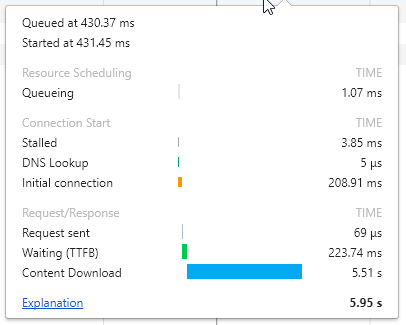
I am on 1.4.1, and still getting this:
GET vendor.bundle.js net::ERR_CONTENT_LENGTH_MISMATCH
(status failed)
 AmitMY
on 11 Sep 2017
AmitMY
on 11 Sep 2017
Hmm, so I don't use Angular CLI, but the change in the PR seem to work for me with Webpack Dev Server standalone. Maybe I got the regex wrong or missed a version? @AmitMY can you run a node interpreter and type process.version, it should hopefully match the regex /^v8.[0-4].\d+$/. If it doesn't match, might need to change it. If it does, may be it's something else.
mtraynham
on 11 Sep 2017
Solved by updating the local version as well as the global version.
AmitMY
on 18 Sep 2017
@mtraynham Now that node 8.5.0 is out, the bug persists. Is there any chance to do this fix for all node 8 minor versions?
AmitMY
on 24 Sep 2017
It looks like they didn't include the http module fix in 8.5.0 😦 ... The bug introduced in Node 8 honestly seems pretty detrimental to using the Node http module for external purposes. At this point, I'm not entirely sure how they decide what makes it into a release and what doesn't. The fix is sitting in a few of their branches (v8.4.0-proposal (#13598) v8.6.0-proposal (#15509, #13598) v8.x (#13598) v8.x-staging (#13598)), but maybe they cherry pick commits for actual release...
Maybe we should just update the regex check to include all of Node 8 or >= Node 8, or just do it regardless of version? Seems heavy handed, but I took a guess about when the fix would land and was wrong...
Maybe @filipesilva can provide some feedback here.
mtraynham
on 24 Sep 2017
Also Node 8.7 does not solve the issue.
 awb99
on 14 Oct 2017
awb99
on 14 Oct 2017
@awb99 What version are you using? in >1.5.0 it works for all node 8 versions (afaik)
AmitMY
on 15 Oct 2017
I downgrade to Node v6.12.0 and it works.
 debiasej
on 28 Nov 2017
debiasej
on 28 Nov 2017
This issue has been automatically locked due to inactivity.
Please file a new issue if you are encountering a similar or related problem.
Read more about our automatic conversation locking policy.
_This action has been performed automatically by a bot._
![angular-automatic-lock-bot[bot] picture](https://avatars0.githubusercontent.com/in/40213?v=4&s=40) angular-automatic-lock-bot[bot]
on 7 Sep 2019
angular-automatic-lock-bot[bot]
on 7 Sep 2019
Related issues
 rwillmer
·
3Comments
rwillmer
·
3Comments
 gotschmarcel
·
3Comments
gotschmarcel
·
3Comments
 IngvarKofoed
·
3Comments
IngvarKofoed
·
3Comments
 naveedahmed1
·
3Comments
naveedahmed1
·
3Comments
 hareeshav
·
3Comments
hareeshav
·
3Comments
Most helpful comment
It seems NodeJS 8.0 - 8.4 has an HTTP Server
keepAliveTimeoutof 5 seconds, which prevents large content or slow connections from receiving the full content and ultimately causes web browsers to receive a 206 partial content, and errors asERR_CONTENT_LENGTH_MISMATCH.Webpack dev server does return the NodeJS http server object when you call
listenso setting that configuration to something higher than 5 seconds fixes the problem.This problem could be resolved with Angular CLI with an update to the serve task, or wait for the NodeJS 8.4+ release.