Please provide us with the following information:
OS?
Windows 10. Linux
Versions.
Please run
ng --version. If there's nothing outputted, please run in a Terminal:node --versionand paste the result here:
@angular/cli: 1.0.0-beta.32.3
node: 7.5.0
os: win32 x64
Repro steps.
Was this an app that wasn't created using the CLI? What change did you do on your code? etc.
ng new myapp -p gt
(No modification has been done to the application)
ng build
ng serve
(IE11) http://localhost:4200/
F5 again -- > then, jscript browser console throws error:
[Error]
SCRIPT5007: No se puede obtener la propiedad 'apply' de referencia nula o sin definir
vendor.bundle.js (43881,5)
... and the app crash.
Sorry, my OS is spanish.
The log given by the failure.
Normally this include a stack trace and some more information.
Mention any other details that might be useful.
Thanks! We'll be in touch soon.
 alexrmg
All 12 comments
You'll need to adjust the polyfills.ts file for your target browsers by uncommenting the appropriate sections.
 clydin
on 19 Feb 2017
clydin
on 19 Feb 2017
that's right... i'd missed adjust polyfills.ts...
Thank you very much...
alexrmg
on 19 Feb 2017
This should be uncomment by default. Certainly for IE 11
 AntiCZ
on 27 Feb 2017
AntiCZ
on 27 Feb 2017
So which lines needs to be uncommented for IE 11 to work?
 eddieedease
on 14 Jun 2017
eddieedease
on 14 Jun 2017
how to adjust polyfills ?
please explain
 HarindraNarayan
on 24 Aug 2017
HarindraNarayan
on 24 Aug 2017
You make find polyfills.ts into you general project folder (by default src)
Then you find section /* IE9, IE10 and IE11 requires all of the following polyfills. */, and delete comments in this section.
 AndreyPatseiko
on 31 Aug 2017
AndreyPatseiko
on 31 Aug 2017
Also, what I found out was that when I made the app via the CLI, it was like a year ago. The polyfills.ts file has changed in that time. So if that's also your case, you could copy/paste if from a fresh ng new, adjust by removing comments and your set.
IE works good now
eddieedease
on 31 Aug 2017
I've error in ie 11 - proxy object is undefined.
ERROR ReferenceError: "Proxy" не определено
how to fix it?
 sergamers
on 25 Oct 2017
sergamers
on 25 Oct 2017
Now i've this polyfills.ts
https://gist.github.com/sergamers/21ba3fc86d09ce0a9b23bbc518d1870e
sergamers
on 25 Oct 2017
I have tried all of the above, uncommenting and installing the packages but still on IE it's giving "Syntax Error" polyfills file attached
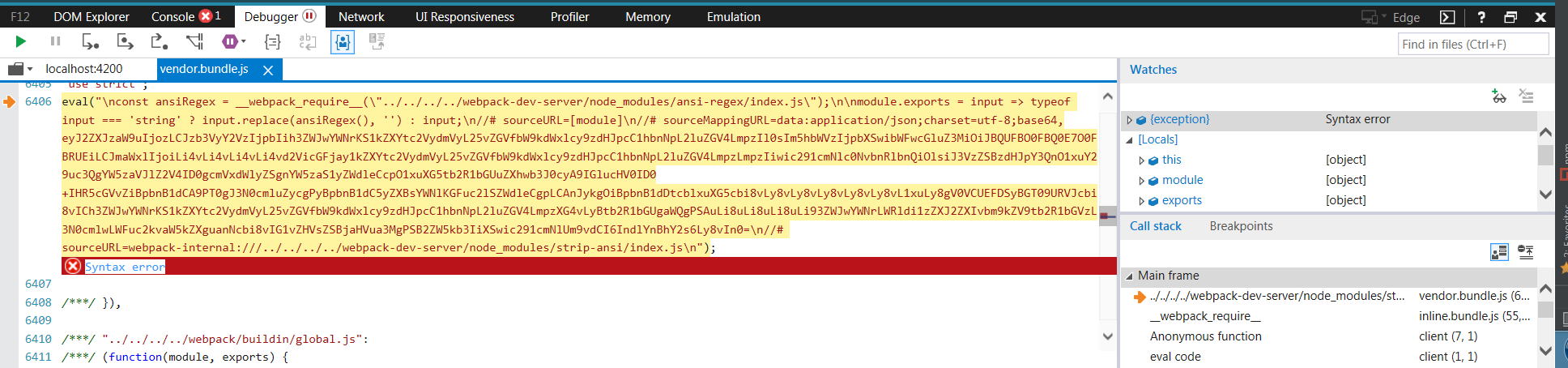
Attached is my polyfills file
polyfills.txt
Also tried to update webpack-dev-server as suggested https://github.com/angular/angular-cli/issues/9310 but npm install failes
 sarahs07
on 15 Mar 2018
sarahs07
on 15 Mar 2018
Having the exact same problem as @c-science1
 zachrickards
on 2 May 2018
zachrickards
on 2 May 2018
This issue has been automatically locked due to inactivity.
Please file a new issue if you are encountering a similar or related problem.
Read more about our automatic conversation locking policy.
_This action has been performed automatically by a bot._
![angular-automatic-lock-bot[bot] picture](https://avatars0.githubusercontent.com/in/40213?v=4&s=40) angular-automatic-lock-bot[bot]
on 8 Sep 2019
angular-automatic-lock-bot[bot]
on 8 Sep 2019
Related issues
 brtnshrdr
·
3Comments
brtnshrdr
·
3Comments
 jbeckton
·
3Comments
jbeckton
·
3Comments
 JanStureNielsen
·
3Comments
JanStureNielsen
·
3Comments
 5amfung
·
3Comments
5amfung
·
3Comments
 purushottamjha
·
3Comments
purushottamjha
·
3Comments
Most helpful comment
You'll need to adjust the
polyfills.tsfile for your target browsers by uncommenting the appropriate sections.