Angular-cli: ng new <project> generates for app.component.spec.ts errors
Please provide us with the following information:
- OS? Windows 7, 8 or 10. Linux (which distribution). Mac OSX (Yosemite? El Capitan?)
OSX- Versions. Please run
ng --version. If there's nothing outputted, please run
in a Terminal:node --versionand paste the result here:
ng --version
Could not start watchman; falling back to NodeWatcher for file system events.
Visit http://ember-cli.com/user-guide/#watchman for more info.
angular-cli: 1.0.0-beta.15
node: 6.5.0
os: darwin x64- Repro steps. Was this an app that wasn't created using the CLI? What change did you
do on your code? etc.
ng g testApp- The log given by the failure. Normally this include a stack trace and some
more information.- Mention any other details that might be useful.
app.component.spec.ts shows "ts] Cannot find name 'describe'"
[ts] Cannot find name 'beforeEach'.
any


Thanks! We'll be in touch soon.
 stefanaerts
All 7 comments
Is this again something related to typings or typescript?
I see in tsconfig.json this:

And when i go those types i see this in the metadata json file

I see describe there as global.
So why do i get the error in the editor?
Is that path not good ?
"typeRoots": [
"../node_modules/@types"
]
stefanaerts
on 21 Sep 2016
Ok, i found the problem. its not the CLI.
CLI works fine,the tests run as expected.
But the editor needs to know the path to the correct typescript version.
So this i added to my user preferences(settings.json):
"typescript.tsdk": "node_modules/typescript/lib",

stefanaerts
on 21 Sep 2016
and some other maybe useful information.
if you use
"typeRoots": [
"../node_modules/@types"
],
together with
"types": [
"firebase"
]
you get errors.
So remove types, just use"typeRoots": [
"../node_modules/@types"
]
stefanaerts
on 21 Sep 2016
...or, just add to tsconfig.json in src folder:
,
    "exclude": [
        "**/*.spec.ts"
    ]
 uncleGena
on 17 Oct 2016
uncleGena
on 17 Oct 2016
just add
import { } from 'jasmine';
Helped me to resolve the errors
 surya1104
on 16 Jul 2018
surya1104
on 16 Jul 2018
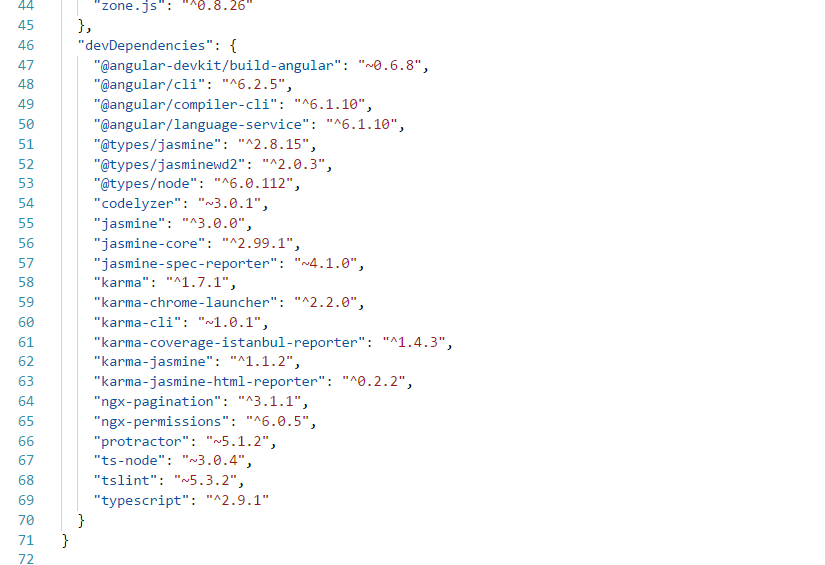
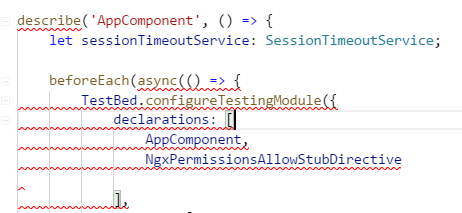
I am facing same issue after upgrading to angular 6
 Dhananjayi9
on 29 Jan 2019
Dhananjayi9
on 29 Jan 2019
This issue has been automatically locked due to inactivity.
Please file a new issue if you are encountering a similar or related problem.
Read more about our automatic conversation locking policy.
_This action has been performed automatically by a bot._
![angular-automatic-lock-bot[bot] picture](https://avatars0.githubusercontent.com/in/40213?v=4&s=40) angular-automatic-lock-bot[bot]
on 9 Sep 2019
angular-automatic-lock-bot[bot]
on 9 Sep 2019
Related issues
 hartjo
·
3Comments
hartjo
·
3Comments
 jmurphzyo
·
3Comments
jmurphzyo
·
3Comments
 donaldallen
·
3Comments
donaldallen
·
3Comments
 hareeshav
·
3Comments
hareeshav
·
3Comments
 delasteve
·
3Comments
delasteve
·
3Comments
Most helpful comment
...or, just add to tsconfig.json in src folder:
,
    "exclude": [
        "**/*.spec.ts"
    ]