Angular-cli: Could not start watchman; falling back to NodeWatcher for file system events.
Hey, I am starting using angular-cli and get this error while starting my first app
Following are the details.
- OS? Ubuntu 14.04 LTS
- $ ng --version:
angular-cli: 1.0.0-beta.9
node: 4.4.7
os: linux x64
Steps :
- ng new my-app
- cd my-app
- ng serve
Looks like you have a different program called watchman, falling back to NodeWatcher.
Visit http://ember-cli.com/user-guide/#watchman for more info.
File: /home/devansh/Documents/Workspace/django-angular2/my-app/src
The Broccoli Plugin: [Funnel] failed with:
Error: watch /home/devansh/Documents/Workspace/django-angular2/my-app/src ENOSPC
at exports._errnoException (util.js:873:11)
at FSWatcher.start (fs.js:1234:19)
at Object.fs.watch (fs.js:1262:11)
at NodeWatcher.watchdir (/home/devansh/Documents/Workspace/django-angular2/my-app/node_modules/angular-cli/node_modules/sane/src/node_watcher.js:144:20)
at new NodeWatcher (/home/devansh/Documents/Workspace/django-angular2/my-app/node_modules/angular-cli/node_modules/sane/src/node_watcher.js:45:8)
at new sane (/home/devansh/Documents/Workspace/django-angular2/my-app/node_modules/angular-cli/node_modules/sane/index.js:17:12)
at EventEmitter.Watcher_addWatchDir as addWatchDir
at /home/devansh/Documents/Workspace/django-angular2/my-app/node_modules/angular-cli/node_modules/angular-cli-broccoli/lib/builder.js:95:35
at lib$rsvp$$internal$$tryCatch (/home/devansh/Documents/Workspace/django-angular2/my-app/node_modules/angular-cli/node_modules/rsvp/dist/rsvp.js:1036:16)
at lib$rsvp$$internal$$invokeCallback (/home/devansh/Documents/Workspace/django-angular2/my-app/node_modules/angular-cli/node_modules/rsvp/dist/rsvp.js:1048:17)
at /home/devansh/Documents/Workspace/django-angular2/my-app/node_modules/angular-cli/node_modules/rsvp/dist/rsvp.js:331:11
at lib$rsvp$asap$$flush (/home/devansh/Documents/Workspace/django-angular2/my-app/node_modules/angular-cli/node_modules/rsvp/dist/rsvp.js:1198:9)
at nextTickCallbackWith0Args (node.js:420:9)
at process._tickCallback (node.js:349:13)
The broccoli plugin was instantiated at:
at Funnel.Plugin (/home/devansh/Documents/Workspace/django-angular2/my-app/node_modules/angular-cli/node_modules/broccoli-plugin/index.js:10:31)
at new Funnel (/home/devansh/Documents/Workspace/django-angular2/my-app/node_modules/angular-cli/node_modules/broccoli-funnel/index.js:44:10)
at Angular2App._buildInputTree (/home/devansh/Documents/Workspace/django-angular2/my-app/node_modules/angular-cli/lib/broccoli/angular2-app.js:92:7)
at new Angular2App (/home/devansh/Documents/Workspace/django-angular2/my-app/node_modules/angular-cli/lib/broccoli/angular2-app.js:51:41)
at module.exports (/home/devansh/Documents/Workspace/django-angular2/my-app/angular-cli-build.js:10:10)
at Class.module.exports.Task.extend.setupBroccoliBuilder (/home/devansh/Documents/Workspace/django-angular2/my-app/node_modules/angular-cli/node_modules/angular-cli/lib/models/builder.js:55:19)
at Class.module.exports.Task.extend.init (/home/devansh/Documents/Workspace/django-angular2/my-app/node_modules/angular-cli/node_modules/angular-cli/lib/models/builder.js:89:10)
at new Class (/home/devansh/Documents/Workspace/django-angular2/my-app/node_modules/angular-cli/node_modules/core-object/core-object.js:18:12)
at Class.module.exports.Task.extend.run (/home/devansh/Documents/Workspace/django-angular2/my-app/node_modules/angular-cli/node_modules/angular-cli/lib/tasks/serve.js:15:19)
at /home/devansh/Documents/Workspace/django-angular2/my-app/node_modules/angular-cli/node_modules/angular-cli/lib/commands/serve.js:64:24
at lib$rsvp$$internal$$tryCatch (/home/devansh/Documents/Workspace/django-angular2/my-app/node_modules/angular-cli/node_modules/rsvp/dist/rsvp.js:1036:16)
at lib$rsvp$$internal$$invokeCallback (/home/devansh/Documents/Workspace/django-angular2/my-app/node_modules/angular-cli/node_modules/rsvp/dist/rsvp.js:1048:17)
at /home/devansh/Documents/Workspace/django-angular2/my-app/node_modules/angular-cli/node_modules/rsvp/dist/rsvp.js:331:11
at lib$rsvp$asap$$flush (/home/devansh/Documents/Workspace/django-angular2/my-app/node_modules/angular-cli/node_modules/rsvp/dist/rsvp.js:1198:9)
at nextTickCallbackWith0Args (node.js:420:9)
at process._tickCallback (node.js:349:13)
Livereload server on http://localhost:49152
Serving on http://localhost:4200/
 Devansh3790
All 19 comments
I am searching a lot about the above issue but still not fount any solution. I found that i have that issue after my Ubuntu update. I have enabled auto update for my OS and this issue starting after update completed.
Devansh3790
on 25 Jul 2016
Closed as this issue was made obsolete by https://github.com/angular/angular-cli/pull/1455.
 filipesilva
on 27 Jul 2016
filipesilva
on 27 Jul 2016
I just encountered this when deploying to Heroku. On development it works fine.
 kamok
on 10 Aug 2016
kamok
on 10 Aug 2016
@kamok did you find a solution ? same problem here when trying to deploy on heroku.
 tonyvince
on 1 Sep 2016
tonyvince
on 1 Sep 2016
@tonyvince Nope. I gave up playing with Angular 2 before it gets out of beta. Currently building projects with Angular 1, and trying React JS.
kamok
on 1 Sep 2016
I had the same issue and was solved by installation of watchman https://facebook.github.io/watchman/docs/install.html
 gnumoksha
on 4 Sep 2016
gnumoksha
on 4 Sep 2016
I had the same issue with Watchman and I actually followed the link mentioned in the cli (http://ember-cli.com/user-guide/#watchman).
Issue resolved by installing watchman like instructed: $ brew install watchman
 mpavel
on 19 Oct 2016
mpavel
on 19 Oct 2016
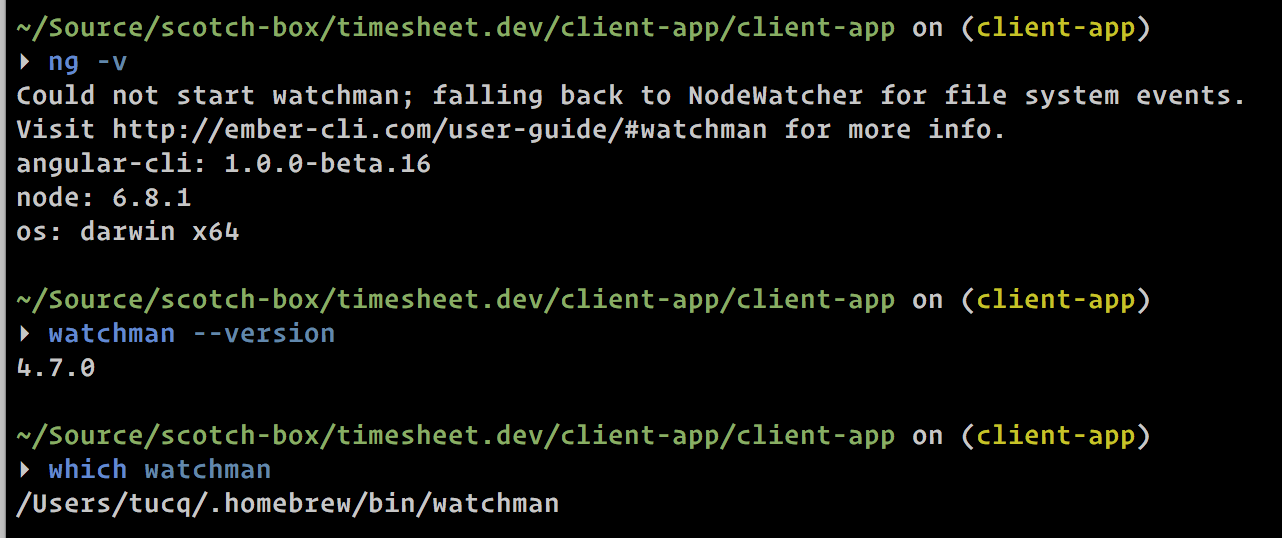
I installed watchman but error still shows T_T confusing
 tucq88
on 20 Oct 2016
tucq88
on 20 Oct 2016
@tucq88, I have watchman under "/usr/local/bin/watchman"
Homebrew:
Homebrew 1.0.8-19-gb9fe36a
Homebrew/homebrew-core (git revision f043; last commit 2016-10-19)
$ which brew
/usr/local/bin/brew
mpavel
on 20 Oct 2016
i have same problem before but now after install watchman is working fine.if you are using linux i think you can install watchman
git clone https://github.com/facebook/watchman.git
cd watchman
./autogen.sh
./configure
make
sudo make install
 nevergear
on 21 Oct 2016
nevergear
on 21 Oct 2016
@mpavel
Watchman location doesn't matter. It's because when we install watchman with brew install watchman , installation will use default locations for config. It's is user/local/bin which if brew doesn't have sudo permission, it will not be created. You could try run watchman then an not found error will shows.
So my solution is using brew install HEAD watchman, it similar to build it from source like @nevergear suggestion. So ./configure is runned, it will able to create watchman dir => Problem solved.
TL;DR: use brew install HEAD watchman
tucq88
on 21 Oct 2016
https://github.com/angular/angular-cli/pull/2846 should make this warning go away. We don't actually use watchman anywhere, it's part of ember-cli. See https://github.com/angular/angular-cli/issues/2791 for more info.
filipesilva
on 24 Oct 2016
Try ln -s /Users/tucp/.homebrew/bin/watchman /usr/local/bin/watchman
On 20 Oct 2016, at 11:38 AM, Tu Chu Quang [email protected] wrote:
I installed watchman but error still shows T_T confusing
https://camo.githubusercontent.com/39389612324fe2470d0a16a496def46c7e752797/68747470733a2f2f692e6779617a6f2e636f6d2f64326135336161336463313535326132363261303237636166323038646235352e706e67
—
You are receiving this because you are subscribed to this thread.
Reply to this email directly, view it on GitHub https://github.com/angular/angular-cli/issues/1390#issuecomment-255001122, or mute the thread https://github.com/notifications/unsubscribe-auth/AB3qgnY9e9TCUPSw0aai4_GQLrIIOoPkks5q1uIjgaJpZM4JQf23.
 jihgao
on 25 Oct 2016
jihgao
on 25 Oct 2016
@tucq88 you more likely want to do brew install --build-from-source watchman such that you are building a release rather than directly from the latest commit (HEAD).
 aren55555
on 1 Nov 2016
aren55555
on 1 Nov 2016
For OSX: Once you have installed watchman and can confirm by running "watchman --version", make sure it has permissions to the project folder in which you're working: "watchman -p". If this returns an error about "permission denied", you have two options: grant your current user account access to everything on your hard drive or run ng in an elevated shell, e.g. "sudo su -" (the latter worked for me). ... or just get the latest version that does away with the check and the warning ...
 dcchristopher
on 27 Nov 2016
dcchristopher
on 27 Nov 2016
@dcchristopher
I got this 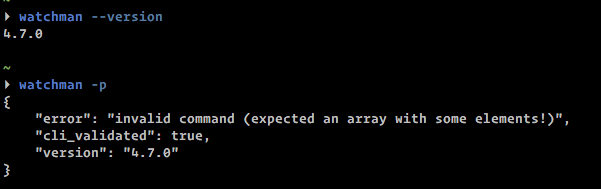
Is it normal ?
tucq88
on 28 Nov 2016
@tucq88 It looks like you're not having any permission issues related to watchman creating a state file. That's one of the first things it tries to do. For me, running "watchman" (with or without " -p") under my personal user account leads to the permissions error. If I run it in a "sudo su -" session, then it's fine (and I get the same error about insufficient arguments as you).
dcchristopher
on 28 Nov 2016
Could not start watchman; falling back to NodeWatcher for file system events.
This means that we don’t have a tool called watchman installed. This tool helps Angular CLI when it needs to monitor files in your filesystem for changes. If you’re running OSX, it’s recommended to install it using Homebrew with the following command
$ brew install watchman
 daliri72
on 22 Apr 2018
daliri72
on 22 Apr 2018
This issue has been automatically locked due to inactivity.
Please file a new issue if you are encountering a similar or related problem.
Read more about our automatic conversation locking policy.
_This action has been performed automatically by a bot._
![angular-automatic-lock-bot[bot] picture](https://avatars0.githubusercontent.com/in/40213?v=4&s=40) angular-automatic-lock-bot[bot]
on 8 Sep 2019
angular-automatic-lock-bot[bot]
on 8 Sep 2019
Related issues
 rwillmer
·
3Comments
rwillmer
·
3Comments
 gotschmarcel
·
3Comments
gotschmarcel
·
3Comments
 purushottamjha
·
3Comments
purushottamjha
·
3Comments
 jbeckton
·
3Comments
jbeckton
·
3Comments
 jmurphzyo
·
3Comments
jmurphzyo
·
3Comments
Most helpful comment
I had the same issue with Watchman and I actually followed the link mentioned in the cli (http://ember-cli.com/user-guide/#watchman).
Issue resolved by installing watchman like instructed:
$ brew install watchman