Angular-calendar: Drag and Drop issue
Describe the bug
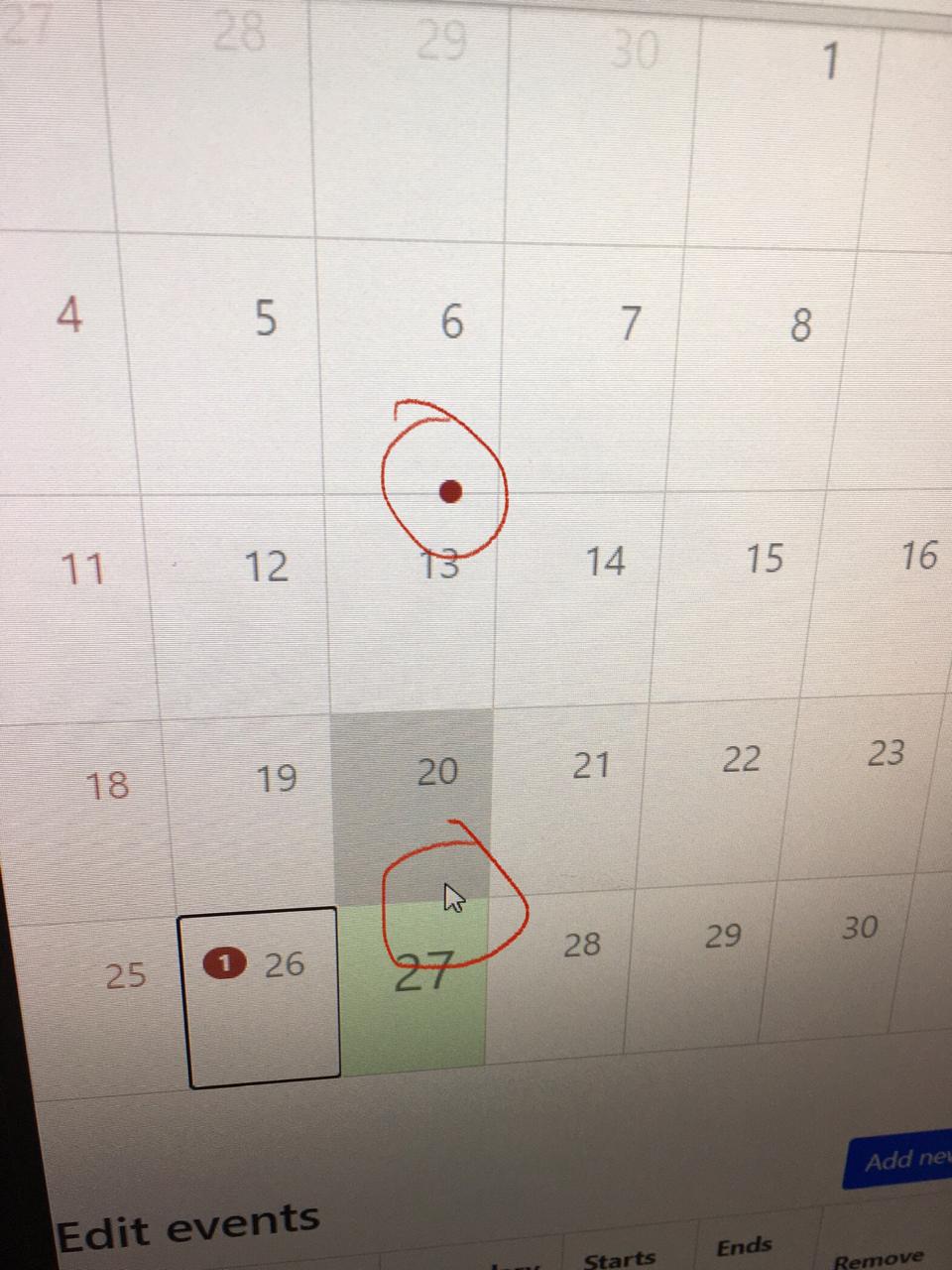
Hi, I am having an issue in drag and drop in calendar, when I drag any event the mouse pointer and event are on different places. I’ve kept screen shot describing that.
I am using Nebular, An angular library and in this library when I use this calendar on NbFlipCard component, then I am facing this issue and if I use NbCard then it works fine. Below is the link regarding the Nebular Angular UI library
https://akveo.github.io/nebular/docs/components/flip-card/overview#nbflipcardcomponent.
Edit:
This is working fine in Day and Week pages, only in month it is not showing properly.
Also tried using this calendar in ngx-flip (https://www.npmjs.com/package/ngx-flip), still this issue occurs
Any help on how to solve that issue? Thanks.
Screenshots

Versions
@angular/core: 9.1.0angular-calendar: 0.28.16
 shreyshahh
All 8 comments
Thanks so much for opening an issue! If you'd like me to give priority to answering your issue or would just like to support this project, then please consider sponsoring me
![matts-bot[bot] picture](https://avatars.githubusercontent.com/in/12675?v=4&s=40) matts-bot[bot]
on 26 Oct 2020
matts-bot[bot]
on 26 Oct 2020
Hey there, I'm not able to reproduce the problem you're having on my end, if you're still facing issues would you mind putting together a runnable stackblitz that demonstrates the issue you're having. You can fork a starter from any of the demos by hitting the "Edit in stackblitz" button. Thanks! 🙌
 mattlewis92
on 26 Oct 2020
mattlewis92
on 26 Oct 2020
Hi, thanks for the reply this is runnable stackblitz to demonstrate the issue,
https://stackblitz.com/edit/angular-3qjm3h?file=main.ts
If you don't see any issue while drag and drop, scroll down the calendar to the bottom of the page and then try dragging the event you will get to see the issue.
shreyshahh
on 27 Oct 2020
Awesome, thanks! I can reproduce now 😄
mattlewis92
on 27 Oct 2020
Hey there, I couldn't find a way of making this work out of the box but I did find a workaround for your specific issue. When dragging an event I apply a css class that disables the CSS applied by ngx-flip which causes the issue by applying these global styles:
<style>

  ngx-flip.disable-flip {
    perspective: none !important;
  }

  .disable-flip .flipper {
    transform-style: flat !important;
  }

  .disable-flip .front {
    transform: none !important;
  }

</style>
and that seems to work pretty well, there's a demo here showing it in action. Hope that helps! 😄
mattlewis92
on 6 Nov 2020
Hi, thanks for the solution, any idea on what styling I need to use if I use Nebular Flip Card instead of Ngx Flip https://akveo.github.io/nebular/next/docs/components/flip-card/overview#nbflipcardcomponent
shreyshahh
on 10 Nov 2020
I haven't tested it, but I think this will work:
<style>

  nb-flip-card.disable-flip, .disable-flip .front-container {
    perspective: none !important;
  }

  .disable-flip .flipcard-body {
    transform-style: flat !important;
  }
</style>
If it doesn't work, all I did was go through each element with the chrome devtools and unchecked css properties until it started working:

mattlewis92
on 10 Nov 2020
Awesome, Thank You! it is working properly. 👍 :)
shreyshahh
on 11 Nov 2020
Related issues
 sylvain-fr
·
3Comments
sylvain-fr
·
3Comments
 Novabllast
·
3Comments
Novabllast
·
3Comments
 chaouiy
·
3Comments
chaouiy
·
3Comments
 oldschoolbg
·
4Comments
oldschoolbg
·
4Comments
 ntsiatinis
·
4Comments
ntsiatinis
·
4Comments