Angular-calendar: Customization for onResize and onDragging events (prevent event on multiple day and prevent event on same time of other event)
Is your feature request related to a problem? Please describe
- Having events limited at one day.
- Not to have 2 events at the same time.
Describe the solution you'd like
- Prevent the event from being "resized" over several days.
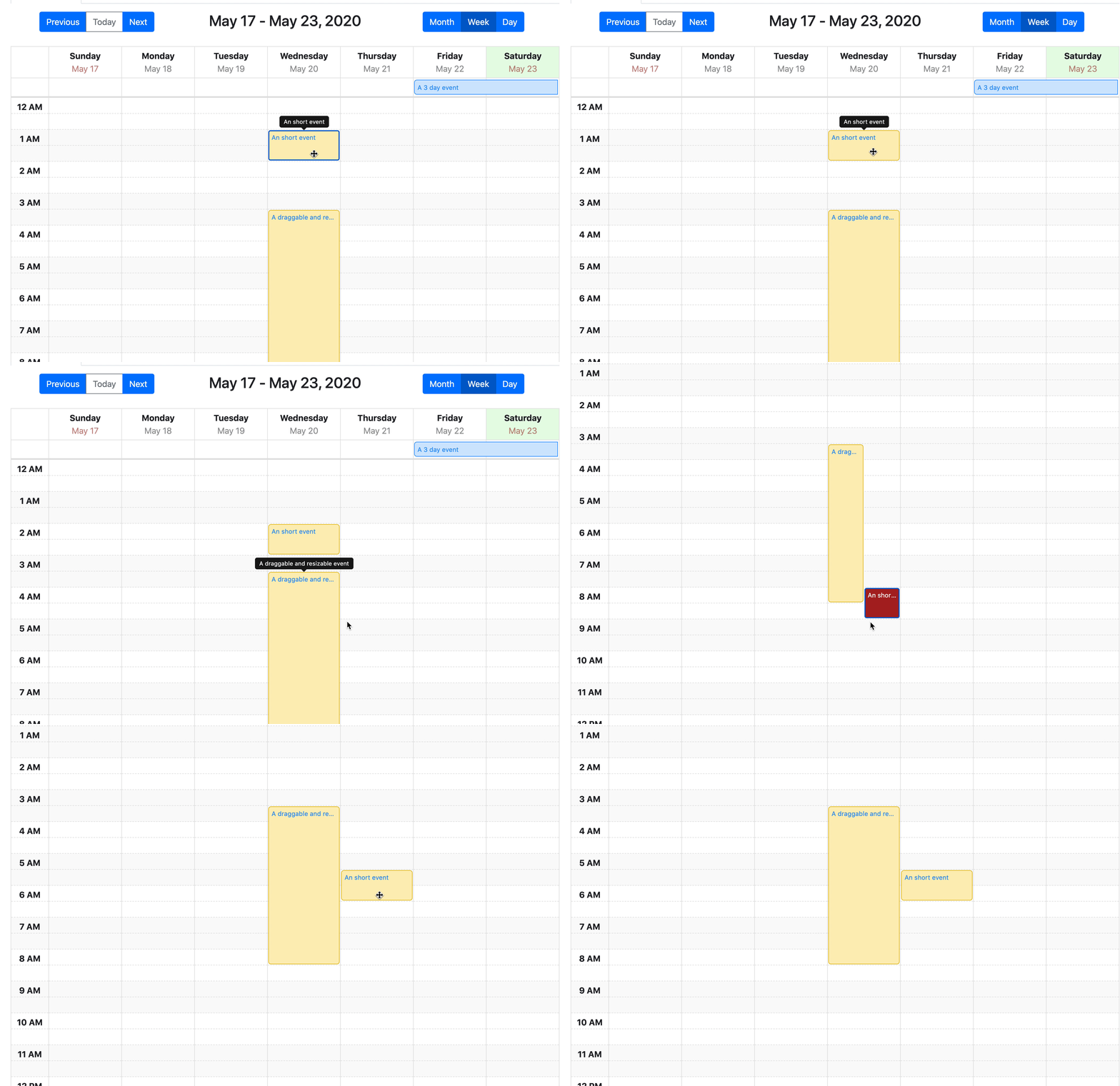
- The event that the user moves or resizes should no longer be displayed "next to" an event that takes place at the same time, but it should, for example, have its background colour in red, which shows that it is not possible to move/resize it here.
Describe your use case for implementing this feature
The goal is to create a room reservation calendar with the format per week.
A room cannot be reserved over several days. And certain time slots have to be "blocked", which is done with other events that have their own style and are neither resizable nor draggable.
Additional context
I manage to do this when the user "drops" his event with "eventTimesChanged". But I would like to do it when the user resizes and drags his event.
One solution would be to be able to override onResize and onDragging events to customize them, but is it possible to do this simply without touching the package itself?
 cheapfun
All 5 comments
Thanks so much for opening an issue! If you'd like me to give priority to answering your issue or would just like to support this project, then please consider sponsoring me
![matts-bot[bot] picture](https://avatars.githubusercontent.com/in/12675?v=4&s=40) matts-bot[bot]
on 20 Feb 2020
matts-bot[bot]
on 20 Feb 2020
This seems like a reasonable request, resizing and dragging are currently very much of a black box with no control over them until the user finishes the action. I think if I add something like this to the API it would solve your problem:
[validateEventTimesChanged]="validateFn"
Where validateFn is a function like:
// called while the user is dragging or resizing an event
validateFn = ({event, newStart, newEnd}) => {
  return true; // check condition here on whether you can drag or resize to this location
}
Right now the only way to get this behaviour is as you said, to override the onResize and onDragging events within the components themselves by extending the root week view component. This validateFn would let you avoid having to do that.
Let me know if that works for you! 😄
 mattlewis92
on 1 Mar 2020
mattlewis92
on 1 Mar 2020
We would be interested in such limitations: preventing events created through drag to occur at the same time of another, in the daily view. We basically use angular-calendar plugin to manage the bookings in a farm for weddings or short term events (couple hours) so we cannot have multiple events at the same time :) Is that kind of limitation possible on daily view?
 blackholegalaxy
on 16 Apr 2020
blackholegalaxy
on 16 Apr 2020
I finally had some time this weekend to get to this 😄 It's available now to try on the 0.29.0 branch, you can find instructions for how to install it here: https://github.com/mattlewis92/angular-calendar/pull/1249 and you can see an example of how to use it here. Please can you try it out in your app and let me know if it works ok for you. Thanks!
mattlewis92
on 23 May 2020
https://stackblitz.com/edit/no-duplicate-events-angular-calendar
I have created a workaround for old versions and added no dups logic while drag and create an event 😄
 DivekJohns
on 6 Nov 2020
DivekJohns
on 6 Nov 2020
Related issues
 oldschoolbg
·
4Comments
oldschoolbg
·
4Comments
 zolee
·
3Comments
zolee
·
3Comments
 vinay13
·
3Comments
vinay13
·
3Comments
 fmoessle
·
5Comments
fmoessle
·
5Comments
 daneshmandi
·
4Comments
daneshmandi
·
4Comments
Most helpful comment
This seems like a reasonable request, resizing and dragging are currently very much of a black box with no control over them until the user finishes the action. I think if I add something like this to the API it would solve your problem:
Where
validateFnis a function like:Right now the only way to get this behaviour is as you said, to override the
onResizeandonDraggingevents within the components themselves by extending the root week view component. ThisvalidateFnwould let you avoid having to do that.Let me know if that works for you! 😄