Angular-calendar: Dividing day view by meta property
I'm submitting a ...
[ ] Bug report
[X ] Feature request
[ ] Documentation issue or request
[ ] Support request => Please do not submit a support request here, please ask on https://stackoverflow.com/
Bug description / Feature request
I am trying to divide the day view calendar by a meta property. For example, if user was a meta property of an event, we would create horizontal columns divided by user, and allow a draggable event to be dragged into a new column and change the user property.
Something like this:

I could drag an event into the column of a user, and it would snap to that column, and the event would contain the name of the new user I have dragged to.
I believe this may be able to be done with custom templates, but I'm having a hard time figuring out how I would build the template across the x/y axis to show the events for each user at the correct times.
Versions
Angular: 4.2.2
Calendar library: 3.10.10
Browser name and version: Chrome
 sixsixtrample
All 27 comments
You're correct that this can be done with a custom template, I chucked together an example here: http://plnkr.co/edit/e3cFy9Nb2xsLx4Txv4NV?p=preview that shows you how it can be done. Hope that helps! 😄
 mattlewis92
on 9 Jul 2017
mattlewis92
on 9 Jul 2017
That is fantastic, thank you! I've read a ton of questions and responses for this calendar and the amount of effort you put in to it and to answers is just amazing man. You deserve a gold 'open source' star.
Thanks again!
sixsixtrample
on 9 Jul 2017
Thanks for the kind words, it's much appreciated 😄
mattlewis92
on 9 Jul 2017
I have one more question:
How can I tell if two events inhabit the same time section? In the base calendar, if I schedule two events at the same time, the column will expand to show both, but with this and assigning them by user, the two will overlap, and I cannot tell that there are two events scheduled at 0830(for example).
I think I can figure out how to increase the width of the user columns, I just can't figure out what to bind to to check if I need to increase the width.
sixsixtrample
on 11 Jul 2017
Ah yeah that's a bit trickier to implement, I'm not sure entirely how you'd do that. You might be better off just building your own component and reusing just the calendar-utils / drag and drop module's.
mattlewis92
on 11 Jul 2017
Sounds good, I'll work on it and update you if/when I finish it.
On Tue, Jul 11, 2017 at 1:06 PM, Matt Lewis notifications@github.com
wrote:
Ah yeah that's a bit trickier to implement, I'm not sure entirely how
you'd do that. You might be better off just building your own component and
reusing just the calendar-utils / drag and drop module's.—
You are receiving this because you authored the thread.
Reply to this email directly, view it on GitHub
https://github.com/mattlewis92/angular-calendar/issues/269#issuecomment-314541900,
or mute the thread
https://github.com/notifications/unsubscribe-auth/AGXn7y52bZVtXySSVJu3In82fyPub-saks5sM8e8gaJpZM4OQHxv
.
sixsixtrample
on 11 Jul 2017
So I've decided to try just rendering different day views with events corresponding to each user. Basically I build an Object with a key for user, and a value of an array of events. I would add a custom template div to wrap each user's view, the ideally be able to use event.sourceElement.parent to get the parent element to tell which user you dragged the event to.
Can you see any reason this wouldn't work? I've been able to make it display two day views, but I wonder about 10-20 if there would be performance issues(even though you'd only ever be changing one event at a time)
I also can't seem to get an event to drag across the two views. I can create a custom div that works, but events don't want to break out of the bounds of their current element:
http://plnkr.co/edit/yJakJrKJ8FqlDOtSSeG4?p=preview
Anyone have an idea?
sixsixtrample
on 13 Jul 2017
I can also just add a context menu to the event that lets you change the user then refresh the view which should move it to the appropriate user, which would prevent the need to drag across...
sixsixtrample
on 13 Jul 2017
@mattlewis92 my friend you are amazing. Thanks for this wonderful plugin <3
 MohibWasay
on 19 Oct 2017
MohibWasay
on 19 Oct 2017
@mattlewis92 Awesome, thanks for this. Was looking for the same.
The plunker you shared is now throwing an error: http://plnkr.co/edit/e3cFy9Nb2xsLx4Txv4NV?p=preview . Any idea why? If its easy, can you fix it for us? Much appreciated, thanks!
 visweswaranr
on 4 Jan 2018
visweswaranr
on 4 Jan 2018
Sometimes plunker and system.js gets a bit messed up, clearing your cache normally does the trick.
mattlewis92
on 4 Jan 2018
Ah okay. Tried it and still doesnt. Any chance you can try to fix it if free? I am also looking into it, will let you know! Thank you
visweswaranr
on 9 Jan 2018
There's nothing to fix my end as it works for me:
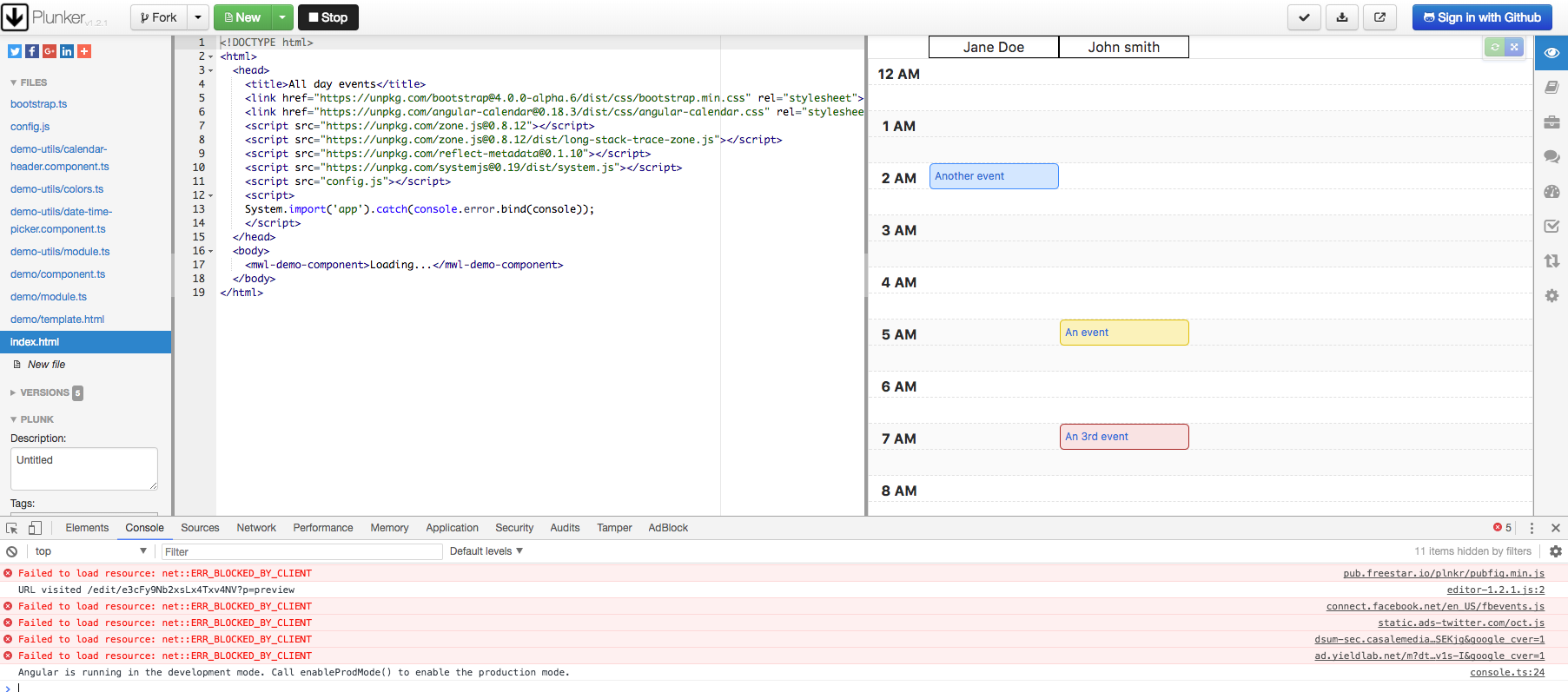
mattlewis92
on 9 Jan 2018
Ah, weird. Doesnt work for me and my friends here.
This is the url right: http://plnkr.co/edit/e3cFy9Nb2xsLx4Txv4NV?p=preview ?
visweswaranr
on 9 Jan 2018
Never mind, i recreated it in my local. Thanks a ton anyway for the example.
visweswaranr
on 9 Jan 2018
I have implemented the above example..Can you pls help me in creating the column line seperator, a vertical line that seperates the calendars....Its a requirement from my client and I am not able to create a line between the calendars downwards so that it is clear which event belongs to which calendar.
Is it possible to make the time slot fixed when calendars are more that the number in the view say 20. I have applied scroll in that case(removing the flex which was already there) . In the scroll I want to make the time slot fixed.
Please help me .
 renilbabu101
on 15 Feb 2018
renilbabu101
on 15 Feb 2018
@renilbabu101 were you able to apply column line separator? I am facing same issue as well and looking for the solution please.
 amittrehan44
on 6 Mar 2018
amittrehan44
on 6 Mar 2018
@sixsixtrample Could you elaborate on what you did to prevent the need to drag across two columns? :)
 GoodPotato
on 18 Jul 2018
GoodPotato
on 18 Jul 2018
Basically I render a day template for each user, and 'unassigned' is a
user. I actually separate each users's day template so its loops and draws
it individually. Then rather than drag and drop, I have a right click menu
to assign something to a different user.
It really isn't the best solution, but its one I could make work with the
constraints I had.
On Wed, Jul 18, 2018 at 3:01 PM GoodPotato notifications@github.com wrote:
@sixsixtrample https://github.com/sixsixtrample Could you elaborate on
what you did to prevent the need to drag across two columns? :)—
You are receiving this because you were mentioned.
Reply to this email directly, view it on GitHub
https://github.com/mattlewis92/angular-calendar/issues/269#issuecomment-406073188,
or mute the thread
https://github.com/notifications/unsubscribe-auth/AGXn78gs6Igg56_QvXlUsRIMCyPoogqoks5uH6I8gaJpZM4OQHxv
.
sixsixtrample
on 18 Jul 2018
I'm trying to replicate your implementations on the shared plunker
Once i copy paste your component.ts ( which should be the custom template we're attempting to create so that we reuse ), I get the following:
ℹ 「wdm」: Failed to compile.
ERROR in src/app/appointments/calendar/my-calendar-day-view.component.ts(41,10): error TS2339: Property 'users' does not exist on type 'DayView'.
src/app/appointments/calendar/my-calendar-day-view.component.ts(48,5): error TS2322: Type 'DayView' is not assignable to type 'MyDayView'.
Property 'users' is missing in type 'DayView'.
src/app/appointments/calendar/my-calendar-day-view.component.ts(71,3): error TS2416: Property 'eventDragged' in type 'MyDayViewComponent' is not assignable to the same property in base type 'CalendarDayViewComponent'.
Type '(dayEvent: DayViewEvent, xPixels: number, yPixels: number) => void' is not assignable to type '(dayEvent: DayViewEvent, draggedInPixels: number) => void'.
src/app/appointments/calendar/my-calendar-day-view.component.ts(77,44): error TS2339: Property 'users' does not exist on type 'DayView'.
src/app/appointments/calendar/my-calendar-day-view.component.ts(79,33): error TS2339: Property 'users' does not exist on type 'DayView'.
src/app/appointments/calendar/my-calendar-day-view.component.ts(147,48): error TS2304: Cannot find name 'CalendarEventTimesChangedEvent'.
The array of users is not getting added when creating an interface MyDayView, extending DayView, and declaring a users empty array.
eventDragged in MyDayViewComponent not assignable to same property in base type CalendarDayViewComponent
Suggestions? what am I doing wrong?
 cyphercodes96
on 9 Aug 2018
cyphercodes96
on 9 Aug 2018
@mattlewis92 I still haven't been capable of implementing this
My main issue is with declaring the interface MyDayView that extends DayView and users is declared inside
I've declared a MyCalendarUtils class that extends CalendarUtils
and declared a view variable = super.getDayView(args);
When i attempt to access view.users, i get that the property users doesn't exist on type DayView
Get I get clarifications upon this and how I could divide my day view using the meta-property?
cyphercodes96
on 4 Sep 2018
P.S:
Still having issues with inheritance and using super(), the plunker you gave me isn't working with angular 6 ( typescript )
Also notice if you remove the meta data from any appEvent and pass it, it screws up and calendar breaks.
I added a default general header for all the rest of the appointments and assigned them to it.
eventDragged() functionality not working since super ( inheritance ) is not working at all
cyphercodes96
on 5 Sep 2018
@mattlewis92 : Having the same issue as @cyphercodes96 about inheristance.
Anybody had a working plunker with custom template in Angular 6 ?
Thanks.
 Geux
on 14 Sep 2018
Geux
on 14 Sep 2018
In case of handling more then 8 users on a day view appointments calendar, as you can notice, the events width and title width mix up.
Suggestions of fixing this?


cyphercodes96
on 15 Feb 2019
Also found two bugs in the getDayView() function, one which you have already mentioned:
// assumes user objects are the same references,
// if 2 users have the same structure but different object references this will fail
// if (!view.users.includes(event.meta.user)) {
// view.users.push(event.meta.user);
// }
And another with indexing dayViewEvent.left
I did my own implementations and logic that I have shared.
If you want, @mattlewis92 , I can share them with you / open a PR accordingly
cyphercodes96
on 15 Feb 2019
Hi, can I do horizontal view of this calendar? when users will be align in left side and timeline on top?
 sweetlanka-dfs
on 6 Feb 2020
sweetlanka-dfs
on 6 Feb 2020
In case of handling more then 8 users on a day view appointments calendar, as you can notice, the events width and title width mix up.
Suggestions of fixing this?
Can you please share the code of how you added the minutes label like :15 :30 :45 etc?
I have trying to add :30 label with hoursegment of 4.
Thank you
 horsebuzz
on 19 Aug 2021
horsebuzz
on 19 Aug 2021
Related issues
 Herb-sh
·
4Comments
Herb-sh
·
4Comments
 Seb69
·
3Comments
Seb69
·
3Comments
 zolee
·
3Comments
zolee
·
3Comments
 chaouiy
·
3Comments
chaouiy
·
3Comments
 daneshmandi
·
4Comments
daneshmandi
·
4Comments
Most helpful comment
You're correct that this can be done with a custom template, I chucked together an example here: http://plnkr.co/edit/e3cFy9Nb2xsLx4Txv4NV?p=preview that shows you how it can be done. Hope that helps! 😄