Angular-auth-oidc-client: AutoLoginGuard appears to cause some sort of infinite loop.
Describe the bug
Attempting to access the root route (/) with AutoLoginGuard present intermittently causes an infinite login loop that crashes the browser.
To Reproduce
Steps to reproduce the behavior:
- Secure all routes with
AutoLoginGuard - Sign out of the identity server
- Open console
- Navigate to web app
- You may be redirected to the identity server the first time, but navigate back to the webapp.
- You should start to see a login loop.
Expected behavior
Expected library to login user and to return them back to the app homepage.
Screenshots

Desktop (please complete the following information):
- OS: Windows 10
- Browser: Chrome, Chromium Edge
- Version: 90
Additional context
You can force this behavior using the sample-code-flow-auto-login sample. Just add AutoLoginGuard to the home route, and you should get the loop after you sign in to the app.
Our end-goal is to have the webapp automatically sign the user in as soon as they access the app. We don't want any sort of landing page. Prior to the existence of the AutoLoginGuard, we managed to force this behavior using an approach similar to the sample-implicit-flow-google demo (though we needed to change the localstorage key name as redirect was being used by the library and causing issues.
 JerrettDavis
All 17 comments
Hey @JerrettDavis, thanks for the issue.
Have you checked that you _do not_ have the checkAuth call when using the auto-login guard at the home route? The sample has the call because there exist two ways of auto-login. Either you call the checkAuth() manually or your home route does that with the AutoLoginGuard. If you want to project your case to the sample you have to remove the manual checkAuth() call.
 FabianGosebrink
on 20 Apr 2021
FabianGosebrink
on 20 Apr 2021
Thanks for the prompt reply @FabianGosebrink! I am actually using checkAuth in various services, should those be replaced with isAuthenticated$ to prevent the login attempts?
JerrettDavis
on 20 Apr 2021
This should work, otherwise, it is a bug. The checkAuth() method is gonna be called from the AuthGuard and then all values should be set. Let us know if it works.
FabianGosebrink
on 20 Apr 2021
Could you solve the issue?
FabianGosebrink
on 22 Apr 2021
I've been unable to test the solution in our own codebase due to other backlog items, but it did correct the issue with the demo project, so I have high hopes.
I'd say go ahead and close this issue, I can open another or bump this if the issue resurfaces.
Thanks for the help.
JerrettDavis
on 22 Apr 2021
Perfect, just let us know if the problem still occurs and if yes we will get that going and help you to solve it :), thanks!
FabianGosebrink
on 22 Apr 2021
@FabianGosebrink
I think this issues occured for me. No checkAuth() calls prior to AuthLoginGuard. My investigation showed me that loop is occuring because after checking authentication it reads previously stored redirect path (saved before the first redirect to identity provider) and goes there. In my case the path is guarded by AuthLoginGuard, so the cycle repeats, and repeats, and repeats
 grffn
on 29 Apr 2021
grffn
on 29 Apr 2021
Do you have a sample repo to reproduce the issue? You can take a config from our samples.
FabianGosebrink
on 29 Apr 2021
I'll try to provide one
grffn
on 29 Apr 2021
I'm seeing the same looping issue when using AutoLoginGuard on the default route and not calling checkAuth.
I changed the sample "sample-code-flow-auto-login" to use AutoLoginGuard on the default route and removed the call to checkAuth. For some reason it still works fine (no looping).
The only differences I see between my app and the sample at this point are I'm using Azure AD as the IdP and using config over http.
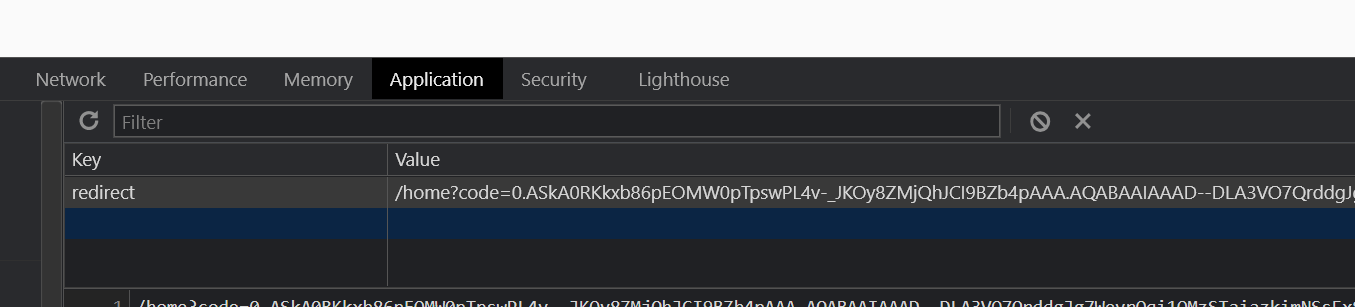
I noticed the app created a local storage variable named redirect as shown below. The value doesn't look like something the redirect should be set to but I could be wrong.
This is my config and routing:
const setupAction$ = httpClient.get
map((authConfig) => {
return {
stsServer: authConfig.stsServer,
clientId: authConfig.clientID,
redirectUrl: window.location.origin,
postLogoutRedirectUri: window.location.origin,
scope: 'openid profile email api://98d5e485-770f-47c2-a836-35c8cd90e103/access_as_user',
responseType: 'code',
silentRenew: true,
triggerAuthorizationResultEvent: true,
startCheckSession: false,
maxIdTokenIatOffsetAllowedInSeconds: 600,
logLevel: LogLevel.Debug,
historyCleanupOff: true,
silentRenewUrl: window.location.origin + '/silent-renew.html'
};
}),
const appRoutes: Routes = [
{
path: '', redirectTo: 'home', pathMatch: 'full'
},
{
path: 'home', component: HomeComponent, canActivate: [AutoLoginGuard]
}
No calls to checkAuth within the application
Recurring within the looping is also this 401:
GET https://graph.microsoft.com/oidc/userinfo 401 (Unauthorized)
 mrob1600
on 29 Apr 2021
mrob1600
on 29 Apr 2021
sample-code-flow-auto-login.zip
@FabianGosebrink
So I toyed a bit with auto login sample. What I discovered that if you guard homeroute (as is required in my app -- no path is public) then it stops working correctly (i.e. start looping) if you remove checkAuth() call from app.component. I don't know if that's a bug or expected behaviour and I just set it up incorrectly
I attached a zip with sample. If that's more convenient to you I can create a repo
grffn
on 30 Apr 2021
I should also add that if you leave checkAuth() call it doesn't help either. When you login then logout then login again, it gets stuck in a loop
grffn
on 30 Apr 2021
A package.json would be fine :) Could you add it to the repo? A repo would be great then we can compare the fix if we create one.
FabianGosebrink
on 30 Apr 2021
https://github.com/grffn/demo-auto-login
Please, look
grffn
on 30 Apr 2021
Have done a PR where the autologin works at my place https://github.com/grffn/demo-auto-login/pull/1
FabianGosebrink
on 30 Apr 2021
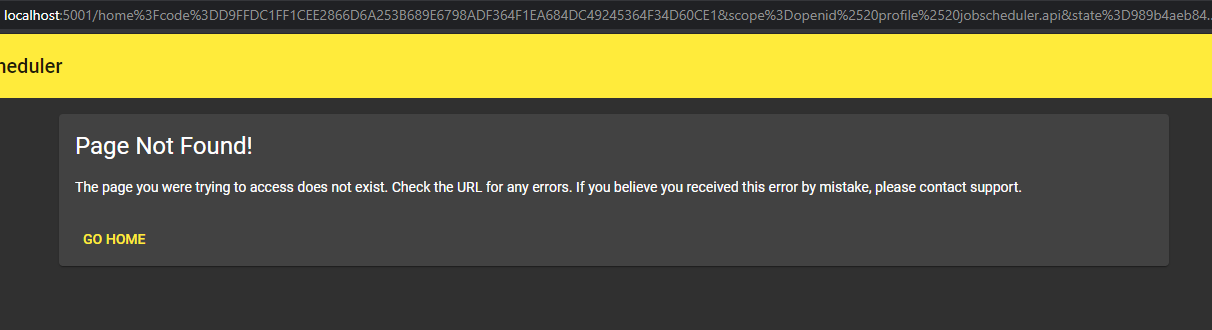
Just a small additional data point relating to the AutLoginGuard. While I have solved the infinite redirect loop (I think), the guard occasionally produces a bad redirect. I can't seem to reproduce it with any regularity, but it happens occasionally during live reloads.
I get something along the lines of this:
Here are the applicable routes:
```typescript
const appRoutes: Routes = [
{path: '', pathMatch: 'full', redirectTo: 'home'},
{
path: 'home',
canActivate: [AutoLoginGuard],
loadChildren: () => import('./modules/home/home.module').then(m => m.HomeModule)
}
{path: '**', component: PageNotFoundComponent}, // Wildcard route for a 404 page
];
````
All the AutoLoginGuards are present only in the app-routing.module, the guard isn't necessary in the child routes since it's secured at the root.
@FabianGosebrink please chime in if this should be a separate issue.
I can attempt to build a reproducible example, if needed, but maybe the answer is obvious based on just the above information.
JerrettDavis
on 30 Apr 2021
I also noticed a infinity loop in some special cases. The reproducing steps are:
- Call a route, which is secured by the
AutoLoginGuard - Now you should be redirected to the Login, do not login.
- Now call the secured route again
- Now the loop is started
I will try to offer you a min repro with this behavior.
What I noticed is that we also have very much calls to the authorize-url and values in the storage will be updated continuesly.
 marcelbarner
on 12 May 2021
marcelbarner
on 12 May 2021
Related issues
 sdev95
·
3Comments
sdev95
·
3Comments
 revok
·
4Comments
revok
·
4Comments
 vit100
·
4Comments
vit100
·
4Comments
 vicver82
·
4Comments
vicver82
·
4Comments
 JohnGalt1717
·
3Comments
JohnGalt1717
·
3Comments