Angular-auth-oidc-client: Not displaying LogoutURI instead going to the default page
I have few pages in my app, I have given AutoLoginGuard for all the pages other than Dashboard (default page) and logout.
Issue
The logout page is not displaying. Actually it is redirecting to logout but the default page is displaying, ie dashboard
const routes: Routes = [
  { path: '', pathMatch: 'full', redirectTo: 'dashboard' },
  { path: 'service', component: MyServiceComponent , canActivate: [AutoLoginGuard] },
  { path: 'dashboard', component: DashboardComponent },
  { path: 'logout', component: LogoutComponent }];
App.Component.ts
ngOnInit() {

    console.log("*** In app page ngOnInit()");

    this.authservice.IsAuthenticated$.subscribe(data =>{
      debugger;
      if(data == false){
        if ('/logout' == window.location.pathname) {
        }
        else{
          this.authservice.checkAuth().subscribe( result => {
            debugger;
            this.isAuthenticated = result;

          });
        }
      }
      else{
        this.isAuthenticated = data;
      }
    }
    );
}
app.module.ts
export function configureAuth(oidcConfigService: OidcConfigService) {
  return () =>
    oidcConfigService.withConfig({
      stsServer: 'https://localhost:5001',
      redirectUrl: window.location.origin,

      clientId: 'clientangular',
      scope: 'openid profile api1 offline_access',
      responseType: 'code',
      triggerAuthorizationResultEvent: true,
      postLogoutRedirectUri: 'http://localhost:4200/logout',

      renewTimeBeforeTokenExpiresInSeconds: 0,
      silentRenew: false,

      logLevel: LogLevel.Debug,
      historyCleanupOff: true,

    });
}
After logout
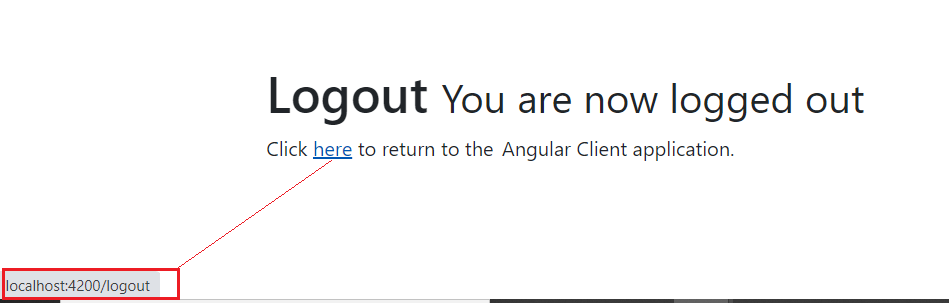
After clicking the link, it is redirecting to logout but display dashboard again. Console log is below

 ebinroy
All 17 comments
Hey, check your app.component's code and see the examples. This should fix it. If not please prove a sample repo and then we can have a look. Thanks.
 FabianGosebrink
on 8 Mar 2021
FabianGosebrink
on 8 Mar 2021
Hi , I checked your source code and noticed that if I remove AutoLoginGuard from home there is an issue.
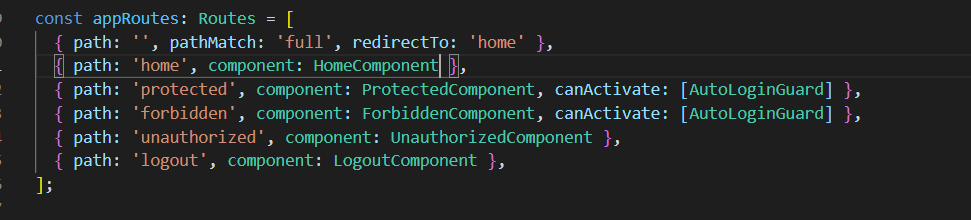
Home page
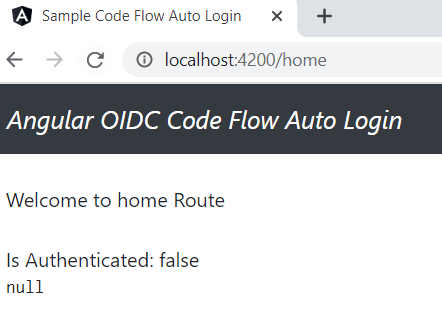
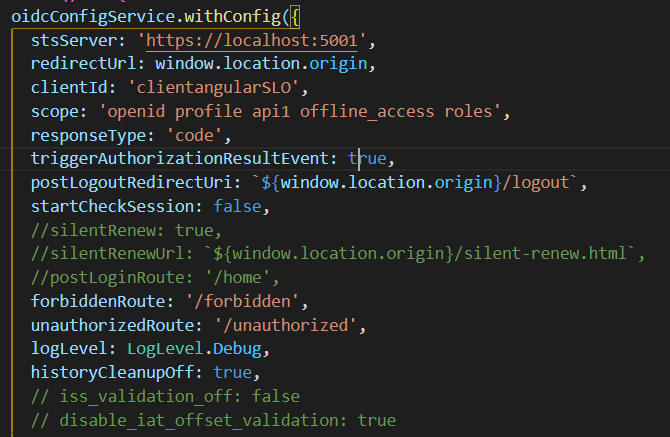
if I go http://localhost:4200/protected --> redirect to STS --> redirect to Home page again

I have uploaded my source code to this repository and the facing issues are below
Scenario1 : if dashboard route has canActivate: [AutoLoginGuard]
Issue 1:- , redirect to logout not working. Actually its redirecting to logout page and then redirect to STS to login
issue 2:- user not login to STS, clicking link http://localhost:4300/secureddetails will redirect to STS , after login redirect to http://localhost:4300 instead of secureddetails. if I want to redirect to the entered path what shd I do?
Scenario 2 : if dashboard route has REMOVE canActivate: [AutoLoginGuard]
issue3:- I am getting userData$ as null in app.component.ts and I can not view secureddetails page redirecting to the dashboard always.

ebinroy
on 9 Mar 2021
@FabianGosebrink @ebinroy
Can we close this?
Greetings Damien
 damienbod
on 12 Mar 2021
damienbod
on 12 Mar 2021
@FabianGosebrink @damienbod I have upload the source on the above comment to prove the issue. Can you take a look on this. Thanks
ebinroy
on 14 Mar 2021
In your repository add the checkAuth() call to your app component. See the docs here
FabianGosebrink
on 14 Mar 2021
@FabianGosebrink @damienbod
I worked on the sample and everything is working fine. But when it applied on my source code the redirection is not working
Source code you can find here --> AngularOidc
The problem is redirect URL not working.
Scenario1
- Enter the URL http://localhost:4200/#/secureddetails
- Redirect to STS for login
- After login redirect to dashboard page
Scenario2
- Click Logout
- Not redirecting to logout page instead dashboard page is displayed
Both cases some issue with redirect I could not found the issue. Can you please help me to find the issue. Thanks
ebinroy
on 15 Mar 2021
Please update to the latest version in your package.json and try again. Just tried it out and it works on my site.
"angular-auth-oidc-client": "^11.6.1", ---> "angular-auth-oidc-client": "^11.6.4",
Please let us know if this helped.
Thanks
FabianGosebrink
on 15 Mar 2021
@FabianGosebrink @damienbod
Actually I used 11.6.1 for the sample source and redirect login and logout working good (don't have any issue). I don't think version is the issue.
ebinroy
on 15 Mar 2021
I just forked your repo and could reproduce the issue you mentioned. I personally fixed the issue in this https://github.com/damienbod/angular-auth-oidc-client/pull/1015 which was released in the mentioned version 11.6.4. https://github.com/damienbod/angular-auth-oidc-client/blob/main/CHANGELOG.md.
Please update to the latest version and tell us if the issue still exists.
FabianGosebrink
on 15 Mar 2021
Yes Noted. The first scenario is solved. Thanks for that.The second scenario about redirect log out is not working
Scenario2
- Click Logout
- Not redirecting to logout page instead dashboard page is displayed
ebinroy
on 15 Mar 2021
Have you configured your sts correctly to redirect to <your-domain>/logout instead of only <your-domain>? It lands on dashboard because you redirect to <your-domain> which then redirects to the dashboard because of your routing configuration I think. Client looks good, looks like a server issue to me. See an example for an identity server here https://github.com/FabianGosebrink/security-token-service/blob/master/SecurityServer/Config.cs#L97-L103
FabianGosebrink
on 15 Mar 2021
Yes. STS side logout URL configured correctly only. You can check the log. It is redirect from STS to logout and again redirect to the dashboard.

ebinroy
on 15 Mar 2021
Yes, you have {provide: LocationStrategy, useClass: HashLocationStrategy}, turned on. This logout/redirect issue can be reproduced easily when you type in http://localhost:4200/login and hit Enter, you are getting redirected to the dashboard. Have you tried redirecting to the logout with a "hash" --> /#/logout?
FabianGosebrink
on 15 Mar 2021
OOps sorry its my mistake! Its working. Thanks for fixing the package! All the best
ebinroy
on 15 Mar 2021
Maybe you can tell us and other what you did to fix the issue. Thanks!
FabianGosebrink
on 15 Mar 2021
Actually your finding has the answer that why I did not mentioned. I have turned on HashLocationStrategy because of that URL has a hash that I have not provided in postLogoutRedirectUri. So the correct redirection works as below.
postLogoutRedirectUri: ${window.location.origin}/#/logout,
ebinroy
on 15 Mar 2021
Perfect, thanks for letting us know!
FabianGosebrink
on 15 Mar 2021
Related issues
 vicver82
·
4Comments
vicver82
·
4Comments
 brentos99
·
4Comments
brentos99
·
4Comments
 Expelz
·
4Comments
Expelz
·
4Comments
 nizarkhsib
·
4Comments
nizarkhsib
·
4Comments
 Jonesie
·
4Comments
Jonesie
·
4Comments
Most helpful comment
OOps sorry its my mistake! Its working. Thanks for fixing the package! All the best